
reqdeck
Think of IBM DOORS, but it lives in your git repo, fits in your terminal, and your AI agent can read it.


The problem
AI agents write code faster than anyone can review it. Describe roughly what you want and you get something that runs. That is vibe coding, and for a weekend project it is great.
For anything bigger it breaks in a predictable way. The agent builds what it guesses you meant. Every gap in the description gets filled with a plausible default — a timeout, a limit, a retry policy, a field nobody asked for — and none of them were decided by anyone. It works in the demo. Three months later nobody can say what the system is supposed to do, so nobody can say whether it does it, and every change is a coin flip.
Old-school engineering has had an answer to this for decades: the V-model. Down the left side, you write down what to build, at increasing levels of detail — user needs, system requirements, the requirements on each part. Up the right side, you prove each of those levels with a test. Every requirement has a reason above it and a test beside it.
Agents made the bottom of the V nearly free. Code is cheap now. The left side — deciding what to build — and the right side — proving it was built — are what is left, and they matter more than they ever did. They are also exactly the parts an agent cannot do alone: the decisions have to come from a person, and the proof has to be checkable by one.
What reqdeck does
reqdeck keeps both sides of the V in your repo, next to the code, linked together, in files an agent reads as easily as you do.
- Open questions first. Before anything is a requirement it is a question in
OPEN-QUESTIONS.md. The agent researches it, lays out options, recommends one. You decide. The answer is written down where the question was. - Requirements from answers. Each requirement names the decision it came from. No source, no requirement — an agent cannot slip in a number nobody chose.
- Traced, both ways. Each requirement names what it satisfies one level up. Code and tests
name what they implement with a
@REQ_REFmarker.reqdeck coveragetells you what is untested, unimplemented or unjustified, andreqdeck traceexits non-zero for a requirement that is not implemented and tested — put it in CI. - Reviewed by a human. Every requirement is
Proposeduntil you accept it, in the TUI. The CLI has no way to writeAccepted, so an agent cannot mark its own homework. - Skills for your agent. Two skills for Claude Code and Codex: one for the CLI, one for the method.
It works the same for an embedded product of three boards and two firmwares as for a single iOS app.
Try it
The repo has an example project — Tick, a made-up iOS to-do app with its brief, its open questions, 23 requirements on three levels below its user stories, and a few Swift files that point at them.
pip install reqdeck
git clone https://github.com/danielriege/reqdeck
cd reqdeck/examples/tick
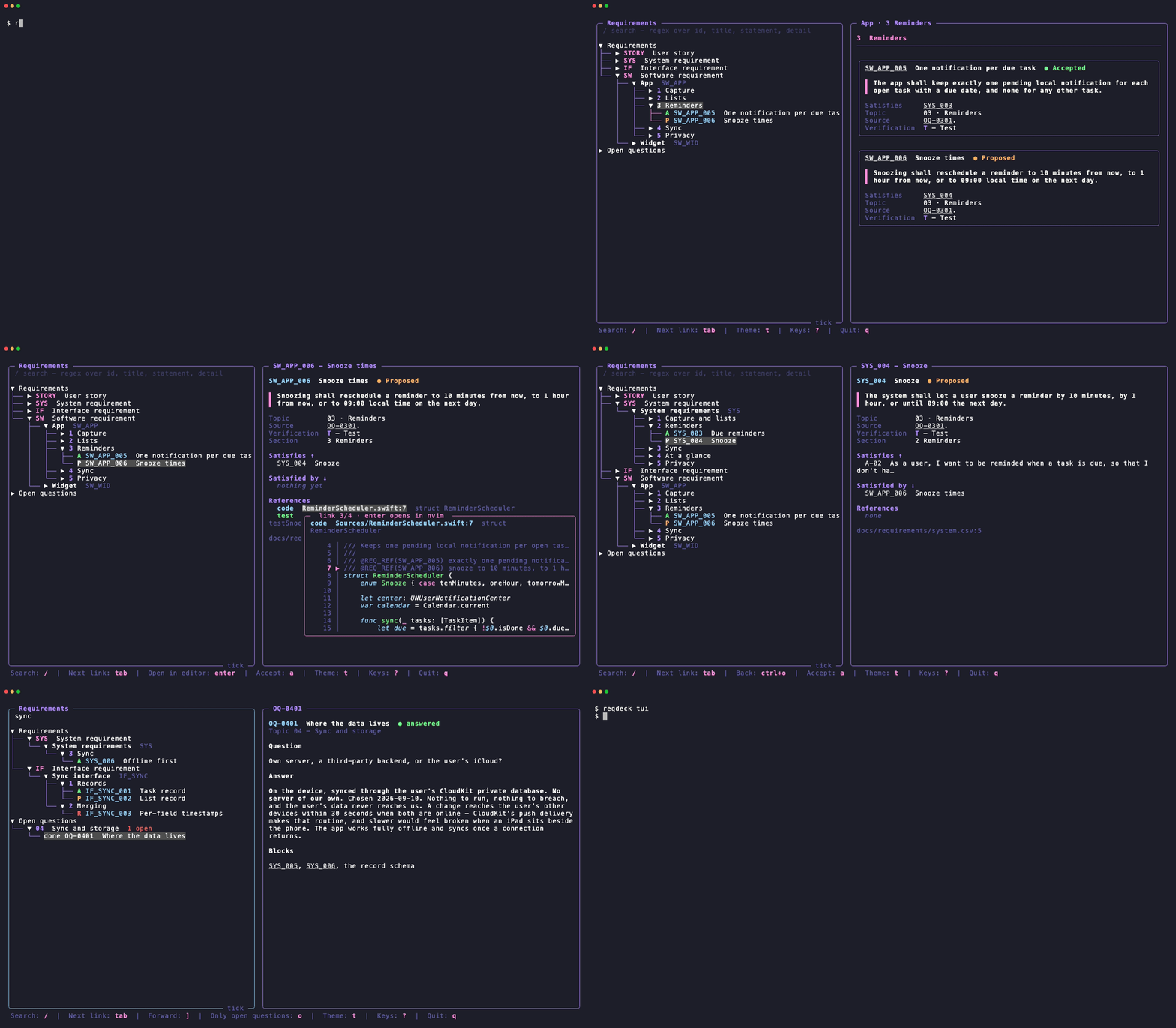
reqdeck tui
Move with j k, tab through the links of a requirement, enter to follow one. Then:
reqdeck coverage          # what is untested, uncoded, unreviewed
reqdeck get SW_APP_006    # one requirement: its chain up and down, its code and tests
reqdeck questions --open  # what is still undecided
Use it in your project
pip install reqdeck
cd your-project
reqdeck init
reqdeck init asks for the shape of your requirement tree and the parts of your product,
then writes .reqdeck.toml, one requirement file per part, an OPEN-QUESTIONS.md, and copies
both skills into .claude/skills/ and .agents/skills/ — commit them, and every agent working
on the project has them. It asks everything first, refuses to overwrite anything, and leaves
the project untouched if it fails halfway. After upgrading reqdeck, reqdeck skills --update
refreshes the copies.
Python 3.11 or newer, macOS or Linux. Pin it in your project's dependencies, so CI checks with the version you work with.
Then tell your agent to load the reqdeck-method skill and start with a product brief.
As a Claude Code plugin
Rather have the skills everywhere than committed to each project? Install them as a plugin:
/plugin install reqdeck --marketplace danielriege/reqdeck
The plugin is only the skills — the agent still runs the reqdeck command, so pip install reqdeck either way.
The method
- Brief. One page: what it is, for whom, what it deliberately is not.
- Stories. Personas and user stories — the root everything traces to.
- Topics. Cut the design into areas: scope, each interface, each part, power, security…
- Questions. For each topic, find what is undecided — with your agent, not by it.
- Answers. One question per session. The agent researches and recommends, you decide, the answer is written in place with the date and the reasoning.
- Requirements. When a topic is answered, its requirements get written. Writing them finds gaps; each gap becomes a new question, not an invented value.
- Build. Code and tests carry
@REQ_REFmarkers.reqdeck coverageis the progress bar.
The reqdeck-method skill holds the details: the levels, how a requirement is worded, which
verification method fits, where a marker goes.
The TUI
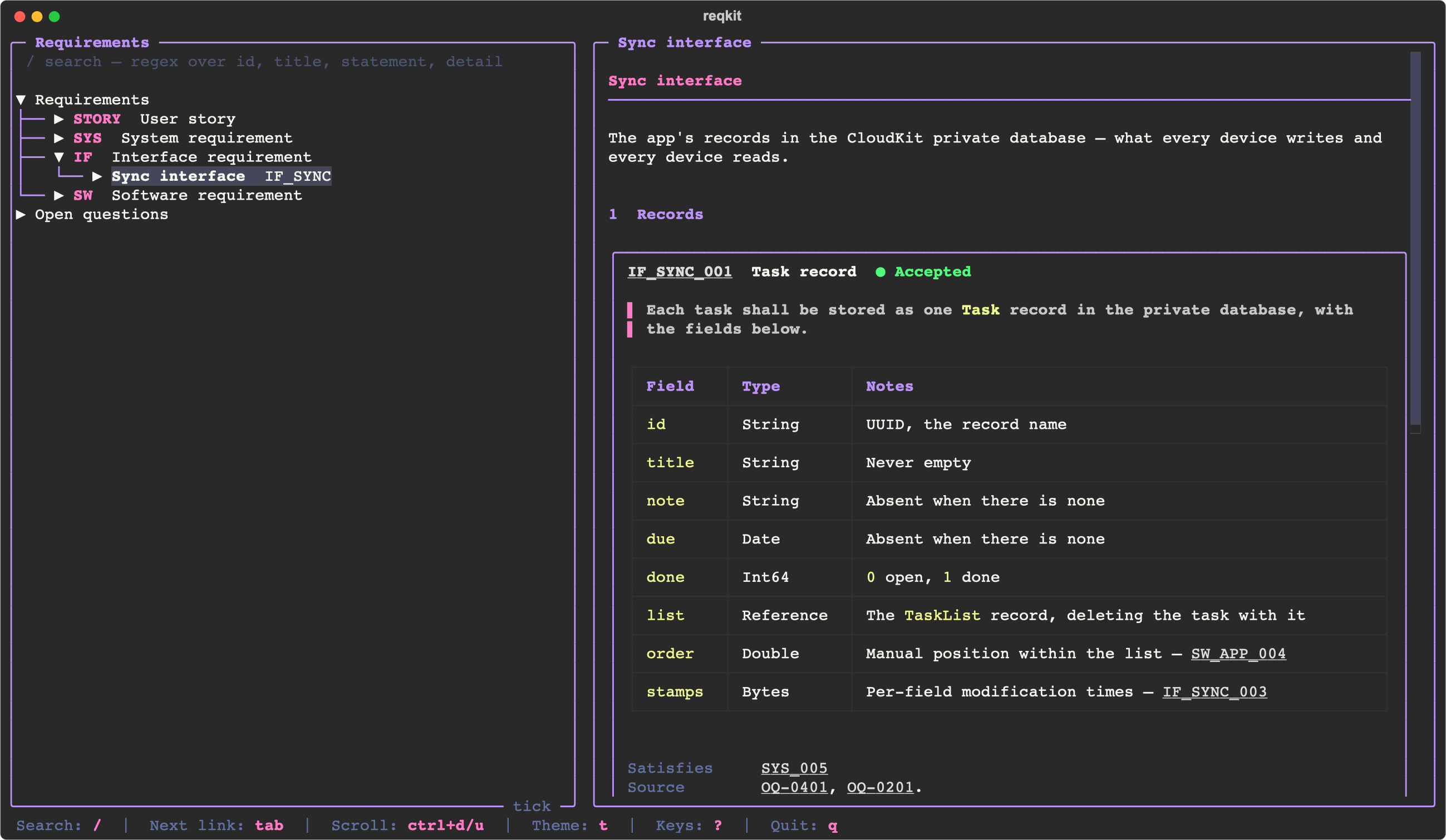
reqdeck tui shows every unit as a document — sections numbered, each requirement a card with its
status, statement, detail tables and fields — beside the open questions by topic. The tree
always has the cursor; the right pane shows what it highlights.
j k h l · gg G |
Move through the tree, as in vim |
tab shift+tab |
The next, previous link in the right pane, previewed beside it |
enter |
Follow the link. A code or test reference opens in your editor |
ctrl+o · ] |
Back, forward through the jumps |
/ · n N |
Search · next, previous result |
ctrl+d ctrl+u |
Scroll the right pane |
a |
Accept the highlighted requirement |
t |
Theme |
? |
All keys |
Every requirement and question ID in the right pane is a link, and so is every code and test
reference, shown with what it is attached to — the test function, the type. Hovering one, or
tab-ing to it, previews it: the requirement, or the source around the marker. enter on a
reference opens it in [editor], or $VISUAL/$EDITOR; a terminal editor like nvim gets
the terminal until you quit it, as in lazygit.
It draws like lazygit: rounded borders, one hint line that only lists what applies right
now, and no background — your terminal's shows through. The themes are Textual's own
(Dracula, Nord, Gruvbox, Tokyo Night, Catppuccin, Solarized, Monokai, One Dark, Rosé Pine,
Flexoki), each given a full colour suite by a file in reqdeck/themes/,
where you can add your own. Your theme and sidebar width are remembered in
~/.config/reqdeck/tui.json.
The CLI
reqdeck get TSR_009                    # one requirement, its chain, its code and tests
reqdeck search 'beacon|sync'           # regex over id, title, statement, detail
reqdeck list --topic 06 --status proposed
reqdeck coverage                       # where traceability is missing
reqdeck trace TSSR_FWN_004             # implemented and tested? exit 1 if not
reqdeck check                          # validate everything, exit 1 on any problem
reqdeck questions --open --topic 04
reqdeck add TSSR_FWN --title "Channel PWM" --statement "The Node shall …" \
    --satisfies TSR_025 --topic 06 --source "OQ-0608." --verification T
reqdeck edit TSR_009 --statement "…" --source "…"
Every command takes --json. add allocates the next ID and can only write Proposed;
edit turns an Accepted requirement Reopened, so a changed requirement goes back to you.
reqdeck check exits 1 on any problem — run it in CI next to your tests.
The files
.reqdeck.toml                    levels, verification methods, marker rules, editor
docs/OPEN-QUESTIONS.md          topics and questions — markdown, edited by hand
docs/requirements/
  stories.csv   stories.toml    user stories, one section per persona
  system.csv    system.toml     one unit per prefix
  icd-bus.csv   icd-bus.toml
  icd-bus.details.md            byte layouts, state tables — one `## <ID>` each
A unit's CSV holds one requirement per row, ordered by ID and only ever appended to. A
row's line is as permanent as its ID, and the diff of a change is exactly the rows it
touched. It is written by reqdeck add and reqdeck edit, never by hand; check rejects a file
that is not in the exact form the tool writes.
Its .toml describes the unit — level, prefix, title, whether code implements it — and
its sections:
level = "SW"
prefix = "SW_APP"
title = "App"
code = true

[[sections]]
key = "reminders"
title = "Reminders"

[[sections]]
key = "reminders.snooze"     # nests under reminders: shown as 1.1
title = "Snooze"
A requirement names its section by key. Numbers come from declaration order when the document is drawn, so inserting a section renumbers the document without touching a single requirement — the way DOORS does it.
.reqdeck.toml
requirements = "docs/requirements"
questions = "docs/OPEN-QUESTIONS.md"

[[levels]]                    # most abstract first
kind = "STORY"
reviewed = false              # no source, verification or status
traced = false                # never referenced from code
separator = "-"
digits = 2                    # A-01

[[levels]]
kind = "SYS"
satisfies = ["STORY"]         # what it may link to — check enforces it
topic = true                  # names the OPEN-QUESTIONS topic behind it
traced = false

[[levels]]
kind = "SW"
satisfies = ["SYS"]
topic = true

[verification.T]
name = "Test"
definition = "An automated test shows the requirement is met."
automated = true              # untraced until a test names it

[markers]
test_paths = ["Tests"]                    # a path containing one is a test
declaration_extensions = [".h", ".swift"] # outside tests, markers only here
interface_suffixes = ["_interface"]       # never marked

[editor]
command = "nvim +{line} {file}"           # or "code --goto {file}:{line}"
Without [verification] the methods are A, I, D and T. Without [markers] every common
source file is scanned and a marker may sit anywhere.
Limitations
- Small teams. It is built for one person and their agents, or a handful of people. Two branches that both add a requirement to the same unit conflict on the last line of its CSV — trivially resolved, but resolved by hand.
- Markers are text.
@REQ_REFis found by a regex, not by parsing your language. Whether the right code carries the marker is a judgement the tool cannot make for you. - No web view. The TUI is the viewer.
reqdeck doc <unit> --markdownrenders a unit as markdown when you need to hand it to someone without a terminal. - macOS and Linux. Windows is untested, and handing the terminal to an editor certainly is.
Development
python3 -m unittest discover tests # the TUI tests skip without textual
License
MIT. See LICENSE.
1 maintainer

Metadata
1 maintainer
Release files for reqdeck 0.1.0
For a detailed explanation of source distributions (sdists) and built distributions (wheels), please see the package formats documentation.
Source distribution (sdist)
| File | Size | Uploaded | |
|---|---|---|---|
| reqdeck-0.1.0.tar.gz | 80.7 kB | Details |
Built distribution (wheel)
| File | Interpreter | ABI | Platform | Reset |
|---|---|---|---|---|
| reqdeck-0.1.0-py3-none-any.whl | Python 3 | none | any | Details |
Total release size: 162.3 kB
Release files / reqdeck-0.1.0.tar.gz
| Download URL | reqdeck-0.1.0.tar.gz |
|---|---|
| Size | 80.7 kB |
| Tags | Source |
|
SHA-256 checksum How to use checksums |
6d169faf6afd970f566aa09fd15882b43f43887a699e6fedccd5013c0a887a47
|
|
BLAKE2b-256 checksum How to use checksums |
348e15ff105c00ef27ee40cbf2ea9d9d5fa6d0b993706b032324a78416e0679c
|
| Upload date | |
|
Uploaded using Trusted Publishing? What is trusted publishing? |
Yes |
| Uploaded via |
twine/7.0.0 CPython/3.13.14
|
Provenance
Provenance describes where a file came from. On PyPI, provenance is shared via attestations, which provide a verifiable record of the build or publishing details. View details, limitations and caveats.


PyPI Publish Attestation
PyPI verified that this artifact, at this checksum, originated from the publisher listed below.
Signed by GitHub Actions, verified by PyPI on Oct 10, 2026.
Transparency logRelease files / reqdeck-0.1.0-py3-none-any.whl
| Download URL | reqdeck-0.1.0-py3-none-any.whl |
|---|---|
| Size | 81.7 kB |
| Tags | Python 3 |
|
SHA-256 checksum How to use checksums |
9526578af12a48223afe1d798e468f2298c9378d333e0a92c7ecf1d0db7f56ad
|
|
BLAKE2b-256 checksum How to use checksums |
454fbca6502d599fc76d6196166c891b2a60014bd2bb2c37235f9666d73d3eaf
|
| Upload date | |
|
Uploaded using Trusted Publishing? What is trusted publishing? |
Yes |
| Uploaded via |
twine/7.0.0 CPython/3.13.14
|
Provenance
Provenance describes where a file came from. On PyPI, provenance is shared via attestations, which provide a verifiable record of the build or publishing details. View details, limitations and caveats.
PyPI Publish Attestation
PyPI verified that this artifact, at this checksum, originated from the publisher listed below.
Signed by GitHub Actions, verified by PyPI on Oct 10, 2026.
Transparency log












