
request-boost
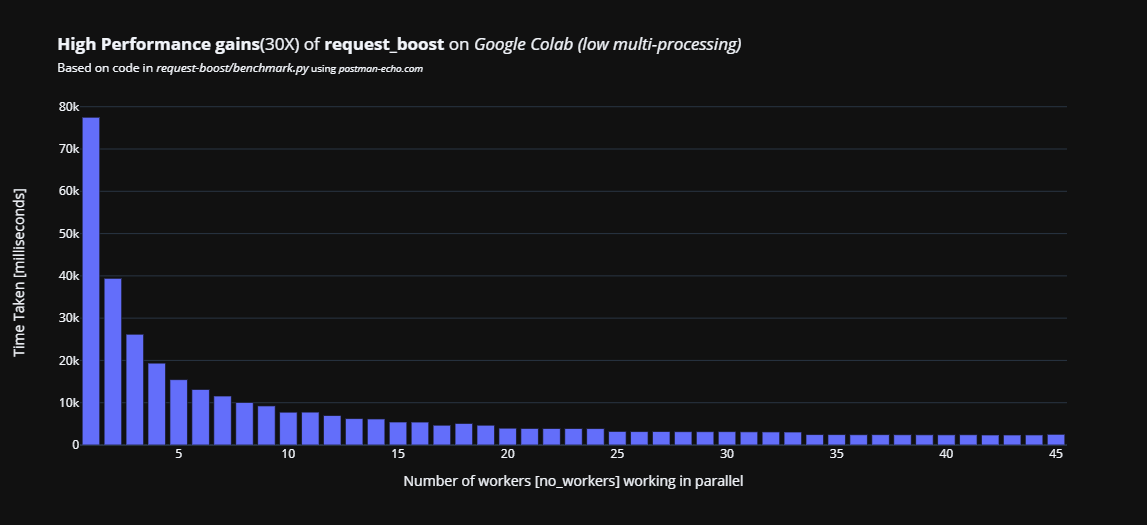
A better requests and urllib package.
A simple package for hitting multiple URLs and performing GET/POST requests in parallel.




Setup
pip install request-boost
Important: Virtual Environment is recommended
Usage
# Sample data
number_of_sample_urls = 1000
urls = [ f'https://postman-echo.com/get?random_data={test_no}' for test_no in range(number_of_sample_urls) ]
headers = [{'sample_header':test_no} for test_no in range(number_of_sample_urls)]
from request_boost import boosted_requests

results = boosted_requests(urls=urls)
print(results)
from request_boost import boosted_requests

results = boosted_requests(urls=urls, no_workers=16, max_tries=5, timeout=5, headers=headers, verbose=True, parse_json=True)
print(results)
from request_boost import boosted_requests

# Config
number_of_sample_urls = 100

# Sample data
urls = [f'https://postman-echo.com/get?random_data={test_no}' for test_no in range(number_of_sample_urls)]
post_urls = [f'https://postman-echo.com/post' for test_no in range(number_of_sample_urls)]
headers = [{'sample_header': test_no} for test_no in range(number_of_sample_urls)]
data = [{'sample_data': test_no} for test_no in range(number_of_sample_urls)] # Required for POST requests,
#For POST request data can be just list of empty dict but not NONE

simple_results = boosted_requests(urls=urls, no_workers=16, max_tries=5, timeout=5, headers=None, verbose=False, parse_json=True)
header_results = boosted_requests(urls=urls, no_workers=16, max_tries=5, timeout=5, headers=headers, parse_json=True)
post_results = boosted_requests(urls=post_urls, no_workers=16, max_tries=5, timeout=5, headers=headers, data=data, verbose=True, parse_json=True)
Documentation

boosted_requests(
    urls,
    no_workers=32,
    max_tries=5,
    after_max_tries="assert",
    timeout=10,
    headers=None,
    data=None,
    verbose=True,
    parse_json=True,
)

Get data from APIs in parallel by creating workers that process in the background
    :param urls: list of URLS
    :param no_workers: maximum number of parallel processes {Default::32}
    :param max_tries: Maximum number of tries before failing for a specific URL {Default::5}
    :param after_max_tries: What to do if not successfull after "max_tries" for a specific URL,
                            one of {"assert", "break"} {Default::assert}
    :param timeout: Waiting time per request {Default::10}
    :param headers: Headers if any for the URL requests
    :param data: data if any for the URL requests (Wherever not None a POST request is made)
    :param verbose: Show progress [True or False] {Default::True}
    :param parse_json: Parse response to json [True or False] {Default::True}
    :return: List of response for each API (order is maintained)
Credits
Maintained by
Kuldeep Singh Sidhu
Github: github/singhsidhukuldeep
https://github.com/singhsidhukuldeep
Website: Kuldeep Singh Sidhu (Website)
http://kuldeepsinghsidhu.com
LinkedIn: Kuldeep Singh Sidhu (LinkedIn)
https://www.linkedin.com/in/singhsidhukuldeep/
Contributors

The full list of all the contributors is available here

TODO:: Want to contribute?
- Make the backend used (urllib/request library) an option that the user can choose, by default we use urllib
- For parallel processing add options for multi-processing along with multi-threading
- Set-up tests for edge cases and changes verification
- Set-up CI/CD pipleine (possibly using GitHub actions) to publish changes to PyPi
- Improeve the doc-strings documentation to add more explanantion and examples
- Add a message queue to deploy the service across machines
- Add option to run URL requests with Self signed certificate
verify=False - Add option to supress warnings
- Add progess bars from tqdm and ascii
- Add option to add session and auth
Say Thanks
If this helped you in any way, it would be great if you could share it with others.
Steps for publishing to pypi [This is just for me, Maybe!]
pip3 install setuptools twine- Go to project folder
python3 setup.py sdisttwine upload --repository-url https://upload.pypi.org/legacy/ dist/*
OR
Go to your project folder and:
pip3 install setuptools twine

python3 setup.py sdist
twine upload --repository-url https://upload.pypi.org/legacy/ dist/*
Current Status






CHANGE LOG
LATEST
0.8 (06/06/2023)
- added a new :param
after_max_tries: What to do if not successfull after"max_tries"for a specific URL, one of {"assert","break"} {Default::assert}
PAST
0.1 (16/09/2021)
- Released first version(stable) of request-boost.
0.2 (16/09/2021)
- Fixed header issue
- Added POST functionality
0.3.1 (17/09/2021)
- Added Verbose
0.4 (17/09/2021)
- Added Verbose timing
- Improved performance
0.5 (16/10/2021)
- Added Encoding fix
- Improved Readability
0.6 (29/12/2021)
- Added option to not parse the JSON
- Improved documentation
0.7 (29/12/2021)
- Fixed timeout key error issue, to return
Nonefor timeouts - Improved documentation
Read more at https://github.com/singhsidhukuldeep/request-boost
1 maintainer

Metadata
1 maintainer
Release files for request-boost 0.8
For a detailed explanation of source distributions (sdists) and built distributions (wheels), please see the package formats documentation.
Source distribution (sdist)
| File | Size | Uploaded | |
|---|---|---|---|
| request-boost-0.8.tar.gz | 19.4 kB | Details |
Release files / request-boost-0.8.tar.gz
| Download URL | request-boost-0.8.tar.gz |
|---|---|
| Size | 19.4 kB |
| Tags | Source |
|
SHA-256 checksum How to use checksums |
1d0d9b89776f119414b1cab1ae462978810645559c16956f7ae06b579b3bbbd8
|
|
BLAKE2b-256 checksum How to use checksums |
320c917b744b0dfb4449b8e431147f182ce0f1bbd39ad7083ddfd8a4a7b12b62
|
| Upload date | |
|
Uploaded using Trusted Publishing? What is trusted publishing? |
No |
| Uploaded via |
twine/4.0.2 CPython/3.11.1
|














