






Report Bug · Request Feature · Ask Question · Report security bug
requests-pprint is a Python library that allows you to print your HTTP requests and responses in a pretty format. It is based on the requests library and uses the rich library to print the response in a more readable way.
Table of Contents
Requirements
Here's a breakdown of the packages needed and their versions:
Installation
From PyPI
requests-pprint can be installed easily as a PyPI package. Just run the following command:
pip3 install requests-pprint
Manual installation
If you prefer to install the program manually, follow these steps:
-
Download the latest version of requests-pprint from this repository:
git clone https://github.com/YisusChrist/requests-pprint
cd requests-pprint
-
Install the package:
poetry install --only main
Uninstall
If you installed it from PyPI, you can use the following command:
pipx uninstall requests-pprint
Usage
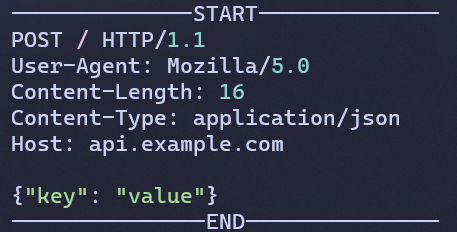
1. Pretty Print HTTP Request
import requests
from requests_pprint import pprint_http_request

# Prepare a sample HTTP request
url = 'https://api.example.com'
headers = {'User-Agent': 'Mozilla/5.0'}
body = {'key': 'value'}
request = requests.Request('POST', url, headers=headers, json=body)
prepared_request = request.prepare()

# Print the formatted HTTP request
pprint_http_request(prepared_request)
Output:
2. Pretty Print HTTP Response
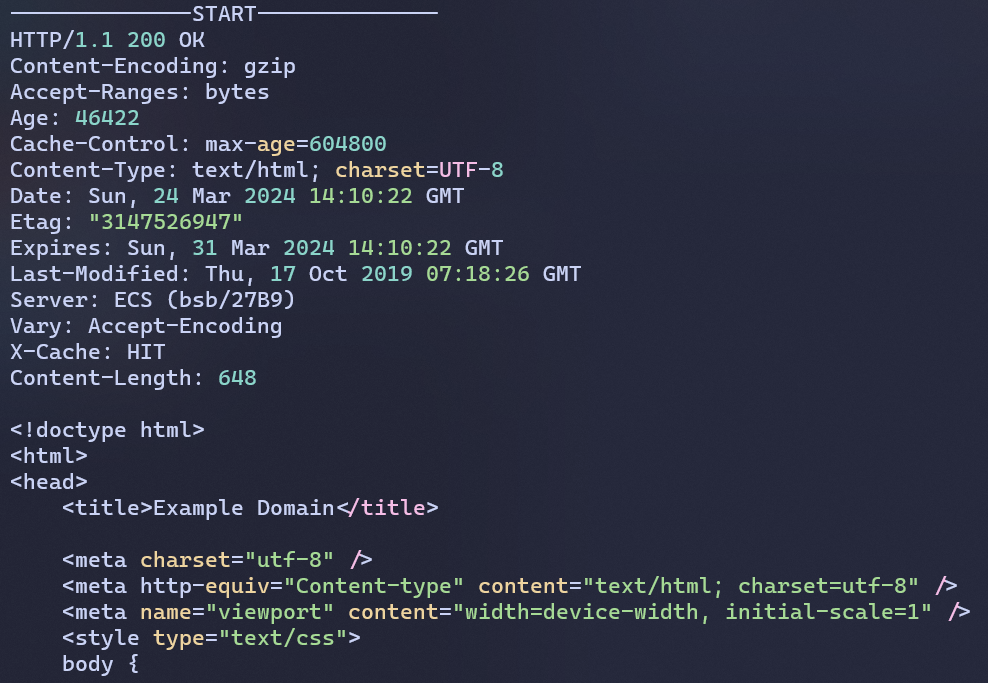
import requests
from requests_pprint import pprint_http_response

# Send a sample HTTP request
response = requests.get('https://example.com')

# Print the formatted HTTP response
pprint_http_response(response)
Output:
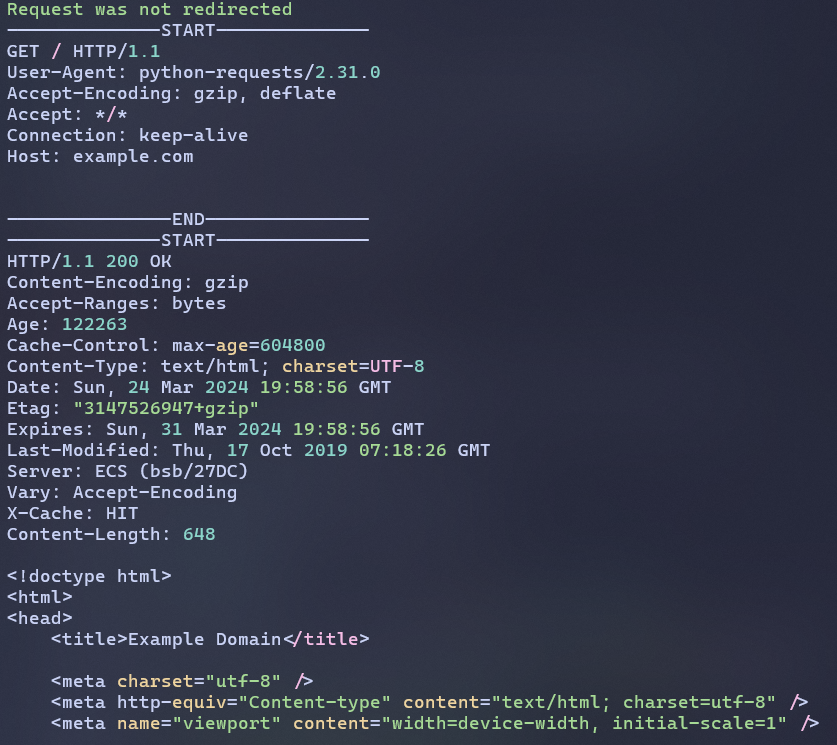
3. Print Response Summary
import requests
from requests_pprint import print_response_summary

# Send a sample HTTP request
response = requests.get('https://example.com')

# Print a summary of the HTTP response
print_response_summary(response)
Output:
Since 2024-07-28, requests-pprint supports asynchronous requests from the aiohttp library. You can use the pprint_async_http_request and pprint_async_http_response functions to print the formatted HTTP request and response, respectively, as well as the print_async_response_summary function to print a summary of the HTTP response.
Here is an example of how to use these functions:
4. Pretty Print Asynchronous HTTP Response
import asyncio
import aiohttp

from requests_pprint import pprint_async_http_response

async def main():
    async with aiohttp.ClientSession() as session:
        url = "https://api.example.com"
        headers = {"User-Agent": "Mozilla/5.0"}
        body = {"key": "value"}
        async with session.post(url, headers=headers, json=body) as response:
            await pprint_async_http_response(response)


asyncio.run(main())
Output:
5. Pretty Print Asynchronous Response Summary
import asyncio
import aiohttp

from requests_pprint import print_async_response_summary

async def main():
    async with aiohttp.ClientSession() as session:
        url = "https://api.example.com"
        headers = {"User-Agent": "Mozilla/5.0"}
        body = {"key": "value"}
        async with session.post(url, headers=headers, json=body) as response:
            await print_async_response_summary(response)


asyncio.run(main())
Output:
Contributors

How do I contribute to requests-pprint?
Before you participate in our delightful community, please read the code of conduct.
I'm far from being an expert and suspect there are many ways to improve – if you have ideas on how to make the configuration easier to maintain (and faster), don't hesitate to fork and send pull requests!
We also need people to test out pull requests. So take a look through the open issues and help where you can.
See Contributing Guidelines for more details.
License
requests-pprint is released under the GPL-3.0 License.
1 maintainer

Metadata
1 maintainer
Release files for requests-pprint 1.2.4
For a detailed explanation of source distributions (sdists) and built distributions (wheels), please see the package formats documentation.
Source distribution (sdist)
| File | Size | Uploaded | |
|---|---|---|---|
| requests_pprint-1.2.4.tar.gz | 19.1 kB | Details |
Built distribution (wheel)
| File | Interpreter | ABI | Platform | Reset |
|---|---|---|---|---|
| requests_pprint-1.2.4-py3-none-any.whl | Python 3 | none | any | Details |
Total release size: 39.8 kB
Release files / requests_pprint-1.2.4.tar.gz
| Download URL | requests_pprint-1.2.4.tar.gz |
|---|---|
| Size | 19.1 kB |
| Tags | Source |
|
SHA-256 checksum How to use checksums |
2f761c3b58fd50f0fc0d708b02433081bd9ef11aceade35d5579a9fdff054191
|
|
BLAKE2b-256 checksum How to use checksums |
056b5180b3d1e288c71d62acaf0f74a5e3ea972b4b132c924ca8ac61afd7ed53
|
| Upload date | |
|
Uploaded using Trusted Publishing? What is trusted publishing? |
No |
| Uploaded via |
poetry/2.1.3 CPython/3.13.6 Windows/11
|
Release files / requests_pprint-1.2.4-py3-none-any.whl
| Download URL | requests_pprint-1.2.4-py3-none-any.whl |
|---|---|
| Size | 20.7 kB |
| Tags | Python 3 |
|
SHA-256 checksum How to use checksums |
99c690db8ddaede0d169a39f96e04a3271380cb758613a8e33f27f51625f3f7d
|
|
BLAKE2b-256 checksum How to use checksums |
89b78b1ed3e10c9caf86aa32a4171767752ba048dc991a8d539e5ff3060f58f7
|
| Upload date | |
|
Uploaded using Trusted Publishing? What is trusted publishing? |
No |
| Uploaded via |
poetry/2.1.3 CPython/3.13.6 Windows/11
|














