
Fast differentiable resizing and warping of arbitrary grids

Project description
Hugues Hoppe 2026
[Open in Colab] [Kaggle] [MyBinder] [DeepNote] [GitHub source] [API docs] [PyPI package]
The notebook resampler_notebook.ipynb demonstrates the resampler library and contains documentation, usage examples, unit tests, and experiments.
Overview
The resampler library enables fast differentiable resizing and warping of arbitrary grids.
It supports:
-
grids of any dimension (e.g., 1D, 2D images, 3D video, 4D batches of videos), containing
-
samples of any shape (e.g., scalars, colors, motion vectors, Jacobian matrices) and
-
any numeric type (e.g.,
uint8,float64,complex128) -
within several array libraries (
numpy,tensorflow,torch, andjax); -
either
'dual'("half-integer") or'primal'grid-type for each dimension; -
many boundary rules, specified per dimension, extensible via subclassing;
-
an extensible set of filter kernels, selectable per dimension;
-
optional gamma transfer functions for correct linear-space filtering;
-
prefiltering for accurate antialiasing when
resizedownsampling; -
efficient backpropagation of gradients for
tensorflow,torch, andjax; -
few dependencies (only
numpyandscipy) and no C extension code, yet -
faster resizing than C++ implementations in
tf.imageandtorch.nn.
A key strategy is to leverage existing sparse matrix representations and operations.
Example usage
!pip install -q mediapy numpy resampler

import mediapy as media
import numpy as np
import resampler
array = np.random.default_rng(1).random((4, 6, 3))  # 4x6 RGB image.
upsampled = resampler.resize(array, (128, 192))  # To 128x192 resolution.
media.show_images({'4x6': array, '128x192': upsampled}, height=128)
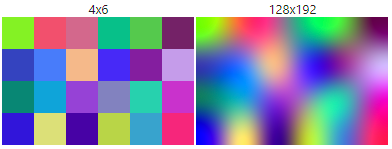
image = media.read_image('https://github.com/hhoppe/data/raw/main/image.png')
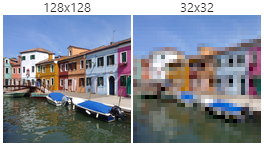
downsampled = resampler.resize(image, (32, 32))
media.show_images({'128x128': image, '32x32': downsampled}, height=128)
import matplotlib.pyplot as plt
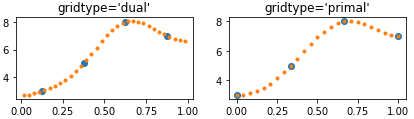
array = [3.0, 5.0, 8.0, 7.0]  # 4 source samples in 1D.
new_dual = resampler.resize(array, (32,))  # (default gridtype='dual') 8x resolution.
new_primal = resampler.resize(array, (25,), gridtype='primal')  # 8x resolution.

_, axs = plt.subplots(1, 2, figsize=(7, 1.5))
axs[0].set_title("gridtype='dual'")
axs[0].plot((np.arange(len(array)) + 0.5) / len(array), array, 'o')
axs[0].plot((np.arange(len(new_dual)) + 0.5) / len(new_dual), new_dual, '.')
axs[1].set_title("gridtype='primal'")
axs[1].plot(np.arange(len(array)) / (len(array) - 1), array, 'o')
axs[1].plot(np.arange(len(new_primal)) / (len(new_primal) - 1), new_primal, '.')
plt.show()
batch_size = 4
batch_of_images = media.moving_circle((16, 16), batch_size)
upsampled = resampler.resize(batch_of_images, (batch_size, 64, 64))
media.show_videos({'original': batch_of_images, 'upsampled': upsampled}, fps=1)
original
 upsampled

Most examples above use the default
resize() settings:
gridtype='dual'for both source and destination arrays,boundary='auto'which uses'reflect'for upsampling and'clamp'for downsampling,filter='lanczos3'(a Lanczos kernel with radius 3),gamma=Nonewhich by default uses the'power2'transfer function for theuint8image in the second example,scale=1.0, translate=0.0(no domain transformation),- default
precisionand outputdtype.
Advanced usage:
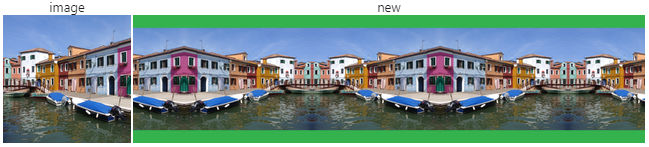
Map an image to a wider grid using custom scale and translate vectors,
with horizontal 'reflect' and vertical 'natural' boundary rules,
providing a constant value for the exterior,
using different filters (Lanczos and O-MOMS) in the two dimensions,
disabling gamma correction, performing computations in double-precision,
and returning an output array in single-precision:
new = resampler.resize(
    image, (128, 512), boundary=('natural', 'reflect'), cval=(0.2, 0.7, 0.3),
    filter=('lanczos3', 'omoms5'), gamma='identity', scale=(0.8, 0.25),
    translate=(0.1, 0.35), precision='float64', dtype='float32')
media.show_images({'image': image, 'new': new})
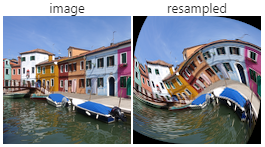
Warp an image by transforming it using polar coordinates:
shape = image.shape[:2]
yx = ((np.indices(shape).T + 0.5) / shape - 0.5).T  # [-0.5, 0.5]^2
radius, angle = np.linalg.norm(yx, axis=0), np.arctan2(*yx)
angle += (0.8 - radius).clip(0, 1) * 2.0 - 0.6
coords = np.dstack((np.sin(angle) * radius, np.cos(angle) * radius)) + 0.5
resampled = resampler.resample(image, coords, boundary='constant')
media.show_images({'image': image, 'resampled': resampled})
Limitations:
- Filters are assumed to be separable.
- Although
resizeimplements prefiltering,resampledoes not yet have it (and therefore may have aliased results if downsampling). - Differentiability is only with respect to the grid values, not wrt the resize shape, scale, translation, or the resampling coordinates.
Release history Release notifications | RSS feed


Download files
Download the file for your platform. If you're not sure which to choose, learn more about installing packages.
Source Distribution
Built Distribution
Filter files by name, interpreter, ABI, and platform.
If you're not sure about the file name format, learn more about wheel file names.
Copy a direct link to the current filters
File details
Details for the file resampler-1.0.3.tar.gz.
File metadata
- Download URL: resampler-1.0.3.tar.gz
- Upload date:
- Size: 48.6 kB
- Tags: Source
- Uploaded using Trusted Publishing? No
- Uploaded via: twine/6.1.0 CPython/3.13.12
File hashes
| Algorithm | Hash digest | |
|---|---|---|
| SHA256 |
080097a6e1894b764857d9ca11df93ed74b76c6ec5597516b8d90a963b09a54a
|
|
| MD5 |
5a9c5f1edd5adff23a097b01841c4815
|
|
| BLAKE2b-256 |
90c6fb6ff84763ec98019ef1f67b13f55ea8a6e3bd65f73f6365f7262477cfe9
|
File details
Details for the file resampler-1.0.3-py3-none-any.whl.
File metadata
- Download URL: resampler-1.0.3-py3-none-any.whl
- Upload date:
- Size: 46.3 kB
- Tags: Python 3
- Uploaded using Trusted Publishing? No
- Uploaded via: twine/6.1.0 CPython/3.13.12
File hashes
| Algorithm | Hash digest | |
|---|---|---|
| SHA256 |
cf6a2495ea5ca33fb436f56a8432b5ffc547ade1d1d0e81c9229e710b6ddf2bd
|
|
| MD5 |
a4ae90adbcf59727ee914c6bf60116be
|
|
| BLAKE2b-256 |
b1d194707b8a66352c72cc36cd7d9ae002e8521c444dad8b734c54d8ad71fdfc
|






