
Personal Research Mentor


AI-powered research mentor that guides you through your research journey, helping you grow your own skills and judgment. Features a conversational office for open-ended mentoring, a Question Workshop with 10 approaches for developing research questions, and a guided sharing flow for making your research visible. Integrates with academic databases, Retraction Watch, and web search. Runs locally with a browser-based interface and three LLM backends (Claude, local vLLM, or any OpenAI-compatible API).
Research is how we advance human knowledge - but getting started is surprisingly hard.
Middle and high school students are curious and capable, yet most have no access to research mentorship. Science fairs scratch the surface, but there's no one to guide a student through forming a real hypothesis, designing a rigorous study, or navigating the iterative mess that actual research is.
College students face a catch-22: labs want prior research experience, but you can't get experience without getting into a lab. Many talented students never break through this gate.
Amateur scientists, citizen scientists, and professionals sometimes want to explore a research question on the side - for intellectual fulfillment, to contribute to a field they care about, or just for fun. But without institutional structure, they don't know where to start or how to stay rigorous.
Personal Research Mentor is an AI research mentor that fills this gap. It doesn't do your research for you - it teaches you how to do research. It asks questions, challenges your thinking, helps you design experiments, and adapts to where you are in the process. Think of it as a patient, always-available advisor who meets you at your level.
Runs locally as a single Python process with SQLite for storage. Three LLM backends: Claude Code CLI (default - flat-fee subscription, no per-call API costs, conversations processed by Anthropic), a local vLLM server (fully offline, nothing leaves your machine, requires GPU), or a remote API (bring your own key).
Free for individual use. Not designed for commercial use. If you want a similar solution for your organization, contact Authentic Research Partners.
Demo
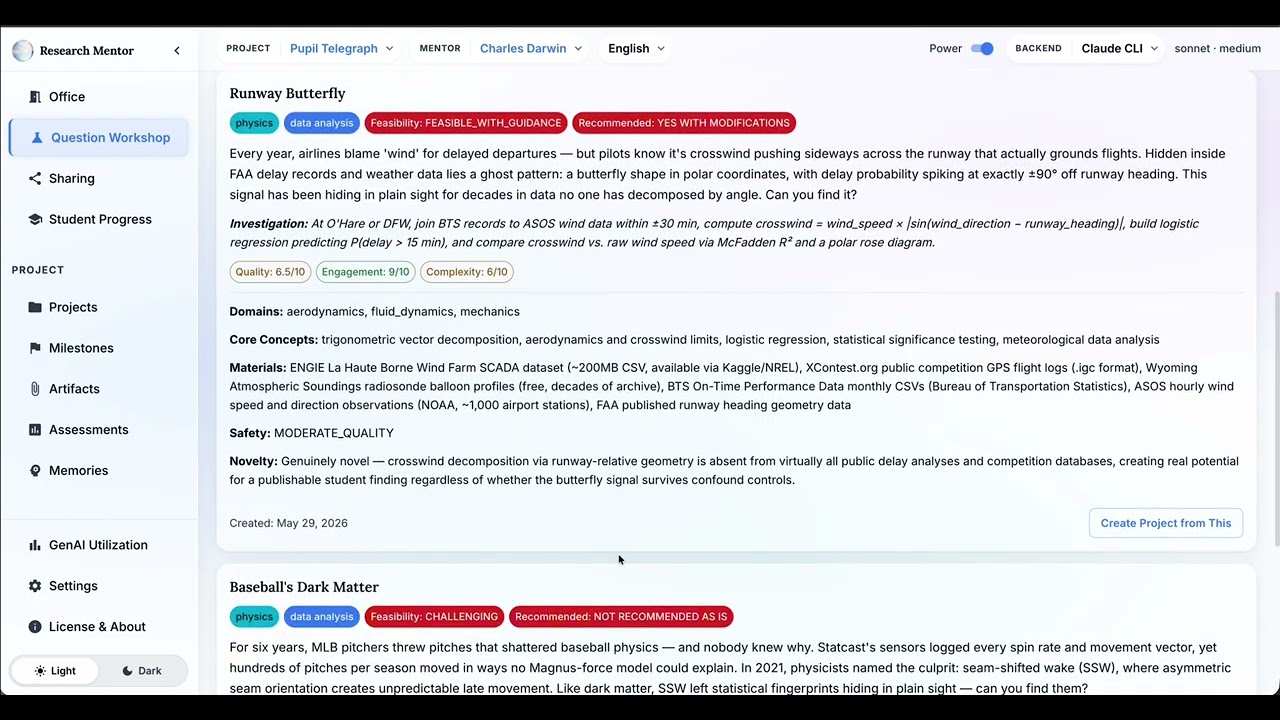
▶️ Watch the demo playlist on YouTube - see Personal AI Research Mentor in action.
Features
Mentoring
- Adaptive research mentoring - 21-node LangGraph agent that guides students through the research process
- Question Workshop - 9 pipelines + Hypothesis chat for developing research questions
- Research sharing - guided publication flow
- Semantic memory - remembers context across sessions within each project
- Assessment tracking - project-level and student-level progress evaluation
- Multiple teaching personas - different mentoring styles
- Content safety filtering - input and output safety review
- Artifact processing - upload papers, documents, data files, photographs, scientific images, charts, and handwritten notes
- Data analysis - automatic statistical analysis of uploaded data, adapted to student level, with pedagogical display of results
- Vision - optional image understanding for describing photographs, scientific images, charts, and handwriting
Infrastructure and Interface
- Three LLM backends - Claude Code CLI, local vLLM, remote API
- Browser-based interface built with React - conversational office, question workshop, research sharing, project management, progress tracking, usage monitoring, and settings
- vLLM container management - start, stop, restart, status, health checks
- API usage budget tracking
- Tool usage tracking with real-time activity reporting
- CLI - serve, init, doctor, reset, export, migrate, vllm-container
Integration with External Resources
- Academic search - OpenAlex, Semantic Scholar, PubMed, arXiv, Europe PMC
- Researcher and institution discovery - OpenAlex, ORCID, ROR
- Paper fetching - introduction extraction from 8 open-access sources
- Retraction Watch - local semantic search over retracted papers
- Web search - Brave Search or Tavily
Installation
Windows
- Open PowerShell and run:
powershell -ExecutionPolicy ByPass -c "irm https://astral.sh/uv/install.ps1 | iex" - Close and reopen PowerShell, then:
uv tool install research-mentor --python 3.13
Mac / Linux
curl -LsSf https://astral.sh/uv/install.sh | shuv tool install research-mentor --python 3.13
See INSTALLATION.md for detailed step-by-step instructions, including uninstall.
Quick Start
research-mentor doctor  # check system dependencies
research-mentor         # start the server (creates database on first run)
To use local vLLM instead of Claude Code CLI (requires Podman + NVIDIA GPU):
research-mentor vllm-container start   # start vLLM in a Podman container
research-mentor serve --backend vllm   # start the app server
vLLM runs in a container (Podman or Docker) - it is not a Python dependency of this package. The container handles all vLLM + CUDA dependencies. See docs/usage.md for details.
API
Once the server is running:
# Health check
curl localhost:8080/api/health

# Talk to the mentor
curl -X POST localhost:8080/api/office \
  -H "Content-Type: application/json" \
  -d '{"message": "How do I design a water filtration experiment?"}'

# Interactive API docs
open http://localhost:8080/api/docs
Configuration
Default config is bundled. Override in ~/.research-mentor/config.toml:
[llm]
backend = "vllm"

[llm.vllm]
# Switch models by changing active_model (profiles defined in bundled config):
#   "gemma3-12b-fp8" - Gemma3-12B, non-thinking (default)
#   "qwen3-8b-fp8"   - Qwen3-8B, thinking (<think> tags)
active_model = "gemma3-12b-fp8"
All options can also be set via CLI flags (research-mentor vllm-server --help) or environment variables (RESEARCH_MENTOR_BACKEND=vllm).
See docs/configuration.md for the full configuration reference.
Security & Privacy
Research Mentor runs as a local server on your machine (localhost only). There is no cloud backend, no user accounts, and no telemetry.
What stays on your machine
- Your conversations - stored in a local SQLite database (
~/.research-mentor/) - Uploaded files - stored locally under
~/.research-mentor/artifacts/ - PDF content - sent only to a local GROBID container for text extraction, never to external services
- With the
vllmbackend - all LLM inference happens locally on your GPU. Nothing leaves your machine
What is sent to external services
| Data | Where | Why |
|---|---|---|
| Paper titles, DOIs, author names | OpenAlex, Semantic Scholar, PubMed, Europe PMC | Literature search |
| Search queries | Brave Search or Tavily (if configured) | Web search tool |
| Researcher names | ORCID | Researcher lookup |
| Your email (if configured) | OpenAlex, Unpaywall | Polite API access (higher rate limits) |
| API keys | Respective services (over HTTPS) | Authentication |
All external requests use HTTPS (encrypted in transit), but the service providers can see your queries. If you search for papers about a sensitive topic, the API providers (OpenAlex, Semantic Scholar, PubMed, Brave, etc.) will see that query and the DOIs/titles you look up. This is the same as using these services directly in a browser - but worth knowing if your research topic is sensitive.
With the claude_cli backend (default), your entire conversation - every message you send and every response the mentor generates - is processed by Anthropic via the Claude Code CLI. This includes your research topic, hypotheses, experimental designs, and any personal details you share. Subject to Anthropic's privacy policy.
With the api backend, the same conversation content is sent to whichever API endpoint you configure (e.g., OpenAI, a hosted model provider). The provider can see everything discussed in the session.
With the vllm backend pointing to a local GPU, LLM inference runs entirely on your machine - no conversation content leaves it. This is the most private option. If you point the vLLM backend at a remote server (e.g., a shared GPU server in your organization), conversation content is sent to that server instead.
In all cases, search tool queries (see above) are still sent to external academic APIs regardless of which LLM backend you use.
How the LLM interacts with external services
The LLM never executes code - its output is either validated through structured JSON parsing or rendered as plain text.
However, the LLM does formulate search queries that are sent to external APIs. When you ask about a research topic, the system searches for relevant papers and web resources on your behalf. The search queries are derived from your conversation - for example, if you're researching water filtration, the system sends queries like "water filtration efficiency" to OpenAlex or Brave Search.
This means your research topic and related terms are sent to external search services as part of normal operation. No system secrets (API keys, configuration, file paths) are ever included in the LLM's context or in search queries. All tool calls are rate-limited and logged.
Every outgoing search query is checked by a two-layer safety reviewer before it leaves your machine:
- Pattern-based check (instant) - blocks queries containing emails, phone numbers, file paths, or credentials
- AI-based check - catches subtler leaks like a student's name combined with their school
Both layers are on by default. If a query is blocked, the search is skipped and the mentor continues without those results. Power-mode users can adjust these in Settings.
How your data is protected
- API keys are stored in individual files with owner-only permissions (
chmod 600) - SQL injection protection - parameterized queries with column allowlists
- File upload security - filename sanitization, file type whitelist, size limits
- XML parsing - uses
defusedxmlto prevent entity expansion attacks - Download size caps - PDF downloads (100 MB) and data imports (500 MB decompressed) are capped to prevent memory exhaustion
- Prompt injection protection - uploaded documents and user inputs are wrapped in content boundary delimiters before being included in LLM prompts, preventing embedded text from being interpreted as instructions
- Security headers - Content-Security-Policy, X-Frame-Options, X-Content-Type-Options on all responses
- Automated security scanning - every commit is checked with bandit (static analysis), pip-audit (known CVEs), and pip-licenses (license compliance)
Not designed for network deployment
Research Mentor binds to localhost and has no authentication. Do not expose it to untrusted networks without adding your own authentication layer.
Papers
- From EdTech to HumanDevTech (Samsonau, Vine & Pearce, 2026) - introduces the HumanDevTech standard for educational software and presents this system as its first implementation. Cite this if you use the software.
- The Research Guide: From Informal Role to Profession (Samsonau & Pearce, 2026) - makes the case for the research-mentoring role this tool is built to support.
See CITATION.cff for citation metadata.
Contributing
This is an opinionated project. We don't accept unsolicited pull requests - please open an issue or reach out before contributing. See CONTRIBUTING.md for details.
Disclaimer
This is an AI-powered educational tool. Like all AI systems, it can produce inaccurate or misleading information. It provides research guidance but does not replace your own critical thinking and judgment. Always verify AI-generated content with authoritative sources. If you are a minor, please involve a parent or other trusted adult when anything seems questionable, unclear, or unsafe.
License
PolyForm Noncommercial 1.0.0 - free for personal and noncommercial use. Provided as-is, with no warranty or liability. Not designed for commercial use. If you want a similar solution for your organization, contact Authentic Research Partners.
1 maintainer

Metadata
1 maintainer
Release files for research-mentor 1.0.5
For a detailed explanation of source distributions (sdists) and built distributions (wheels), please see the package formats documentation.
Source distribution (sdist)
| File | Size | Uploaded | |
|---|---|---|---|
| research_mentor-1.0.5.tar.gz | 1.1 MB | Details |
Built distribution (wheel)
| File | Interpreter | ABI | Platform | Reset |
|---|---|---|---|---|
| research_mentor-1.0.5-py3-none-any.whl | Python 3 | none | any | Details |
Total release size: 2.3 MB
Release files / research_mentor-1.0.5.tar.gz
| Download URL | research_mentor-1.0.5.tar.gz |
|---|---|
| Size | 1.1 MB |
| Tags | Source |
|
SHA-256 checksum How to use checksums |
73d6ae7b4fb0917ff4eb1e7c4098dedf52c286d5166748d465300687ab4deffa
|
|
BLAKE2b-256 checksum How to use checksums |
5416e8fac2f5534257a55a4f154027a43c2f929294263cfd7225133cce29c648
|
| Upload date | |
|
Uploaded using Trusted Publishing? What is trusted publishing? |
No |
| Uploaded via |
twine/6.2.0 CPython/3.13.9
|
Release files / research_mentor-1.0.5-py3-none-any.whl
| Download URL | research_mentor-1.0.5-py3-none-any.whl |
|---|---|
| Size | 1.2 MB |
| Tags | Python 3 |
|
SHA-256 checksum How to use checksums |
0dba92264c4f130c16b0bf06be14aed5823b0eab6eca168e6d29077181a97a08
|
|
BLAKE2b-256 checksum How to use checksums |
5fd9517c6105161d5699859ffb56d2b125ccdaf61a86eb59d38a74fce9dd64b3
|
| Upload date | |
|
Uploaded using Trusted Publishing? What is trusted publishing? |
No |
| Uploaded via |
twine/6.2.0 CPython/3.13.9
|














