
ResearchLoop
Run AI-automated research experiments on your HPC cluster. Monitor from anywhere.


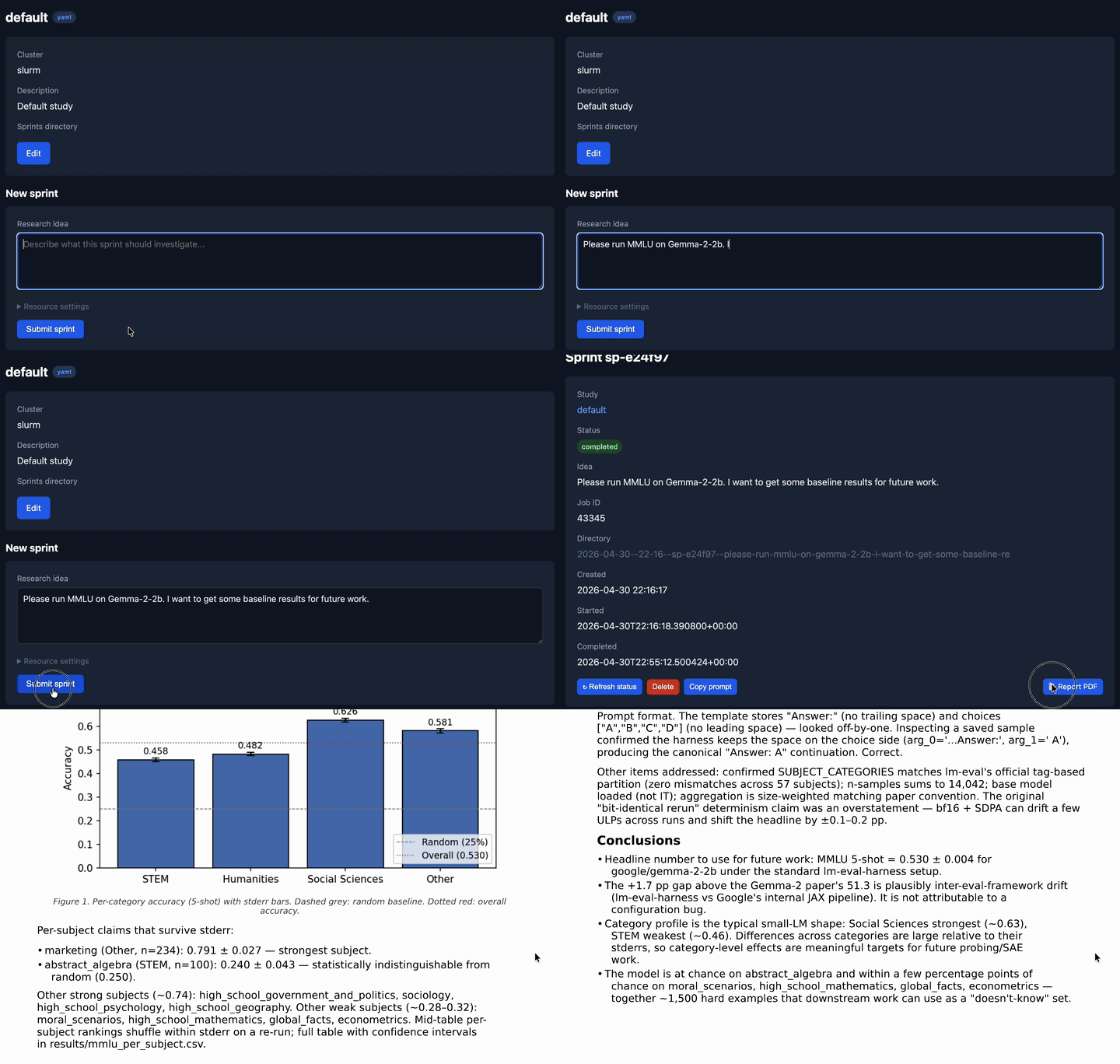
ResearchLoop submits AI-powered research experiments to your SLURM or SGE cluster, then reports back the results. You describe a research idea in natural language, it handles the rest: submitting the job, running a multi-step pipeline with Claude Code, red-teaming the results, generating a report, and notifying you when it's done.
pip install researchloop

# Submit an experiment to your cluster
researchloop sprint run "Investigate whether batch normalization improves convergence" --study my-project

# Start an auto-loop: 5 experiments, each building on the last
researchloop loop start --study my-project --count 5 --context "Focus on improving F1 score"
Monitor everything from a web dashboard, Slack, or the CLI -- no need to SSH in and check on jobs.
Why ResearchLoop?
If you run experiments on shared HPC clusters, you know the pain: SSH in, write a script, submit with sbatch, wait, check logs, repeat. ResearchLoop automates this loop:
- You describe what to investigate (via CLI, dashboard, or Slack)
- ResearchLoop submits a job to your cluster via SSH
- Claude runs the full experiment -- writes code, runs it, analyzes results
- A red-team step critiques the work and Claude fixes any issues
- You get a report with a summary, PDF, and all artifacts
The auto-loop feature takes this further: after each experiment, Claude analyzes the results and proposes the next one. You set how many iterations, and walk away.
Get started in 5 minutes
Prerequisites: Python 3.10+, SSH access to an HPC cluster, Claude Code installed on the cluster.
1. Install and initialize
pip install researchloop
researchloop init
2. Edit researchloop.toml
shared_secret = "pick-a-secret"
orchestrator_url = "http://localhost:8080"

[[cluster]]
name = "my-cluster"
host = "login.cluster.example.com"
user = "researcher"
key_path = "~/.ssh/id_ed25519"
scheduler_type = "slurm"
working_dir = "/scratch/researcher/researchloop"

[cluster.job_options]
gres = "gpu:1"
mem = "64G"
cpus-per-task = "8"

[[study]]
name = "my-project"
cluster = "my-cluster"
description = "Investigating X"
3. Start the server and run your first sprint
researchloop serve &
researchloop connect http://localhost:8080
researchloop sprint run "Try approach X on dataset Y" --study my-project
That's it. ResearchLoop SSHes to your cluster, submits the job, and you can monitor progress from the dashboard at http://localhost:8080/dashboard/.
Three ways to interact
Web dashboard
Browse to /dashboard/ to see all your studies, sprints, and loops. Submit new sprints, start loops with custom GPU/memory settings, refresh live status from the cluster, and read reports -- all from the browser.
Slack bot
Get sprint notifications in your Slack channel and run commands from a thread:
sprint run my-project "investigate feature X under condition Y"
sprint list
loop start my-project 5
help
See the Slack setup guide for configuration.
CLI
researchloop sprint run "idea" --study my-project   # Submit a sprint
researchloop sprint list                             # List recent sprints
researchloop sprint show sp-a3f7b2                   # View details
researchloop loop start --study my-project --count 5 # Auto-loop
researchloop loop stop loop-b4e1c9                   # Stop a loop
Customizing your studies
Each study can have its own context, cluster settings, and configuration:
[[study]]
name = "sae-research"
cluster = "my-cluster"
max_sprint_duration_hours = 12
red_team_max_rounds = 2
allow_loop = true

# Tell Claude what this study is about and how to approach it
context = """
You are researching sparse autoencoder architectures.
Always train for 200M samples. Use batch size 1024.
Validate on the variation models listed in ~/reference/models.txt.
"""

# Or point to a file with detailed instructions
claude_md_path = "./studies/sae-research/CLAUDE.md"

# Override GPU/memory for this study
[study.job_options]
gres = "gpu:a100:2"
mem = "128G"
The context hierarchy is: global > cluster > study. All levels are merged and included in every sprint's prompt.
Deployment
For production, deploy the orchestrator as a Docker container on Fly.io, Railway, or any platform that supports persistent volumes:
pip install researchloop
# See deployment guide for Docker/Fly.io setup
Full deployment guide: researchloop.github.io/researchloop/deployment
Documentation
Full docs at researchloop.github.io/researchloop, including:
- Configuration reference -- all TOML options and environment variables
- Deployment guide -- Docker, Fly.io, SSH key setup
- Dashboard guide -- web UI features and authentication
- Slack integration -- setup, commands, notifications
- CLI reference -- all commands with examples
- Security -- authentication, CSRF, webhook tokens
- Development -- contributing, testing, architecture
Contributing
git clone https://github.com/researchloop/researchloop.git
cd researchloop
uv sync
uv run pytest tests/ -m "not integration"   # Unit tests
uv run ruff check . && uv run pyright researchloop/  # Lint + type check
Integration tests run against a real SLURM scheduler in Docker -- see development guide.
License
MIT
1 maintainer

Metadata
1 maintainer
Release files for researchloop 0.3.4
For a detailed explanation of source distributions (sdists) and built distributions (wheels), please see the package formats documentation.
Source distribution (sdist)
| File | Size | Uploaded | |
|---|---|---|---|
| researchloop-0.3.4.tar.gz | 8.5 MB | Details |
Built distribution (wheel)
| File | Interpreter | ABI | Platform | Reset |
|---|---|---|---|---|
| researchloop-0.3.4-py3-none-any.whl | Python 3 | none | any | Details |
Total release size: 8.6 MB
Release files / researchloop-0.3.4.tar.gz
| Download URL | researchloop-0.3.4.tar.gz |
|---|---|
| Size | 8.5 MB |
| Tags | Source |
|
SHA-256 checksum How to use checksums |
908d99b70fdaf20e2055d86e9f4ef1c1f6e52b52c583c245cdc7182e1aab8c61
|
|
BLAKE2b-256 checksum How to use checksums |
c950df940e07543a25f5992ce6ec0a8e987263d645d109509226ccfec8354341
|
| Upload date | |
|
Uploaded using Trusted Publishing? What is trusted publishing? |
Yes |
| Uploaded via |
twine/6.1.0 CPython/3.13.12
|
Provenance
Provenance describes where a file came from. On PyPI, provenance is shared via attestations, which provide a verifiable record of the build or publishing details. View details, limitations and caveats.


PyPI Publish Attestation
PyPI verified that this artifact, at this checksum, originated from the publisher listed below.
Signed by GitHub Actions, verified by PyPI on May 22, 2026.
Transparency logRelease files / researchloop-0.3.4-py3-none-any.whl
| Download URL | researchloop-0.3.4-py3-none-any.whl |
|---|---|
| Size | 134.3 kB |
| Tags | Python 3 |
|
SHA-256 checksum How to use checksums |
cbdee5119b2a875cfb4529d5b5cb6e7e525f2aa4f507c4211eec73ea3bdb7763
|
|
BLAKE2b-256 checksum How to use checksums |
cb48588894fb10408ce8a3bfd59d9ded675189ddd35c19de53cfc875272702cb
|
| Upload date | |
|
Uploaded using Trusted Publishing? What is trusted publishing? |
Yes |
| Uploaded via |
twine/6.1.0 CPython/3.13.12
|
Provenance
Provenance describes where a file came from. On PyPI, provenance is shared via attestations, which provide a verifiable record of the build or publishing details. View details, limitations and caveats.
PyPI Publish Attestation
PyPI verified that this artifact, at this checksum, originated from the publisher listed below.
Signed by GitHub Actions, verified by PyPI on May 22, 2026.
Transparency log













