
re:Seat
re:Seat keeps your AWS re:Invent seats after the plan is made. It watches the catalog all day, books a seat the moment one frees up or a new repeat sitting appears, swaps a held seat for a better one without losing either, and tells you when to leave and whether to queue. It runs on your laptop against the AWS Events API, and your phone is the remote.
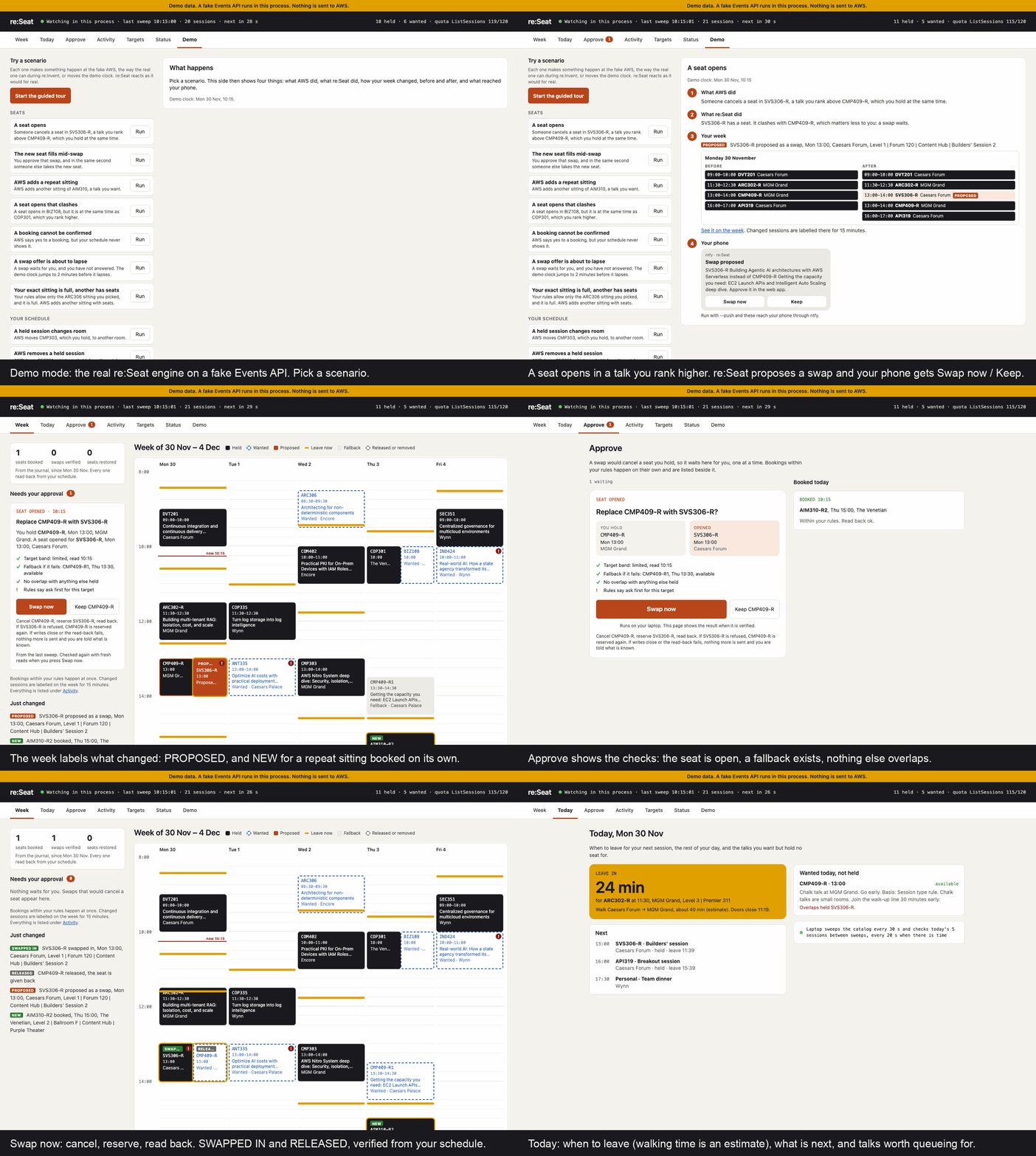
Try it without installing anything: the click-through demo is the web app on demo data, built from this code. Run it live in two minutes: pip install reseat then reseat serve --demo. See Open the dashboard.
The problem
Planners help you pick sessions. Attendees say the trouble starts after that:
- "Most things were full by 10:03am." (2022)
- "Some stuff that was full yesterday I was able to reserve right now." (2024)
- "The more popular sessions get 2-3x extra sessions once they get booked up." (2022)
- "Get in line and keep refreshing the app. Most sessions will have no shows." (2022)
- "I was the 50th person on the walk-up line. They only accepted 20." (2023)
Seats free up, repeats get added, rooms move. Catching that means refreshing the app all week. re:Seat does the refreshing and acts on what it finds, within rules you set.
Open the dashboard
pip install reseat         # or: pipx install reseat
reseat serve --demo        # a scripted week on a fake Events API. No sign-in. Open http://127.0.0.1:8491/
Demo mode runs the real watcher, router and swap code against an in-process fake of the API, with a week of real sessions from the 1 October catalog. Within two minutes a seat opens and a swap waits for your approval, a new sitting is booked, and a held session changes room. Nothing is sent to AWS, nothing is read from the keychain, and nothing is written to ~/.reseat. Every page says "Demo data".
With your own seats, reseat serve runs the watcher and the same web app at http://127.0.0.1:8490/, in one process.
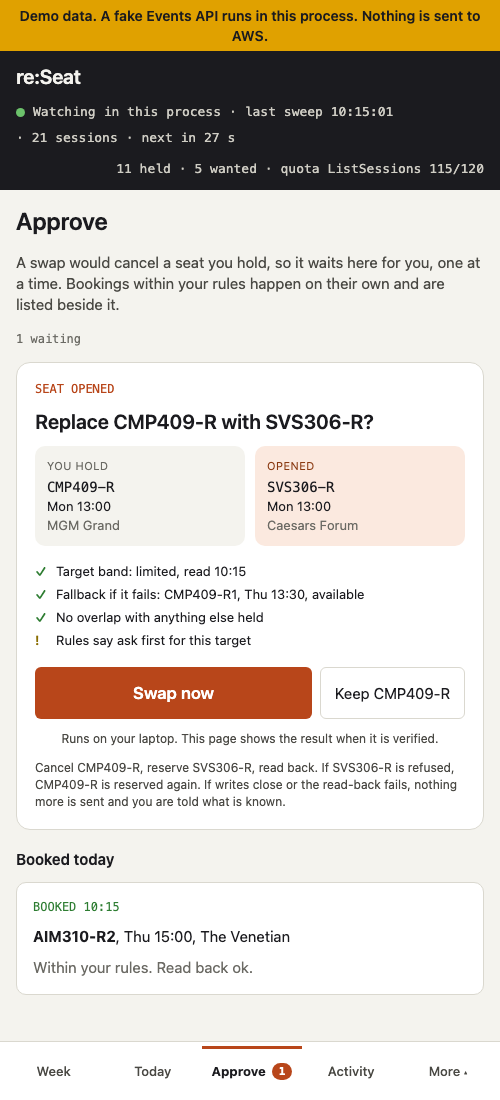
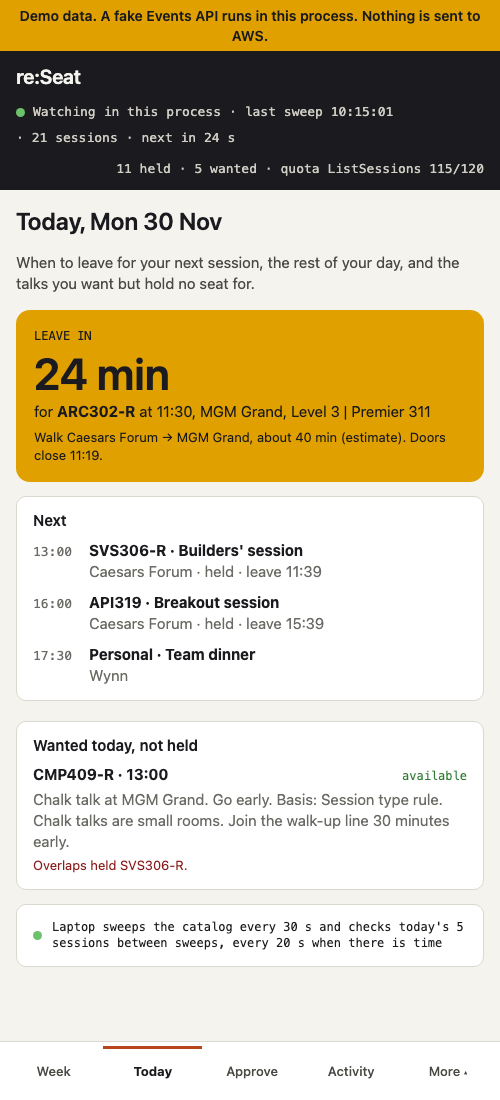
| Dashboard, laptop width | Approve, phone width | Today, phone width |
|---|---|---|
 |
 |
 |
- Dashboard (
/). What re:Seat has done for you, counted from the journal: seats booked, swaps verified, seats restored. Watching or paused, the last sweep and its session count, the next sweep, held and wanted counts, and ListSessions quota left. Swaps that need you, each with its checks from the last sweep: the target's band, a fallback, no overlap, and whether the rules allow it or ask first. A week grid of held, wanted, proposed and fallback sessions with leave-now strips, a badge where the walk is longer than the gap, and a note on a held session that changed room. Last changes and the journal. - Approve (
/approve). One proposal at a time: what you hold and what opened, side by side, the checks, and one button. Bookings within your rules happen at once and show here and under Last changes. - Today (
/today). How long until you leave for the next held session, with the walk and when the doors close. The rest of today, your own personal time included. Wanted sessions you do not hold, with queue-or-go advice, its basis, and any clash with a held session's walk.
It follows your system's light or dark setting. Approve and Dismiss send a plan id and nothing else. Pressing Swap now runs the same checked swap as reseat swap, with fresh reads. The CLI and the MCP server use the same engine.
Install
pipx install reseat        # or: pip install reseat
reseat login
Python 3.11 or newer. login opens your AWS Builder ID sign-in. Use the Builder ID your re:Invent registration is under: reseat whoami should then say Registered for reinvent2026. The tokens stay in your OS keychain and are sent only to api.awsevents.com. Then point re:Seat at the sessions you want:
reseat sync                                  # the catalog, about 9 calls
reseat rules from-schedule                   # your reserved sessions and favorites from the AWS portal
reseat favorites sync                        # mirror them into the official app
reseat book --dry-run                        # see the plan. Nothing is sent
Your week with re:Seat
| When | What re:Seat does |
|---|---|
| Before writes open | Takes your targets from the schedule you built in the AWS portal, or from a reinvent-planner.cloud export, and mirrors them into your favorites. |
| The day API writes open | reseat book reserves your targets, scarcest formats first and then in your order, 10 per call, inside the quota. A full session falls back to its next sitting in the same run. Every write is read back. |
| Every day until the event | reseat serve sweeps the catalog every minute. A freed seat or a new repeat of a target is booked at once. A better sitting that clashes with a lower-priority hold becomes a swap proposal on the dashboard and your phone. Leave-now reminders go into your official schedule. |
| At re:Invent | The laptop stays in the hotel room. Your phone shows today's seats, a leave-now countdown and whether to queue. During the day the laptop checks your sessions every 20 seconds, so a no-show's seat can be booked while you stand in the walk-up line. |
Safe swap
The API has no swap. To move from held session A to a better B at the same time, A must be cancelled before B can be reserved, and for that moment you hold neither. re:Seat cancels A only when a fresh read shows B open, B clashes with nothing else you hold, A has a fallback (its own open seat or another open sitting of A, read fresh), and you approved or allowed auto-swap for that target. If the cancel fails and A is still held, it stops. If B fails, it re-reserves A. If A is gone too, it tries each fallback once and tells you exactly what you hold. If a read-back fails, or writes close mid-swap, it stops and says so. One swap at a time, every step journaled.
The phone remote
Sign-in only works on your own machine, so the token stays on the laptop and the laptop makes every call. The web app that reseat serve runs also works at phone width, over Tailscale: approve a swap, see when to leave, and see what is wanted today. Optional push through ntfy. Designed for a laptop left in the hotel room. See Running it all week.
Why re:Seat runs on your machine
The Events API signs you in with OAuth and PKCE, using your own Builder ID, through a callback on a loopback port of the machine you sign in on. It has no hosted sign-in. A hosted re:Seat would have to hold other attendees' tokens, and those tokens can cancel their seats. So re:Seat runs on your laptop, keeps your token in the OS keychain, sends it only to api.awsevents.com, and your phone talks only to your laptop.
What the API requires, and what re:Seat does
| The API says | re:Seat |
|---|---|
| Quotas are per operation per minute, and reserve counts each session | Keeps its own count per operation and never sends a batch larger than what is left. |
| A 200 on reserve can still carry per-session failures | Reads every failed entry, then reads back your schedule after every write. |
| Reserve and cancel are not safe to retry | Never retries a write. A failure is resolved by reading the schedule back. |
429 carries Retry-After |
Waits that long, once. |
| 409 means writes are switched off | Stops writing, keeps every opening queued, resumes when writes open. |
| Seat availability is a band, not a count | Treats a move from unavailable to an open band as a freed seat. |
| There is no search | Pulls the whole catalog, about 9 calls, and works locally. |
| Personal time is UTC in 5-minute steps | Writes leave-now blocks exactly that way. |
Seen live
On 8 October 2026, between 20:19 and 20:28 PDT, on the day writes were scheduled to open, the Events API answered GetSchedule but served no sessions:
ListSessions                -> 200, totalCount 0, items 0
GetSession <held session>   -> 404 "No session was found with the requested id"
GetSchedule                 -> 200, reserved 14, favorites 16
re:Seat's sync read the empty answer as every session removed and emptied its local copy of the catalog. It sent no write, and nothing on the attendee's AWS schedule changed. Three fixes followed, each tested against the fake: a sweep that comes back empty, or would drop more than half the catalog without bringing back one of about the same size, is refused and the local copy kept, a sweep of about the same size whose ids are mostly new is recorded as a new baseline, and nothing is booked while a held session is missing from the local catalog. The record, with commands and output, is in docs/proof/2026-10-08-catalog-empty.md. It shows nothing about booking through the API.
Limits
- It manages seats you already chose. It does not recommend sessions or solve your schedule.
- Queue-or-go advice is a rule by session type, improved by seat band history once there is some. It is a heuristic, never a prediction.
- Walking times between venues are conservative estimates, not official figures. Wynn and Encore come from the API as one venue and are split by room name.
- The web app is plain HTTP. Use it over Tailscale, not open hotel Wi-Fi. It is access control, not a security product.
- It cannot help with the first rush when reserved seating opens in the portal, two days before the API opens.
- The MCP server tells an agent to ask before approving a change, but cannot check that it did.
How it is tested
Every write path runs against an in-process fake of the API that produces each documented failure: partial bulk results, sessionFull, scheduleConflict, 409, 429 with Retry-After, 5xx, dropped connections and expired sign-in. A fault storm runs the whole flow for an hour on the real 2026 catalog with 30 percent of reserves full, a 429 every minute, a 503, fifteen minutes of 409, and the real quotas enforced, and checks that no quota is exceeded, no talk is held twice and every write is read back. CI runs the tests on Linux, macOS and Windows, on Python 3.11 and 3.13. Details in How re:Seat works.
Reference
Use
reseat events                      # list events, no sign-in needed
reseat sync                        # pull the whole catalog, about 9 API calls
reseat sync --no-abstracts         # cheap sweep, reports band changes and new sessions
reseat sync --force                # apply even an empty or much smaller catalog. Exit 4 means a sweep was refused
reseat search "serverless"
reseat show <sessionId>            # details, repeats, seat band history
reseat schedule                    # your reserved, favorites, personal time
reseat favorite <id> <id> ...      # add favorites, 10 per call, quota aware
reseat probe --session-id <id>     # are reservation writes open yet? never changes anything
reseat save-fixture                # dev: save a catalog pull for tests, no abstracts or speakers
reseat rules init                  # write a commented ~/.reseat/rules.yaml
reseat rules import export.json    # targets from a reinvent-planner.cloud export, in its order
reseat rules from-schedule         # targets from your official schedule: reserved first, then favorites
reseat rules check                 # every code resolves in the local catalog?
reseat book --dry-run              # sweep, then print the plan. Sends nothing
reseat book                        # reserve, fall back on full sessions, read back. --yes skips the confirmation
reseat cancel <sessionId>          # shows the seat band, asks first, reads back
reseat favorites sync              # mirror every target sitting into favorites. Works before 8 October
reseat watch                       # sweep every minute, book freed seats and new repeats. --once for cron
reseat swap <held> <wanted>        # replace a held session safely: fallback checked, rolls back on failure
reseat guard sync                  # leave-now blocks in your official schedule. --dry-run shows the diff
reseat serve                       # watcher plus the web app: dashboard, approve, today. See "Running it all week"
reseat serve --demo                # the web app on a fake API with a scripted week. No sign-in
reseat mcp                         # local MCP server on stdio. Needs pip install "reseat[mcp]"
reseat logout
Data lives in ~/.reseat/reseat.db. Set RESEAT_HOME to move it. On macOS and Linux, re:Seat creates the folder readable by you only and the database the same way, and tightens an existing ~/.reseat. A folder you name with RESEAT_HOME that already exists, or a symbolic link, keeps its own permissions.
Rules file
~/.reseat/rules.yaml lists targets in priority order. re:Seat reserves nothing else. re:Seat writes it readable by you only, because it can hold serve_secret, and refuses to write through a symbolic link. If you made the file yourself and others on the machine can read a secret in it, re:Seat says so and gives the chmod to run.
If you built your schedule in the AWS portal, reseat rules from-schedule writes the file for you. Your reserved sessions come first, then your favorites, in the order the API lists them. The API does not promise that order, so reorder the targets to set your priority. Each target is the exact sitting you picked, by session id with repeats: false, so the file can be written even while the catalog is empty. favorites sync and book still need reseat sync first. Every reserved session is listed. A favorite past watch_cap is written as a comment, not dropped. The API treats a favorite as interest only, not a reservation. This command turns your favorites into booking targets on purpose, and says how many, so delete any you only want to keep an eye on. When an exact sitting is full and the talk has other sittings, book says so in one line. Nothing moves to another sitting unless you set repeats: true on that target. Other settings are the rules init defaults, with its example lunch left as a comment. Without --force it never replaces an existing file. With --force the old file is kept as rules.yaml.bak, because its settings, serve_secret included, are reset.
targets:
  - code: ARC301          # any sitting of ARC301. Earliest first unless prefer: latest
    backups: [ARC302]     # tried if no sitting of ARC301 can be held
  - session_id: 1780442277219001cKCh
    repeats: false        # this sitting only
meals:
  - {day: Tuesday, start: "12:00", end: "13:00"}
max_per_day: 5
watch_cap: 25
home_venue: Venetian      # where the first walk of each day starts
serve_secret: <long random string>   # needed for the web app off this laptop
ntfy_topic: <random 16 to 64 characters>   # optional push
probe_session: <id of a session that takes no reservations>   # resume the moment writes open
The first target wins a time slot. Within a batch, formats that are not recorded go first, because they fill first: Workshop, Lab and Bootcamp, then Builders' session, Chalk talk, Code talk, Breakout session, then the rest.
Running it all week
re:Seat is designed for a laptop left in the hotel room, plugged in and awake, while you carry only your phone. Your sign-in can only happen on your own machine, so the laptop does every API call and the phone only talks to the laptop. Run reseat serve there. It runs the watcher and serves the web app: the dashboard, approve and today.
Set up the phone. Install Tailscale on the laptop and the phone and sign in to the same account on both. Add a long random serve_secret to the rules file, then start it on the laptop:
reseat serve --tailscale
re:Seat listens on 127.0.0.1 only and asks Tailscale to forward http://<your laptop's Tailscale name>:8490 to it, so the page is reachable from your own Tailscale devices and nowhere else. Stopping reseat serve removes the forwarding. This also avoids macOS's Local Network rules, which can drop connections from other devices to a program they do not recognise. --host <Tailscale address> still works where those rules allow it.
It prints a one-time link. Open it once on each device. It sets a cookie and the address bar is left clean. If the cookie is lost, open /login on the same address and type the secret. A sign-in lasts 7 days. To sign every device out, stop and restart reseat serve: sign-ins live only in the running process. The page is plain HTTP, so open it over Tailscale, which encrypts the connection, not across open hotel Wi-Fi. Without serve_secret, reseat serve listens on 127.0.0.1 only and refuses any other address. It never listens on every interface: --host 0.0.0.0 is refused. The page is access control for a hotel network, not a security product: it stops a neighbour on the same Wi-Fi from approving your swaps. Swap now and Dismiss take a plan id that expires after 10 minutes. No page or endpoint takes a session id.
Keep the laptop awake with the lid closed.
- macOS.
caffeinate -s reseat serve --tailscalekeeps the Mac awake while it is plugged in. Closing the lid still puts most MacBooks to sleep unless an external display is attached. Either leave the lid open with the screen dimmed, or runsudo pmset -a disablesleep 1before you leave andsudo pmset -a disablesleep 0when you are back. - Windows. Settings, System, Power and battery: when plugged in, sleep after Never. Control Panel, Power Options, Choose what closing the lid does: when plugged in, Do nothing.
Reach it from the phone. With --tailscale, open the printed link on the phone. The phone then reaches the laptop from any venue, and the page is not offered on the hotel network.
If the phone cannot open it. reseat serve checks it can reach its own address when it starts. On macOS, a terminal app without Local Network permission accepts connections and then drops them. Allow the app you run reseat in (Terminal, iTerm or VS Code) under System Settings, Privacy & Security, Local Network, then quit and reopen it. Also check Tailscale is switched on on both devices.
Put it on the home screen. On the iPhone, open the web app in Safari, tap Share, then Add to Home Screen. re:Seat then opens full screen with its own icon, on Approve. If it asks you to sign in, open /login and enter serve_secret.
Push, if you want it. Set ntfy_topic in the rules file to a long random name, install the ntfy app on the phone and subscribe to that topic. The laptop posts to https://ntfy.sh/<topic> when a seat is booked, a swap is proposed, done or rolled back, it is time to leave, the API has been unreachable for 10 minutes, it is back, or sign-in is needed. What leaves the laptop: the event type, session codes and titles, and those status lines. When reseat serve listens on an address other than 127.0.0.1, each push also carries a link to that address and the page to open, so a tap on "Swap proposed" opens Approve. Use your Tailscale address: it only works inside your own Tailscale network. Never your token, an abstract or a session id. Push is off unless the topic is set.
Approve from the notification. Add ntfy_approve: true and a swap proposal arrives with Swap now and Keep buttons. Long-press the notification to see them. The tap goes back through ntfy.sh to a second topic derived from yours, and re:Seat reads it over an outgoing connection, so the phone never has to reach the laptop: no Tailscale, no link, no sign-in. It runs the same checked swap as the web app, and a second push tells you the result. The button carries the proposal's plan id, which is random, works once and expires after 10 minutes, so tapping twice runs the swap once. With this on, anyone who knows your topic name could approve or dismiss a proposal, not only read it, so keep the topic as secret as a password. To try it first on demo data: reseat serve --demo --push <your topic>.
When writes are switched off. A 409 means the API has reservation writes turned off, and retrying will not help until they are back. re:Seat keeps watching and keeps every opening queued, but sends no reserve and runs no swap. It tries once after 15 minutes. With probe_session set to a session that takes no reservations, it checks every minute instead and resumes the moment writes open. Push says "Booking paused" and "Booking resumed".
On site. During the event days the laptop also checks the day's held and wanted sessions every 20 seconds, at most 40 of them, so a seat freed by a no-show is booked while you are in the walk-up line.
When the hotel Wi-Fi drops. The watcher keeps running. It retries with a growing wait, up to 5 minutes between tries, and goes back to its normal pace as soon as a sweep works. A sweep that fails halfway is not saved, so a seat that opened during the outage is still caught afterwards. Each outage goes in the journal. Your reserved seats stay reserved, because they live in your AWS schedule, not on the laptop. While the laptop is offline it cannot book anything and the phone cannot reach it, so use the official app until it is back. If the AWS API is down but the internet is up, push tells you "re:Seat offline since HH:MM" after 10 minutes and "re:Seat back" when it recovers.
When sign-in expires. If the token can no longer be refreshed, re:Seat stops booking, keeps watching for the moment it can read again, and tells you once: "sign in needed". Run reseat login on the laptop. Booking resumes on the next sweep.
MCP server
reseat mcp runs a local MCP server over stdio, so an agent can read your targets and plan changes for you. Install the extra first: pip install "reseat[mcp]". A client config looks like this, with the path to your reseat command:
{
  "mcpServers": {
    "reseat": { "command": "/path/to/.venv/bin/reseat", "args": ["mcp"] }
  }
}
Tools: list_targets, propose_changes, propose_swap, approve_changes, explain_drift, guard_sync, queue_or_go. Every change is two steps. propose_changes, propose_swap or guard_sync returns a plan id and sends nothing. propose_swap(held_code) finds the open sitting of a held talk that your rules prefer to the one you hold, runs the swap's checks with fresh reads, and lists them. Approving it runs the same checked swap as reseat swap. approve_changes carries that plan out once, within 10 minutes, and reserves only what it named. A leave-now plan is refused if what you hold changed after it was shown. Calls run one at a time. No tool takes a list of session ids.
Know the limit: the server tells the agent to ask you before approving, but it cannot check that it did. The agent sees the plan id and could approve on its own. Session titles come from the catalog and reach the agent. Use a client that shows you each tool call before it runs.
Good citizen rules
re:Seat only reserves what you asked for. It never holds two sittings of one talk. Watch lists are capped. It does not scrape or redistribute the catalog. Seats it frees during a swap go back to the pool at once.
Development
git clone https://github.com/hsiddhu2/reseat && cd reseat
pip install -e ".[dev]"
pytest
ruff check .
A fault storm runs the whole flow for an hour on the real catalog: 30 percent of reserves full, a 429 every minute, a 503, fifteen minutes of 409, quotas enforced. Tests run against an in-process fake of the API that produces every documented failure: sessionFull, scheduleConflict with conflictsWith, alreadyScheduled, 409 while writes are closed, 429 with Retry-After, and partial batch results. No network needed.
tests/fixtures/catalog-2026-10-01.json is a real catalog pull (no abstracts, no speaker names). FakeEventsApi.from_fixture(path) serves it, so tests see the real venue, room and type strings.
Docs
- How re:Seat works: the design, each part marked built or planned, and how it is tested.
- AWS Events API facts: the API behaviour re:Seat relies on, with sources.
- Live proof: checks run against the real API.
- Demo scripts: demos against the fake API, no sign-in.
reseat serve --demois the web app version. - Click-through demo: the web app on demo data, rebuilt from
scripts/build_site.pyon every push to main.
License
MIT
1 maintainer

Metadata
1 maintainer
Release files for reseat 0.5.2
For a detailed explanation of source distributions (sdists) and built distributions (wheels), please see the package formats documentation.
Source distribution (sdist)
| File | Size | Uploaded | |
|---|---|---|---|
| reseat-0.5.2.tar.gz | 1.3 MB | Details |
Built distribution (wheel)
| File | Interpreter | ABI | Platform | Reset |
|---|---|---|---|---|
| reseat-0.5.2-py3-none-any.whl | Python 3 | none | any | Details |
Total release size: 1.4 MB
Release files / reseat-0.5.2.tar.gz
| Download URL | reseat-0.5.2.tar.gz |
|---|---|
| Size | 1.3 MB |
| Tags | Source |
|
SHA-256 checksum How to use checksums |
8bbc201f16fd23c7e3c61b6895b3501a2df5e72cdf83757b6e969a6360b9c6c3
|
|
BLAKE2b-256 checksum How to use checksums |
ad46b5238359d707541419196f1003203530a270ee3f9db3fe547afe92c5d344
|
| Upload date | |
|
Uploaded using Trusted Publishing? What is trusted publishing? |
Yes |
| Uploaded via |
twine/7.0.0 CPython/3.13.14
|
Provenance
Provenance describes where a file came from. On PyPI, provenance is shared via attestations, which provide a verifiable record of the build or publishing details. View details, limitations and caveats.


PyPI Publish Attestation
PyPI verified that this artifact, at this checksum, originated from the publisher listed below.
Signed by GitHub Actions, verified by PyPI on Oct 11, 2026.
Transparency logRelease files / reseat-0.5.2-py3-none-any.whl
| Download URL | reseat-0.5.2-py3-none-any.whl |
|---|---|
| Size | 142.2 kB |
| Tags | Python 3 |
|
SHA-256 checksum How to use checksums |
adf8e37be3e0dfb6f069a4c2241f49146d95ba357f01ac23337e4599146d2723
|
|
BLAKE2b-256 checksum How to use checksums |
8f92ac7d9ead776c59a451a0dd1ae7019762074bfc739eba1bc9f50b97efa8ad
|
| Upload date | |
|
Uploaded using Trusted Publishing? What is trusted publishing? |
Yes |
| Uploaded via |
twine/7.0.0 CPython/3.13.14
|
Provenance
Provenance describes where a file came from. On PyPI, provenance is shared via attestations, which provide a verifiable record of the build or publishing details. View details, limitations and caveats.
PyPI Publish Attestation
PyPI verified that this artifact, at this checksum, originated from the publisher listed below.
Signed by GitHub Actions, verified by PyPI on Oct 11, 2026.
Transparency log













