
ReSpotGUI
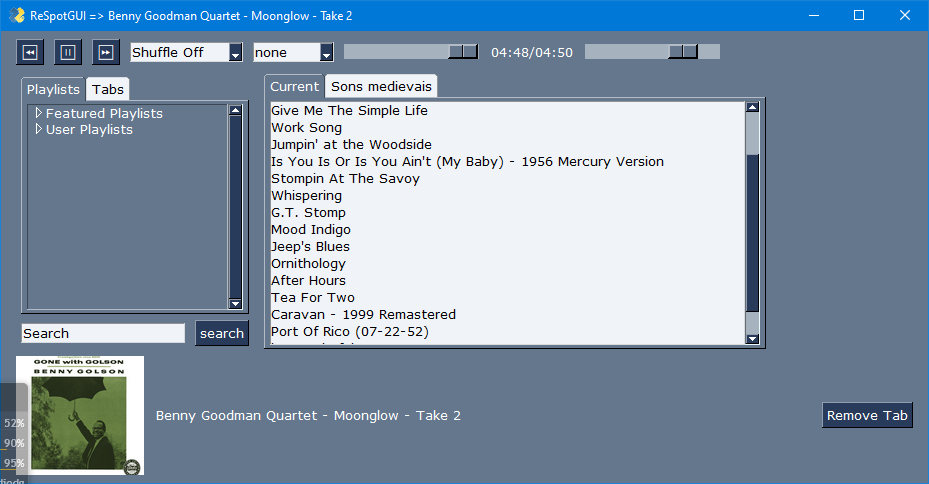
The purpose is to provide a graphical frontend for the librespot-java, a library that provides streaming and support for Spotify Connect devices.
Features
- Search for any kind of item in spotify (artist, playlist, track names, albums)
- Volume control
- Play controls
- Seek to any time point in the track
- Able to choose any track in the playlist
Requirements
- A Spotify premium subscription
- Java installed
- librespot-java (last version can be obtained here)1
- Python 3 installed (of course!)
Install
To install type:
pip install respotgui
to execute:
python -m respot.gui
or simply:
respotgui
Changelog
- updated screenshot
- Tabs are now restored at start
- Implemented playlists in tabs
- Added buttons for change the repeat and shuffle.
- Changed font to Verdana and implemented buttons
- Search results in a tree, cleaned code
- Now listens to presses on media keys
- Added slider for volume
- added total time in timer and made improvements
- Implemented search for playlists and listbox with active playlist
- Minor changes to the gui. Removed thread timers
- minor fixes to the gui
- synced with the project in pypi
- Minor corrections to allow a stable install
- image files relative to the source dir
- Updated definition files
- Delete respogui-0+unknown directory
- first commit
-
Download the file
librespot-api-*.jarand execute it withjava -jar↩
1 maintainer

Metadata
1 maintainer
Release files for respotgui 0.1.71
For a detailed explanation of source distributions (sdists) and built distributions (wheels), please see the package formats documentation.
Built distribution (wheel)
| File | Interpreter | ABI | Platform | Reset |
|---|---|---|---|---|
| respotgui-0.1.71-py3-none-any.whl | Python 3 | none | any | Details |
Release files / respotgui-0.1.71-py3-none-any.whl
| Download URL | respotgui-0.1.71-py3-none-any.whl |
|---|---|
| Size | 17.2 kB |
| Tags | Python 3 |
|
SHA-256 checksum How to use checksums |
c365d75c07c0963e9395169a0a46118be787ec291cd342827176ee55ff84eb08
|
|
BLAKE2b-256 checksum How to use checksums |
9b3eca2237c071435b85eb9ae898bbad6074548a163748e96254ed335d62db4e
|
| Upload date | |
|
Uploaded using Trusted Publishing? What is trusted publishing? |
No |
| Uploaded via |
twine/4.0.1 CPython/3.10.4
|














