
RESSEG
Automatic segmentation of postoperative brain resection cavities from magnetic resonance images (MRI) using a convolutional neural network (CNN) trained with PyTorch 1.7.1.
Installation
It's recommended to use conda.
A 6-GB GPU is large enough to segment an image in an MNI space of size 193 × 229 × 193.
conda create -n resseg python=3.8 -y
conda activate resseg
pip install light-the-torch
ltt install torch
pip install resseg
resseg --help
Usage
Below are two examples of cavity segmentation for tumor and epilepsy surgery. The epilepsy example includes registration to the MNI space. Both examples can be run online using Google Colab:

BITE
Example using an image from the Brain Images of Tumors for Evaluation database (BITE).
BITE=`resseg-download bite`
resseg $BITE -o bite_seg.nii.gz

EPISURG
Example using an image from the EPISURG dataset.
Segmentation works best when images are in the MNI space, so resseg includes a tool
for this purpose (requires `antspyx).
pip install antspyx
EPISURG=`resseg-download episurg`
resseg-mni $EPISURG -t episurg_to_mni.tfm
resseg $EPISURG -o episurg_seg.nii.gz -t episurg_to_mni.tfm

Trained model
The trained model can be used without installing resseg, but you'll need to install unet first:
pip install unet==0.7.7
Then, in Python:
import torch
repo = 'fepegar/resseg'
model_name = 'ressegnet'
model = torch.hub.load(repo, model_name, pretrained=True)
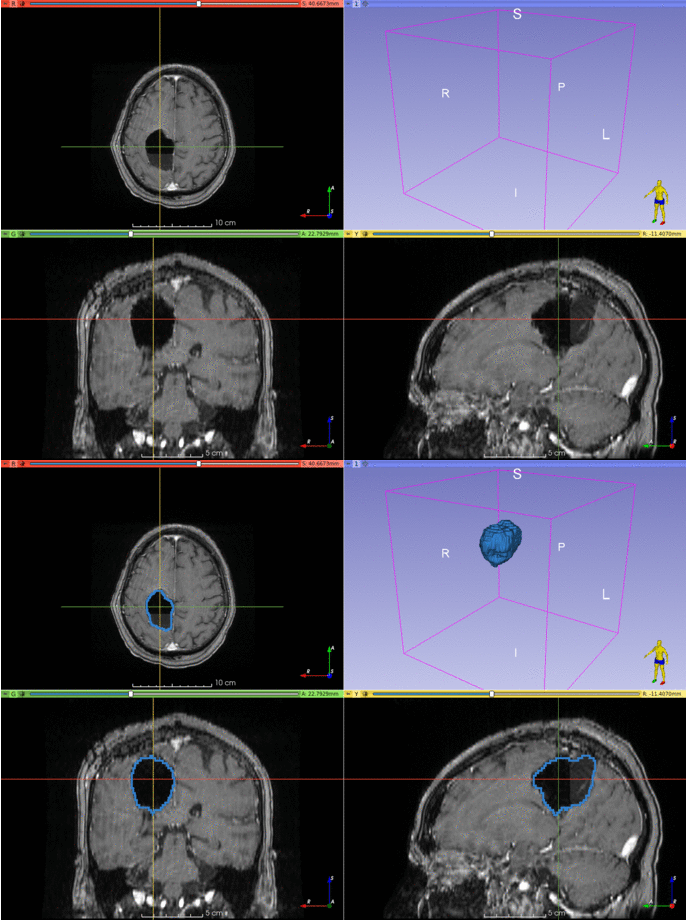
Graphical user interface using 3D Slicer
There is an experimental graphical user interface (GUI) built on top of 3D Slicer.
Visit this repository for additional information and installation instructions.
Plotting resected structures
A quantitative analysis of the resected structures can be performed using a brain parcellation computed using GIF (3.0) or FreeSurfer.
from resseg.parcellation import GIFParcellation, FreeSurferParcellation
parcellation_path = 't1_seg_gif.nii.gz'
cavity_seg_on_preop_path = 'cavity_on_preop.nii.gz'
parcellation = GIFParcellation(parcellation_path)
I used a sphere near the hippocampus to simulate the resection cavity segmentation, and the GIF parcellation in the FPG dataset of TorchIO.
parcellation.print_percentage_of_resected_structures(cavity_seg_on_preop_path)
Percentage of each resected structure:
100% of Left vessel
 83% of Left Inf Lat Vent
 59% of Left Amygdala
 58% of Left Hippocampus
 26% of Left PIns posterior insula
 24% of Left PP planum polare
 21% of Left Basal Forebrain
 18% of Left Claustrum
 16% of Left PHG parahippocampal gyrus
 15% of Left Pallidum
 15% of Left Ent entorhinal area
 13% of Left FuG fusiform gyrus
 13% of Left Temporal White Matter
 11% of Left Putamen
 10% of Left Insula White Matter
  5% of Left ITG inferior temporal gyrus
  5% of Left periventricular white matter
  5% of Left Ventral DC

The resection volume is composed of:
 30% is Left Temporal White Matter
 12% is Left Hippocampus
 10% is Left Insula White Matter
  7% is Left FuG fusiform gyrus
  6% is Left Amygdala
  4% is Left ITG inferior temporal gyrus
  4% is Left PP planum polare
  3% is Left Putamen
  3% is Left Claustrum
  3% is Left PIns posterior insula
  3% is Left PHG parahippocampal gyrus
  2% is [Unkown label: 4]
  1% is Left Ent entorhinal area
  1% is Left Pallidum
  1% is Left Inf Lat Vent
  1% is Left Ventral DC
parcellation.plot_bars(cavity_seg_on_preop_path)

parcellation.plot_pie(cavity_seg_on_preop_path)

Credit
If you use this library for your research, please cite the following publications:
If you use the EPISURG dataset, which was used to train the model, please cite the following publication:
See also
1 maintainer

Metadata
1 maintainer
Release files for resseg 0.3.7
For a detailed explanation of source distributions (sdists) and built distributions (wheels), please see the package formats documentation.
Source distribution (sdist)
| File | Size | Uploaded | Provenance | Actions |
|---|---|---|---|---|
| resseg-0.3.7.tar.gz | 13.7 kB | Without provenance | Details for resseg-0.3.7.tar.gz |
Built distribution (wheel)
| File | Interpreter | ABI | Platform | Actions Reset |
|---|---|---|---|---|
| resseg-0.3.7-py2.py3-none-any.whl | Python 3, Python 2 | none | any | Details for resseg-0.3.7-py2.py3-none-any.whl |
Total release size: 28.9 kB
Release files / resseg-0.3.7.tar.gz
| Download URL | resseg-0.3.7.tar.gz |
|---|---|
| Size | 13.7 kB |
| Tags | Source |
|
SHA-256 checksum How to use checksums |
9247046a4675ded61a746d0868f73c2d4b779f13f750f9b7aac47e8a8b60bf48
|
|
BLAKE2b-256 checksum How to use checksums |
76c01bc9278e46e874ce5cd0921f523f41a1766f3f97f892b3c1f3842269c73a
|
| Upload date | |
|
Uploaded using Trusted Publishing? What is trusted publishing? |
No |
| Uploaded via |
twine/3.4.2 importlib_metadata/4.8.1 pkginfo/1.7.1 requests/2.26.0 requests-toolbelt/0.9.1 tqdm/4.62.2 CPython/3.7.1
|
Release files / resseg-0.3.7-py2.py3-none-any.whl
| Download URL | resseg-0.3.7-py2.py3-none-any.whl |
|---|---|
| Size | 15.2 kB |
| Tags | Python 2 Python 3 |
|
SHA-256 checksum How to use checksums |
bde5a6cae01d6e3424d2d0c408b4fea66e3eb1bfc6f917307b55d4b01fb5e4e6
|
|
BLAKE2b-256 checksum How to use checksums |
9db228f7e928be2ddb2059d85fd6f74378aab8e714575f1c04425e693f389a99
|
| Upload date | |
|
Uploaded using Trusted Publishing? What is trusted publishing? |
No |
| Uploaded via |
twine/3.4.2 importlib_metadata/4.8.1 pkginfo/1.7.1 requests/2.26.0 requests-toolbelt/0.9.1 tqdm/4.62.2 CPython/3.7.1
|
Security for resseg 0.3.7
Provenance
Provenance describes where a file came from. On PyPI, provenance is shared via attestations, which provide a verifiable record of the build or publishing details. View details, limitations and caveats.
No provenance found
None of the files in this release were uploaded with provenance metadata.
A note on package security
PyPI is a repository for distributing packages, not a service for auditing them. While third-party security researchers and our staff do their best to detect and remove malicious packages, PyPI cannot guarantee the quality, security or suitability of any given package.
To learn more about protecting yourself from malicious actors, visit our package security documentation.














