
Restricted Input
Important Change
Made a small backward incompatible change. Instead of exclude, use allow. I changed it because:
- There was a typo anyway. It was
exludeinstead ofexclude! - I feel like
allowhas a better and clearer meaning thanexclude.excludemight be confusing sometimes.
Overview
A way of imposing restrictions in input().
For example, if you want the user to only enter numbers, you could use this. Only want uppercase letters? Works here.
It uses msvcrt.getch/alternative in *nix to get the keystroke and check it in real time.
Installation
Install restricted_input from pypi using:
pip install restricted_input
How to use it
Import it
from restricted_input import r_input
r_input is the function which can be used instead of input()
It has five arguments
variable = r_input(prompt, input_type, allow, maxlength, warning)
-
prompt: is the prompt to be given for the input dialog.string -
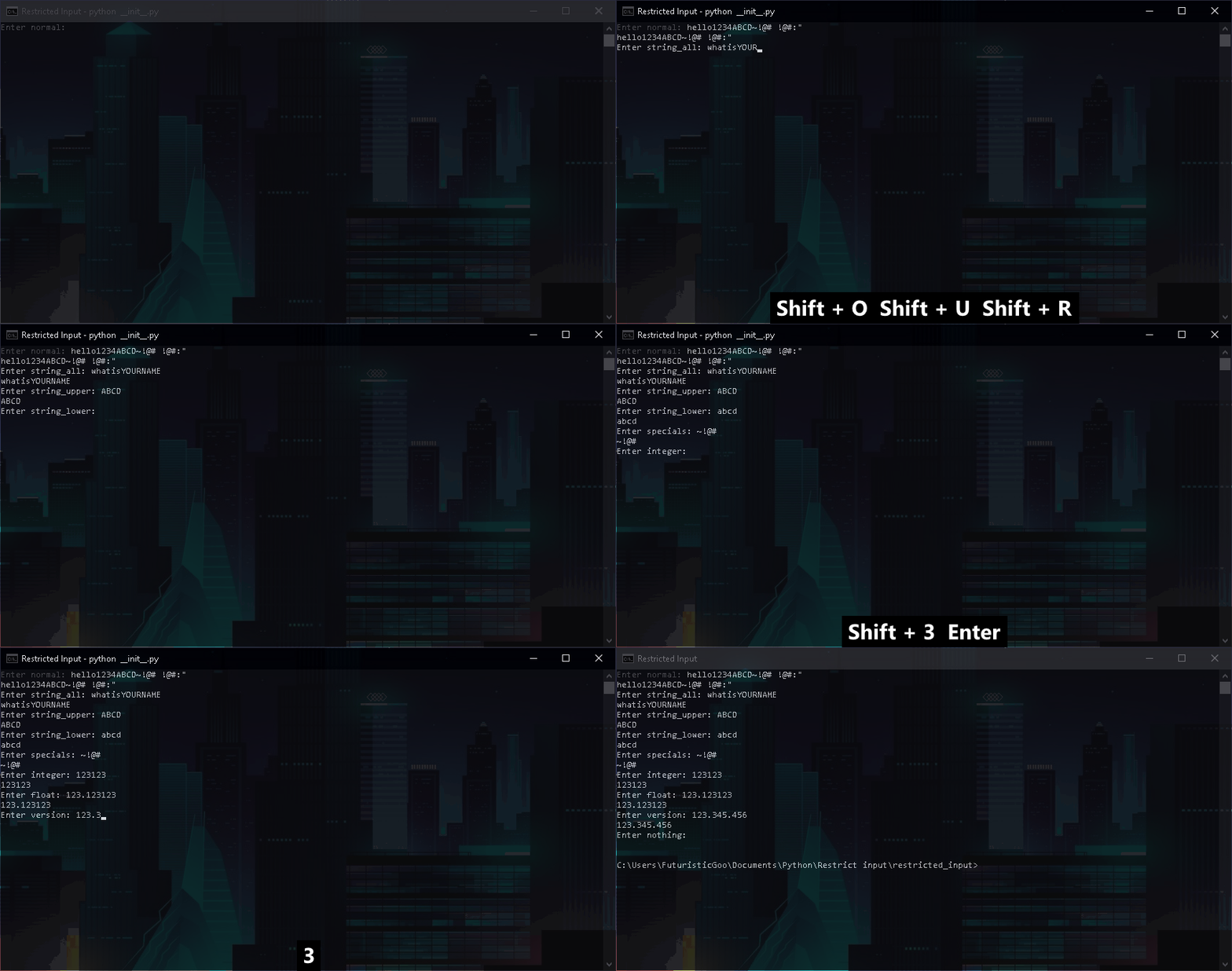
input_type: is the type of data to which the input should be restricted to.stringIt can be
-
"normal": normal text -
"string_all": Allows only string, space is not allowed -
"string_upper": Allows only uppercase string, space is not allowed -
"string_lower": Allows only lowercase string, space is not allowed -
"specials"Allows only special characters - `` ~ ! @ # $ % ^ & * ( ) - _ = + [ { ] } ; : ' " , < . > / ? \ |`. Space not included -
"integer": Allows only integers, doesn't allow-,.or space -
"float": Allows only integers, including.single time. Space or-not included -
"version": Allows only integers, including.multiple times. Space or-not included -
"nothing". Obviously allows nothing. Useful in scenarios where you need only a limited number of characters.
To get the list of input_types:
from restricted_input import get_input_types
print(get_input_types)
-
-
allow: is the argument for allowing certain characters.
string or listFor example, if you want to allow hyphens in
integers, you can user_input("Enter the number: ", "integer", "-")
If you want to allow input of the character
v,a,bandgin version type input, use:r_input("Enter the version: ", "version", "vabg") # Or r_input("Enter the version: ", "version", ["v", "a", "b", "g"])
-
maxlength: is the argument for maximum length for input. Useful in scenarios where only single character is required.integer -
warning: is the argument for any warnings is the user has entered something which isn't allowed.string
Example
Issues/limitations
-
It will not work in some IDLEs like Spyder or PyCharm. This is because some IDLEs emulate a terminal which might not work with this module. Try to run the program in external terminal.
-
You tell me!
Contributing
If you need help, don't hesitate to open an issue. Pull requests are welcome, but please state the reason for it.
License
This project is under MIT License
1 maintainer

Metadata
1 maintainer
Release files for restricted-input 0.3.0
For a detailed explanation of source distributions (sdists) and built distributions (wheels), please see the package formats documentation.
Source distribution (sdist)
| File | Size | Uploaded | |
|---|---|---|---|
| restricted_input-0.3.0.tar.gz | 5.0 kB | Details |
Built distribution (wheel)
| File | Interpreter | ABI | Platform | Reset |
|---|---|---|---|---|
| restricted_input-0.3.0-py3-none-any.whl | Python 3 | none | any | Details |
Total release size: 10.9 kB
Release files / restricted_input-0.3.0.tar.gz
| Download URL | restricted_input-0.3.0.tar.gz |
|---|---|
| Size | 5.0 kB |
| Tags | Source |
|
SHA-256 checksum How to use checksums |
bd0f19c51965a0ef0b39eee446a4bf74c1fc9cac3e807b9c9a792b2f92086fe8
|
|
BLAKE2b-256 checksum How to use checksums |
1b52cded8bc810a11b2f0cd823314a7969928bff74cda51d055656324d1a7a3f
|
| Upload date | |
|
Uploaded using Trusted Publishing? What is trusted publishing? |
No |
| Uploaded via |
twine/3.2.0 pkginfo/1.6.1 requests/2.25.0 setuptools/51.0.0 requests-toolbelt/0.9.1 tqdm/4.54.1 CPython/3.9.1
|
Release files / restricted_input-0.3.0-py3-none-any.whl
| Download URL | restricted_input-0.3.0-py3-none-any.whl |
|---|---|
| Size | 5.9 kB |
| Tags | Python 3 |
|
SHA-256 checksum How to use checksums |
3007b18d0465c95abfc15356cda6161b374df26f7ea06d6c990d0bdee0a66473
|
|
BLAKE2b-256 checksum How to use checksums |
211316c3540d98bc4b71672293ab799e3ab339e796209da6fae39f141fe64d94
|
| Upload date | |
|
Uploaded using Trusted Publishing? What is trusted publishing? |
No |
| Uploaded via |
twine/3.2.0 pkginfo/1.6.1 requests/2.25.0 setuptools/51.0.0 requests-toolbelt/0.9.1 tqdm/4.54.1 CPython/3.9.1
|














