
resume-markdown-mcp
Write your resume in Markdown, export to PDF — powered by AI via MCP.
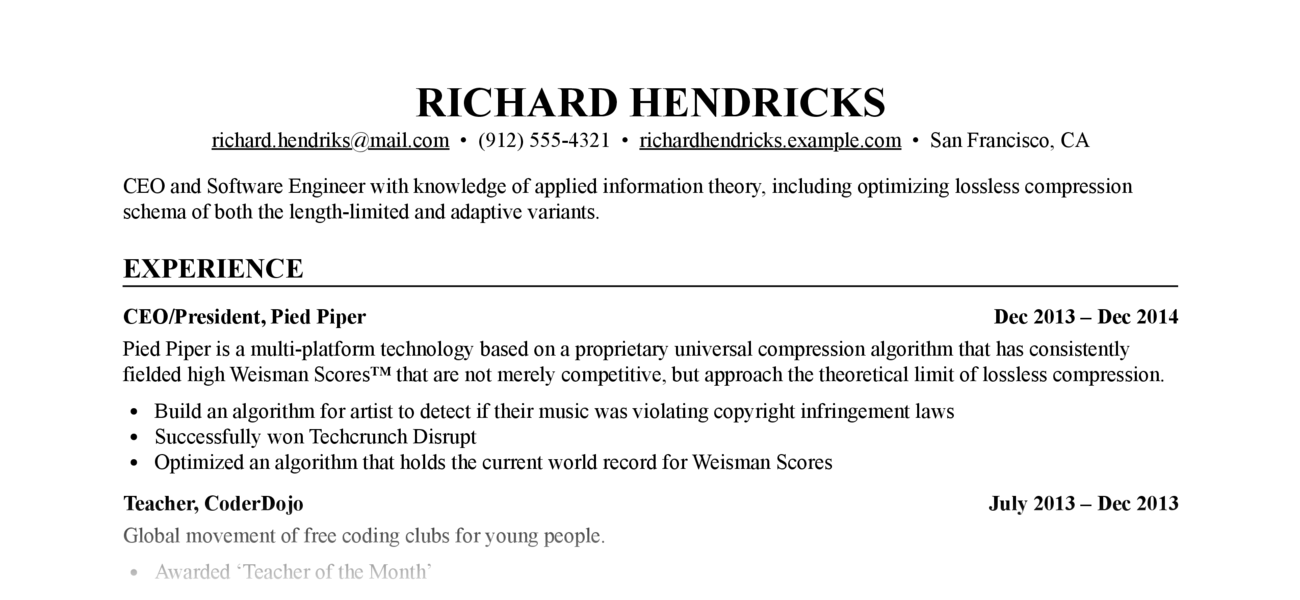
Let Claude write, edit, and format your resume. The MCP server handles Markdown-to-PDF conversion with a built-in stylesheet — no CSS knowledge required.
Requires: Python ≥ 3.12, Google Chrome or Chromium (for PDF export)
Setup
claude mcp add resume-markdown -- uvx resume-markdown-mcp@latest@latest
What Can It Do?
| Type | Name | Description |
|---|---|---|
| Tool | export_resume_pdf |
Convert a Markdown resume to PDF. Accepts a file path or raw Markdown text. CSS is applied automatically. |
| Resource | resume://template |
The built-in Markdown resume template. AI reads this to understand the required format. |
| Resource | resume://style |
The built-in CSS stylesheet. AI reads this when you want to customise the appearance. |
Example Prompts
- "Help me write a resume for a software engineer role and export it as a PDF to my Desktop"
- "Here's my resume at ~/resume.md — export it to PDF"
- "My resume.md doesn't follow the right format, fix it and export to /tmp/resume.pdf"
- "Make the font size smaller and re-export my resume"
Resume Markdown Format
The PDF renderer depends on these Markdown conventions:
# Full Name

- email@example.com
- Phone number
- City, Country

One-line summary (optional)

## Experience

### <span>Job Title, Company</span> <span>2022 – 2025</span>

- Achievement one
- Achievement two

## Education

### <span>Degree, University</span> <span>2018 – 2022</span>

## Skills

- Skill category: item, item, item
The <span> tags inside ### headings are required — they enable the left/right flexbox layout for title and date. AI handles this automatically when writing from scratch; if your existing file lacks them, ask Claude to reformat it before exporting.
How It Works
- AI calls
export_resume_pdfwith Markdown content or a file path - The server converts Markdown to HTML using python-markdown, with the built-in CSS inlined
- Headless Chrome renders the HTML and prints it to PDF
- Chrome exits as soon as the PDF is written; the tool returns the output path
CLI Usage
The package also ships a standalone CLI:
# Create template files in the current directory
uvx resume-markdown-mcp@latest init

# Build HTML and PDF from resume.md
uvx resume-markdown-mcp@latest build

# Options
uvx resume-markdown-mcp@latest build --no-pdf          # HTML only
uvx resume-markdown-mcp@latest build --no-html         # PDF only
uvx resume-markdown-mcp@latest build myresume.md       # Custom input file
uvx resume-markdown-mcp@latest build --chrome-path=... # Specify Chrome path
The CLI picks up a resume.css file alongside the input if present; otherwise the built-in stylesheet is used.
License
MIT
1 maintainer

Metadata
1 maintainer
Release files for resume-markdown-mcp 1.0.2
For a detailed explanation of source distributions (sdists) and built distributions (wheels), please see the package formats documentation.
Source distribution (sdist)
| File | Size | Uploaded | |
|---|---|---|---|
| resume_markdown_mcp-1.0.2.tar.gz | 330.8 kB | Details |
Built distribution (wheel)
| File | Interpreter | ABI | Platform | Reset |
|---|---|---|---|---|
| resume_markdown_mcp-1.0.2-py3-none-any.whl | Python 3 | none | any | Details |
Total release size: 343.0 kB
Release files / resume_markdown_mcp-1.0.2.tar.gz
| Download URL | resume_markdown_mcp-1.0.2.tar.gz |
|---|---|
| Size | 330.8 kB |
| Tags | Source |
|
SHA-256 checksum How to use checksums |
28f42ca62e7858fcebb47b6e815ba630f9f0d9d87213fd001ca201a8eb696bf5
|
|
BLAKE2b-256 checksum How to use checksums |
119d3188c5ef2644b4cae5ea7a5873646c42f4ce4ed171ec4412f74d2e028943
|
| Upload date | |
|
Uploaded using Trusted Publishing? What is trusted publishing? |
Yes |
| Uploaded via |
twine/6.1.0 CPython/3.13.7
|
Provenance
Provenance describes where a file came from. On PyPI, provenance is shared via attestations, which provide a verifiable record of the build or publishing details. View details, limitations and caveats.


PyPI Publish Attestation
PyPI verified that this artifact, at this checksum, originated from the publisher listed below.
Signed by GitHub Actions, verified by PyPI on Apr 3, 2026.
Transparency logRelease files / resume_markdown_mcp-1.0.2-py3-none-any.whl
| Download URL | resume_markdown_mcp-1.0.2-py3-none-any.whl |
|---|---|
| Size | 12.2 kB |
| Tags | Python 3 |
|
SHA-256 checksum How to use checksums |
89faa59fdaee729f4e9a4be58012f989000f21f17b614759bcec2bdde366bde5
|
|
BLAKE2b-256 checksum How to use checksums |
5b6492deafad317ef64e6b41754587ea3bf3c8d7f7dd455f12504de16472b810
|
| Upload date | |
|
Uploaded using Trusted Publishing? What is trusted publishing? |
Yes |
| Uploaded via |
twine/6.1.0 CPython/3.13.7
|
Provenance
Provenance describes where a file came from. On PyPI, provenance is shared via attestations, which provide a verifiable record of the build or publishing details. View details, limitations and caveats.
PyPI Publish Attestation
PyPI verified that this artifact, at this checksum, originated from the publisher listed below.
Signed by GitHub Actions, verified by PyPI on Apr 3, 2026.
Transparency log













