
Resume Screener





A native-feeling macOS app that reads a folder of PDF resumes, scores each one
against your keywords, and copies or moves the strongest matches into a
Shortlisted folder.
Built with Python 3.12 + PySide6, with PyMuPDF for text extraction. Everything runs locally — resumes are never uploaded.
Features
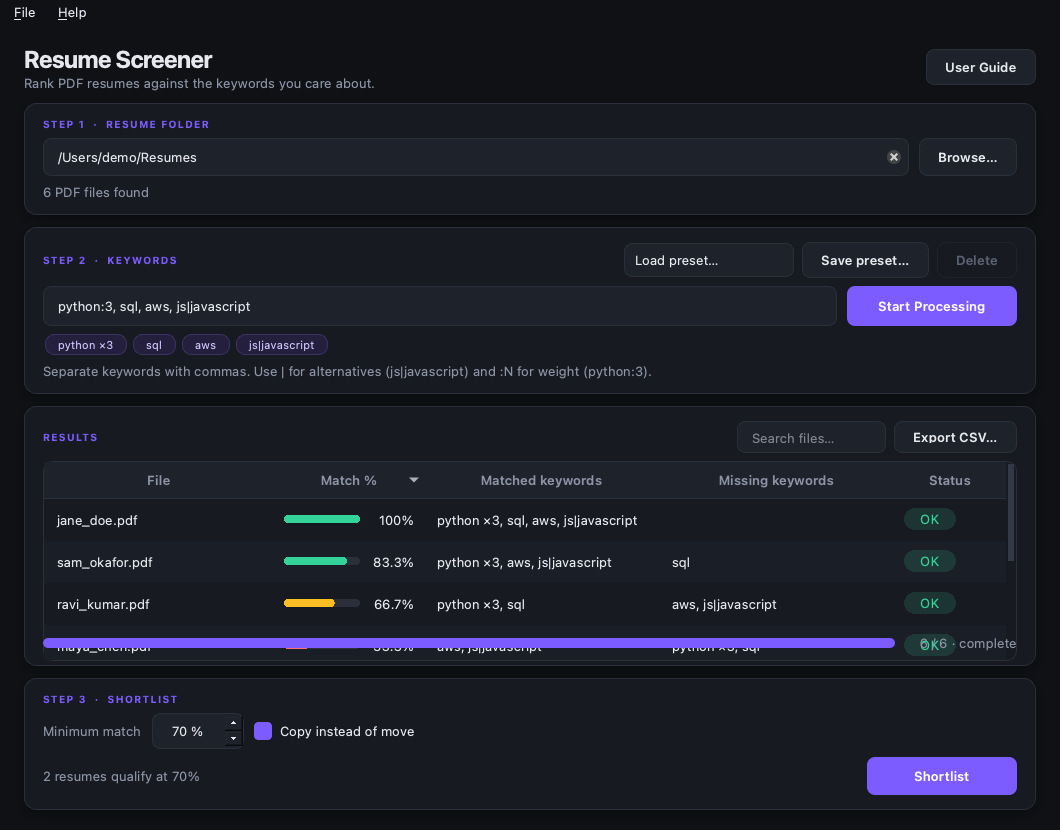
- Folder picker, drag-and-drop, and a live PDF count
- Comma-separated keywords, with
js|javascriptalternatives - Weighted keywords (
python:3) and saved keyword presets - Background scanning with progress and cancel — the window never freezes
- Ranked, sortable results with a match bar, matched/missing keywords, and status
- Live count of resumes above the threshold
- CSV export of the visible results in their current ranked order
- Shortlist by copying (default) or moving, with collision-safe filenames
- Handles scanned, encrypted, and corrupt PDFs without aborting the scan
- Dark theme, saved settings, and keyboard shortcuts
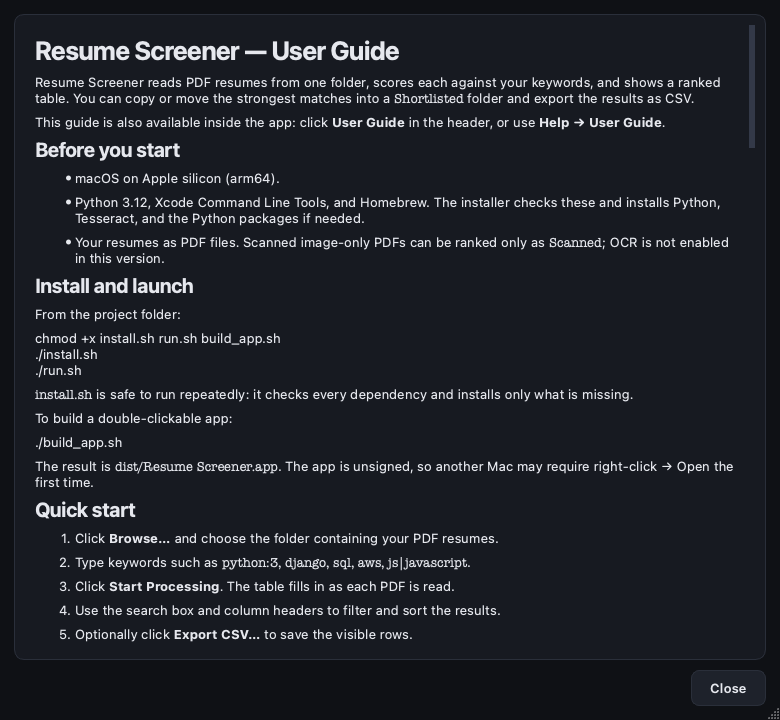
- Built-in user guide via Help → User Guide or the header button
Download a release
Release builds are published on the repository's Releases page as
Resume-Screener-vX.Y.Z-macOS-arm64.zip. Download the zip, unzip it, and move
Resume Screener.app wherever you like. Each release attaches
SHA256SUMS.txt, LICENSE, THIRD_PARTY_NOTICES.md, and the full
AGPL-3.0.txt/LGPL-3.0.txt texts. The packaged app is distributed as an
AGPL-3.0 combined work (see License below).
The app is ad-hoc signed but not Developer ID-signed or notarized. On another Mac, right-click the app and choose Open the first time. To distribute more widely, sign and notarize the build with an Apple Developer ID.
Install with pip
pip install resume-screener
resume-screener
Requires Python 3.12. PySide6 and PyMuPDF are installed as regular
dependencies, and the entry point launches the same window as the packaged app.
Everything still runs locally — resumes are never uploaded.
Requirements (from source)
- macOS on Apple silicon
- Python 3.12
- Xcode Command Line Tools
- Homebrew
install.sh checks these and installs only what is missing.
Quick start
From the project folder:
chmod +x install.sh run.sh build_app.sh
./install.sh     # checks everything and installs only missing dependencies
./run.sh         # launches the app
If you prefer to set up manually:
python3.12 -m venv .venv
source .venv/bin/activate
pip install -r requirements.txt
python app.py
Usage
- Choose the folder that holds your PDF resumes.
- Enter keywords, for example
python:3, django, sql, aws, js|javascript. Append:Nto make a keyword count more heavily. - Press Start Processing. Results appear as each PDF is read.
- Use the search box and column headers to filter and sort the results.
- Optionally press Export CSV… (or
Cmd+E) to save the visible rows. - Set the minimum match percentage and press Shortlist.
- Resumes land in
<selected folder>/Shortlisted. Copy is the default; untick Copy instead of move to move the originals instead.
Matching is case-insensitive and whole-word: java does not match
javascript, C does not match C++, and js|javascript counts as one
keyword where either spelling is accepted. Match % is the share of total
keyword weight that was found, so python:3, sql scores 75% when Python is
present but SQL is missing. Weights are positive integers and default to 1.
Use Save preset… next to the keyword field to name and store the current keywords (weights included). Pick a preset from the dropdown to load it, or select one and press Delete. Presets are stored with the rest of the app settings and survive restarts.
Double-click a row to open the PDF in your default viewer.
The CSV export contains rank, file, numeric match %, matched/missing keywords, status, and full path. Keyword lists are semicolon-separated, and the file is UTF-8 with a BOM so Excel opens accented filenames correctly. Exporting respects the current search filter and sort order.
User guide
The full guide covers installation, scoring, presets, statuses, shortlisting, CSV export, shortcuts, troubleshooting, and privacy:
- Read USER_GUIDE.md.
- Or open Help → User Guide inside the app (also the User Guide button).
Tests
source .venv/bin/activate
pytest
The suite covers keyword parsing/weighting/scoring edge cases, preset persistence, CSV export, shortlist folder and collision behavior, PDF extraction statuses (OK, scanned, encrypted, corrupt), user-guide content sync and rendering, and a headless end-to-end scan through the real window and worker thread.
The GitHub Actions CI workflow runs the same checks on an arm64 macOS runner, plus Python and shell syntax checks.
Build a macOS app
./build_app.sh
# Result: dist/Resume Screener.app
Build on Apple silicon for an arm64 bundle. If assets/icon.icns exists it is
used automatically. The build excludes PyMuPDF 2.0's optional ONNX layout
subsystem (the app only needs text extraction), which keeps roughly 50 MB of
model files out of the bundle. The bundle's Finder/Get Info version is synced
from core.__version__.
The release workflow runs when a v* tag is pushed, verifies the tag against
core.__version__, runs the tests, builds the .app, creates a zip plus
SHA-256 checksums, and publishes a GitHub release. The PyPI workflow publishes
the same tag to PyPI. See
CONTRIBUTING.md
for the first-publish and tagging steps.
Project layout
app.py                  entry point and theme setup
USER_GUIDE.md           end-user guide (also rendered in the app)
THIRD_PARTY_NOTICES.md  bundled dependency licenses and release obligations
licenses/               full AGPL-3.0 and LGPL-3.0 texts
core/                   Qt-free domain logic
  extractor.py          PDF -> text; OK/SCANNED/ENCRYPTED/ERROR
  matcher.py            parse_keywords, weighted score, qualifies
  export.py             ranked results -> UTF-8 CSV
  shortlist.py          Shortlisted folder, copy/move, collisions
  models.py             ResultRow dataclass + status labels
ui/
  main_window.py        layout, threading, shortlist flow, settings
  worker.py             background ScanWorker
  presets.py            QSettings-backed keyword preset store
  user_guide.py         embedded guide text + modeless guide dialog
  results_model.py      QAbstractTableModel
  delegates.py          match bar and status badge painters
  theme.py              design tokens, palette, QSS
tests/                  core, presets, CSV, guide, and headless UI tests
.github/                CI, release workflow, issue/PR templates, Dependabot
docs/                   README screenshots
core/ never imports Qt, so the matching and file logic can be tested without
opening a window.
Privacy and limitations
- Everything runs locally; no resume text leaves the machine.
- OCR is not enabled: image-only PDFs are flagged Scanned, shown with no percentage, and excluded from shortlisting.
- Password-protected and corrupt PDFs are flagged and skipped.
- Only the top level of the selected folder is scanned; the
Shortlistedfolder itself is never reprocessed. - Only PDF input is supported. DOCX input and Excel export are not included.
- Extracted text is cached by path and modification time, so rerunning with new keywords skips PDF parsing for unchanged files.
- macOS asks for permission the first time the app reads Desktop, Documents, or Downloads.
- Tesseract is installed for future OCR work but is not bundled in the app.
Contributing
Contributions are welcome. Read CONTRIBUTING.md for setup, conventions, and the release process, and follow the Code of Conduct. Please open an issue using the provided templates before large changes.
For security reports, follow SECURITY.md instead of opening a public issue.
License
Two licenses apply, and the binary is not MIT-only:
- Source code in this repository — MIT © 2026 Resume Screener contributors. MIT is permissive, so this code may be included in an AGPL-3.0 combined work.
- Distributed binaries (
.app/ release zip) — AGPL-3.0 combined work, because the app bundles PyMuPDF (AGPL-3.0). Corresponding source is this repository: https://github.com/Dheerajzxx/resume_screener. The full AGPL-3.0 text ships inlicenses/AGPL-3.0.txtand is attached to every release. If you build against a commercial PyMuPDF license from Artifex, the PyMuPDF AGPL obligation does not apply — say so explicitly in the release notes.
PySide6/Qt stays under LGPL-3.0/GPL: the Qt libraries are bundled unmodified
as dynamic libraries and remain replaceable, with licenses/LGPL-3.0.txt
attached to every release.
See THIRD_PARTY_NOTICES.md for the full dependency list, the release checklist, and redistribution obligations, and CHANGELOG.md for release history.
1 maintainer

Metadata
1 maintainer
Release files for resume-screener 1.0.0
For a detailed explanation of source distributions (sdists) and built distributions (wheels), please see the package formats documentation.
Source distribution (sdist)
| File | Size | Uploaded | Provenance | |
|---|---|---|---|---|
| resume_screener-1.0.0.tar.gz | 56.9 kB | With provenance | Details |
Built distribution (wheel)
| File | Interpreter | ABI | Platform | Reset |
|---|---|---|---|---|
| resume_screener-1.0.0-py3-none-any.whl | Python 3 | none | any | Details |
Total release size: 103.4 kB
Release files / resume_screener-1.0.0.tar.gz
| Download URL | resume_screener-1.0.0.tar.gz |
|---|---|
| Size | 56.9 kB |
| Tags | Source |
|
SHA-256 checksum How to use checksums |
2c8463fcafcc2561558a4e521e5445d0ec730e730fbfeb81fda184f3b6252098
|
|
BLAKE2b-256 checksum How to use checksums |
febbcac9795579093bc1fe59d83f11bf7a758325714da3e984fc61a8026cf8b6
|
| Upload date | |
|
Uploaded using Trusted Publishing? What is trusted publishing? |
Yes |
| Uploaded via |
twine/7.0.0 CPython/3.13.14
|
Provenance
Provenance describes where a file came from. On PyPI, provenance is shared via attestations, which provide a verifiable record of the build or publishing details. View details, limitations and caveats.


PyPI Publish Attestation
PyPI verified that this artifact, at this checksum, originated from the publisher listed below.
Signed by GitHub Actions, verified by PyPI on Oct 20, 2026.
Transparency logRelease files / resume_screener-1.0.0-py3-none-any.whl
| Download URL | resume_screener-1.0.0-py3-none-any.whl |
|---|---|
| Size | 46.5 kB |
| Tags | Python 3 |
|
SHA-256 checksum How to use checksums |
3fb6c68b147d13884a1c5a17d8cdbb95d68b8f524a32801cdf782179c2efed60
|
|
BLAKE2b-256 checksum How to use checksums |
bc9132e864f4905802914ecae01d38ac1404e42c8e9feeb4c928a868016410ae
|
| Upload date | |
|
Uploaded using Trusted Publishing? What is trusted publishing? |
Yes |
| Uploaded via |
twine/7.0.0 CPython/3.13.14
|
Provenance
Provenance describes where a file came from. On PyPI, provenance is shared via attestations, which provide a verifiable record of the build or publishing details. View details, limitations and caveats.
PyPI Publish Attestation
PyPI verified that this artifact, at this checksum, originated from the publisher listed below.
Signed by GitHub Actions, verified by PyPI on Oct 20, 2026.
Transparency logSecurity for resume-screener 1.0.0
Provenance
Provenance describes where a file came from. On PyPI, provenance is shared via attestations, which provide a verifiable record of the build or publishing details. View details, limitations and caveats.
Full provenance
All 2 files in this release have been uploaded with provenance metadata.
Attestation for resume_screener-1.0.0.tar.gz
PyPI Publish Attestation
PyPI verified that this artifact, at this checksum, originated from the publisher listed below.
Signed by GitHub Actions, verified by PyPI on Oct 20, 2026.
Transparency logA note on package security
PyPI is a repository for distributing packages, not a service for auditing them. While third-party security researchers and our staff do their best to detect and remove malicious packages, PyPI cannot guarantee the quality, security or suitability of any given package.













