
 ___   ___   _____   ___   ___   __ __    __    _
| _ \ | __| |_   _| | __| | _ \ |  V  |  /  \  | |
| v / | _|    | |   | _|  | v / | \_/ | | /\ | | |
|_|_\ |___|   |_|   |___| |_|_\ |_| |_| |_||_| |_|

[reTermAI] Smart command assistant for your terminal 🧠💻
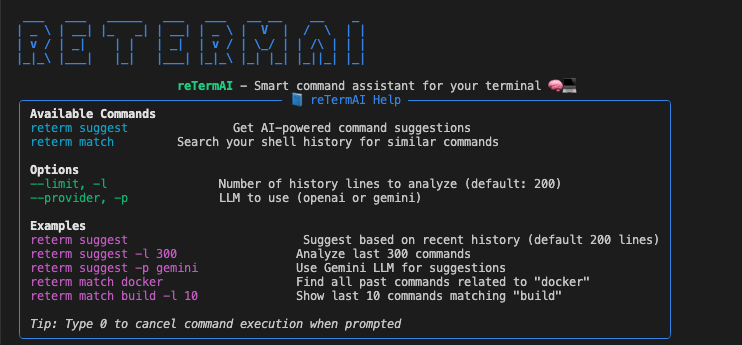
reTermAI
💡 A terminal command recommender powered by AI and your own shell history.
Demo GIF

✨ Features
- 🔍 Recommends relevant terminal commands based on your past history using OpenAI or Gemini
- 🧠 Supports intelligent matching by keyword or partial input
- ⚡ Easy to install via pip
- 🐚 Supports
zshandbashshell history - 🔐 API keys managed via
.env
📦 Installation
pip install reterm-ai
Or, for local development:
git clone https://github.com/pie0902/reTermAI.git
cd reTermAI
pip install -e .
⚙️ Usage
🔮 AI-powered command suggestions:
reterm suggest
Options:
| Option | Description |
|---|---|
--history-limit, -hl |
Number of recent commands to read (default: 300) |
--context-limit, -cl |
How many commands to feed into the LLM (default: 20) |
--provider, -p |
LLM to use (openai or gemini) |
Examples:
reterm suggest -p gemini

reterm suggest --history-limit 500 --context-limit 30
# Basic suggestion
reterm suggest

# Suggest using Gemini and 50 recent commands
reterm suggest -hl 50 -p gemini

# Suggest using OpenAI and 30 context commands
reterm suggest --provider openai --context-limit 30

# Search for past docker commands
reterm match docker

# Show up to 10 matching commands
reterm match docker -l 10
🔎 Match past commands by keyword:
reterm match docker
Options:
| Option | Description |
|---|---|
--limit, -l |
Max number of matching results to show (default: 5) |
🔐 Configuration
Add a .env file in your home or project directory:
OPENAI_API_KEY=sk-xxxxxxxxxxxxxxxxxxxxx
GOOGLE_API_KEY=your-gemini-api-key
| Key | Used for |
|---|---|
OPENAI_API_KEY |
Required if using --provider openai |
GOOGLE_API_KEY |
Required if using --provider gemini |
You can also refer to the included .env.example.
📂 Project Structure
reterm/
├── cli.py          # Main CLI interface
├── llm.py          # LLM integration (OpenAI, Gemini)
├── shell.py        # Shell history detection and parsing
├── config.py       # API key loader
├── welcome.py      # ASCII and help panel
🧑💻 Contributing
We welcome contributions! Fork the repo, create a feature branch, and open a pull request.
git checkout -b feat/your-feature
Optional ideas:
- Add support for
fishshell - Add model options (e.g.
gpt-4o,gemini-pro) - Improve LLM prompt formatting
📄 License
Apache License 2.0
1 maintainer

Metadata
1 maintainer
Release files for reterm-ai 0.1.2
For a detailed explanation of source distributions (sdists) and built distributions (wheels), please see the package formats documentation.
Source distribution (sdist)
| File | Size | Uploaded | |
|---|---|---|---|
| reterm_ai-0.1.2.tar.gz | 14.1 kB | Details |
Built distribution (wheel)
| File | Interpreter | ABI | Platform | Reset |
|---|---|---|---|---|
| reterm_ai-0.1.2-py3-none-any.whl | Python 3 | none | any | Details |
Total release size: 28.7 kB
Release files / reterm_ai-0.1.2.tar.gz
| Download URL | reterm_ai-0.1.2.tar.gz |
|---|---|
| Size | 14.1 kB |
| Tags | Source |
|
SHA-256 checksum How to use checksums |
f43f483ea1cea518421d75afcd74e01218a1b41b7d8b716ef3d8f544c27422ee
|
|
BLAKE2b-256 checksum How to use checksums |
fdbc2d10f0ea013721ee2fd717c1c84cbdbd38a540177959fa9d97fd5e46812e
|
| Upload date | |
|
Uploaded using Trusted Publishing? What is trusted publishing? |
No |
| Uploaded via |
twine/6.1.0 CPython/3.9.13
|
Release files / reterm_ai-0.1.2-py3-none-any.whl
| Download URL | reterm_ai-0.1.2-py3-none-any.whl |
|---|---|
| Size | 14.5 kB |
| Tags | Python 3 |
|
SHA-256 checksum How to use checksums |
6ebc6e644b00b8130b9473a4deddbcffbc0e125842192929db142ca83d336af1
|
|
BLAKE2b-256 checksum How to use checksums |
217979429087827b5001ae7ca99da86f3735b67dec1ecd68df3d1981c1c602d0
|
| Upload date | |
|
Uploaded using Trusted Publishing? What is trusted publishing? |
No |
| Uploaded via |
twine/6.1.0 CPython/3.9.13
|














