
RetinaFace: Deep Face Detection Framework in TensorFlow for Python

Project description
RetinaFace


RetinaFace is the face detection module of insightface project. The original implementation is mainly based on mxnet. Then, its tensorflow based re-implementation is published by Stanislas Bertrand.
This repo is heavily inspired from the study of Stanislas Bertrand. Its source code is simplified and it is transformed to pip compatible but the main structure of the reference model and its pre-trained weights are same.

Notice that face recognition module of insightface project is called as ArcFace.
Installation
The easiest way to install retinaface is to download it from pypi.
pip install retina-face
Face Detection
RetinaFace offers a face detection function. It expects an exact path of an image as input.
from retina-face import RetinaFace
resp = RetinaFace.detect_faces("img1.jpg")
Then it returns the facial area coordinates and some landmarks (eyes, nose and mouth) with a confidence score.
{
    "face_1": {
        "score": 0.9993440508842468,
        "facial_area": [155, 81, 434, 443],
        "landmarks": {
          "right_eye": [257.82974, 209.64787],
          "left_eye": [374.93427, 251.78687],
          "nose": [303.4773, 299.91144],
          "mouth_right": [228.37329, 338.73193],
          "mouth_left": [320.21982, 374.58798]
        }
  }
}
Alignment
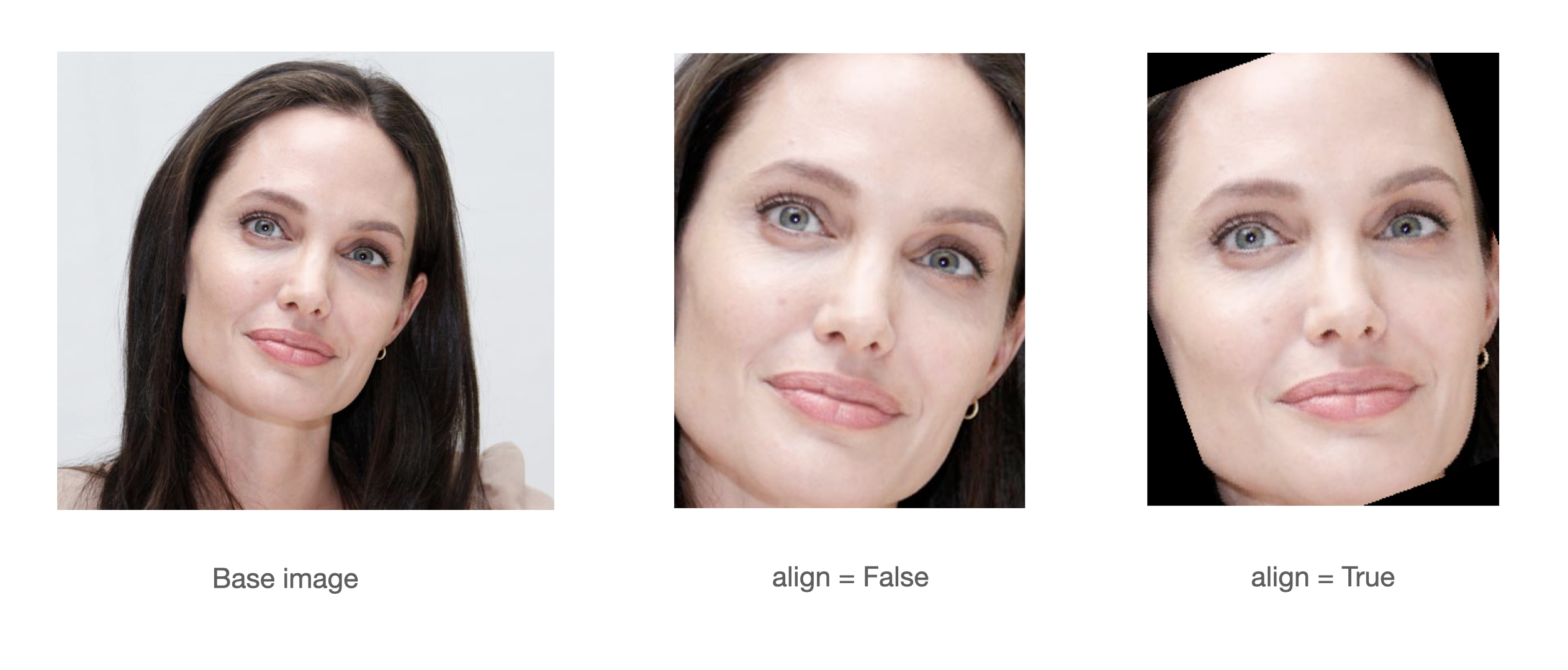
A modern face recognition pipeline consists of 4 common stages: detect, align, represent and verify. Experiments show that alignment increases the face recognition accuracy almost 1%. Here, retinaface can find the facial landmarks including eye coordinates. In this way, it can apply alignment to detected faces with its extract faces function.
import matplotlib.pyplot as plt
faces = RetinaFace.extract_faces(img_path = "img.jpg", align = True)
for face in faces:
  plt.imshow(face)
  plt.show()
FAQ and troubleshooting
Pre-trained weights of the retinaface model is going to be downloaded from Google Drive once. Download limit of my Google Drive account might be exceeded sometimes. In this case, you will have an exception like "too many users have viewed or downloaded this file recently. Please try accessing the file again later". Still, you can access the pre-trained weights on Google Drive. Please, download it here and copy to the HOME/.deepface/weights folder manually.
You can find out your HOME_FOLDER with python as shown below.
from pathlib import Path
home = str(Path.home())
print("HOME_FOLDER is ",home)
Support
There are many ways to support a project. Starring⭐️ the repo is just one🙏
Acknowledgements
This work is mainly based on the insightface project and retinaface paper; and it is heavily inspired from the re-implementation of retinaface-tf2 by Stanislas Bertrand. Finally, Bertrand's implemenation uses Fast R-CNN written by Ross Girshick in the background. All of those reference studies licensed are under MIT license.
Licence
This project is licensed under the MIT License - see LICENSE for more details.
Release history Release notifications | RSS feed


Download files
Download the file for your platform. If you're not sure which to choose, learn more about installing packages.
Source Distribution
Built Distribution
Filter files by name, interpreter, ABI, and platform.
If you're not sure about the file name format, learn more about wheel file names.
Copy a direct link to the current filters
File details
Details for the file retina-face-0.0.2.tar.gz.
File metadata
- Download URL: retina-face-0.0.2.tar.gz
- Upload date:
- Size: 3.6 kB
- Tags: Source
- Uploaded using Trusted Publishing? No
- Uploaded via: twine/3.4.1 importlib_metadata/3.10.0 pkginfo/1.7.0 requests/2.25.1 requests-toolbelt/0.9.1 tqdm/4.59.0 CPython/3.8.5
File hashes
| Algorithm | Hash digest | |
|---|---|---|
| SHA256 |
b163f1a9deeb059dc919e2e86a85730486a1421b0d11db5892fefc79f5719299
|
|
| MD5 |
95679938ad984376a49a5d511cd99866
|
|
| BLAKE2b-256 |
09a136650115bf5e41738e7e5b310eae1a4495c802dec2bd63e0731c7eb6ec2c
|
File details
Details for the file retina_face-0.0.2-py3-none-any.whl.
File metadata
- Download URL: retina_face-0.0.2-py3-none-any.whl
- Upload date:
- Size: 4.1 kB
- Tags: Python 3
- Uploaded using Trusted Publishing? No
- Uploaded via: twine/3.4.1 importlib_metadata/3.10.0 pkginfo/1.7.0 requests/2.25.1 requests-toolbelt/0.9.1 tqdm/4.59.0 CPython/3.8.5
File hashes
| Algorithm | Hash digest | |
|---|---|---|
| SHA256 |
f721c9f21ed799c89848e80a765fe9a526bc06345417c065edfba225dde17c1c
|
|
| MD5 |
a0ff4da690c6e4c3f0cdc777a3ce021c
|
|
| BLAKE2b-256 |
ca6b017a3727d08f064c3da4115f2d9b4f9b3a05db9dc59eb2934515b41c2e71
|






