
Retinaface

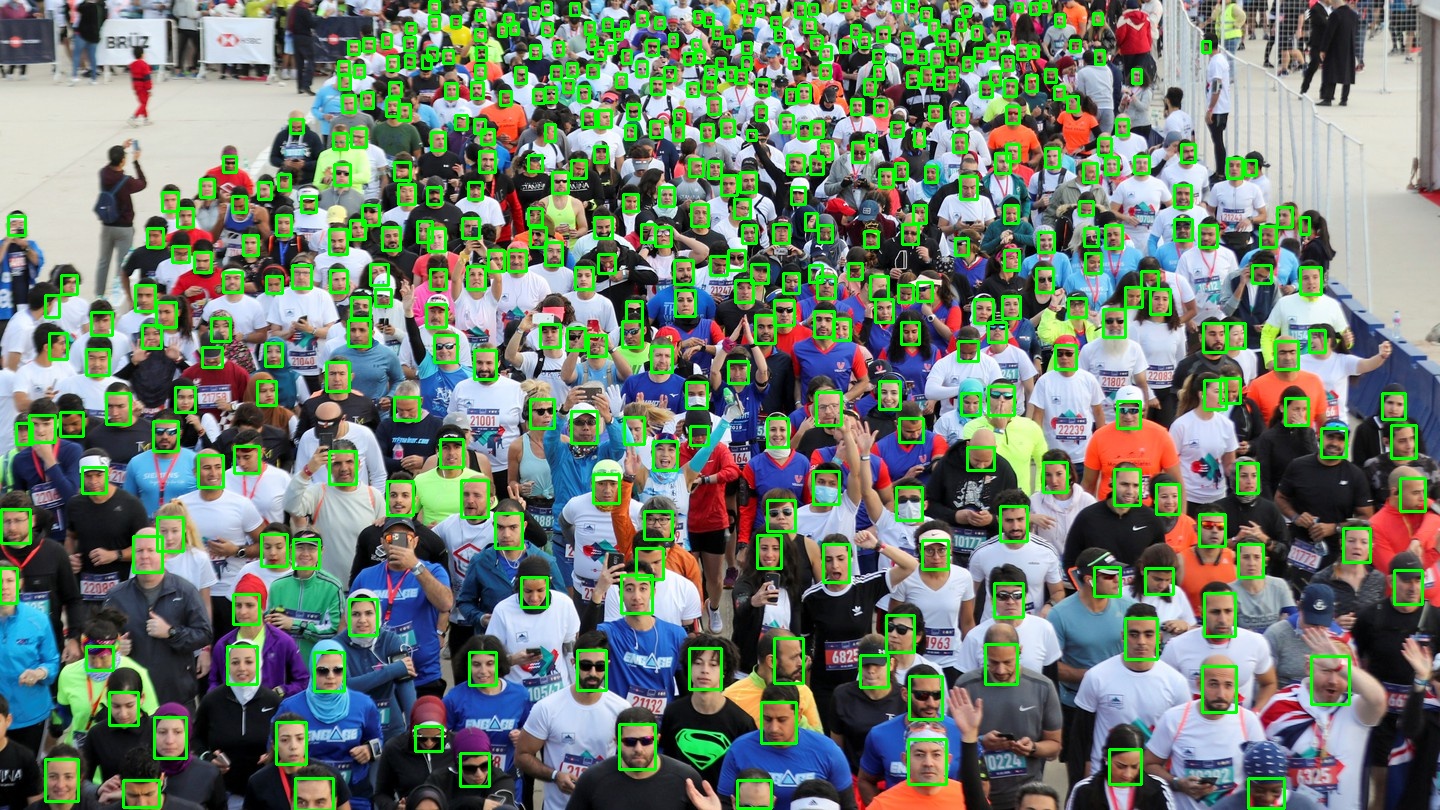
This repo is build on top of https://github.com/biubug6/Pytorch_Retinaface
Differences
Train loop moved to Pytorch Lightning
IT added a set of functionality:
- Distributed training
- fp16
- Syncronized BatchNorm
- Support for various loggers like W&B or Neptune.ml
Hyperparameters are defined in the config file
Hyperparameters that were scattered across the code moved to the config at retinadace/config
Augmentations => Albumentations
Color that were manually implemented replaced by the Albumentations library.
Todo:
- Horizontal Flip is not implemented in Albumentations
- Spatial transforms like rotations or transpose are not implemented yet.
Color transforms defined in the config.
Added mAP calculation for validation
In order to track the progress, mAP metric is calculated on validation.
Installation
pip install -U retinaface_pytorch
Example inference
import cv2
from retinaface.pre_trained_models import get_model
image = <numpy array with shape (height, width, 3)>
model = get_model("resnet50_2020-07-20", max_size=2048)
model.eval()
annotation = model.predict_jsons(image)
- Jupyter notebook with the example:
- Jupyter notebook with the example on how to combine face detector with mask detector:

Data Preparation
The pipeline expects labels in the format:
[
  {
    "file_name": "0--Parade/0_Parade_marchingband_1_849.jpg",
    "annotations": [
      {
        "bbox": [
          449,
          330,
          571,
          720
        ],
        "landmarks": [
          [
            488.906,
            373.643
          ],
          [
            542.089,
            376.442
          ],
          [
            515.031,
            412.83
          ],
          [
            485.174,
            425.893
          ],
          [
            538.357,
            431.491
          ]
        ]
      }
    ]
  },
You can convert the default labels of the WiderFaces to the json of the propper format with this script.
Training
Install dependencies
pip install -r requirements.txt
pip install -r requirements_dev.txt
Define config
Example configs could be found at retinaface/configs
Define environmental variables
export TRAIN_IMAGE_PATH=<path to train images>
export VAL_IMAGE_PATH=<path to validation images>
export TRAIN_LABEL_PATH=<path to train annotations>
export VAL_LABEL_PATH=<path to validation annotations>
Run training script
python retinaface/train.py -h
usage: train.py [-h] -c CONFIG_PATH

optional arguments:
  -h, --help            show this help message and exit
  -c CONFIG_PATH, --config_path CONFIG_PATH
                        Path to the config.
Inference
python retinaface/inference.py -h
usage: inference.py [-h] -i INPUT_PATH -c CONFIG_PATH -o OUTPUT_PATH [-v]
                    [-g NUM_GPUS] [-m MAX_SIZE] [-b BATCH_SIZE]
                    [-j NUM_WORKERS]
                    [--confidence_threshold CONFIDENCE_THRESHOLD]
                    [--nms_threshold NMS_THRESHOLD] -w WEIGHT_PATH
                    [--keep_top_k KEEP_TOP_K] [--world_size WORLD_SIZE]
                    [--local_rank LOCAL_RANK] [--fp16]

optional arguments:
  -h, --help            show this help message and exit
  -i INPUT_PATH, --input_path INPUT_PATH
                        Path with images.
  -c CONFIG_PATH, --config_path CONFIG_PATH
                        Path to config.
  -o OUTPUT_PATH, --output_path OUTPUT_PATH
                        Path to save jsons.
  -v, --visualize       Visualize predictions
  -g NUM_GPUS, --num_gpus NUM_GPUS
                        The number of GPUs to use.
  -m MAX_SIZE, --max_size MAX_SIZE
                        Resize the largest side to this number
  -b BATCH_SIZE, --batch_size BATCH_SIZE
                        batch_size
  -j NUM_WORKERS, --num_workers NUM_WORKERS
                        num_workers
  --confidence_threshold CONFIDENCE_THRESHOLD
                        confidence_threshold
  --nms_threshold NMS_THRESHOLD
                        nms_threshold
  -w WEIGHT_PATH, --weight_path WEIGHT_PATH
                        Path to weights.
  --keep_top_k KEEP_TOP_K
                        keep_top_k
  --world_size WORLD_SIZE
                        number of nodes for distributed training
  --local_rank LOCAL_RANK
                        node rank for distributed training
  --fp16                Use fp6
python -m torch.distributed.launch --nproc_per_node=<num_gpus> retinaface/inference.py <parameters>
Web app
https://retinaface.herokuapp.com/
Code for the web app: https://github.com/ternaus/retinaface_demo
Converting to ONNX
The inference could be sped up on CPU by converting the model to ONNX.
Ex: python -m converters.to_onnx -m 1280 -o retinaface1280.onnx
1 maintainer

Metadata
1 maintainer
Release files for retinaface-pytorch 0.0.8
For a detailed explanation of source distributions (sdists) and built distributions (wheels), please see the package formats documentation.
Source distribution (sdist)
| File | Size | Uploaded | Provenance | Actions |
|---|---|---|---|---|
| retinaface_pytorch-0.0.8.tar.gz | 26.1 kB | Without provenance | Details for retinaface_pytorch-0.0.8.tar.gz |
Built distribution (wheel)
| File | Interpreter | ABI | Platform | Actions Reset |
|---|---|---|---|---|
| retinaface_pytorch-0.0.8-py2.py3-none-any.whl | Python 2, Python 3 | none | any | Details for retinaface_pytorch-0.0.8-py2.py3-none-any.whl |
Total release size: 52.9 kB
Release files / retinaface_pytorch-0.0.8.tar.gz
| Download URL | retinaface_pytorch-0.0.8.tar.gz |
|---|---|
| Size | 26.1 kB |
| Tags | Source |
|
SHA-256 checksum How to use checksums |
1236a4a87f4d261eb4838219ace39d96a864731c92aa75f01cee452cc38329a2
|
|
BLAKE2b-256 checksum How to use checksums |
069101fc6e8c5bc5df5635fcec28c49efdbe7272965b2f0c76d459e4569fdcd1
|
| Upload date | |
|
Uploaded using Trusted Publishing? What is trusted publishing? |
No |
| Uploaded via |
twine/3.7.1 importlib_metadata/4.10.1 pkginfo/1.8.2 requests/2.25.1 requests-toolbelt/0.9.1 tqdm/4.61.1 CPython/3.9.5
|
Release files / retinaface_pytorch-0.0.8-py2.py3-none-any.whl
| Download URL | retinaface_pytorch-0.0.8-py2.py3-none-any.whl |
|---|---|
| Size | 26.8 kB |
| Tags | Python 2 Python 3 |
|
SHA-256 checksum How to use checksums |
bf64dd6562e7dd0342c7408e086c57b675bd15cf759f51def9737b31cd581de7
|
|
BLAKE2b-256 checksum How to use checksums |
16a70d59e76c03d7446ea4d47f17e05bdd1153ce3259c84b883d903d5d2f4da8
|
| Upload date | |
|
Uploaded using Trusted Publishing? What is trusted publishing? |
No |
| Uploaded via |
twine/3.7.1 importlib_metadata/4.10.1 pkginfo/1.8.2 requests/2.25.1 requests-toolbelt/0.9.1 tqdm/4.61.1 CPython/3.9.5
|
Security for retinaface-pytorch 0.0.8
Provenance
Provenance describes where a file came from. On PyPI, provenance is shared via attestations, which provide a verifiable record of the build or publishing details. View details, limitations and caveats.
No provenance found
None of the files in this release were uploaded with provenance metadata.
A note on package security
PyPI is a repository for distributing packages, not a service for auditing them. While third-party security researchers and our staff do their best to detect and remove malicious packages, PyPI cannot guarantee the quality, security or suitability of any given package.
To learn more about protecting yourself from malicious actors, visit our package security documentation.














