
retrack-ai
Retrack builds experience for AI agents.
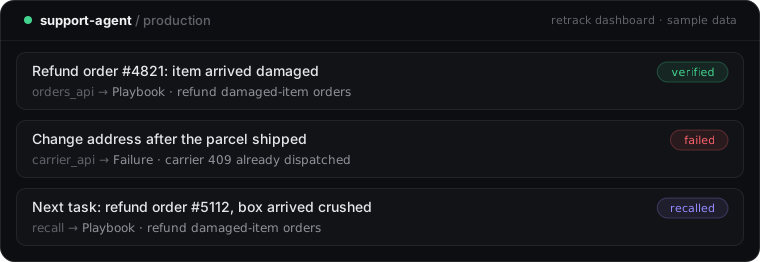
Your agent runs the same kinds of tasks every day, and starts each one from scratch. Retrack watches every run, checks whether it worked, turns what worked into playbooks and what failed into warnings, and hands the right ones to your agent before its next similar task.
This package is the connector for Retrack, a hosted service. It works with LangGraph and LangChain agents in Python.
Quickstart (5 minutes)
1. Get an API key. Sign in at retrack-ai.online with GitHub, create a project and copy its key.
2. Install and set the key.
pip install retrack-ai
export RETRACK_API_KEY="rtk_live_..."
3. Capture every run. Add one callback to your graph:
from retrack import Retrack

rt = Retrack("support-agent")  # one name per agent

result = graph.invoke(inputs, config={"callbacks": [rt.callback()]})
Retrack records the task, each tool call and its result, the final answer, tokens and the model. Obvious secrets (API keys, tokens, passwords) are stripped on your machine before anything is sent, and the server redacts again.
4. Recall before each task.
memory = rt.recall(task)  # never raises; returns empty memory on any problem

result = graph.invoke(
    {"messages": [("system", memory.as_prompt()), ("user", task)]},
    config={"callbacks": [rt.callback()]},
)
Or as a LangGraph node: graph.add_node("memory", rt.recall_node(task_key="task")).
5. Tell Retrack what worked. Playbooks are only trusted when there's real evidence. Send a result whenever you know it, such as a passing test, a resolved ticket or a user's thumbs-up:
import uuid

run_id = uuid.uuid4()
graph.invoke(inputs, config={"callbacks": [rt.callback()], "run_id": run_id})

rt.feedback(run_id, outcome="success", source="test")  # or source="event" / "feedback"
Without a signal, Retrack's AI judge scores the run.
6. Approve your first playbook. Successful runs become playbooks, which appear in the dashboard under Memory. A new playbook is a candidate: your agent does not use it until you open it and click Approve. That is the memory firewall at work: nothing an outsider could have influenced reaches your agent unchecked.
To let playbooks switch on by themselves, after 3 confirmed successes of the same kind of task, Retrack must trust the runs: mark the tools whose output you control as trusted (trusted_tools=[...] or the project's Settings) and, if task text never comes from end users, trust the task text in Settings. Success signals from rt.feedback count only for trusted runs; anything else waits for your approval.
Expect your first playbook after a handful of successful runs of the same kind of task. Retrack spends a small daily AI budget per project on judging runs and writing playbooks during early access; above it, runs are still recorded.
What you get
- Playbooks: steps that worked for a kind of task, recalled only when they clearly match (a confidence gate decides).
- Warnings: failures your agent has hit before, with the fix that worked, if one exists.
- Protection:
tools = memory.protect(tools)adds known-fix hints to failing tools and stops your agent from repeating a failure it can't recover from. - Memory firewall: runs fed by untrusted input never become memory without a check or your review.
- Proof: a small holdout group gets no memory, so the dashboard shows the measured difference memory makes.
- Regression tests:
retrack test --entry my_agent:run_task --agent support-agentreplays your playbooks and known failures as tests (good in CI). - Model migration:
retrack migrate --entry my_agent:run_task --agent support-agent --to <new-model>replays memory on a new model before you switch.
Never in your agent's way
Capture runs in the background with bounded memory and never raises into your code. Recall gives up after 1.5 seconds (rt.recall(task, timeout=...)) and returns empty memory, so your agent always runs.
Configuration
| Setting | Default |
|---|---|
RETRACK_API_KEY |
required (without it, capture and recall are off) |
RETRACK_BASE_URL |
https://api.retrack-ai.online |
Retrack("agent", model_id="...", tool_versions={"stripe": "2026-09"}, trusted_tools=["orders_api"]) records the model and tool versions (memory is matched to them) and marks tools whose output you trust.
Status
Early access (alpha). Requires Python 3.10+. Feedback is very welcome.
License
This connector is MIT licensed. The Retrack service it connects to is a hosted product, not open source.
1 maintainer

Metadata
1 maintainer
Release files for retrack-ai 0.1.2
For a detailed explanation of source distributions (sdists) and built distributions (wheels), please see the package formats documentation.
Source distribution (sdist)
| File | Size | Uploaded | Provenance | Actions |
|---|---|---|---|---|
| retrack_ai-0.1.2.tar.gz | 16.5 kB | Without provenance | Details for retrack_ai-0.1.2.tar.gz |
Built distribution (wheel)
| File | Interpreter | ABI | Platform | Actions Reset |
|---|---|---|---|---|
| retrack_ai-0.1.2-py3-none-any.whl | Python 3 | none | any | Details for retrack_ai-0.1.2-py3-none-any.whl |
Total release size: 37.1 kB
Release files / retrack_ai-0.1.2.tar.gz
| Download URL | retrack_ai-0.1.2.tar.gz |
|---|---|
| Size | 16.5 kB |
| Tags | Source |
|
SHA-256 checksum How to use checksums |
e260574455ef94ad87d32407b29a6e1f06dd8816c4152b763b245cae3cfd2a7d
|
|
BLAKE2b-256 checksum How to use checksums |
f60c473f416e1d3d8dfc7062867b0c9de433a33d9f02de02e7d89b7986cb8950
|
| Upload date | |
|
Uploaded using Trusted Publishing? What is trusted publishing? |
No |
| Uploaded via |
uv/0.11.16 {"installer":{"name":"uv","version":"0.11.16","subcommand":["publish"]},"python":null,"implementation":{"name":null,"version":null},"distro":{"name":"macOS","version":null,"id":null,"libc":null},"system":{"name":null,"release":null},"cpu":null,"openssl_version":null,"setuptools_version":null,"rustc_version":null,"ci":null}
|
Release files / retrack_ai-0.1.2-py3-none-any.whl
| Download URL | retrack_ai-0.1.2-py3-none-any.whl |
|---|---|
| Size | 20.7 kB |
| Tags | Python 3 |
|
SHA-256 checksum How to use checksums |
cc059e8cd07976a8c34d07011fe1a6a6c2d323e7a8ef0dd8fece3ca30b1a32cb
|
|
BLAKE2b-256 checksum How to use checksums |
606e43a99a562938922fa51b63a5c529a5672b97b5861c9f1d992f7446fa4caa
|
| Upload date | |
|
Uploaded using Trusted Publishing? What is trusted publishing? |
No |
| Uploaded via |
uv/0.11.16 {"installer":{"name":"uv","version":"0.11.16","subcommand":["publish"]},"python":null,"implementation":{"name":null,"version":null},"distro":{"name":"macOS","version":null,"id":null,"libc":null},"system":{"name":null,"release":null},"cpu":null,"openssl_version":null,"setuptools_version":null,"rustc_version":null,"ci":null}
|
Security for retrack-ai 0.1.2
Provenance
Provenance describes where a file came from. On PyPI, provenance is shared via attestations, which provide a verifiable record of the build or publishing details. View details, limitations and caveats.
No provenance found
None of the files in this release were uploaded with provenance metadata.
A note on package security
PyPI is a repository for distributing packages, not a service for auditing them. While third-party security researchers and our staff do their best to detect and remove malicious packages, PyPI cannot guarantee the quality, security or suitability of any given package.
To learn more about protecting yourself from malicious actors, visit our package security documentation.














