

RetrievalLoom






Find the right passage, whatever the user types, and prove where it came from.
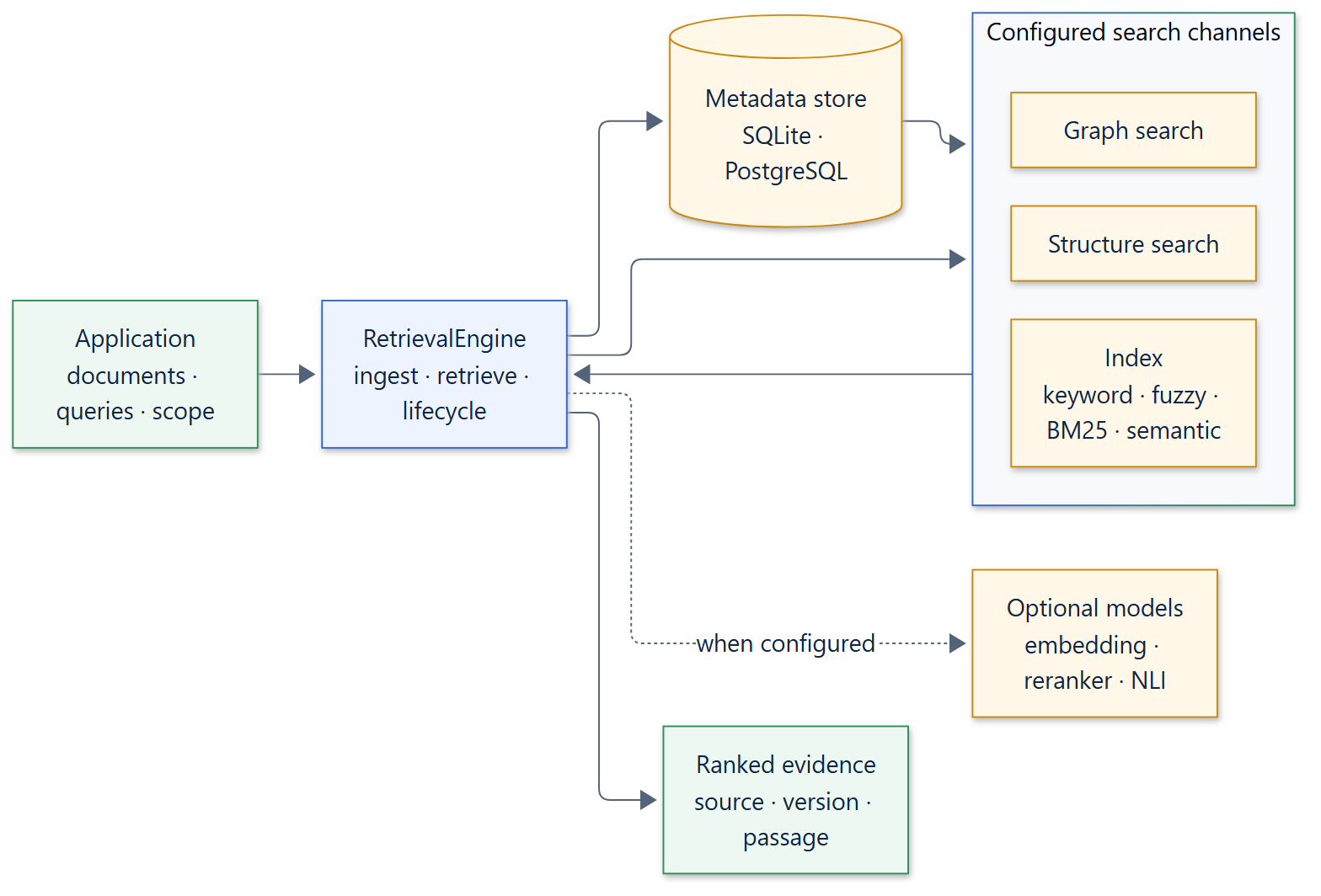
RetrievalLoom is a hybrid retrieval library for async Python applications. One call searches your documents by exact keyword, by spelling-tolerant match, by term relevance (BM25) and by meaning, and merges the results into one ranked list. Every result tells you which document, which version and which passage it came from. It runs inside your application: there is no separate service to deploy.
Why RetrievalLoom
Picture a support assistant for a software product. In one hour it has to answer:
- "What does error
E1042mean?" — an exact code that semantic search blurs. - "How do I fix a conflcted copy?" — a typo that exact search misses.
- "How do I get my money back?" — a paraphrase of an article titled "Refunding a card payment" that shares no words with it.
No single search method handles all three. Real deployments add more demands: articles change every day, each customer must see only their own content, and every answer must cite its source.
| What you need | What RetrievalLoom gives you |
|---|---|
| Match codes, typos and paraphrases | Keyword, fuzzy, BM25 and vector search run together, and their rankings are fused into one list. Optional graph and section-tree search join the same list. |
| Search results that stay correct as content changes | Edits and deletions reach every index automatically. A search never mixes an old and a new version of a document, and never reads a half-built index. |
| Answers you can cite and audit | Each result names its document and version, lists the search methods that found it, and carries the character span, pages and section path you supplied. |
| Many customers on one deployment | Every call is scoped to a tenant and collection. A result from another tenant is an error, never a silent leak. Per-tenant limits keep one busy customer from slowing the rest. |
| A responsive async service | Model inference and index work run in worker threads with admission control, so your event loop keeps serving requests. |
Highlights
- Useful with zero setup.
RetrievalEngine()runs in memory with keyword, fuzzy and BM25 search. No model download, server or network access. - Add what you need. Plug in an embedding model for semantic search, a reranker for precision at the top, or an NLI model that flags passages which contradict a claim.
- Your content, your chunks. Send plain text, your own chunks with spans and pages, a section outline, or a knowledge graph.
- Indexes that look after themselves. New and edited documents are indexed incrementally. Adding a search method backfills existing documents, and changing an embedding model rebuilds its index without interrupting searches.
- Durable when you need it. Keep metadata in SQLite or PostgreSQL and vectors in Qdrant (in memory, on disk, on a server or in Qdrant Cloud). Several engines can share one store.
- Your own components. Swap in your own embedding model, reranker, vector
store or metadata store by subclassing a small base class. The pytest
contract kits in
retrievalloom.testingcheck your implementation against the same tests the built-in components pass. - Small and typed. An async API with type hints throughout, structured logging with structlog, and 100% branch coverage on Python 3.12 to 3.14.
Installation
pip install retrievalloom                # core: in-memory engine, Qdrant client, FlashRank
pip install "retrievalloom[all]"         # plus the graph and structure channels and PostgreSQL
RetrievalLoom supports Python 3.12, 3.13 and 3.14. Optional extras:
| Extra | Adds |
|---|---|
graph |
The graph channel with LadybugDB (LadybugGraphStore) |
structure |
The structure channel with TreeSearch (TreeSearchStructureEngine) |
postgres |
The PostgreSQL metadata store (PostgresMetadataStore), shared by engines on several hosts |
testing |
The pytest contract kits in retrievalloom.testing |
all |
graph, structure and postgres |
The library prints nothing by default. To see its log events, call
logging.basicConfig(level=logging.INFO) or configure structlog; see
Logging.
Quickstart
Index three documents in memory and search them. No model or server is needed:
import asyncio

from retrievalloom import (
    DocumentInput,
    RetrievalEngine,
    Scope,
    SourceDescriptor,
    TextRepresentation,
)

TEXTS = {
    "asyncio": "asyncio runs coroutines on a single-threaded event loop.",
    "bm25": "BM25 ranks documents by term frequency and inverse document frequency.",
    "eiffel": "The Eiffel Tower in Paris was completed in 1889.",
}


async def main() -> None:
    scope = Scope(tenant_id="acme")
    documents = [
        DocumentInput(
            id=key,
            source=SourceDescriptor(uri=f"kb://{key}"),
            representations=[TextRepresentation(text=text)],
        )
        for key, text in TEXTS.items()
    ]
    async with RetrievalEngine() as engine:
        report = await engine.ingest(documents, scope=scope)
        print("ingested:", [item.outcome.value for item in report.documents])

        result = await engine.retrieve("event loop coroutines", scope=scope, top_k=3)
        print("status:", result.status.value)
        for item in result.evidence:
            source = item.sources[0]
            methods = sorted({hit.method.key for hit in item.provenance.hits})
            print(f"{source.document_id} v{source.document_version} {item.score:.4f} {methods}")
            print("  ", item.display_text)


asyncio.run(main())
Output:
ingested: ['created', 'created', 'created']
status: complete
asyncio v1 0.0164 ['index.fuzzy', 'index.sparse']
   asyncio runs coroutines on a single-threaded event loop.
Each result names the document and version it came from, and the search
methods that found it. Documents are searchable as soon as ingest returns.
result.warnings tells you about anything the engine skipped, such as semantic
search when no embedding model is configured. The
Quickstart
walks through the program step by step.
Your own embedding model
Add semantic search with any embedding model. Subclass EmbeddingModelABC and
hand the blocking model call to the worker pool the engine gives you
(context.offloader), so your event loop keeps serving requests:
from collections.abc import Callable, Sequence

from retrievalloom import Components, RetrievalEngine
from retrievalloom.contracts.component import ComponentContext, ComponentInfo, make_info
from retrievalloom.contracts.models import EmbeddingModelABC
from retrievalloom.runtime.offloader import WorkloadKind


class MyEmbedding(EmbeddingModelABC):
    def __init__(self, encode: Callable[[list[str]], list[list[float]]], dimensions: int) -> None:
        self._encode = encode  # a blocking call, such as your model's encode()
        self._dimensions = dimensions
        self._info = make_info(
            component="embedding",
            implementation="my-embedding",
            version="1",
            model_identity="my-org/my-model",
            dimensions=dimensions,
        )

    @property
    def info(self) -> ComponentInfo:
        return self._info

    @property
    def dimensions(self) -> int:
        return self._dimensions

    async def initialize(self, context: ComponentContext) -> None:
        self._offloader = context.offloader

    async def embed_documents(self, texts: Sequence[str]) -> Sequence[Sequence[float]]:
        return await self._offloader.run(WorkloadKind.EMBEDDING, self._encode, list(texts))

    async def embed_query(self, text: str) -> Sequence[float]:
        (vector,) = await self._offloader.run(WorkloadKind.EMBEDDING, self._encode, [text])
        return vector


engine = RetrievalEngine(components=Components(embedding=MyEmbedding(model.encode, 1024)))
With an embedding model configured, every search also runs a vector (dense)
search. When you later change model_identity, the engine builds a new vector
index and switches to it once it is complete. Searches keep using the old index
until then. See
Use your own embedding model.
Your own stores
By default everything lives in memory. Pass durable stores to keep your data across restarts:
from retrievalloom import Components, RetrievalEngine
from retrievalloom.index.vector import QdrantVectorStore
from retrievalloom.storage.sqlite import SQLiteMetadataStore

components = Components(
    embedding=MyEmbedding(model.encode, 1024),
    metadata_store=SQLiteMetadataStore("var/metadata.db"),
    vector_store=QdrantVectorStore(url="http://localhost:6333"),
)
engine = RetrievalEngine(components=components)
To run engines on several hosts, use PostgresMetadataStore (postgres extra)
instead of a SQLite file. To use another database, subclass
DocumentMetadataStoreABC or VectorStoreABC and check your class with
MetadataStoreContract or VectorStoreContract from retrievalloom.testing.
The engine opens the components you pass in but leaves closing them to you. See
Keep data on disk
and Write your own backend.
Benchmarks
scripts/benchmark.py measures ingest throughput, search latency and
event-loop lag with the default in-memory components. See
Benchmarks
for the method, the results and how to reproduce them.
Examples
Each program in examples/
models a real deployment, and the test suite runs it and checks its output.
examples/adapters/
holds production-style custom components you can copy, from bge-m3 embeddings
to a Neo4j graph store:
| Example | Shows | Needs |
|---|---|---|
quickstart.py |
Index and search three documents in memory | Base install |
customer_support.py |
Help-center search that handles typos, jargon, German and paraphrases, with reranking and filters | Local models, Qdrant |
multi_tenant_saas.py |
One engine for many customers: isolation, role-based access, quotas and an audit log | Base install |
document_lifecycle.py |
Edit, delete and erase documents, add semantic search later, and change models | Local models, pgvector |
knowledge_graph.py |
Answer relationship questions from a knowledge graph built at ingest, on Neo4j or LadybugDB | graph extra; Neo4j optional |
policy_manual.py |
Search a long policy by section and cite the section path | structure extra |
fact_checking.py |
Check a claim against your documents and flag contradicting passages | Local models |
http_service.py |
Serve search over HTTP with FastAPI, with a Postman collection | examples group |
observability_jaeger.py |
Trace each request in Jaeger and find its log lines by trace id | examples group; Jaeger optional |
durable_restart.py |
Restart a service without re-ingesting or re-embedding | Local models, Qdrant |
prechunked_and_multi_representation.py |
Index your own chunks with spans and pages, plus a section outline | structure extra |
agxai_provenance.py |
Record every ingestion, deletion and search in an agxai audit trail | Base install |
Documentation
Full documentation: retrievalloom.readthedocs.io
Changes are listed in the changelog.
Agent skills
Let your AI coding assistant build with RetrievalLoom correctly. Two
Agent Skills teach
Claude Code, Codex, Cursor, GitHub Copilot and other compatible agents how to
use the library: retrievalloom adds it to your application, and
retrievalloom-extend helps you connect your own models and stores. Install
them with the skills CLI:
npx skills add smuniharish/retrievalloom                                # choose interactively
npx skills add smuniharish/retrievalloom --skill retrievalloom          # only the core skill
npx skills add smuniharish/retrievalloom --skill retrievalloom-extend   # only the extension skill
See Install the skills for manual and per-agent installation.
Scope
RetrievalLoom is a retrieval library. It does not parse files, split text into chunks, host models or orchestrate agents; use it alongside the tools you already have for those jobs. It does not depend on LangChain, LlamaIndex or any other framework.
Contributing
Contributions are welcome. See CONTRIBUTING.md for the development setup and checks, and SECURITY.md to report a vulnerability.
License
Apache License 2.0. See LICENSE.
1 maintainer

Metadata
1 maintainer
Release files for retrievalloom 0.1.0
For a detailed explanation of source distributions (sdists) and built distributions (wheels), please see the package formats documentation.
Source distribution (sdist)
| File | Size | Uploaded | Provenance | Actions |
|---|---|---|---|---|
| retrievalloom-0.1.0.tar.gz | 211.3 kB | Without provenance | Details for retrievalloom-0.1.0.tar.gz |
Built distribution (wheel)
| File | Interpreter | ABI | Platform | Actions Reset |
|---|---|---|---|---|
| retrievalloom-0.1.0-py3-none-any.whl | Python 3 | none | any | Details for retrievalloom-0.1.0-py3-none-any.whl |
Total release size: 457.6 kB
Release files / retrievalloom-0.1.0.tar.gz
| Download URL | retrievalloom-0.1.0.tar.gz |
|---|---|
| Size | 211.3 kB |
| Tags | Source |
|
SHA-256 checksum How to use checksums |
fccaee21364ea630eeb57609b7f10ca390fd3cc17badf04af4659d21766a329e
|
|
BLAKE2b-256 checksum How to use checksums |
0c574ff5861e7db0624671ea1d4d2f62451a40a2094065fda1e2e7b222208987
|
| Upload date | |
|
Uploaded using Trusted Publishing? What is trusted publishing? |
No |
| Uploaded via |
uv/0.12.15 {"installer":{"name":"uv","version":"0.12.15","subcommand":["publish"]},"python":null,"implementation":{"name":null,"version":null},"distro":null,"system":{"name":null,"release":null},"cpu":null,"openssl_version":null,"setuptools_version":null,"rustc_version":null,"ci":null}
|
Release files / retrievalloom-0.1.0-py3-none-any.whl
| Download URL | retrievalloom-0.1.0-py3-none-any.whl |
|---|---|
| Size | 246.3 kB |
| Tags | Python 3 |
|
SHA-256 checksum How to use checksums |
a3b752bfc412225a1c45de27b1b3a14aab68881e2193ebaf3323033cf75fab16
|
|
BLAKE2b-256 checksum How to use checksums |
dd41a8a6f60047dd1af5ba4d094ad25e6be54c3f7589074de47d2825c9aede6e
|
| Upload date | |
|
Uploaded using Trusted Publishing? What is trusted publishing? |
No |
| Uploaded via |
uv/0.12.15 {"installer":{"name":"uv","version":"0.12.15","subcommand":["publish"]},"python":null,"implementation":{"name":null,"version":null},"distro":null,"system":{"name":null,"release":null},"cpu":null,"openssl_version":null,"setuptools_version":null,"rustc_version":null,"ci":null}
|
Security for retrievalloom 0.1.0
Provenance
Provenance describes where a file came from. On PyPI, provenance is shared via attestations, which provide a verifiable record of the build or publishing details. View details, limitations and caveats.
No provenance found
None of the files in this release were uploaded with provenance metadata.
A note on package security
PyPI is a repository for distributing packages, not a service for auditing them. While third-party security researchers and our staff do their best to detect and remove malicious packages, PyPI cannot guarantee the quality, security or suitability of any given package.
To learn more about protecting yourself from malicious actors, visit our package security documentation.














