
retro-amp








A terminal music player with retro charm — built with Python and Textual. The themes come from textual-themes, the dialogs and widgets from textual-widgets. Both are separate libraries you can use in your own Textual app.
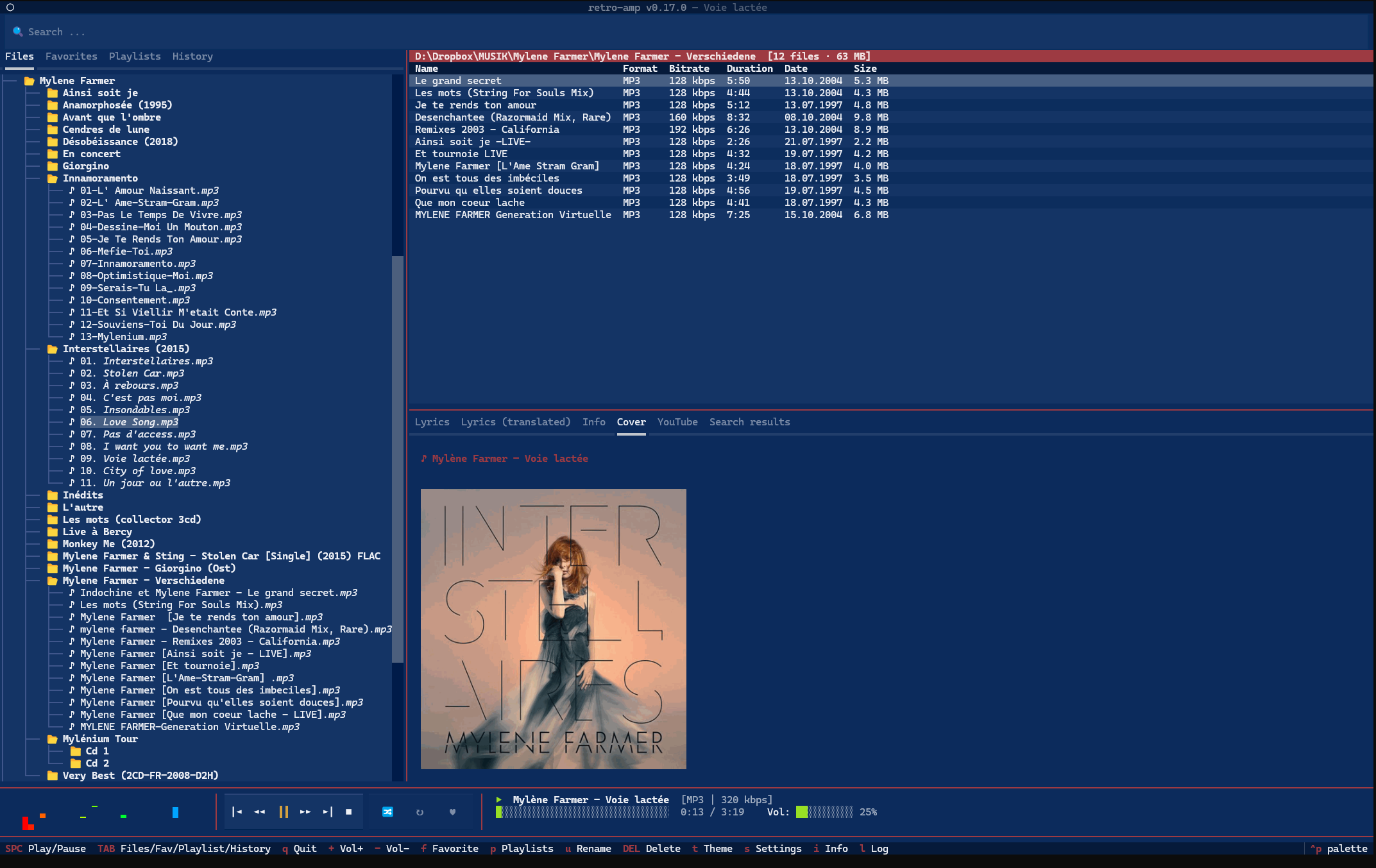
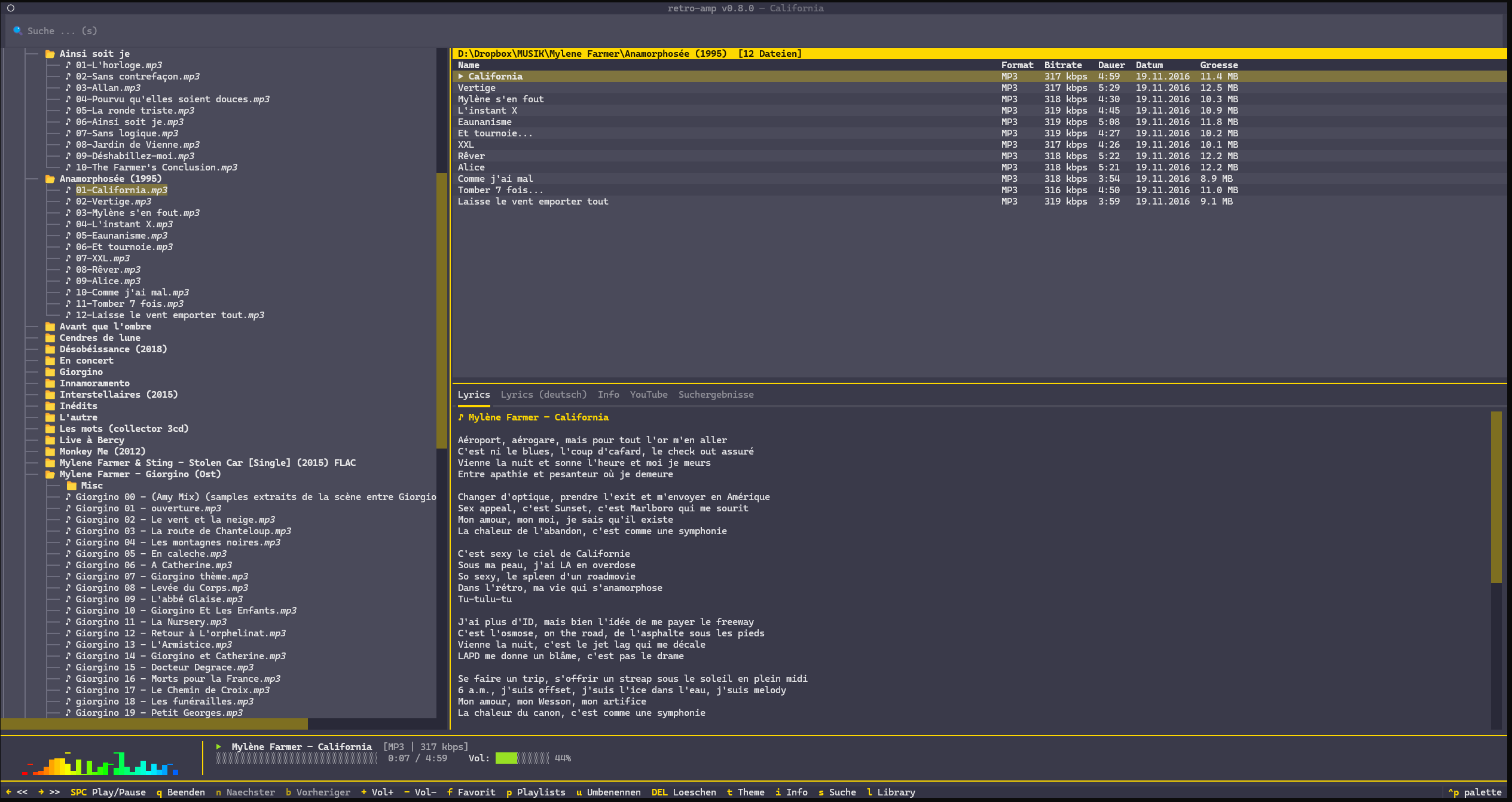
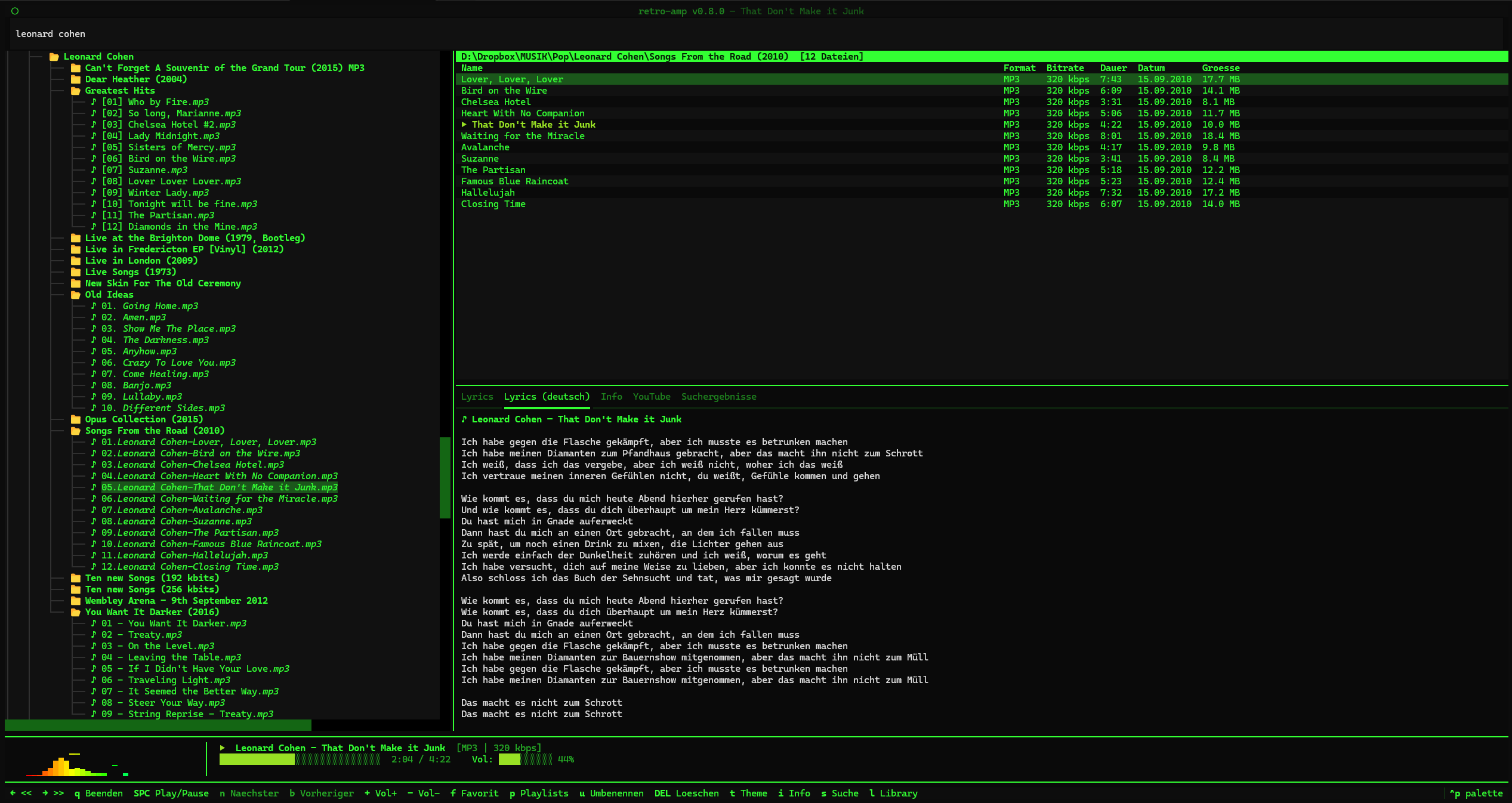 |
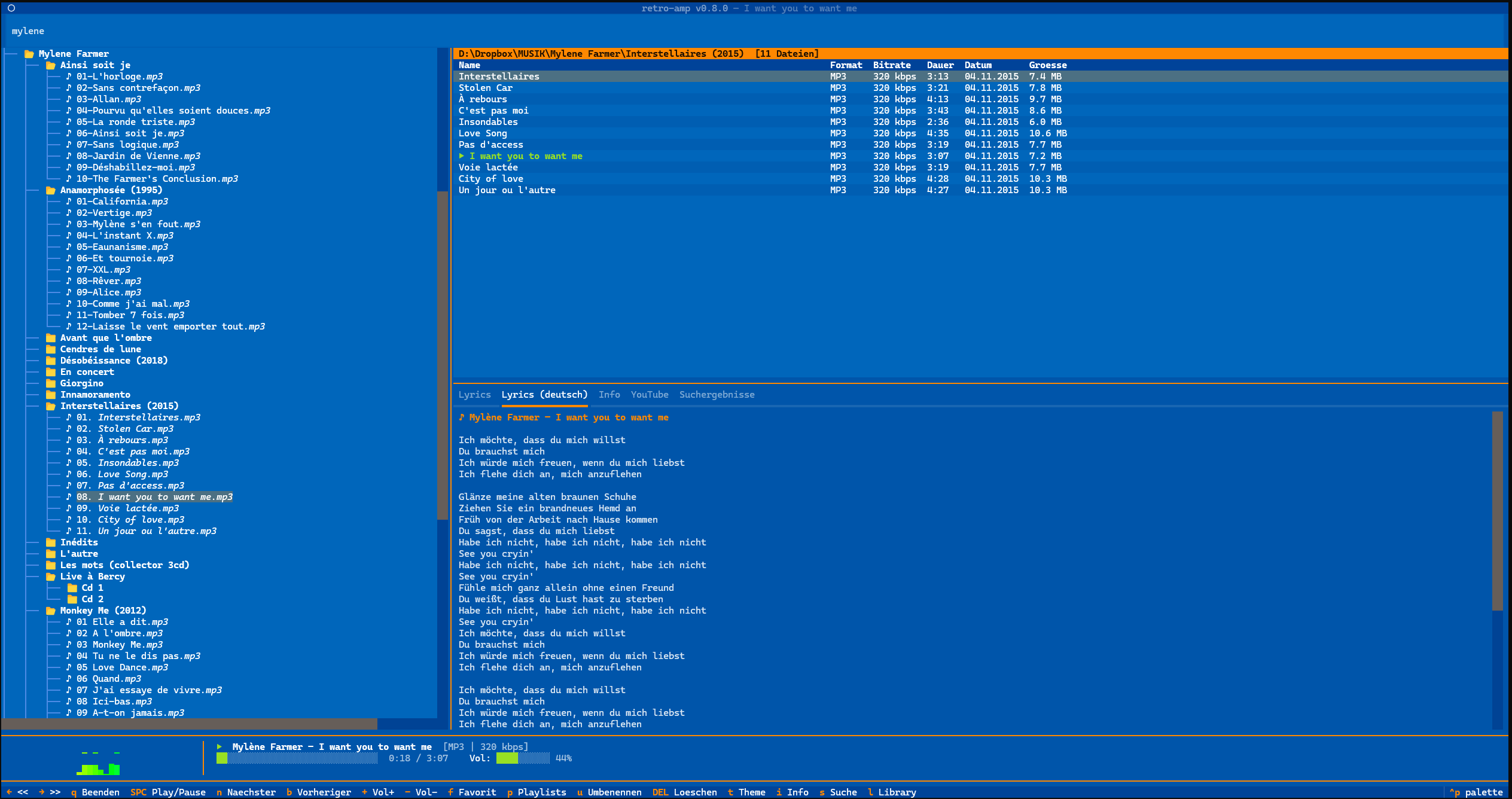 |
| Classic Terminal — phosphor green | Boing — blue/orange |
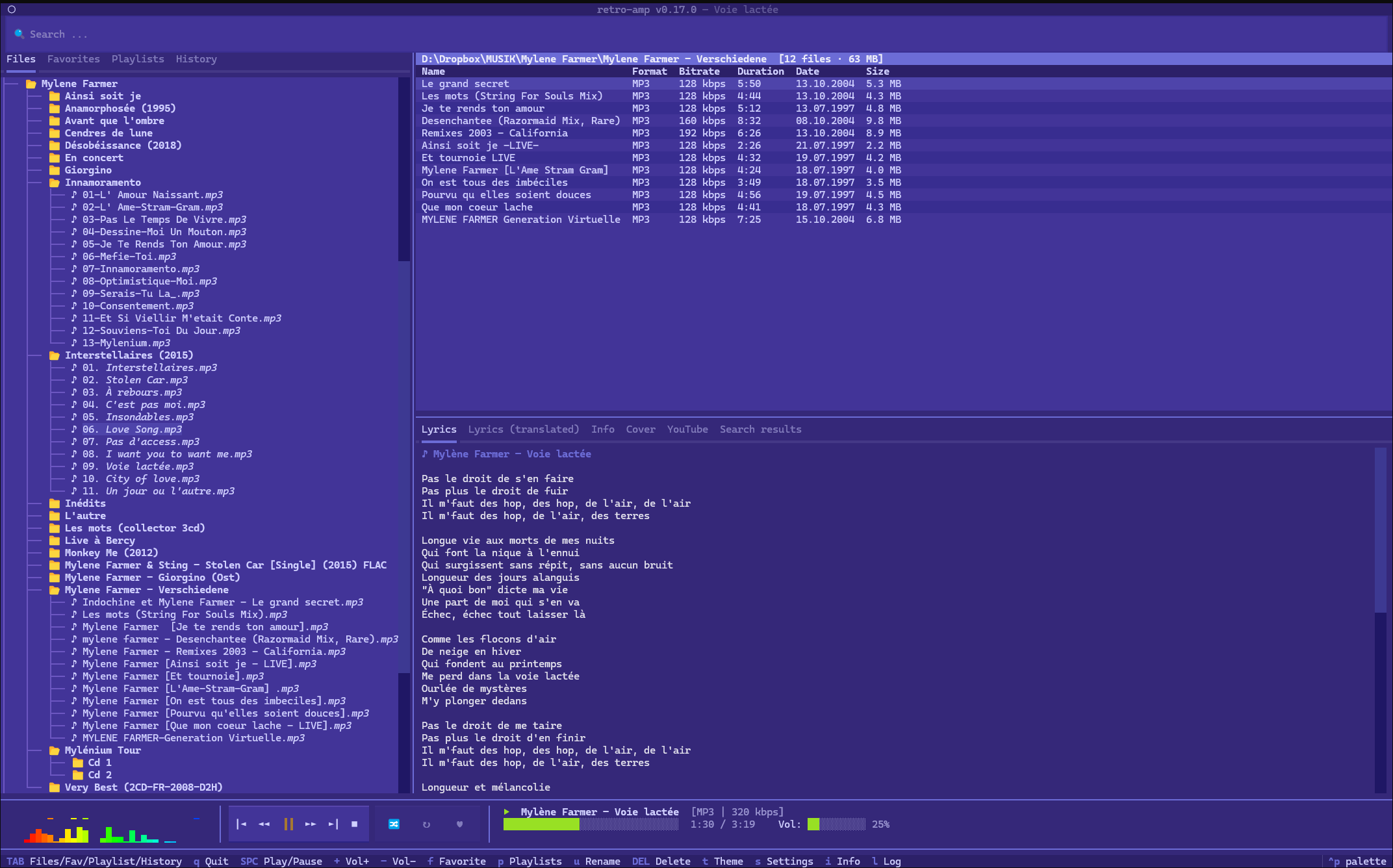 |
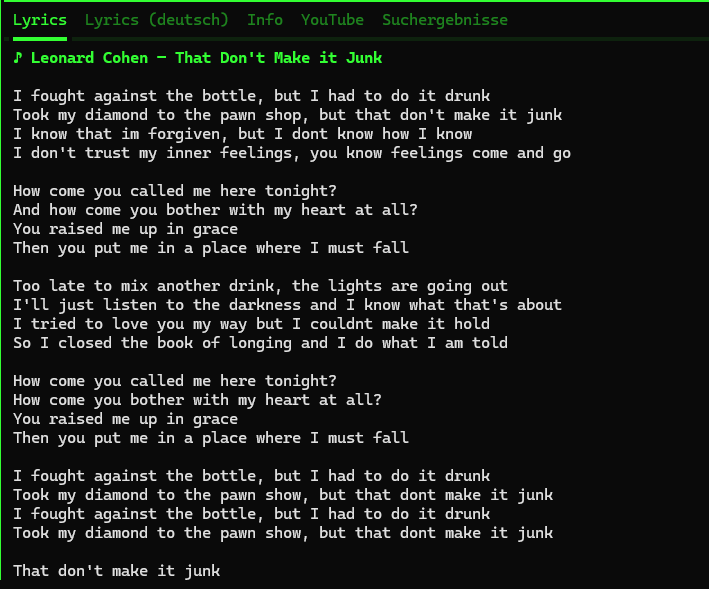 |
| Brotkasten — YouTube links | Lyrics — original (English) |
Installation
One-Click Installer
No dependencies needed — no Python, no Git.
Linux / macOS:
curl -fsSL https://github.com/michaelblaess/retro-amp/releases/latest/download/install.sh | bash
Windows (PowerShell as Administrator):
irm https://github.com/michaelblaess/retro-amp/releases/latest/download/install.ps1 | iex
Installation Paths
| Platform | Path |
|---|---|
| Linux | ~/.local/bin/retro-amp |
| macOS | /usr/local/bin/retro-amp |
| Windows | C:\Program Files\retro-amp\retro-amp.exe |
Optional Dependency
For M4A/AAC playback, ffmpeg is required. Without ffmpeg, all other formats play normally — only M4A/AAC is skipped (with a log message).
# Windows
choco install ffmpeg        # or: scoop install ffmpeg / winget install ffmpeg

# Linux
sudo apt install ffmpeg

# macOS
brew install ffmpeg
Run without installing (uv)
With uv installed, one line fetches and starts it:
uvx retro-amp ~/Music
Manual (Python >= 3.12)
pip install retro-amp
retro-amp
The latest state of main, before the next release:
uvx --from git+https://github.com/michaelblaess/retro-amp retro-amp ~/Music
From Source
Needs uv. bootstrap creates the .venv,
installs all dependencies from uv.lock and the Nuitka build tool.
git clone https://github.com/michaelblaess/retro-amp.git
cd retro-amp
.\bootstrap.ps1     # Windows      (Linux/macOS: ./bootstrap.sh)
.\run.ps1           # start it      (Linux/macOS: ./run.sh)
Usage
retro-amp                     # Start with default music folder
retro-amp /path/to/music      # Start in a specific folder
retro-amp song.mp3            # Play a file directly
retro-amp --lang en           # Start with English UI
retro-amp --version           # Show version
Features
- Folder browser — Left panel with directory tree, automatically filters audio files. Right-click opens a context menu: for folders play, expand/collapse, collapse all, add to playlist, set as music library, rename and delete - for files also favorite and automatic title completion
- Quick-jump sidebar — At the top of the Files tab: Home, Music (= configured library), XDG folders (Downloads, Desktop, Documents, Pictures, Videos) and accessible drives. Clicking an entry switches the tree root temporarily — the persistent library stays untouched, the friendly label (e.g.
💾 C:\,📁 Downloads) is also shown as the tree root. The sidebar starts collapsed as a single▸ Quick accessline - click it or pressOto expand it; the state is remembered - Favorites view — All favorites as a tree, toggle with TAB. A track started there keeps playing within the favorites: when it ends, the next favorite in the list follows, not the next track of the album. Next, previous, shuffle and repeat apply to the favorites as well. Starting something from the file table or the folder tree afterwards switches back to playing the folder. The playing track carries a ▶ in the tree. "Play" in the context menu of the root plays all favorites from the top, on a group only the favorites of that folder. The transport bar shows, after the format info, which list is playing and the position in it (
★ Favorites 3/19, for a playlist♫ Name 2/5). In a narrow window the hint first shrinks to★ 3/19and then disappears, so the title stays readable - Context menus everywhere — Right-click an entry in favorites, history, search, playlists or the file table: play, add or remove favorite, add to playlist and "show in folder tree" (switches to the files tab and marks the file there). The file table also offers rename, delete and automatic title completion, the playlist tree "play playlist" and "remove from playlist". On group nodes expand/collapse and collapse all. Entries whose file has disappeared are greyed out
- Playlist view — Playlists as a tree, play or remove songs directly
- File table — Right panel with name, format, bitrate, duration, date and size (via mutagen). Clicking a column header sorts by that column, a second click reverses the direction. The ▲/▼ arrow marks the active sort, and the playback order follows the visible sort order.
- Audio playback — MP3, M4A/AAC, OGG/Opus, FLAC, WAV, MOD/XM/S3M, SID (via pygame.mixer + pyogg + ffmpeg)
- Spectral visualizer — Real FFT analysis, 5 display modes (Bars, Blocks, Scope, Matrix, LCD VU meter in cassette-deck style). Every mode takes its colors from the current theme; the old fixed rainbow is still available as a setting. Switch mode by right-clicking the visualizer or configure it in the "Visualizer" settings tab.
- Studio look — All surfaces drawn by retro-amp itself derive their colors from the theme: level meter, LCD display, transport keys, position and volume bars, separators. Level behavior follows a real peak meter — decay in dB per second (independent of frame rate), peak hold, ring-out on stop instead of a frozen picture.
- Synced lyrics — Time-stamped lyrics from lrclib.net, color-synced (played/current/upcoming), click-to-seek on any line, auto-scroll with a 3s timeout after manual scrolling
- Liner notes — Wikipedia info on the current artist (key I), cached automatically
- Album cover art — Embedded covers from audio tags (ID3, FLAC, MP4) or image files in the folder (cover.jpg, folder.jpg, etc.), rendered as Unicode half-blocks via Pillow
- Global search with history — Search files across the whole library; clicking the search field shows the last 20 queries, typing filters matching entries and highlights hits (persisted in SQLite). Hits appear in the "Search" tab on the left as a tree, grouped by parent directory — when several hits share the same album folder, the path is shown only once. The search ignores accents and special characters:
eternitafindsEternità,gruenandgrunfindGrün,dont stopfindsDon't Stop,ac dcfindsAC/DC - Cloud files - If a file is only stored online (Dropbox or OneDrive "online only") and cannot be fetched, retro-amp says so instead of reporting a misleading "corrupt mp3 file"
- Playlists — Stored in the SQLite database, default playlist "Favorites". A track started in the playlist tree keeps playing within its playlist, just like the favorites. Markdown playlists from older versions are imported once at startup.
- Shuffle & repeat — Shuffle mode (X) and Repeat Off/All/One (R), combinable
- 41 retro themes — vintage 8-bit, terminal, Unix workstation, watch, comic-pulp and 80s-pastel palettes (see textual-themes)
- Settings dialog — tabbed settings (key S): library default directory, cover renderer, visualizer mode, database journal mode, history, auto-title (MusicBrainz / AcoustID API key), language, plus a storage tab that opens the data folders (settings.json, database, caches)
- Footer tooltips — hover over any key in the footer to see a full description of what the command does
- Clickable links — links in the About dialog, Wikipedia source and YouTube panel open on a normal click (no Ctrl needed) and highlight on hover
- Multilingual — German (default) and English, switchable via
--langor the Settings dialog (Language tab) - Session recovery — After a crash, the last track and folder are restored (without auto-play)
- Crash guard — An unexpected error opens a dialog with a copyable error report instead of crashing the app — you decide whether to continue or quit
- Debug log — Detailed log with artist/title, paths, events (key L). Right-click the log panel for a context menu — copy, export to a text file, or hide it. A splitter above the panel resizes it
- File management — Rename (U) and delete (DEL) directly from the player
- Auto-title (fill in missing titles) — For files that only carry a track number (
01.mp3,Track 07.mp3), keyGgathers title proposals from three sources — embedded ID3 tags, AcoustID audio fingerprint and the MusicBrainz tracklist — and shows a preview dialog before anything changes. Confirmed matches are preselected, the heuristic MusicBrainz tracklist is not. Accepted files are renamed toNN - Title.extand the title is written into the tag; see the Auto-title section - Settings persistence — Volume, last folder, theme and language are saved
- Resizable panels — The mouse can freely adjust the size between the file browser on the left and the file table/lyrics on the right (vertical splitter), as well as between file table and lyrics (horizontal splitter). The layout is persisted in settings.
- File association — Double-click an audio file to open retro-amp directly
- Single instance — A second double-click sends the track to the running instance
- Terminal tab title — The terminal tab shows the playing track; set before Textual starts and updated live during playback
Keybindings
The key map is switchable (Settings -> Keyboard). There are two styles, and
vim navigation can be added to either. Press ? at any time to see what is
currently bound.
Without an explicit choice the operating system decides: the classic style on macOS, because the system claims several function keys, function keys everywhere else.
Classic (letters only)
| Key | Action |
|---|---|
Space |
Play / Pause |
+ - |
Volume |
Z V B |
Previous track / Stop / Next track |
< > |
Seek 5 seconds back / forward |
/ |
Global search |
O |
Expand / collapse quick access |
TAB |
Cycle view: Files → Favorites → Playlists → History |
↑ ↓ |
Navigate list |
Enter |
Play track / Open folder |
F |
Toggle favorite |
P |
Playlist menu |
U |
Rename file |
G |
Auto-title (fill in missing titles) |
DEL |
Delete file |
T |
Cycle theme |
S |
Settings |
I |
Info / About |
L |
Toggle debug log |
C |
Copy debug log |
X |
Toggle shuffle |
R |
Repeat: Off → All → One |
Q |
Quit |
? |
Key binding overview |
The transport keys Z V B follow Winamp. They are not listed in the footer because the control bar offers the same functions as buttons - clicking still works.
With function keys
The function key is added next to the letter, it does not replace it. So
everything above still applies, with two exceptions: L and G move out of the
way because vim navigation needs those letters.
| Key | Action |
|---|---|
F1 |
Info / About |
F2 |
Settings |
F3 |
Global search |
F4 or Alt+L |
Toggle debug log (no longer L) |
F7 |
Playlist menu |
F8 |
Rename file |
F9 or Alt+G |
Auto-title (no longer G) |
F10 |
Toggle favorite |
F5 and F6 stay free. The sibling applications put refresh and details there,
and retro-amp has neither.
Vim navigation
Optional, active in the file list and all trees while one of them has focus.
| Key | File list | Tree |
|---|---|---|
j k |
line up and down | line up and down |
Ctrl+U Ctrl+D |
page up and down | page up and down |
g G |
to start and end | to start and end |
h l |
column back and forth | parent node, expand |
In the classic style this takes the keys L and G away from the application.
That is reported in the debug log, and the function key style has already moved
both.
Custom bindings
In settings.json under keymap_custom, mapping an action to a list of keys:
"keymap_custom": { "cycle_theme": ["alt+t"], "toggle_log": ["f4"] }
Anything that goes wrong - an unknown action name, a key that takes the last one away from another action - is reported in the debug log.
File Association
retro-amp can be registered as the default player for audio files.
Windows (PowerShell):
powershell -ExecutionPolicy Bypass -File register-file-types.ps1
Windows (CMD):
register-file-types.bat
Linux:
./register-file-types.sh
Double-click an audio file to start retro-amp. If it is already running, the new track is sent to the existing instance (single-instance).
Themes
Press T to cycle through themes, or use the theme picker (Ctrl+P → "theme").
retro-amp registers all themes from the textual-themes package (41 themes — dark + light, from 8-bit through terminal phosphor to 80s-pastel and comic-pulp). The full gallery with a live carousel: michaelblaess.github.io/textual-themes.
Migrating from older versions: retro-amp 0.16+ migrates stored theme slugs automatically on load — anyone who previously had e.g.
c64as their favorite theme ends up on the renamedbrotkastenwithout doing anything.
Spectral Visualizer
- Real FFT-based analysis (stdlib
cmath, no numpy) - 2048-point FFT with Hann window
- 32 log-scaled frequency bands (20 Hz – 18 kHz)
- Colors from the theme: the bands run as a gradient across the theme's three level colors, so an amber monitor gets an amber meter. The fixed rainbow (red → yellow → green → cyan → blue) remains available for Bars and Scope via the "Rainbow" checkbox in the Visualizer settings tab.
- Peak meter behavior: bars fall at a fixed rate in dB per second, so the picture stays the same regardless of frame rate. A peak is held for at least one analysis window and then falls more slowly than the bar, which keeps the marker visible above it.
- On stop the display rings out instead of freezing
- 3-row multi-row display (24 height levels)
- PCM loading in a background thread
Playlists
Playlists live in the SQLite database at ~/.retro-amp/retro-amp.db.
Earlier versions kept them as Markdown files in ~/.retro-amp/playlists/.
Those are imported once at startup and removed afterwards — nothing to do by
hand.
F— Add/remove a song to favoritesP— Playlist menu: create a new one, load an existing one, add a song
Auto-title
Files that only have a track number in the name (01.mp3, Track 07.mp3) can
get their real titles filled in. Press G on a folder — retro-amp gathers
proposals and shows a preview dialog (confirm / cancel) before touching
anything. Rows without a reliable match stay unchanged.
Four sources, in order of certainty:
- Embedded ID3 tag — deterministic, preselected. A generic placeholder tag
(
Track 01,Untitled) is treated as missing so a real title can be found. - AcoustID audio fingerprint — identifies the title from the actual audio
(acoustid.org); the most reliable online source,
preselected. Requires the
fpcalctool (Chromaprint) and a free Application API key (Settings → Auto-title). Off by default. - MusicBrainz tracklist — matches folder = album and filename number = track against the MusicBrainz tracklist. This is heuristic — only an exact track-count match with plausible durations is accepted — so it is shown in yellow and not preselected; you confirm it. On by default.
- Filename fallback — last resort: if no source finds a title but the
filename carries one (
01 Jonny Controletti.mp3), the title is taken from the filename. Not preselected. On by default.
Accepted rows are renamed to NN - Title.ext and the title is written into the
file's tag. When the filename already contains the title (only the tag was
missing or generic), only the tag is written — the file is not renamed. The
currently playing file is unloaded for the change and resumed at the same
position; playlist and history paths are updated automatically.
Architecture
Clean architecture with a strict dependency rule:
src/retro_amp/
├── domain/           # Models, protocols — no external imports
│   ├── models.py     #   AudioTrack, PlayerState, Playlist
│   └── protocols.py  #   AudioPlayer, MetadataReader, PlaylistRepository
├── services/         # Business logic — imports domain/ only
│   ├── player_service.py
│   ├── playlist_service.py
│   └── metadata_service.py
├── infrastructure/   # Implementations — pygame, mutagen, JSON
│   ├── audio_player.py    # PygameAudioPlayer
│   ├── spectrum.py        # SpectrumAnalyzer (FFT)
│   ├── metadata_reader.py # MutagenMetadataReader + cover-art extraction
│   ├── sqlite_playlist_repository.py  # SqlitePlaylistRepository
│   ├── playlist_migration.py          # one-time import of old .md playlists
│   ├── settings.py        # JsonSettingsStore
│   ├── session.py         # Crash recovery (session.json)
│   └── single_instance.py # Single-instance lock + play request
├── widgets/          # Textual widgets
├── screens/          # Textual ModalScreens
├── i18n.py           # Internationalization (de/en)
├── locale/           # JSON language packs (de.json, en.json)
├── themes.py         # Re-export from textual-themes
└── app.py            # Composition root
Development
# Setup (uv: .venv + dev dependencies + Nuitka)
git clone https://github.com/michaelblaess/retro-amp.git
cd retro-amp
.\bootstrap.ps1     # Windows      (Linux/macOS: ./bootstrap.sh)

# Tasks (poethepoet, defined in pyproject.toml)
uv run poe test         # pytest
uv run poe typecheck    # mypy strict
uv run poe lint         # ruff
uv run poe run          # start retro-amp
Local build (standalone binary)
Nuitka compiles retro-amp to a native, self-contained binary that runs
without a Python install (one distributable archive per OS). One script per OS;
each runs uv sync first and writes to dist/:
.\compile-win64.ps1     # Windows -> dist/retro-amp-vX.Y.Z-win64.zip
./compile-linux.sh      # Linux   -> dist/retro-amp-vX.Y.Z-linux-x86_64.tar.gz
./compile-macos.sh      # macOS   -> dist/retro-amp-vX.Y.Z-macos-<arch>.tar.gz
Nuitka needs nuitka in the venv (uv pip install nuitka) and a C compiler —
Windows: MSVC; Linux: gcc patchelf python3-dev; macOS: Xcode Command Line Tools.
Nuitka does not cross-compile — build each OS on that OS.
Create a Release
git tag v0.4.0
git push origin v0.4.0
# GitHub Actions automatically builds the Windows/macOS/Linux installers
Tech Stack
| Component | Library |
|---|---|
| TUI framework | Textual >= 8.2.6 |
| Rich text | Rich >= 13.0 |
| Audio playback | pygame.mixer >= 2.5 |
| Audio metadata | mutagen >= 1.47 |
| Album cover art | Pillow >= 10.0 |
| Cover rendering (TGP/Sixel) | textual-image >= 0.12 |
| Themes | textual-themes >= 0.8 |
| UI widgets (about dialog, crash guard, settings dialog, search history, context menu, splitter) | textual-widgets >= 0.25 |
| Lyrics API | lrclib.net (synced + plain) |
| Title lookup (fingerprint) | AcoustID + Chromaprint fpcalc |
| Title lookup (tracklist) | MusicBrainz |
| Testing | pytest, pytest-asyncio, pytest-cov |
| Type checking | mypy (strict) |
Credits
Synced lyrics, album art rendering, and session recovery were inspired by ytm-player — a YouTube Music player built with Textual.
Multiple visualizer modes and the "player-first, keyboard-driven" UX approach were inspired by cliamp (cliamp.stream) by @bjarneo — a Winamp-inspired terminal player written in Go.
Pixel-perfect cover rendering via TGP (Kitty protocol) and Sixel is powered by the wonderful textual-image library by @lnqs — many thanks!
License
Apache License 2.0 — see LICENSE.
Author
Michael Blaess — GitHub
1 maintainer

Metadata
1 maintainer
Release files for retro-amp 0.35.2
For a detailed explanation of source distributions (sdists) and built distributions (wheels), please see the package formats documentation.
Source distribution (sdist)
| File | Size | Uploaded | |
|---|---|---|---|
| retro_amp-0.35.2.tar.gz | 231.8 kB | Details |
Built distribution (wheel)
| File | Interpreter | ABI | Platform | Reset |
|---|---|---|---|---|
| retro_amp-0.35.2-py3-none-any.whl | Python 3 | none | any | Details |
Total release size: 439.6 kB
Release files / retro_amp-0.35.2.tar.gz
| Download URL | retro_amp-0.35.2.tar.gz |
|---|---|
| Size | 231.8 kB |
| Tags | Source |
|
SHA-256 checksum How to use checksums |
d2256125d827159b7dcb71c3580c1ee6153e35bddc92379c6971ed20c57a2a8b
|
|
BLAKE2b-256 checksum How to use checksums |
f6d17dea8f289b7cad5b41e8553bf3c98967fecb696cb7159230bd004cc809a9
|
| Upload date | |
|
Uploaded using Trusted Publishing? What is trusted publishing? |
Yes |
| Uploaded via |
twine/7.0.0 CPython/3.13.14
|
Provenance
Provenance describes where a file came from. On PyPI, provenance is shared via attestations, which provide a verifiable record of the build or publishing details. View details, limitations and caveats.


PyPI Publish Attestation
PyPI verified that this artifact, at this checksum, originated from the publisher listed below.
Signed by GitHub Actions, verified by PyPI on Oct 5, 2026.
Transparency logRelease files / retro_amp-0.35.2-py3-none-any.whl
| Download URL | retro_amp-0.35.2-py3-none-any.whl |
|---|---|
| Size | 207.8 kB |
| Tags | Python 3 |
|
SHA-256 checksum How to use checksums |
cf8c0c6f55f8ddb024a4f63177106c064d98e14c3623a23adfcc592d9b09a997
|
|
BLAKE2b-256 checksum How to use checksums |
a93e48bf61bd290d100496db15afebb79ac981230ea860e71dfb3f92940e49ec
|
| Upload date | |
|
Uploaded using Trusted Publishing? What is trusted publishing? |
Yes |
| Uploaded via |
twine/7.0.0 CPython/3.13.14
|
Provenance
Provenance describes where a file came from. On PyPI, provenance is shared via attestations, which provide a verifiable record of the build or publishing details. View details, limitations and caveats.
PyPI Publish Attestation
PyPI verified that this artifact, at this checksum, originated from the publisher listed below.
Signed by GitHub Actions, verified by PyPI on Oct 5, 2026.
Transparency log













