
retrocat
Retrospective cataloging for small libraries.




Install and use retrocat · Try the sample data · Use the call-number generator
retrocat helps libraries catalog their physical collections and bring their online catalogs back into sync without expensive commercial tooling or months of manual entry. Scan each book's ISBN and item barcode, run two commands, and get a MARC21 .mrc file ready for your library system, along with a focused worklist for the records that still need a person to look at them.
The name is short for retrospective cataloging: bringing an older or previously uncataloged collection into a modern library system. retrocat can handle a full shelf-by-shelf backfill, but its offline LC call-number generator also works as a standalone tool.
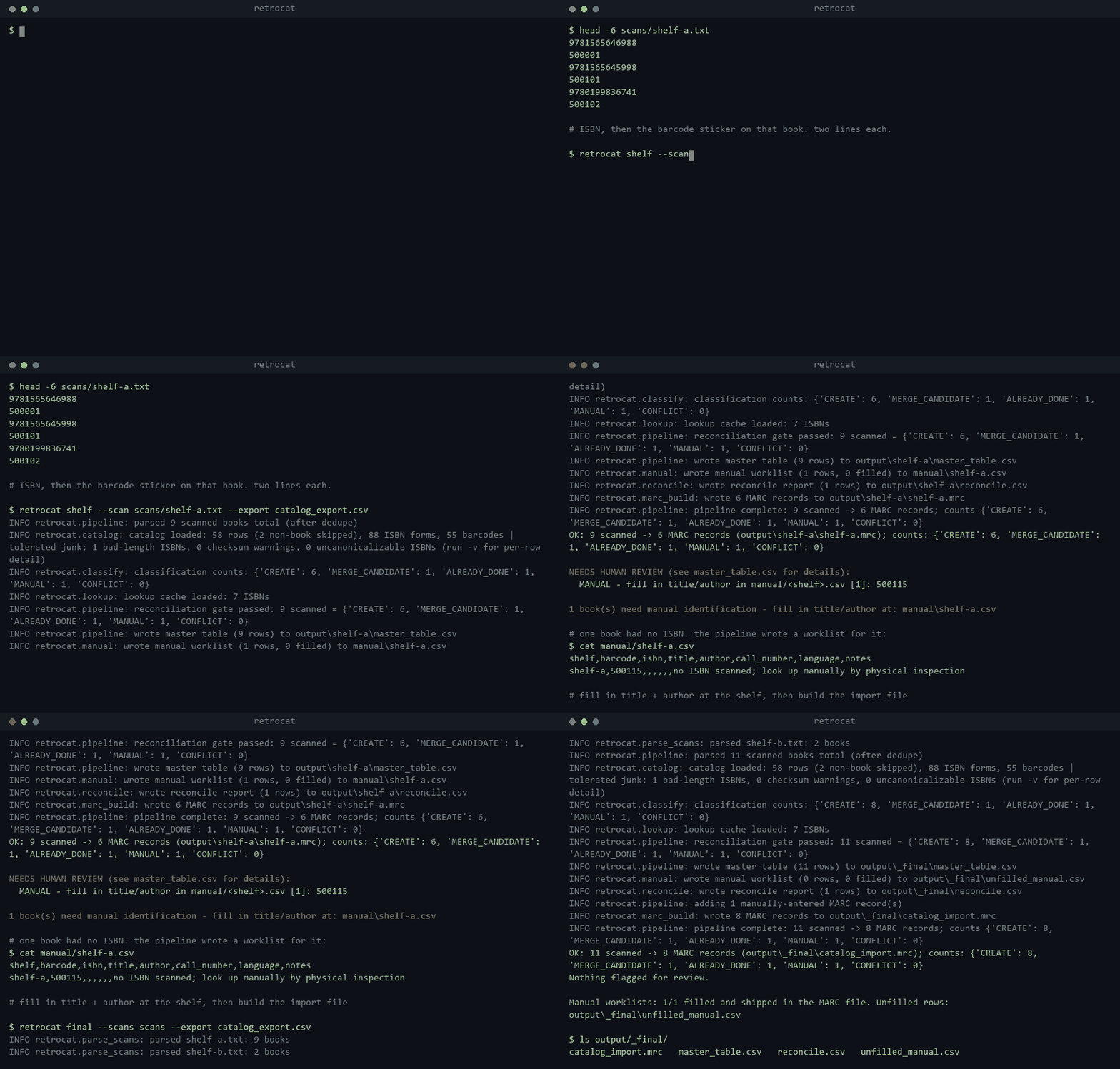
What it does
retrocat starts with two things most libraries can already produce: a barcode scan of the shelves and a CSV export of the existing catalog. It compares them to work out which books are new, which ones already exist online, which physical copies need to be attached to an existing record, and which records are too uncertain to import automatically.
Along the way, it:
- Validates ISBNs and item barcodes as they are scanned
- Treats ISBN-10 and ISBN-13 as two forms of the same identifier
- Reconciles shelf scans against an existing ILS export
- Looks up titles, authors, languages, LCCNs, and call numbers through Google Books, OpenLibrary, and the Library of Congress
- Generates an LC call number locally when a source does not provide one
- Produces one MARC resource with separate holdings for each physical copy
- Stops conflicts from quietly entering the import
- Writes a complete audit table and a much shorter manual worklist
The routine matching and record-building happen automatically and uncertain records stay visible and wait for a decision.
Why I built it
I built retrocat for a local nonprofit seminary in Richardson, Texas. Its library had more than 2,000 uncataloged books, and the original plan was expected to require four to six months of manual data entry.
The problem went beyond uncataloged books. The existing online catalog had missing or incorrect Library of Congress call numbers, mismatched barcodes, inconsistent ISBN formats, and records that did not reliably reflect what was actually on the shelves. I had to reconcile messy existing data, prevent duplicate records, correct catalog information, and reconnect physical copies to their digital records.
That unreliable data directly affected students. They used the online catalog to find out whether the library owned a book, whether a copy was available, and where it could be found. Because large parts of the physical collection were missing or incorrectly represented online, they could not trust the catalog to answer those questions.
retrocat was used to complete a clean 2,227-book catalog import, bringing the physical collection and digital catalog back into sync. After open-sourcing was approved, I moved the institution-specific values into configuration so other small academic, religious, nonprofit, and community libraries could use the same workflow.
Quick start
Before you begin
You will need:
- Python 3.11 or newer
- A USB barcode scanner, or another way to put one scanned code on each line of a text file
- A CSV export of the library's existing catalog
- Access to the MARC import tool in the target ILS
- A small sandbox or test import before touching the production catalog
The scanner does not need special integration.
1. Install retrocat
python -m pip install retrocat
Confirm that the command is available:
retrocat --help
2. Make a working folder
On macOS or Linux:
mkdir library-backfill
cd library-backfill
curl -O https://raw.githubusercontent.com/mrnouiouat/retrocat/main/sample/config.toml
mkdir scans
On Windows PowerShell:
New-Item -ItemType Directory library-backfill
Set-Location library-backfill
Invoke-WebRequest https://raw.githubusercontent.com/mrnouiouat/retrocat/main/sample/config.toml -OutFile config.toml
New-Item -ItemType Directory scans
Keep config.toml, the catalog export, and the scans folder together. Run the retrocat commands from this working folder unless you pass explicit paths for them.
3. Edit config.toml
The downloaded template is fully commented. Work through it once before scanning a real shelf.
In [library], set:
home_libraryto the library name your ILS already recognizeslocationandstatusto the values you want written on each copy, or leave them blank and let the ILS apply its import defaultsmarc_languageto the three-letter MARC language code that should be used when no source reports one
In [barcodes], describe the library's item barcodes:
lengthis the number of digits in an item barcodeminandmaxare optional plausibility checksvalid_new_rangeslists ranges assigned to unused stickers; set it to[]if the library does not have a predictable range
In [catalog.columns], map retrocat's fields to the exact column headings in the CSV export. For example:
[catalog.columns]
isbn = "ISBN"
barcode = "Barcode"
title = "Title"
author = "Author"
call_number = "Call Number"
resource_id = "Resource ID"
type = "Type"
Do not rename the export just to match this example. Change the values in config.toml to match the export you actually have. Set an optional column to "" if it is not present.
retrocat checks these names against the real CSV header before it reads any records. A misspelled ISBN or barcode column stops the run instead of making every book look new.
4. Add a Google Books key if you have one
Google Books works anonymously, but its anonymous quota can be slow or heavily rate-limited. A key is optional, but it is worth adding for a large backfill.
Create a file named .env in the working folder:
GOOGLE_BOOKS_API_KEY=your-key-here
OpenLibrary and the Library of Congress do not need keys. The sources fail independently, so one unavailable service does not end the whole run.
5. Export the current catalog
Export the existing catalog as CSV and place it in the working folder. The examples below call it catalog_export.csv, but the filename can be anything.
The export must include an ISBN column and an item-barcode column. Title, author, call number, internal record ID, and resource type are useful when the ILS makes them available.
retrocat tolerates ordinary export junk such as malformed ISBNs and non-book rows. It logs what it skips so the bad data does not disappear without explanation.
At this point, the folder should look roughly like this:
library-backfill/
    config.toml
    catalog_export.csv
    .env                  optional
    scans/
6. Scan one shelf
For a book with an ISBN, scan the ISBN first and the library's item barcode second:
9781565645998
500101
9780199836741
500102
Save the lines as a plain-text file such as scans/shelf-a.txt. Use one file per shelf or manageable scanning batch.
If a book has no ISBN, scan only its item barcode. retrocat recognizes it as a local book and sends it to the manual worklist. If an ISBN is missing its following barcode, or a scan does not fit the configured rules, the error names the file and line where scanning went off track.
The operator guide describes the two-pass scanning method used during the original project.
7. Process the shelf
retrocat shelf --scan scans/shelf-a.txt --export catalog_export.csv
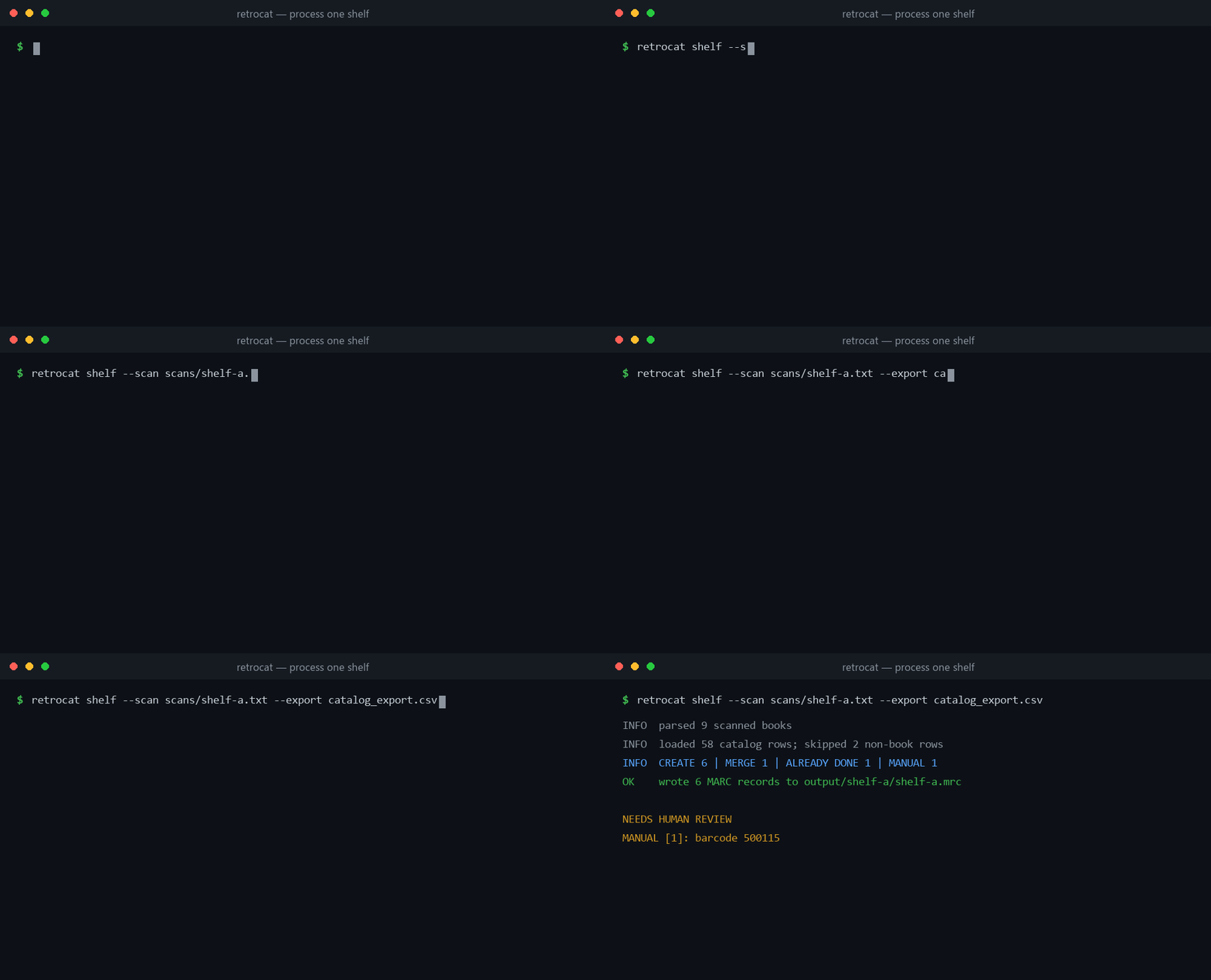
The command creates:
output/
    shelf-a/
        shelf-a.mrc
        master_table.csv

manual/
    shelf-a.csv
shelf-a.mrc is a shelf-level file for spot-checking. master_table.csv has one row for every scanned book and shows what retrocat decided, which metadata it used, where the call number came from, and how confident that result was.
The manual CSV contains only books that could not be completed automatically. The terminal prints the exact barcodes that need review, so you do not have to hunt through the full audit table to find them.
Every scanned item receives one of five results:
CREATE: make a new resource and copyMERGE_CANDIDATE: the resource appears to exist, but this physical copy needs to be added or mergedALREADY_DONE: the scanned barcode is already represented in the catalogMANUAL: no source could identify the book well enough to build the recordCONFLICT: the data is ambiguous, so output is blocked until someone reviews it
8. Fill in anything retrocat could not identify
Open manual/shelf-a.csv in Excel, LibreOffice, or another CSV editor. Its columns are:
shelf, barcode, isbn, title, author, call_number, language, notes
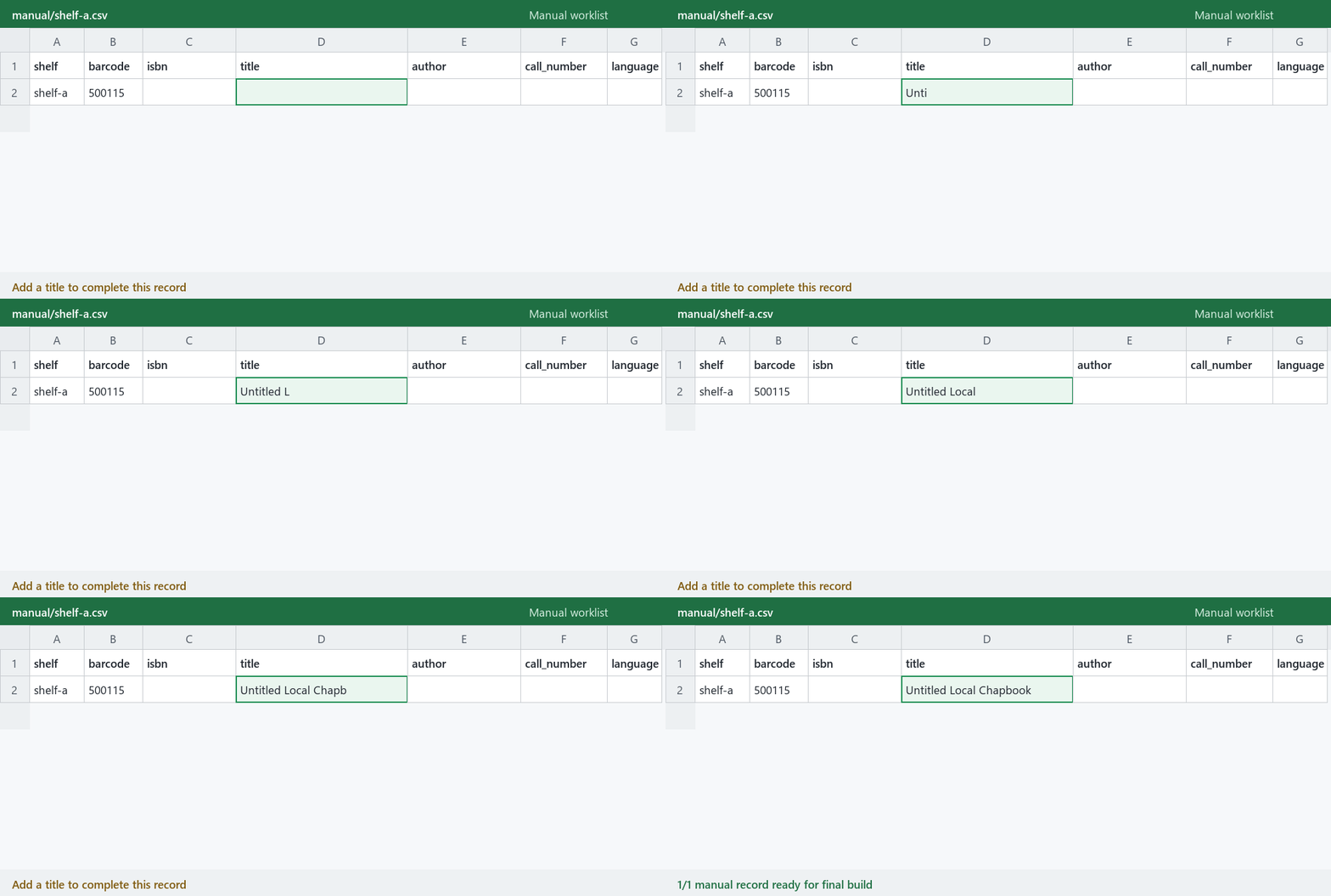
A row is usable once you supply a title. Add the author, call number, and language when you know them. If the call number is left blank, retrocat can build an LC-shaped fallback and mark it for review.
You can rerun the shelf command after editing the file. Values entered in the manual worklist are preserved instead of being overwritten.
If a run reports a conflict, inspect the corresponding rows in master_table.csv before going further. The --allow-conflicts flag will write the non-conflicting records and continue to exclude the conflicted books, but it should only be used after you understand what caused the conflict.
Repeat the scan, shelf command, and manual review for the rest of the collection.
9. Build the final import
When every shelf has been processed:
retrocat final --scans scans --export catalog_export.csv
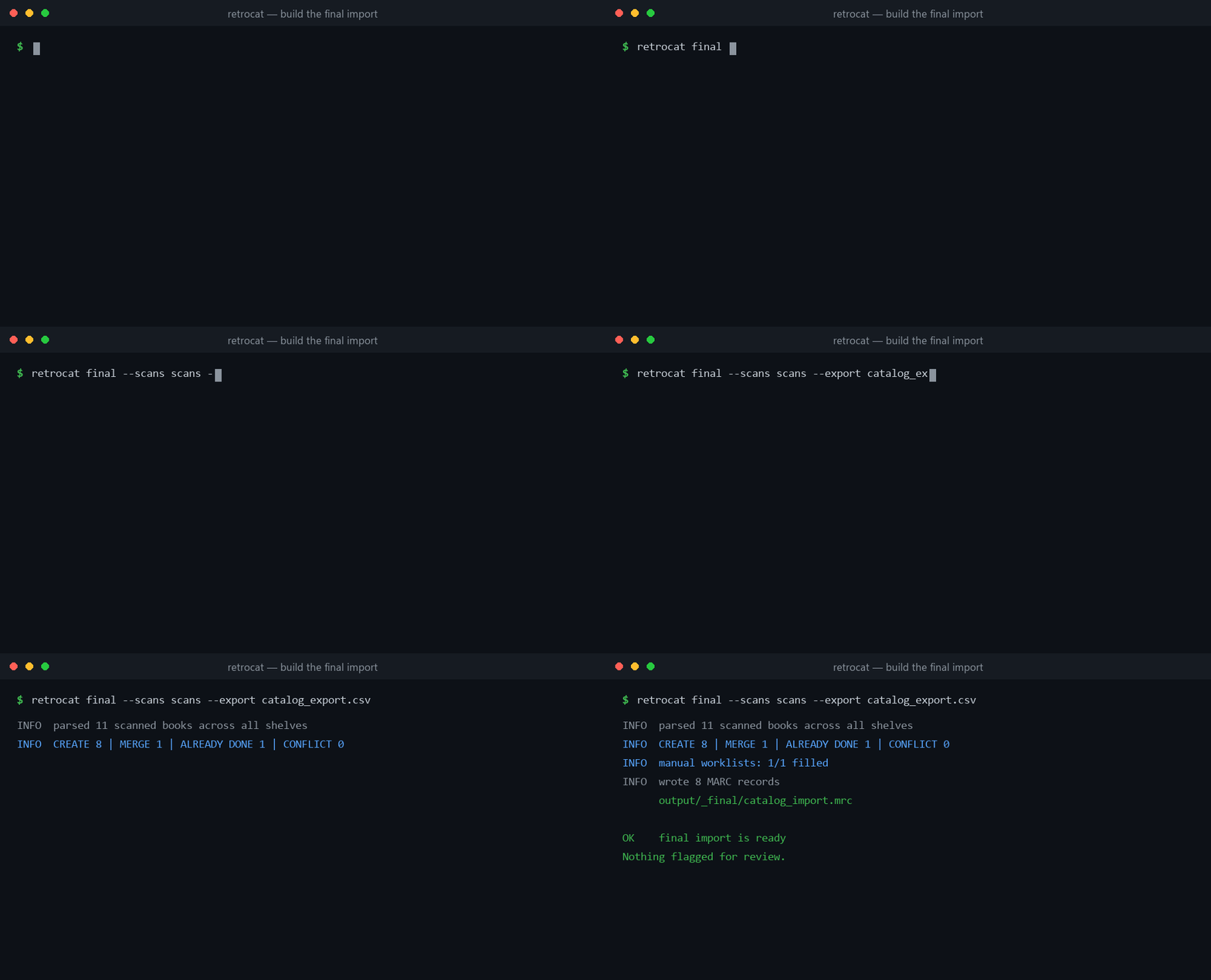
The final files are written under:
output/_final/
The MARC filename comes from [output].mrc_filename in config.toml. With the sample configuration, it is:
output/_final/catalog_import.mrc
retrocat rebuilds the final file from all scan files together. It does not concatenate the shelf-level .mrc files. That matters when the same title appears on more than one shelf: one resource can be written with a separate holdings pair for each physical barcode.
Before importing the final file, review output/_final/master_table.csv and confirm that the manual worklist is complete.
10. Test it in the ILS
MARC21 is widely supported, but the holdings fields used for location and status are not identical in every library system. Before a production import, load a representative file into the ILS sandbox and check:
- Title and author
- ISBN matching and merge behavior
- Call number
- Item barcode
- Home library and location
- Availability status
- A title with more than one physical copy
- At least one manually completed record
Back up the production catalog before the full import. retrocat writes import files; it does not connect to or edit the ILS database directly.
Try it with the sample data
The repository contains a small synthetic catalog and two shelf scans. The ISBNs are real, so the metadata step uses the live public services.
git clone https://github.com/mrnouiouat/retrocat.git
cd retrocat
python -m pip install -e .
cd sample
retrocat shelf --scan scans/shelf-a.txt --export catalog_export.csv
Open manual/shelf-a.csv and add a title for the unresolved book. Then run:
retrocat final --scans scans --export catalog_export.csv
The finished sample file will be at output/_final/catalog_import.mrc.
If anonymous Google Books requests are being rate-limited, the sample may pause while it backs off. Add a Google Books key to sample/.env or let the other sources finish independently.
There is also a sample/conflict-demo.txt file if you want to see the conflict gate refuse to write unsafe output:
retrocat shelf --scan conflict-demo.txt --export catalog_export.csv
Standalone LC call-number generator
The call-number command does not need config.toml, a catalog export, or a network connection.
Build a call number from an LC class, author, and year:
retrocat callnumber --lc-class BP130 --author "Garry Wills" --year 2017
BP130 .W55 2017
Generate only the Cutter:
retrocat callnumber --cutter Wills
W55
Add call numbers to a CSV:
retrocat callnumber --batch books.csv > books_with_callnumbers.csv
The input needs an lc_class column. It can also include author, title, year, and corporate. The output contains all of the original columns plus call_number.
The same functions can be imported in Python:
from retrocat.lc_call import build_call_number, cutter

print(cutter("Wills"))
print(build_call_number("BP130", author="Garry Wills", year=2017))
How retrocat handles messy data
The hardest part of the original project was deciding whether two imperfect pieces of data referred to the same physical book without creating another bad record.
Catalog exports often store ISBN-10, while scanners read ISBN-13. retrocat converts every valid ISBN into canonical ISBN-13 before comparing anything. That keeps the same title from looking new just because the scanner and ILS use different forms of the identifier.
It also validates the configured CSV column names before loading the export. Without that check, a renamed ISBN column could quietly disable matching and make an entire shelf appear uncataloged.
Metadata lookups are cached, transient failures are retried with bounded backoff, and one failing source does not take down the others. A temporary error is not cached as a permanent missing result.
When a source supplies a call number, retrocat keeps the source with it. When it has to infer the subject class and generate the rest locally, the number is marked low confidence and appears in the review digest. A plausible-looking guess never gets presented as equal to a number supplied by the Library of Congress.
For each distinct ISBN, retrocat writes one MARC resource record and one 852/876 holdings pair per physical barcode. Each generated record is read back through a MARC reader before it is written to disk.
The classification totals must also add back up to the number of scanned books. If they do not, or if unresolved conflicts remain, the normal MARC write is blocked.
Optional run analytics
Add --analytics-db to either pipeline command to keep local run history:
retrocat shelf --scan scans/shelf-a.txt --export catalog_export.csv --analytics-db .cache/runs.sqlite
retrocat final --scans scans --export catalog_export.csv --analytics-db .cache/runs.sqlite
Each execution appends a snapshot to SQLite and writes two additional files alongside the existing shelf or final outputs:
run_report.md: action counts, actual MARC resource/copy counts, pending identification, review totals, and call-number provenance.review_queue.csv: one row per item/issue, ordered by priority, shelf, and barcode, with the source scan line and a suggested next action.
Priority 1 covers conflicts, priority 2 covers identification and shelving
checks, and priority 3 covers estimates and call-number differences. A filled
manual record stays in the MANUAL action bucket but is counted separately
from pending identification. A manually completed book with a generated default
call number still gets a shelving check. A difference between existing and
resolved call numbers is a review request, not a confirmed error.
The database contains five tables: runs, actions, run_items, provenance,
and issues. Four views support analysis: run_summary, action_counts,
call_number_sources, and review_queue. For example, using a SQLite client:
SELECT run_id, status, scanned_total, marc_records, included_items,
       pending_manual, review_items, issue_count
FROM run_summary
ORDER BY started_at DESC, run_id;

SELECT priority, shelf, barcode, code, detail, next_action
FROM review_queue
WHERE run_id = :run_id
ORDER BY priority, shelf, barcode, code;
Each run stores its input paths, configuration, package version, and status.
Items retain scan-file/line provenance; call numbers retain the source label
already known to the resolver, with manual_default distinguishing generated
manual values. This does not establish field accuracy, preserve full input/API
snapshots, or attribute title/author values to individual metadata services.
SQLite preserves previous runs; the two report files describe the latest
successfully reported execution at that output location and include its run ID.
Use a separate database per library. Shelf and final runs overlap, so do not
sum their totals as collection progress. Store or back up the database outside
regenerable output; deleting .cache/runs.sqlite loses its history.
Failures inside the pipeline also get a run snapshot when storage is available. Early failures have unavailable item-derived metrics rather than a clean bill of health. Configuration errors before the pipeline starts are not recorded. Analytics failures log a warning and preserve the pipeline's original result; in that case, any older report is not evidence for the current execution.
The queue is an advisory CSV, not an editable approval system. Make corrections through the existing scan/manual/catalog workflow and rerun. Existing gates, MARC output, and reports retain their behavior. Analytics uses Python's built-in SQLite support, adds no dependencies, and performs no additional network calls.
Adapting it to another library
Most changes belong in config.toml, not in the Python code. The library name, location, status, barcode scheme, export column names, default language, and output filename are already configurable.
The bundled subject-to-LC-class map is a worked example based on a religious-studies collection. To use a different map, copy src/retrocat/data/lc_class_map.toml, edit it for the collection, and set [lookup].class_map_file to the copied file.
The main ILS-specific surface is the 852/876 holdings mapping in marc_build.py. Different importers may expect location and status in different subfields. Verify those fields against the target ILS documentation, or leave location and status blank in config.toml and let the importer apply its own defaults.
Production use and current limits
retrocat was used end to end to complete a clean 2,227-book import at the library where it was developed. It corrected the disconnect between the physical shelves and the online catalog, while keeping the records that needed judgment separate from the routine work.
It is still a batch cataloging tool, not a live two-way integration with an ILS. Books that cannot be identified need someone to fill in the worklist. Inferred subject classes need to be checked. Public metadata can be incomplete, and each new ILS needs its own sandbox test for holdings behavior.
Those are boundaries of the data, so at the end of the day, the tool's job is to automate the repeatable work and make the remaining uncertainty obvious.
Project documentation
- Operator guide: the physical scanning and shelf-by-shelf workflow
- System design: data contracts, invariants, and classification rules
- Validation status: the completed production deployment and checks for a new ILS
- Decision log: why the generalized version works the way it does
- Changelog: release history
Development
git clone https://github.com/mrnouiouat/retrocat.git
cd retrocat
python -m venv .venv
Activate the environment on macOS or Linux:
source .venv/bin/activate
Or on Windows PowerShell:
.venv\Scripts\Activate.ps1
Install the development dependencies and run the tests:
python -m pip install -e ".[dev]"
python -m pytest
This project has 303 fully offline tests, including golden-file and end-to-end coverage. HTTP calls are mocked, so the test suite does not depend on public APIs. CI runs it on Python 3.11, 3.12, and 3.13.
License
1 maintainer

Metadata
1 maintainer
Release files for retrocat 0.2.0
For a detailed explanation of source distributions (sdists) and built distributions (wheels), please see the package formats documentation.
Source distribution (sdist)
| File | Size | Uploaded | |
|---|---|---|---|
| retrocat-0.2.0.tar.gz | 102.3 kB | Details |
Built distribution (wheel)
| File | Interpreter | ABI | Platform | Reset |
|---|---|---|---|---|
| retrocat-0.2.0-py3-none-any.whl | Python 3 | none | any | Details |
Total release size: 165.4 kB
Release files / retrocat-0.2.0.tar.gz
| Download URL | retrocat-0.2.0.tar.gz |
|---|---|
| Size | 102.3 kB |
| Tags | Source |
|
SHA-256 checksum How to use checksums |
e1e96c0833216e34f144ceaee6aba4fa0578a2c7dcf154b8e6bbaff772befe3b
|
|
BLAKE2b-256 checksum How to use checksums |
23c9df90e00cea97a528d8d181959a0e8ae5b1bbb1204a039fe8e854f422e626
|
| Upload date | |
|
Uploaded using Trusted Publishing? What is trusted publishing? |
Yes |
| Uploaded via |
twine/7.0.0 CPython/3.13.14
|
Provenance
Provenance describes where a file came from. On PyPI, provenance is shared via attestations, which provide a verifiable record of the build or publishing details. View details, limitations and caveats.


PyPI Publish Attestation
PyPI verified that this artifact, at this checksum, originated from the publisher listed below.
Signed by GitHub Actions, verified by PyPI on Oct 2, 2026.
Transparency logRelease files / retrocat-0.2.0-py3-none-any.whl
| Download URL | retrocat-0.2.0-py3-none-any.whl |
|---|---|
| Size | 63.1 kB |
| Tags | Python 3 |
|
SHA-256 checksum How to use checksums |
913bed613b0f0683b79b4f5f67a866a1c6875d9b457b41e0d2169e8768436936
|
|
BLAKE2b-256 checksum How to use checksums |
a3fecb78f4fad3f9a201ab70634cc8a53938f50503216a7e244168f20da98f37
|
| Upload date | |
|
Uploaded using Trusted Publishing? What is trusted publishing? |
Yes |
| Uploaded via |
twine/7.0.0 CPython/3.13.14
|
Provenance
Provenance describes where a file came from. On PyPI, provenance is shared via attestations, which provide a verifiable record of the build or publishing details. View details, limitations and caveats.
PyPI Publish Attestation
PyPI verified that this artifact, at this checksum, originated from the publisher listed below.
Signed by GitHub Actions, verified by PyPI on Oct 2, 2026.
Transparency log













