
RETRO//GRID
A cyberpunk NFL gameday console for your second monitor.
It watches every live game and draws the plays worth seeing as lo-res neon diagrams, with Reddit's game threads down the right side.




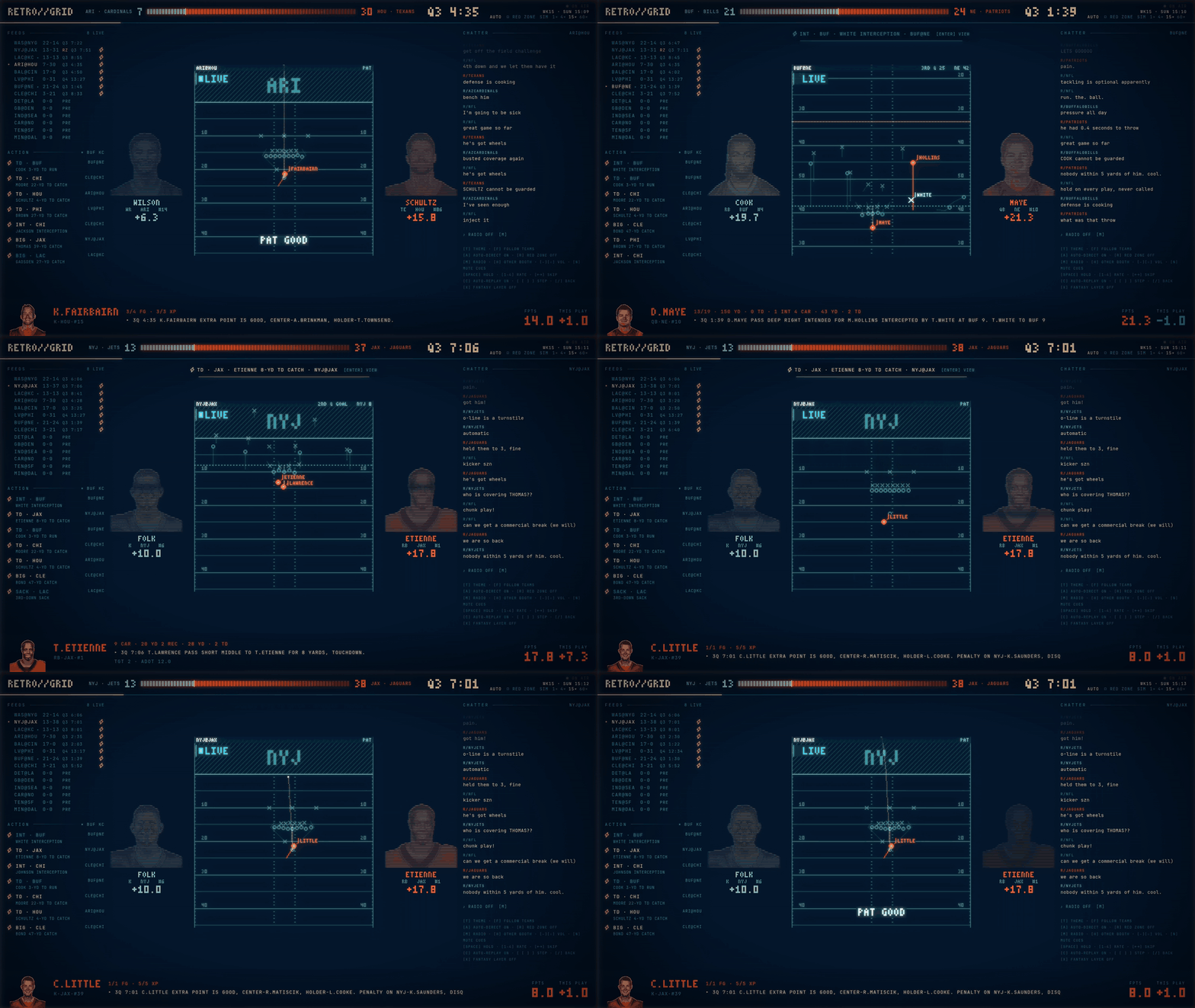
SIM SUNDAY at 15×, recorded straight off the app. The full minute at 1600×900 (mp4)
Why
Some games I want on the TV. Most of them I end up half-watching from my desk while I'm working on a project or playing something with my buddies, and the usual options are bad at that. A broadcast needs my eyes the whole time. A scoreboard tab tells me Buffalo scored and nothing about how. I wanted a window I could park on the side monitor that keeps track of all the games at once and mostly stays quiet. When something happens it draws the play, so ten seconds of looking over is enough to see the interception and who threw it.
The screen
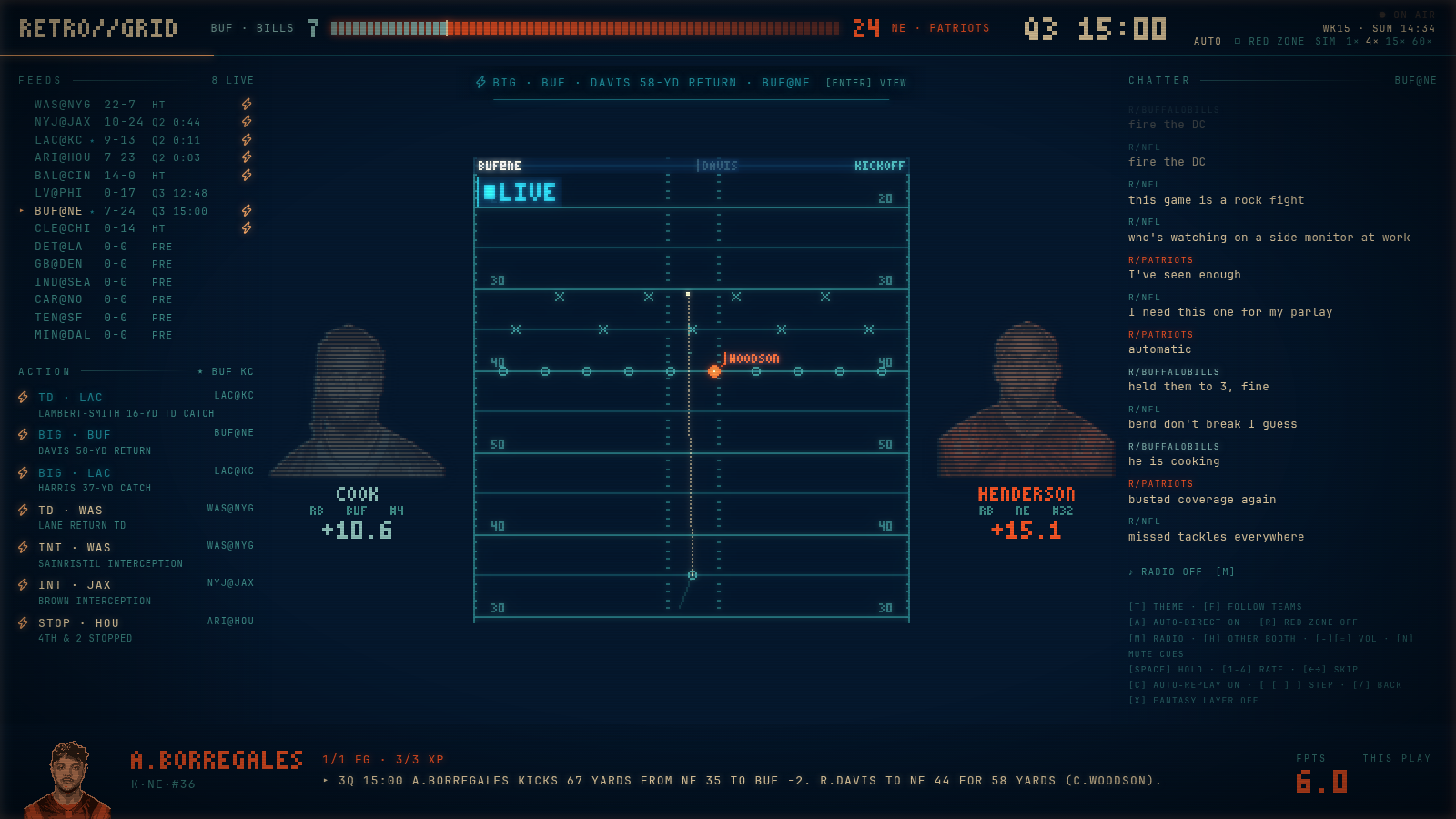
The left rail is the whole slate. FEEDS lists every game with its score and
clock, and a row picks up a bolt once its recent plays add up to enough heat,
or RZ while an offense is inside the 20. Under it, ACTION is a running list of
the plays that scored highest on a simple scale. Touchdowns, turnovers, 4th
downs, 25-yard passes and 15-yard runs are worth the most. A play in the 4th
quarter of a one-score game counts for more than the same play in a blowout,
overtime doubles it, and anything involving a team you follow (F) doubles it
again. Scores decay with age, so an early touchdown drops off the list by the
second half.
The field in the middle shows one play at a time. There is no video or tracking
feed behind it. The console takes the play-by-play sentence, works out a
formation, the routes and where the ball went, and animates that on the grid.
The corner of the field says LIVE, REPLAY or LAST PLAY so I can tell at a
glance whether I'm looking at something new. The two faces either side of it
are whoever has been hottest lately for each team, made from real headshots
pushed through a scanline filter. The strip along the bottom names whoever was
just involved, his stat line so far, and the official play-by-play line.
The right rail shows Reddit comments from r/nfl and both teams' subreddits for the game in focus.
With A on, the console picks its own shots and cuts to whichever game just
produced something. If six seconds go by with nothing new it replays the last
play.
RED ZONE
R follows whichever drive is inside the 20 and stays on it until the drive
ends, then moves to the next one. Followed teams get priority, then whoever is
closest to the goal line.
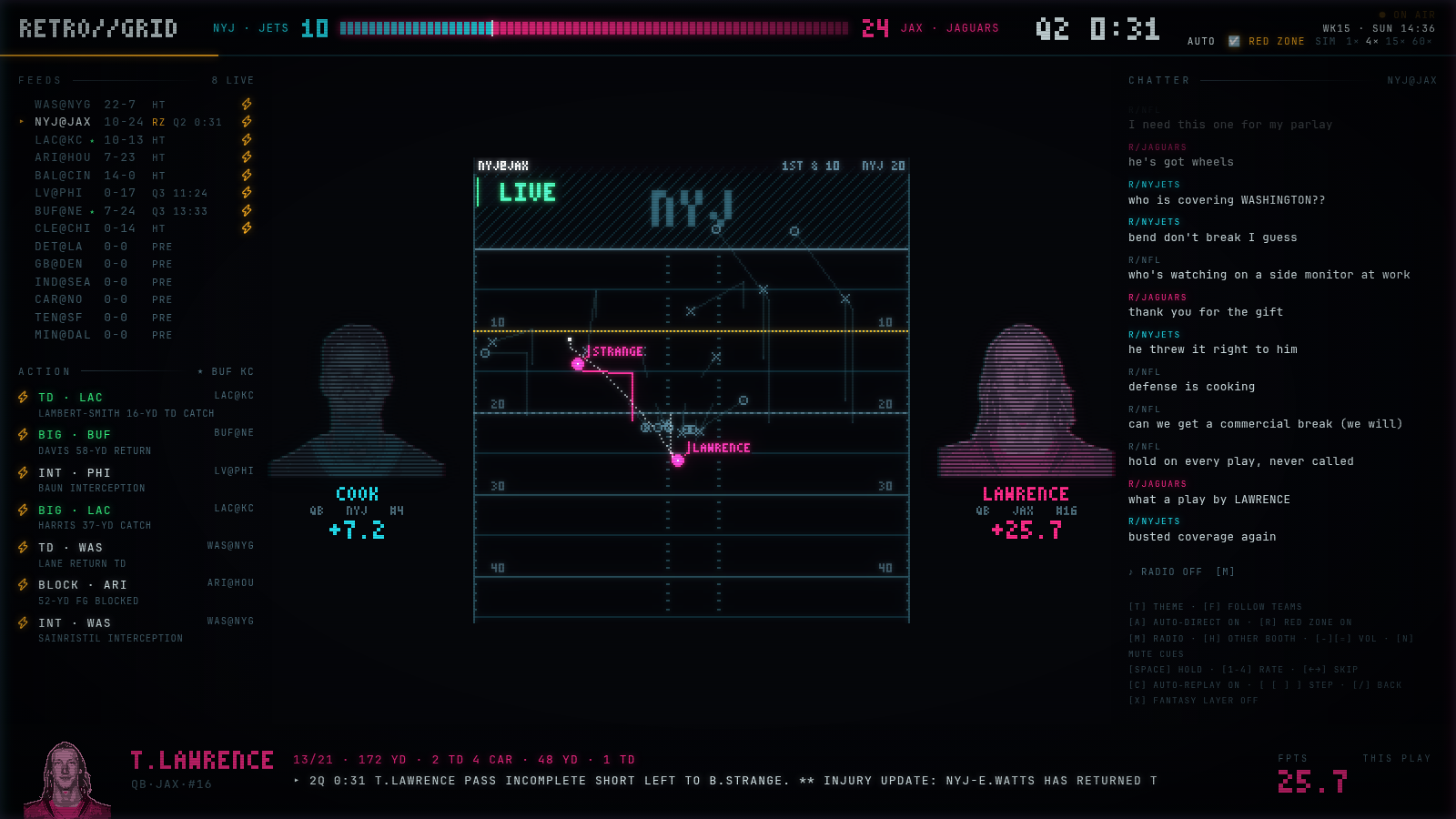
REEL
retrogrid reel is for Tuesday through Saturday. It loops the big plays of the
weeks already played on the same field, so the side monitor has something on it
when no games are. One loop is a Top 10 countdown for the latest week (each play
runs twice), your followed teams, two or three plays from every other game, then
the top five of a couple of older weeks. With two weeks cached that is about 15
minutes, and the game order and the older weeks change every loop.
Plays are ranked on win probability added from nflverse, so a 9 yard catch on 4th and 8 with a minute left beats a 60 yard touchdown in a blowout. A flat bonus keeps the 60 yarder in the show anyway, along with return touchdowns, blocked kicks, strip sacks and 50 yard field goals. A made kick under 50 yards only gets 60% of its WPA, because a walk-off chip shot is the dullest part of the drive that set it up. Every game gets at least 2 plays and at most 6 out of the week's 40.
A highlight means nothing outside its game, so each play opens on a card with
the week, the score going in, the clock, and the down and distance. The
scoreboard turns over when the play ends. The badge says HIGHLIGHT · WK 2 and
the lamp never pulses, because LIVE still means one thing. There is no real
video in any of this. NFL footage is licensed, so it is the same schematic
replay as LIVE.
At launch, and hourly while it runs, it asks nflverse whether the season file changed (one HEAD request per file) and ranks any new week. nflverse republishes overnight, so Sunday shows up on Monday morning. With nothing downloaded it ranks the shipped SIM SUNDAY slate, and that slate has no WPA, so it falls back to the ACTION weights.
Themes
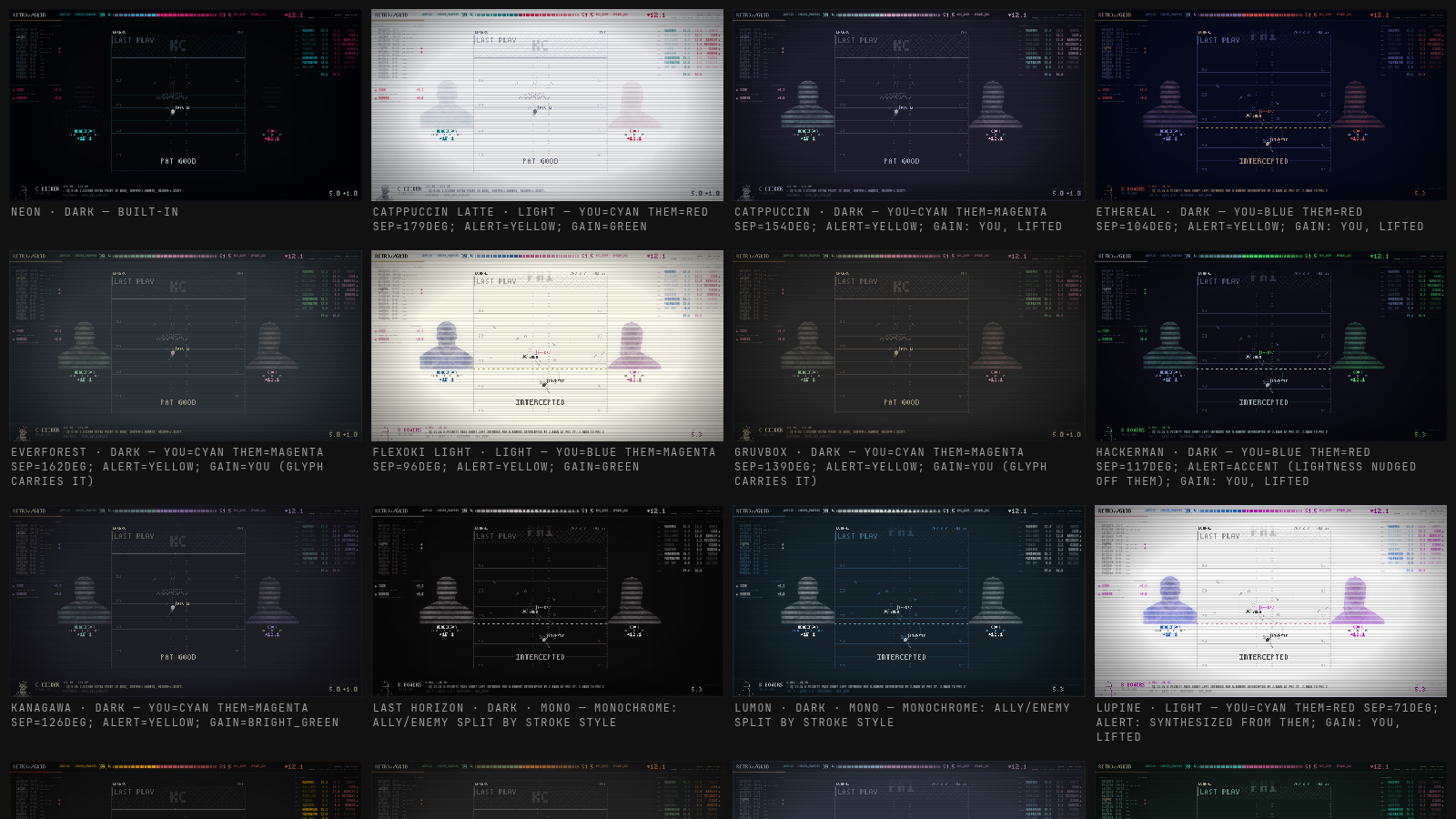
I run Omarchy, and the console follows its system theme
while running. Switch themes and the picture collapses to a line like an old
CRT, then comes back in the new colours. Omarchy themes don't know anything
about football, so a resolver picks which of the theme's colours stand for your
side, the other side, alerts and gains, and nudges them apart when two land too
close. It copes with light themes, and on monochrome ones it separates the
sides by stroke style. On other systems T opens a picker with the built-in
NEON palette and the stock Omarchy themes, which ship in the package.
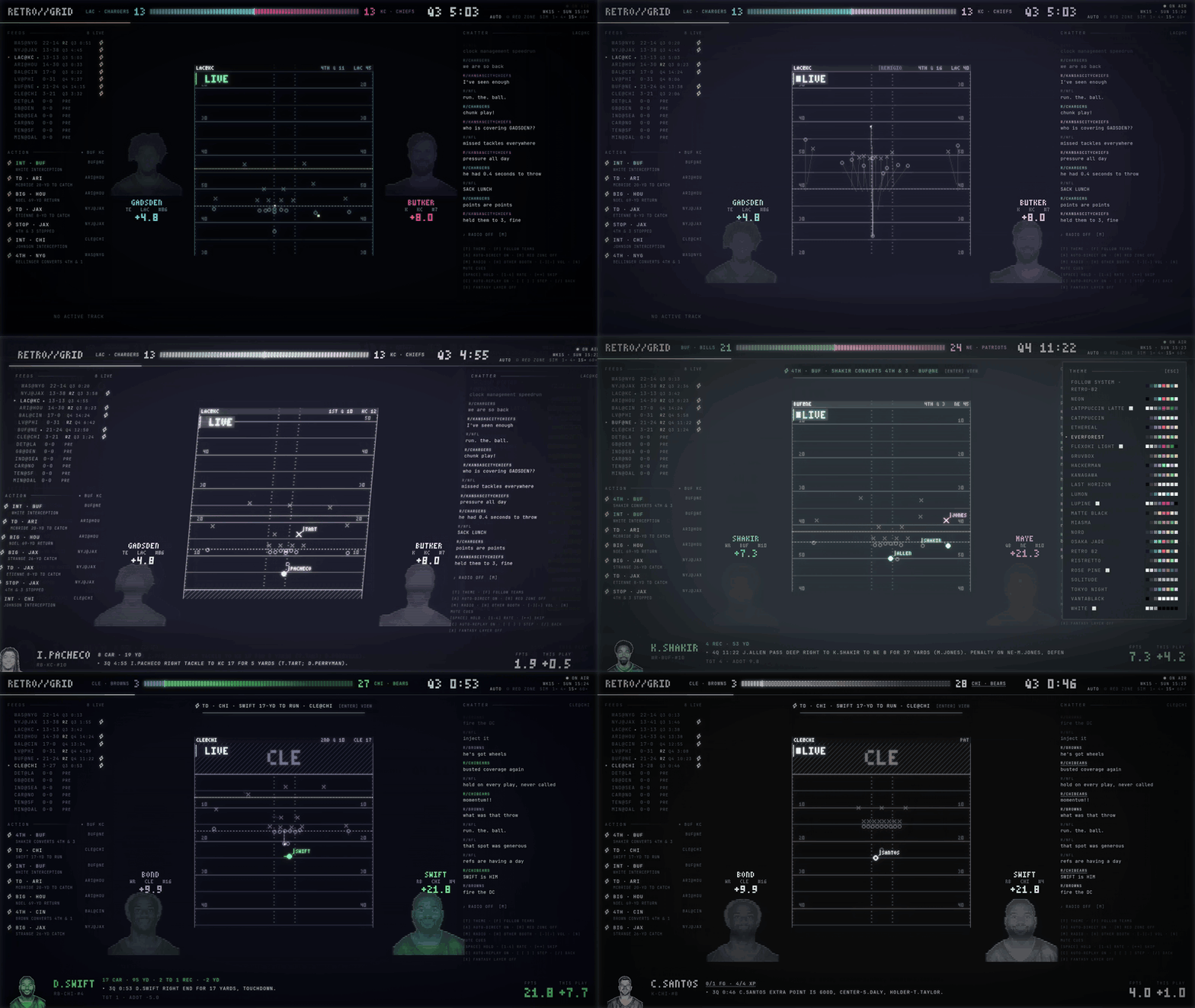
/themes renders the console under every stock Omarchy theme on one page
Fantasy layer
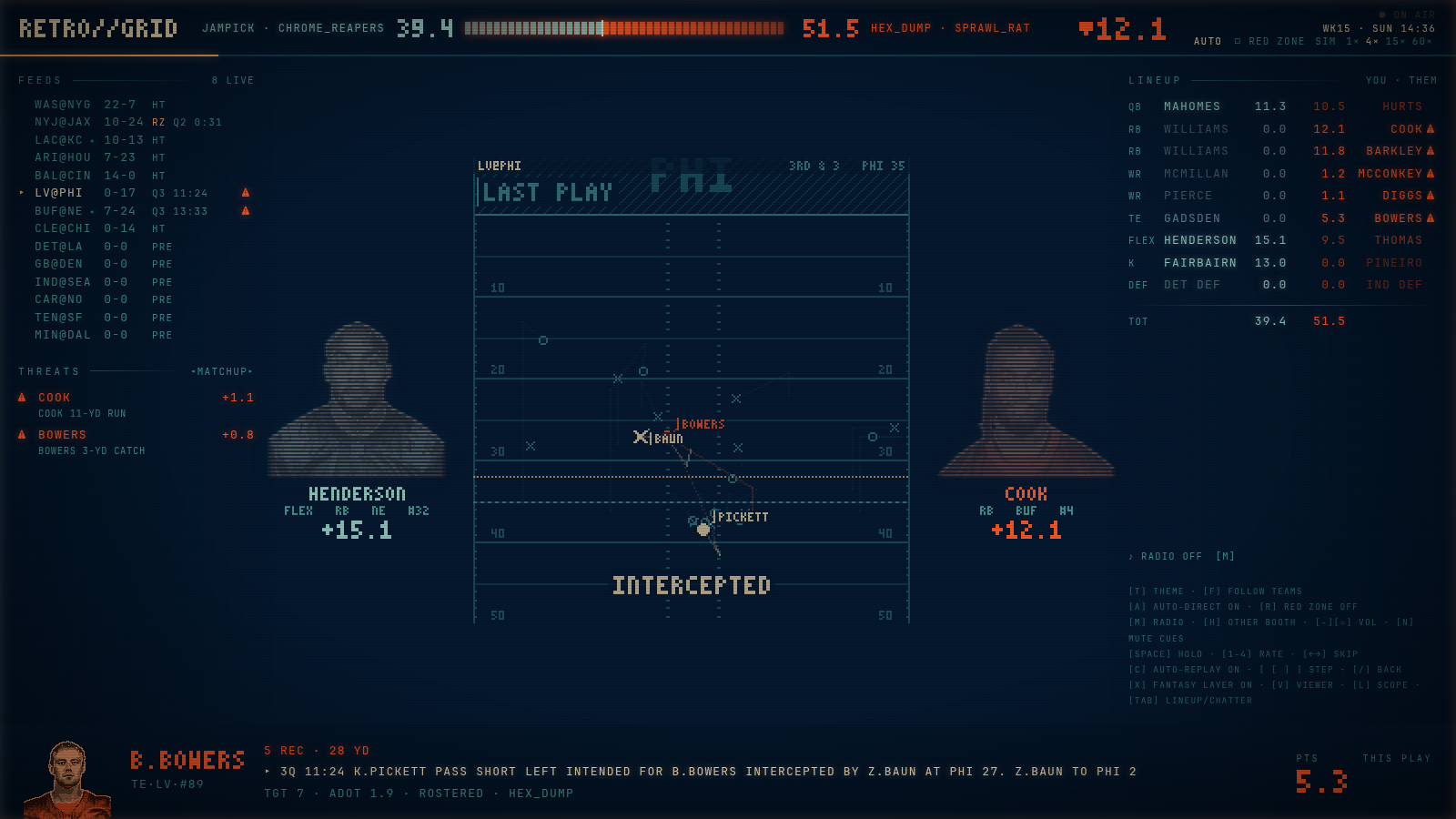
This part is off unless you ask for it. Start with --league stub (a made-up
12-team league) or --league yahoo, press X, and the same console switches
to your matchup. The score bar becomes your fantasy score against your
opponent's, the right rail becomes both lineups, and ACTION turns into THREATS,
ranked by how many points a play moved your week. Players on the field are
coloured by who rosters them. In the shot below Pickett's interception shows up
because the opponent has Bowers, the intended receiver.
The Yahoo adapter is written and tested against fixtures, but I'm still waiting on Yahoo to approve API access. See #6 and docs/YAHOO.md.
How the plays get drawn
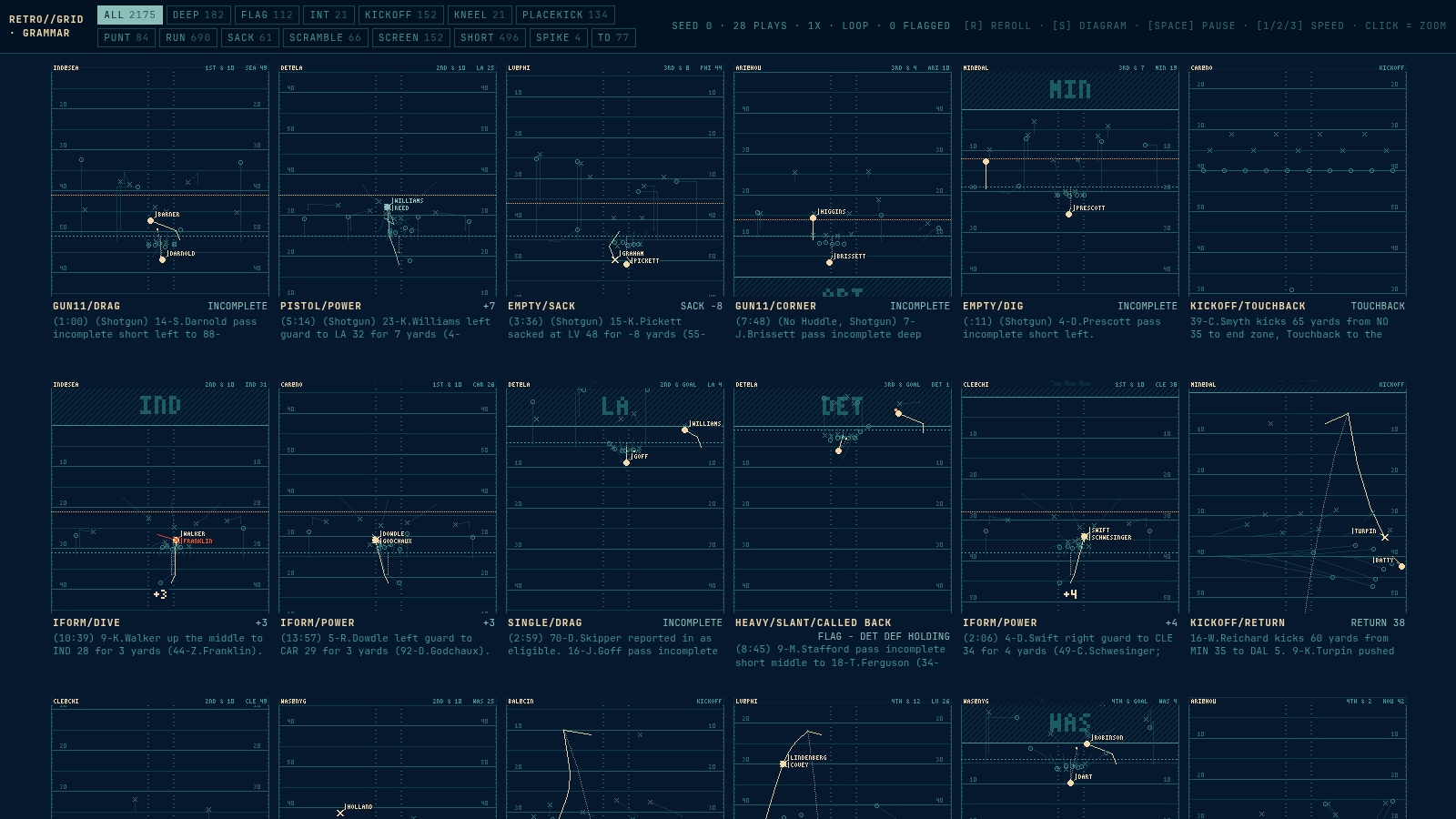
Real player tracking (the 10 Hz XY data) isn't public, so every diagram is
built from the text of the play. A parser pulls out who did what, and a play
grammar turns that into personnel, a formation, route families, and coverage
lanes on kicks and punts. All 2,175 plays in the demo slate compile without
falling back to a generic diagram. Plenty of them still look off, and /plays
is the page I use to find those: it loops a random sample side by side and lets
me flag the bad ones.
The full design is in docs/DESIGN.md.
Install
uv tool install retrogrid        # or: pipx install retrogrid   (Python 3.12+)
retrogrid                        # SIM SUNDAY: 2025 wk 15, 14 games. No downloads, no keys.
retrogrid live                   # today's real games off ESPN (pulls a few MB of rosters first)
retrogrid reel                   # midweek: the big plays of the weeks already played, on a loop
The first PyPI release is tracked in #2. Until it lands, run from a checkout (see Develop).
Linux, macOS, Windows. It serves on http://127.0.0.1:8082 and opens a
chromeless window if a Chromium-family browser is installed, a normal tab if
not (--no-window to open it yourself). retrogrid paths shows where data
lives; RETROGRID_DATA moves it. On Omarchy, for an instant retune instead of
the 1 s poll, install the optional hook:
omarchy hook install theme-set scripts/omarchy-theme-hook.sh.
Flags: --league stub|yahoo · --favs "KC BUF" · --speed 15 · --port N ·
--chatter reddit|stub|off. Data tools: retrogrid fetch | build-slate | build-reel | sprites | yahoo-auth | find-stream (each takes --help).
Keys
T |
theme |
F |
follow teams |
A |
auto-direct |
R |
RED ZONE |
M · H · - = |
radio · the other booth · volume |
N |
mute alert cues |
Enter |
view the alert in the banner |
C · [ ] · / |
auto-replay in dead time · step through recent plays · back to live |
X |
fantasy layer, then V who-am-I · L threat scope · Tab lineup/chatter |
Space · 1 to 4 · ← → |
SIM only: hold · rate 1×/4×/15×/60× · skip 5 min |
Space · ← → |
REEL: hold · previous / next play. Click a row in the rundown or the finals to jump. |
Develop
python3 -m venv .venv && .venv/bin/pip install -e '.[dev]' && npm install
scripts/dev-server.sh                           # esbuild watch + uvicorn --reload, :8082
scripts/dev-window.sh / 4                       # chromeless window on Hyprland workspace 4
.venv/bin/retrogrid fetch && .venv/bin/retrogrid build-slate && .venv/bin/retrogrid sprites --all
.venv/bin/python scripts/make_bundle.py         # freeze that slate into the package (what installs ship)
scripts/capture_media.py URL OUTDIR STEPS         # headless-Chromium stills + takes for docs/media (see its docstring)
A checkout keeps its data in ./data; the shipped bundle lives in
backend/retrogrid/bundled/, the web frontend in backend/retrogrid/web/
(TypeScript sources in frontend/src/).
/themes is the contact sheet: the console under every stock Omarchy theme.
/plays is the grammar contact sheet (DESIGN §8): N seeded-random slate plays
compiled and looping side by side, filterable by family. R reroll · S
finished diagrams · click to zoom · in zoom F/N flag a bad play (with a
note) into data/grammar_flags.json, the worklist for the next grammar pass.
Env: RETROGRID_LEAGUE (unset = NFL monitor · stub = synthetic 12-team league ·
yahoo = docs/YAHOO.md), RETROGRID_FAVS="KC BUF" (default followed teams),
RETROGRID_CHATTER (stub canned crowd, default in SIM · reddit, default in
LIVE · off), RETROGRID_START (sim seconds), RETROGRID_SPEED, RETROGRID_SEED,
RETROGRID_PROSE=1 (rehearse the live path: every play rebuilt from its
description alone, using the parser, name resolution and an air-yards prior).
LIVE. retrogrid live runs today's real games (it fetches this season's nflverse
rosters/stats, tools/build_live.py drafts the synthetic league from teams playing
today, then serves with RETROGRID_LIVE=1). Plays come from ESPN's public
scoreboard + summary feeds (providers/espn.py, no credentials), polled every
8 s; a play lands once its text holds still for a poll, touchdown+try entries
are split in two, and booth amendments trigger a rebuild. --keep reuses
today's league instead of redrafting. Sim controls are inert in LIVE.
REEL. retrogrid build-reel writes one file per week to data/reel/<season>_wk<NN>.json
(about 60 KB: the 40 picks as PlayRows, the score going into each, each play's
star with his final line, and the players the diagrams name), so the show itself
reads no parquet. The ranker is scoring/reel.py, the show is reel_console.py.
A cached week is left alone except the newest, which is rebuilt whenever the
play-by-play file is newer than it. /plays?reel=1 is the contact sheet in rank
order for the newest week (reel=N for week N), which is how I check the picks.
build-reel --from-slate data/live ranks an ESPN day before nflverse has it.
--keep skips the nflverse check.
CHATTER. Reddit's JSON API is walled (403 without an approved OAuth app) but
its Atom feeds are not, at one request a minute per IP. So providers/chatter.py
makes one combined /r/nfl+<team subs>/comments/.rss poll every ~65 s and buckets
comments per game by thread title + subreddit. At peak that is a sample of the
thread, not all of it. In SIM a stub crowd reacts to the plays.
RADIO. Best effort. providers/audio_seed.json lists each team's flagship
station and a stream URL where one was verified to open (26/32); whether a
station's web stream carries the game, swaps in talk, or geo-fences is up to the
station, game by game. The radio pins to the game in focus when switched on and
stays there while the view roams. Fix or add a station with
retrogrid find-stream "<station>" --set TEAM (writes audio_streams.json in the data dir,
picked up without a restart). NFL+ (paid) is the reliable source; the console
only links to it.
Status
| Phase | State |
|---|---|
| 0 Skeleton, contracts, SIM SUNDAY clock, Omarchy ThemeProvider + role resolver | working |
| 1 nflverse ingest, headshot sprite pipeline, synthetic league | working |
2 desc parser, ≥99.9% agreement with nflverse on 2024 + held-out 2025 |
working; RETROGRID_PROSE=1 puts it on the hot path, and all 322 scoring players match nflverse-column scoring to the point |
| 3 Play grammar: all 2,175 slate plays compile, zero fallbacks | second pass (kick/punt coverage lanes + fates, reachable catch points); iterate via /plays; BDB constant fit open |
| 4 Renderer, PHOSPHOR + PRINTOUT light models, ghosts, RETUNE | working |
| 5 Console shell | working |
| 6 Scoring + threat ranking | working |
| 7 Polish | open |
| 8 ESPN live plays | working (first pass) |
| 8 Yahoo league adapter, hosting | needs credentials |
| REEL: highlight show of finished weeks (#11) | working (first pass); the fantasy-swings segment waits on a real league |
pytest runs 209 tests.
Everything I'm working on is in the issues. If a play draws wrong or your team's radio stream is dead, open one.
Unofficial
Not associated with the NFL, its teams, ESPN, Yahoo or Reddit. It reads public feeds at run time and redistributes none of them; the shipped demo slate is derived from nflverse data. MIT licensed.
1 maintainer

Release files for retrogrid 0.1.0
For a detailed explanation of source distributions (sdists) and built distributions (wheels), please see the package formats documentation.
Source distribution (sdist)
| File | Size | Uploaded | |
|---|---|---|---|
| retrogrid-0.1.0.tar.gz | 1.3 MB | Details |
Built distribution (wheel)
| File | Interpreter | ABI | Platform | Reset |
|---|---|---|---|---|
| retrogrid-0.1.0-py3-none-any.whl | Python 3 | none | any | Details |
Total release size: 2.8 MB
Release files / retrogrid-0.1.0.tar.gz
| Download URL | retrogrid-0.1.0.tar.gz |
|---|---|
| Size | 1.3 MB |
| Tags | Source |
|
SHA-256 checksum How to use checksums |
eabe58a4bb08b6f17eb2987567407f783eb64e5f2ad66271fb6d7f05b25186c1
|
|
BLAKE2b-256 checksum How to use checksums |
f8cca044bbd981c0c9ef2bf7465ec3106e100ddec4f1cc122213bf04d23e6035
|
| Upload date | |
|
Uploaded using Trusted Publishing? What is trusted publishing? |
Yes |
| Uploaded via |
twine/7.0.0 CPython/3.13.14
|
Provenance
Provenance describes where a file came from. On PyPI, provenance is shared via attestations, which provide a verifiable record of the build or publishing details. View details, limitations and caveats.


PyPI Publish Attestation
PyPI verified that this artifact, at this checksum, originated from the publisher listed below.
Signed by GitHub Actions, verified by PyPI on Sep 24, 2026.
Transparency logRelease files / retrogrid-0.1.0-py3-none-any.whl
| Download URL | retrogrid-0.1.0-py3-none-any.whl |
|---|---|
| Size | 1.4 MB |
| Tags | Python 3 |
|
SHA-256 checksum How to use checksums |
b8120b62a93473e884792bdc201d7e67c981cd7d2cc192ecc5bab8df426de3ef
|
|
BLAKE2b-256 checksum How to use checksums |
620d375ea2afca8c62367c43a432e779fc2de6f4261a601757c1960e58eaa64f
|
| Upload date | |
|
Uploaded using Trusted Publishing? What is trusted publishing? |
Yes |
| Uploaded via |
twine/7.0.0 CPython/3.13.14
|
Provenance
Provenance describes where a file came from. On PyPI, provenance is shared via attestations, which provide a verifiable record of the build or publishing details. View details, limitations and caveats.
PyPI Publish Attestation
PyPI verified that this artifact, at this checksum, originated from the publisher listed below.
Signed by GitHub Actions, verified by PyPI on Sep 24, 2026.
Transparency log












