
reveriee
Turn your idea into a published Python package. Create the project files with one command, then check everything before you upload.


Publishing your first Python package means getting a lot of small files and settings right. One wrong detail, like a version that already exists or a README full of stray symbols, only shows up after you upload, and a published version can never be changed. reverie sets up the boring parts correctly and warns you about the common mistakes first.
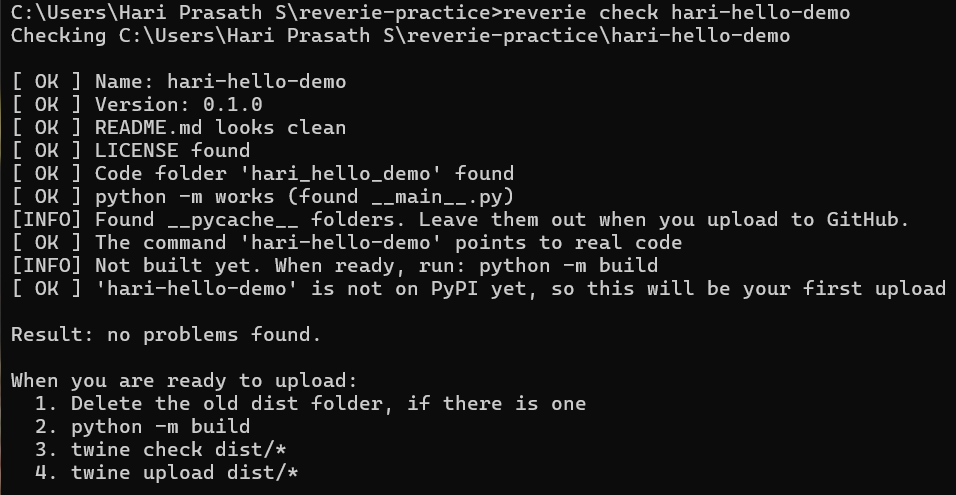
See it in action
Install
pip install reveriee
The package on PyPI is called reveriee, but the command you run is still reverie.
Create a new package
reverie new my-tool
reverie checks that the name is free on PyPI, asks for a one-line description and your name, and creates a ready-to-install project:
my-tool/
  pyproject.toml
  README.md
  LICENSE
  .gitignore
  my_tool/
    __init__.py
    __main__.py
    cli.py
The new project already installs and runs and prints a hello message. Open cli.py and replace the hello message with your own idea.
Check before you upload
Inside your project folder, run:
reverie check
or point it at a folder:
reverie check my-tool
It looks for the mistakes that most often hurt first-time publishers:
| It looks for | Why it matters |
|---|---|
| A version that is already on PyPI | A version can never be uploaded twice |
| Old files left in the dist folder | The upload would send them too |
| Stray backslashes, or leftover web page codes, in the README | Your PyPI page would look broken |
| Images in the README that PyPI cannot see | They would show as broken pictures |
| A missing LICENSE file | The build fails, or people will not use your package |
| A missing code folder or init.py | Your code would not be in the package |
| A command that points to code that does not exist | The command would fail after install |
| A missing main.py | python -m your_tool would not work |
| Version numbers that do not match | Easy to forget when you raise the version |
Every problem comes with a plain-language fix. Add --offline to skip the PyPI lookup.
Deep check (new in 0.2.0)
Because a published version can never be changed, run the thorough check right before you upload:
pip install build twine
reverie deepcheck
It does everything reverie check does, and then goes much further:
| It does | Why it matters |
|---|---|
| Reads every Python file | A typing mistake would break your package |
| Looks for passwords, keys and tokens in your files | A leaked key can be used by anyone |
| Looks for leftover starter text | So you do not publish "Hello from..." |
| Builds your package from a clean copy | Finds build problems before PyPI does |
| Runs twine check | Makes sure your PyPI page will work |
| Looks inside the built files | Makes sure your code and LICENSE are really included |
| Installs it in a brand-new empty environment | Proves it works for other people, not only on your laptop |
If everything is fine it says so. If not, it says exactly what is wrong and how to fix it. reverie never runs your program itself, it only checks that it can be loaded.
Options: --offline skips the PyPI lookup, --no-install skips the clean install test, --force runs the build tests even when the basic checks found problems.
Publish (new in 0.3.0)
You need a free PyPI account and an API token. Then, inside your project folder:
pip install build twine
reverie publish
reverie does the whole job for you, in three steps:
- Runs the deep check. If anything is wrong, it stops and nothing is uploaded.
- Builds fresh files in a temporary place, so old files can never be sent by accident.
- Asks you to type the version number to confirm, asks for your token, and uploads.
Your token is typed with nothing showing on screen, is never saved, and is never printed.
Options: --test uploads to TestPyPI, a practice website (it needs its own account and token), and --dry-run does everything except the upload.
If the upload fails, reverie explains the reason in plain language, for example a wrong token or a version that already exists.
You can still publish by hand if you prefer:
python -m build
twine check dist/*
twine upload dist/*
Delete any old dist folder before you build.
Command not recognised?
On some Windows computers the reverie command is not found right after installing, because Windows does not know where pip put it. Start it through Python instead:
python -m reverie check
If pip says "defaulting to user installation" or "not writeable" while installing, that is normal and harmless.
Good to know
- reverie does not write your program for you. It sets up the packaging, and the idea is yours.
- It does not upload anything. You do that yourself with twine, after the check.
- Package names use lowercase letters, numbers and hyphens, like
my-tool. - The name check and the version check need an internet connection.
License
MIT
1 maintainer

Metadata
1 maintainer
Release files for reveriee 0.3.0
For a detailed explanation of source distributions (sdists) and built distributions (wheels), please see the package formats documentation.
Source distribution (sdist)
| File | Size | Uploaded | |
|---|---|---|---|
| reveriee-0.3.0.tar.gz | 19.1 kB | Details |
Built distribution (wheel)
| File | Interpreter | ABI | Platform | Reset |
|---|---|---|---|---|
| reveriee-0.3.0-py3-none-any.whl | Python 3 | none | any | Details |
Total release size: 39.5 kB
Release files / reveriee-0.3.0.tar.gz
| Download URL | reveriee-0.3.0.tar.gz |
|---|---|
| Size | 19.1 kB |
| Tags | Source |
|
SHA-256 checksum How to use checksums |
308f2b925e4a34ef6a394a3346b2576a60012c85e4274ad7b6aaf6af90b09fe9
|
|
BLAKE2b-256 checksum How to use checksums |
cf31acbc8c0885421f72bb1294fafbf70a80a887c6fbb8b7c996863e385d7325
|
| Upload date | |
|
Uploaded using Trusted Publishing? What is trusted publishing? |
No |
| Uploaded via |
twine/7.0.0 CPython/3.14.6
|
Release files / reveriee-0.3.0-py3-none-any.whl
| Download URL | reveriee-0.3.0-py3-none-any.whl |
|---|---|
| Size | 20.4 kB |
| Tags | Python 3 |
|
SHA-256 checksum How to use checksums |
ba065118820dc805732b9bbe05d83c56fd85f1663da5eeab6071f9410a859df8
|
|
BLAKE2b-256 checksum How to use checksums |
88502d8482a0f739b12c1a1f56fa12635d8580b269b84f333bbd2d83fba46daf
|
| Upload date | |
|
Uploaded using Trusted Publishing? What is trusted publishing? |
No |
| Uploaded via |
twine/7.0.0 CPython/3.14.6
|














