
review-tally
This tool is intended to retrieve a basic review count for the pull requests for a GitHub organization in a given time frame. The default time from is 2 weeks. The tool will retrieve statistics only on all repositories in the specified organization unless there are specific languages specified.
This tool uses the GitHub API to retrieve the data. The tool requires that
you have your GitHub token set as an environment variable. The environment
variable should be named GITHUB_TOKEN.
basic usage:
review-tally -o expressjs --languages javascript
which would produce the following output
User                                  Reviews    Comments    Avg Comments
----------------------------------  ---------  ----------  --------------
Phillip9587                                11           3             0.3
bjohansebas                                 6           0             0
UlisesGascon                                5           0             0
tausiq2003                                  2           2             1
copilot-pull-request-reviewer[bot]          2           1             0.5
AkashDev01                                  1           2             2
Cycloctane                                  1           1             1
lululolily                                  1           1             1
avivkeller                                  1           1             1
ShubhamOulkar                               1           1             1
SleepyStew                                  1           0             0
shivarm                                     1           0             0
LinusU                                      1           0             0
This output shows the number of reviews that each user has carried out in the time period for the repositories that have python as a language specified.
A comma separated list of languages can be provided to filter the repositories that are included in the statistics. If no languages are provided then all of the repositories will be included in the statistics.
review-tally -m reviews,comments,avg-comments,\
engagement,thoroughness,response-time,\
completion-time,active-days -o expressjs
User                                  Reviews    Comments    Avg Comments  Engagement    Thoroughness    Avg Response    Review Span      Active Days
----------------------------------  ---------  ----------  --------------  ------------  --------------  --------------  -------------  -------------
Phillip9587                                11           3             0.3  Low           6%              1.2d            1.2d                       2
bjohansebas                                 6           0             0    Low           0%              1.8d            7.0d                       2
UlisesGascon                                5           0             0    Low           0%              1.2d            7.0d                       5
tausiq2003                                  2           2             1    Medium        25%             4.3d            0m                         1
copilot-pull-request-reviewer[bot]          2           1             0.5  Medium        12%             3.7d            0m                         1
AkashDev01                                  1           2             2    High          50%             4.2d            0h                         1
Cycloctane                                  1           1             1    Medium        25%             19.4h           0h                         1
lululolily                                  1           1             1    Medium        25%             19.8h           0h                         1
avivkeller                                  1           1             1    Medium        25%             22.0h           0h                         1
ShubhamOulkar                               1           1             1    Medium        25%             6.3d            0h                         1
SleepyStew                                  1           0             0    Low           0%              43m             0h                         1
shivarm                                     1           0             0    Low           0%              35m             0h                         1
LinusU                                      1           0             0    Low           0%              4.9d            0h                         1
multiple languages:
review-tally -o crossplane --languages python,go
All languages:
review-tally -o expressjs
Specifying the time frame:
review-tally -o expressjs --languages javascript -s 2021-01-01 -e 2021-01-31
You can use the long-form flags as well (note the hyphenated names):
review-tally -o expressjs --languages javascript --start-date 2021-01-01 --end-date 2021-01-31
Customizing metrics displayed:
review-tally -o expressjs --languages javascript -m reviews,engagement,thoroughness
Rubber-Stamp Reviews
A "rubber stamp" is an approval that carries no real feedback: an APPROVED
review with no review body and no inline comments. Reviews in other states
(COMMENTED, CHANGES_REQUESTED, etc.) are never counted as rubber stamps.
Add the rubber-stamps metric to surface the count per reviewer:
review-tally -o expressjs --languages javascript -m reviews,comments,rubber-stamps
Use --exclude-rubber-stamps to drop those approvals from the review and
comment tallies entirely, so the numbers reflect only substantive reviews:
review-tally -o expressjs --languages javascript --exclude-rubber-stamps
Sprint Analysis
If aggregate data is required sprint over sprint then the --sprint-analysis
option can be used. This will produce a CSV file with the data for each sprint.
review-tally -o expressjs --languages javascript --sprint-analysis --output-path sprint_analysis.csv
Sprint Plotting
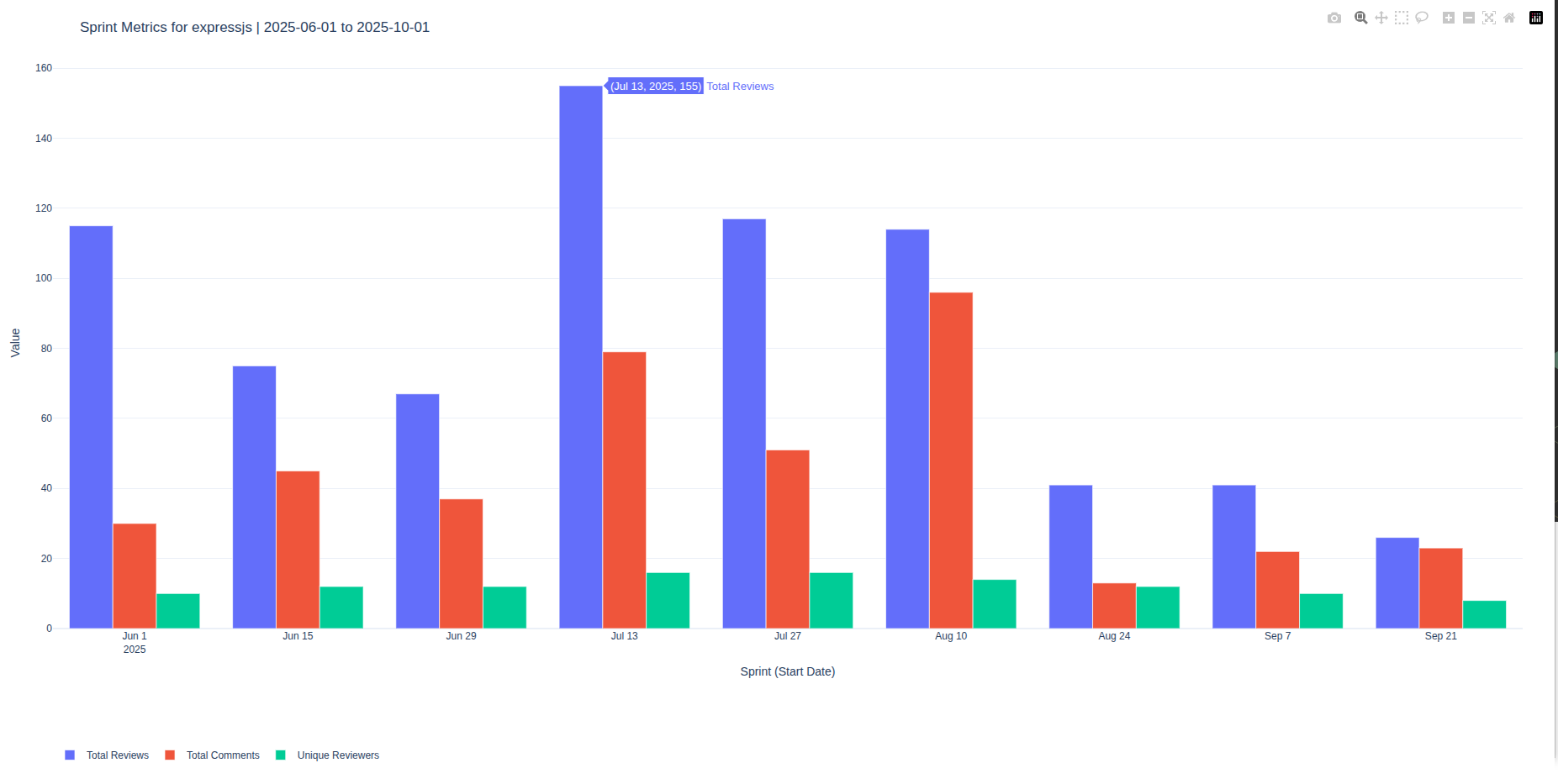
The tool can generate interactive charts showing sprint metrics over time. You can use --plot-sprint to create visualizations that open in your browser.
Basic plotting (automatically enables sprint analysis):
review-tally -o expressjs --languages javascript --plot-sprint
Plotting with custom chart type and metrics:
review-tally -o expressjs --languages javascript --plot-sprint --chart-type line --chart-metrics total-reviews,unique-reviewers
Saving the plot to a file:
review-tally -o expressjs --languages javascript --plot-sprint --save-plot sprint_metrics.html
Combining with CSV export:
review-tally -o expressjs --languages javascript --sprint-analysis --plot-sprint --output-path sprint_data.csv
Example: Sprint bar chart for expressjs
Individual Reviewer Visualization
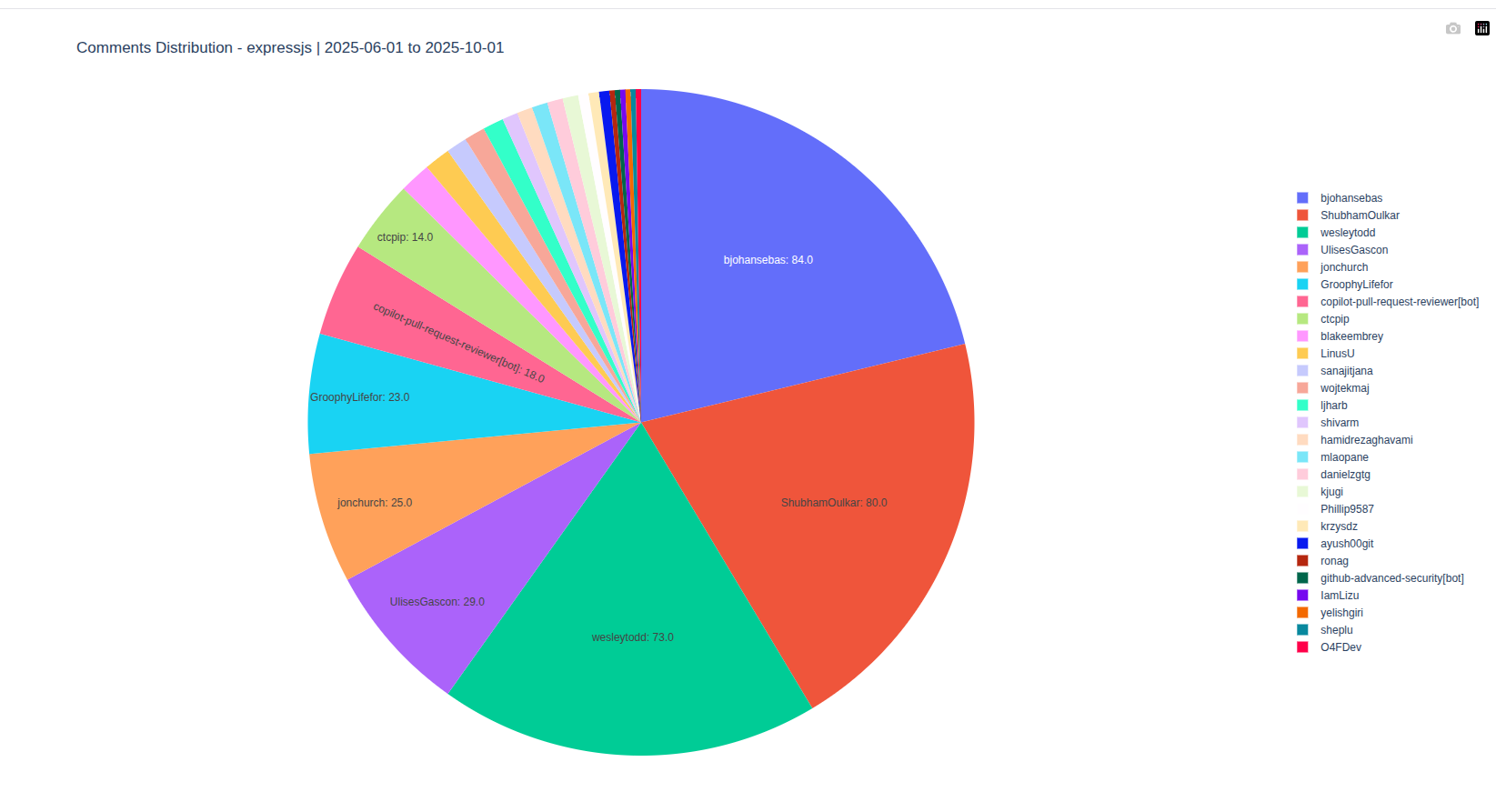
The tool can generate pie charts showing the distribution of metrics across individual reviewers. Use --plot-individual to create interactive pie charts that open in your browser.
Basic pie chart (shows review distribution):
review-tally -o expressjs --languages javascript --plot-individual
Pie chart with specific metrics:
# Show engagement level distribution
review-tally -o expressjs --languages javascript --plot-individual --individual-chart-metric engagement_level

# Show thoroughness score distribution
review-tally -o expressjs --languages javascript --plot-individual --individual-chart-metric thoroughness_score

# Show comment distribution
review-tally -o expressjs --languages javascript --plot-individual --individual-chart-metric comments
Saving the pie chart to a file:
review-tally -o expressjs --languages javascript --plot-individual --save-plot reviewer_distribution.html
Example: Comment distribution pie chart for expressjs
Available metrics for pie charts:
reviews- Number of reviews per reviewer (default)comments- Number of comments per reviewerengagement_level- Engagement level (High/Medium/Low)thoroughness_score- Thoroughness percentage scoreavg_response_time_hours- Average response time in hoursavg_completion_time_hours- Average completion time in hoursactive_review_days- Number of active review days
Options
- -c, --config Path to a TOML configuration file containing CLI options
- -o, --org The GitHub organization that you want to query
- -l, --languages A comma separated list of languages that you want to include
- -s, --start-date The start date for the time frame that you want to query (optional)
- -e, --end-date The end date for the time frame that you want to query (optional)
- -m, --metrics Comma-separated list of metrics to display (reviews,comments,avg-comments,rubber-stamps,engagement,thoroughness). Default: reviews,comments,avg-comments
- --github-host Base host used for GitHub API requests. Defaults to api.github.com
- --github-rest-path Optional base path appended to REST API requests. Defaults to none or the path embedded in
--github-host - --github-graphql-path Optional path to the GraphQL endpoint. Defaults to
/graphqlor mirrors the REST path - -h, --help Show this message and exit
- -v, --version Show the version of the tool
- --sprint-analysis selects the sprint analysis option
- --output-path specifies the output file for sprint analysis
- --plot-sprint Generate interactive charts showing sprint metrics (opens in browser)
- --chart-type Chart type for sprint metrics (bar or line). Default: bar
- --chart-metrics Comma-separated sprint metrics to plot. Default: total_reviews,total_comments. Available: total-reviews,total-comments,unique-reviewers,avg-comments-per-review,reviews-per-reviewer,avg-response-time-hours,avg-completion-time-hours,active-review-days
- --save-plot Optional path to save the interactive HTML chart
- --plot-individual Generate pie charts showing individual reviewer metric distribution (opens in browser)
- --individual-chart-metric Metric to visualize in individual pie chart. Default: reviews. Available: reviews,comments,engagement_level,thoroughness_score,avg_response_time_hours,avg_completion_time_hours,active_review_days
- --exclude-rubber-stamps Exclude rubber-stamp reviews (approvals with no body and no inline comments) from the review and comment tallies
- --no-cache Disable PR review caching (always fetch fresh data from API). By default, caching is enabled for better performance.
- --clear-cache Clear all cached pull request data and exit
- --clear-expired-cache Clear only expired cached data and exit
- --cache-stats Show cache statistics and exit
Configuration files
You can provide all CLI options via a TOML configuration file by passing the --config flag. Each setting uses the same name (with dashes) as
its corresponding long-form CLI option, and command line values continue to override anything defined in the file. In addition
to the existing switches, configuration files support a repositories list that lets you target specific repositories without
providing an organization. Repositories must be defined in owner/repository-name format.
Example configuration:
# basic time window and filters
start-date = "2023-01-01"
end-date = "2023-01-15"
languages = ["python", "javascript"]
metrics = ["reviews", "comments"]
github-host = "https://ghe.example.com"
github-rest-path = "/api/v3"
github-graphql-path = "/api/graphql"

# exclude rubber-stamp approvals from the tallies
exclude-rubber-stamps = true

# sprint analysis output and plotting
sprint-analysis = true
output-path = "sprint.csv"
plot-sprint = true
chart-type = "line"
chart-metrics = ["total_reviews", "unique_reviewers"]
save-plot = "sprint_plot.html"

# caching controls
no-cache = true
clear-cache = true
clear-expired-cache = true
cache-stats = true

# repositories to process (no --org needed)
repositories = [
  "octocat/hello-world",
  "cli/review-tally",
]
When repositories is supplied the tool skips organization discovery and queries each repository owner pair directly.
Set github-host when targeting GitHub Enterprise and adjust github-rest-path / github-graphql-path if your deployment uses
custom routes (for example /api/v3 for REST and /api/graphql for GraphQL).
GitHub API Rate Limiting
This tool uses GitHub's REST and GraphQL APIs extensively to gather pull request and review data. GitHub enforces rate limits to ensure fair usage of their API resources.
Rate Limit Information
GitHub API rate limits vary depending on your authentication method:
- Personal Access Token: 5,000 requests per hour
- GitHub App: 15,000 requests per hour (per installation)
- OAuth App: 5,000 requests per hour (per user)
For GraphQL API:
- Personal Access Token: 5,000 points per hour (each query has a different point cost)
Checking Your Current Rate Limit
You can check your current rate limit status using curl:
# Check REST API rate limit
curl -H "Authorization: Bearer YOUR_GITHUB_TOKEN" \
     -H "Accept: application/vnd.github.v3+json" \
     https://api.github.com/rate_limit

# Check GraphQL API rate limit
curl -H "Authorization: Bearer YOUR_GITHUB_TOKEN" \
     -H "Accept: application/vnd.github.v3+json" \
     https://api.github.com/rate_limit | jq '.resources.graphql'
Replace YOUR_GITHUB_TOKEN with your actual GitHub personal access token.
Rate Limiting Best Practices
- Use caching: This tool includes built-in caching (enabled by default) to reduce API calls
- Smaller time ranges: Process smaller date ranges to avoid hitting limits on large organizations
- Monitor usage: Use the curl commands above to monitor your rate limit consumption
- GitHub Apps: Consider using a GitHub App for higher rate limits if processing very large datasets
Useful Links
1 maintainer

Metadata
1 maintainer
Release files for review-tally 0.5.9
For a detailed explanation of source distributions (sdists) and built distributions (wheels), please see the package formats documentation.
Source distribution (sdist)
| File | Size | Uploaded | Provenance | Actions |
|---|---|---|---|---|
| review_tally-0.5.9.tar.gz | 39.6 kB | Without provenance | Details for review_tally-0.5.9.tar.gz |
Built distribution (wheel)
| File | Interpreter | ABI | Platform | Actions Reset |
|---|---|---|---|---|
| review_tally-0.5.9-py3-none-any.whl | Python 3 | none | any | Details for review_tally-0.5.9-py3-none-any.whl |
Total release size: 85.6 kB
Release files / review_tally-0.5.9.tar.gz
| Download URL | review_tally-0.5.9.tar.gz |
|---|---|
| Size | 39.6 kB |
| Tags | Source |
|
SHA-256 checksum How to use checksums |
1837629416e0b63539f78900d3ddca80e44fe307cc13a80b9229c0bfced84099
|
|
BLAKE2b-256 checksum How to use checksums |
6ffffdcab1efbb32cf0df7f333ef088783497b68a979420f3813e0ed425b325e
|
| Upload date | |
|
Uploaded using Trusted Publishing? What is trusted publishing? |
No |
| Uploaded via |
poetry/2.4.1 CPython/3.11.15 Linux/6.17.0-1020-azure
|
Release files / review_tally-0.5.9-py3-none-any.whl
| Download URL | review_tally-0.5.9-py3-none-any.whl |
|---|---|
| Size | 46.0 kB |
| Tags | Python 3 |
|
SHA-256 checksum How to use checksums |
b45c42a154f885438fdd4e32eedf5cc801d4a27e3df5d12159b362ceec50d702
|
|
BLAKE2b-256 checksum How to use checksums |
865a3ee24c5478f65fef49ad6792cd6f08b458d420d8e8851fbc347c0546b4a8
|
| Upload date | |
|
Uploaded using Trusted Publishing? What is trusted publishing? |
No |
| Uploaded via |
poetry/2.4.1 CPython/3.11.15 Linux/6.17.0-1020-azure
|
Security for review-tally 0.5.9
Provenance
Provenance describes where a file came from. On PyPI, provenance is shared via attestations, which provide a verifiable record of the build or publishing details. View details, limitations and caveats.
No provenance found
None of the files in this release were uploaded with provenance metadata.
A note on package security
PyPI is a repository for distributing packages, not a service for auditing them. While third-party security researchers and our staff do their best to detect and remove malicious packages, PyPI cannot guarantee the quality, security or suitability of any given package.
To learn more about protecting yourself from malicious actors, visit our package security documentation.














