
A command line tool that uses LLMs to give constructive feedback about scientific .docx manuscripts.

Project description
reviewer3
reviewer3 is a command line tool that uses LLMs to give constructive feedback about scientific .docx manuscripts.
It is intended for personal use, if you need feedback about a document you wrote yourself.
Per default it uses a locally installed, privacy-preserving large language model (LLM) via ollama. Optionally, you can configure it to use LLMs on remote servers.
In case you use it for reviewing manuscript of others, make sure to follow best-practices for preseving confidentiality! Do not submit manuscripts to remote servers if you're not sure what service providers do with it. Also check institutional guidelines on the use of generative artificial intelligence for reviewing, and for example the related statement by the German Research Foundation. In general, the human reviewer is responsible for submitting a reviewed document, no matter what [artificial intelligence] tools they used for reviewing. Keep in mind that LLMs do mistakes and so does reviewer3.
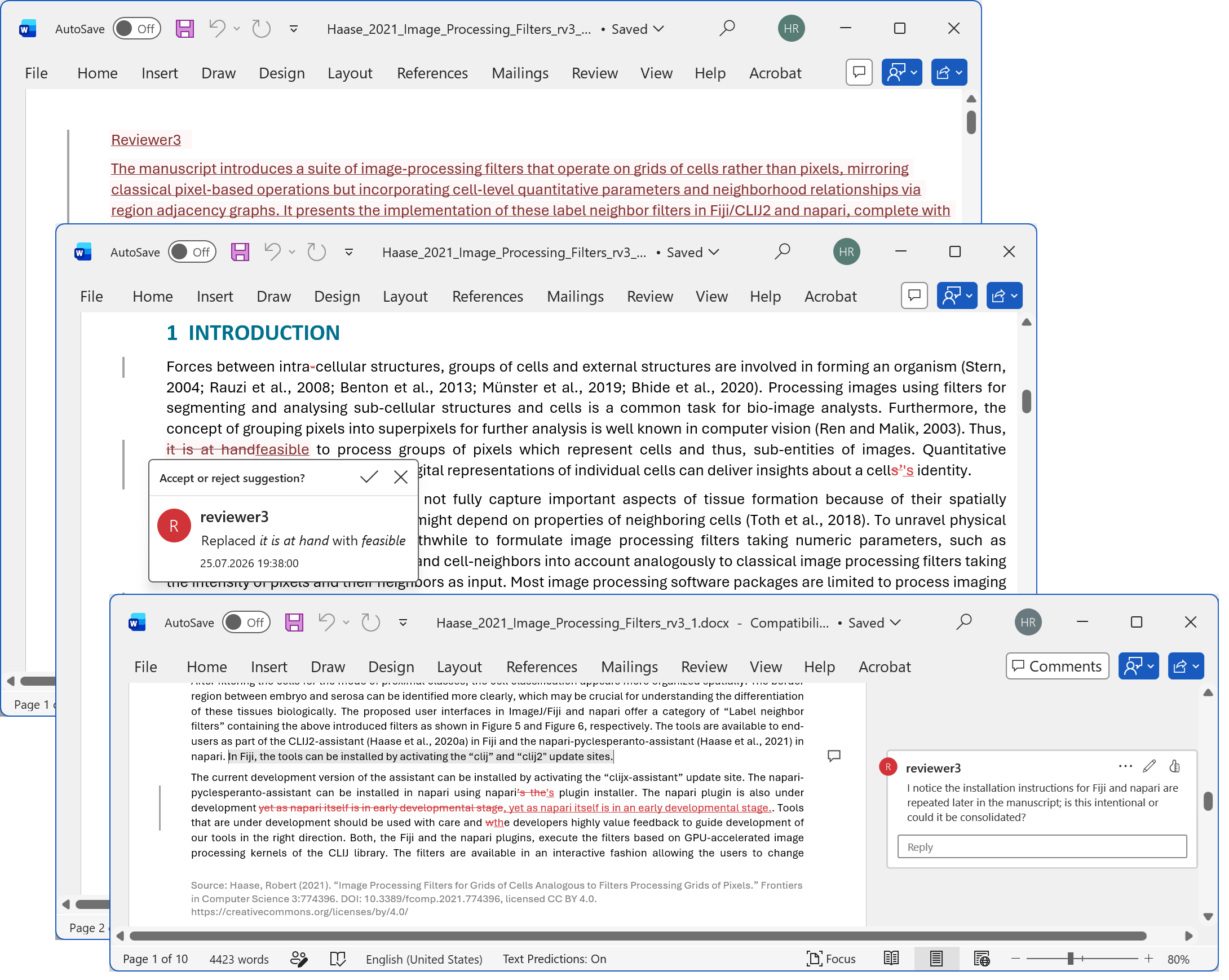
reviewer3 reads the document, potentially splits it in paragraphs, and asks an LLM for a structured feedback:
- inline tracked edits (insertions/deletions) for text suggestions,
- comments for clarification questions, and
- a prepended review preface containing:
- what the document is about,
- why it is important for science / the scientific community,
- global feedback (open questions and cross-section coherence),
- a short summary of the feedback.
The original file is never overwritten. Output is written as *_rv3.docx.
What reviewer3 is not
reviewer3 is not intended for judging manuscripts. Many language models are not capable of drawing educated decisions about manuscript quality, scientific novelty or if manuscripts should be accepted or not for publishing. Instead, reviewer3 is intended for providing constructive feedback, allowing to improve a manuscript, not matter how innovative or relevant it might be for the scientific society.
reviewer3 is not a replacement for human reviewing. It can assist spotting obvious mistakes, or open questions. However, as it splits long documents in multiple blocks for reviewing, it may miss the big picture and may provide misleading suggestions. Review its suggestions and comments carfully, in particular if you use reviewer3 for preparing feedback for people who asked you to review their work.
reviewer3 cannot give feedback about figures yet. It only processes the text in manuscript files.
Installation
Install the CLI from PyPI:
pip install reviewer3
Usage
You can use reviewer3 from the terminal by providing it with a .docx file.
reviewer3 manuscript.docx
Trying it out
There are some example docx files in the docs/examples folder. Feel free to ask reviewer3 to review them.
git clone https://github.com/haesleinhuepf/reviewer3
cd reviewer3/docs/examples
reviewer3 Haase_2021_Image_Processing_Filters.docx
reviewer3 should then save a copy of the document with a preface, suggestions and comments as shown above.
Local LLM Setup (Ollama)
reviewer3 is configured by default to call an OpenAI-compatible server at http://localhost:11434/v1, which matches Ollama's local API.
- Install Ollama from https://ollama.com.
- Pull the default model gpt-oss:20b used by
reviewer3:
ollama pull gpt-oss:20b
Hardware note: Running gpt-oss:20b effectively requires a GPU with at least 8 GB of memory.
Environment Variables
reviewer3 optionally reads configuration from environment variables. You can set those if you would like to use reviewer3 with a remote server. Keep confidentiality in mind when configuring remote LLM servers.
REVIEWER3_BASE_URL: OpenAI-compatible API base URL (default:http://localhost:11434/v1)REVIEWER3_API_KEY: API key/token for the server (default:ollama)REVIEWER3_MODEL: Model name to use (default:gpt-oss:20b)REVIEWER3_TEMPERATURE: Sampling temperature (default:0.2)REVIEWER3_CHUNK_SIZE: Maximum characters sent per review request (default:12000)
Example (PowerShell):
$env:REVIEWER3_BASE_URL = "http://localhost:11434/v1"
$env:REVIEWER3_API_KEY = "ollama"
$env:REVIEWER3_MODEL = "gpt-oss:20b"
$env:REVIEWER3_TEMPERATURE = "0.2"
Example (bash/zsh):
export REVIEWER3_BASE_URL="http://localhost:11434/v1"
export REVIEWER3_API_KEY="ollama"
export REVIEWER3_MODEL="gpt-oss:20b"
export REVIEWER3_TEMPERATURE="0.2"
Example for a remote server:
export REVIEWER3_BASE_URL="https://your-llm-server.example.com/v1"
export REVIEWER3_API_KEY="your-token"
export REVIEWER3_MODEL="your-model-name"
Contributing
Contributions are welcome! Consider opening an issue first to discuss potential improvements, before preparing a pull-request. Note that reviewer3 was largely vibe-coded using Github Copilot and OpenAI Codex integrations in Visual Studio Code. Consider using similar tools for modifying the code.
Release history Release notifications | RSS feed


Download files
Download the file for your platform. If you're not sure which to choose, learn more about installing packages.
Source Distribution
Built Distribution
Filter files by name, interpreter, ABI, and platform.
If you're not sure about the file name format, learn more about wheel file names.
Copy a direct link to the current filters
File details
Details for the file reviewer3-0.1.0.tar.gz.
File metadata
- Download URL: reviewer3-0.1.0.tar.gz
- Upload date:
- Size: 475.0 kB
- Tags: Source
- Uploaded using Trusted Publishing? No
- Uploaded via: twine/6.2.0 CPython/3.14.6
File hashes
| Algorithm | Hash digest | |
|---|---|---|
| SHA256 |
e35d61045137f6bf90a5536e71ea98d6042ce54552cbe47f91cb5d8c6f334028
|
|
| MD5 |
e529ace1e19e94eb5c470440e3a0651e
|
|
| BLAKE2b-256 |
ec99ea387c780c30c7eece0b96c18a203e607dd3f8d57c3c01aa6312f26885e6
|
File details
Details for the file reviewer3-0.1.0-py3-none-any.whl.
File metadata
- Download URL: reviewer3-0.1.0-py3-none-any.whl
- Upload date:
- Size: 14.4 kB
- Tags: Python 3
- Uploaded using Trusted Publishing? No
- Uploaded via: twine/6.2.0 CPython/3.14.6
File hashes
| Algorithm | Hash digest | |
|---|---|---|
| SHA256 |
d217cbf62b5f393dd2978860a29c97e314548c773c760a643435e74f7f6a0f68
|
|
| MD5 |
4eb836503174901b14ce2d33bf8e3089
|
|
| BLAKE2b-256 |
2b76e977a9571637553158a9be7af656ff288cec3453a7d6541f0954e51e9fb3
|






