
REvoDesign

Basic Information
| Basic | Badges |
|---|---|
| OS |    |
| Architecture |  |
| Python |  |
| PyMOL |     |
| Dependencies |   |
| Documentation |   |
| CI status |    |
| Code Quality Status |          |
| Server Docker Image |   |
| Server Status |   |
| Code Quality Control |          |
REvoDesign requires no non-standard hardware to run.
Dependency
All dependencies and extras are listed in pyproject.toml.
Introduction
Welcome to REvoDesign - a PyMOL plugin that makes enzyme redesign tasks easier for everyone. REvoDesign aims at facilitating enzyme redesign using a combination of structural and phylogenetic information, serving as a co-pilot for protein designers and leveraging the wealth of human knowledge in enzyme design.
About the Plugin
Enzyme redesign is a complex task that requires a deep understanding of protein structures, substrate binding sites, and evolutionary relationships. REvoDesign Toolkit is designed to streamline this process by offering a range of tools and functionalities to assist protein designers in their endeavors.
Basic Architecture Design
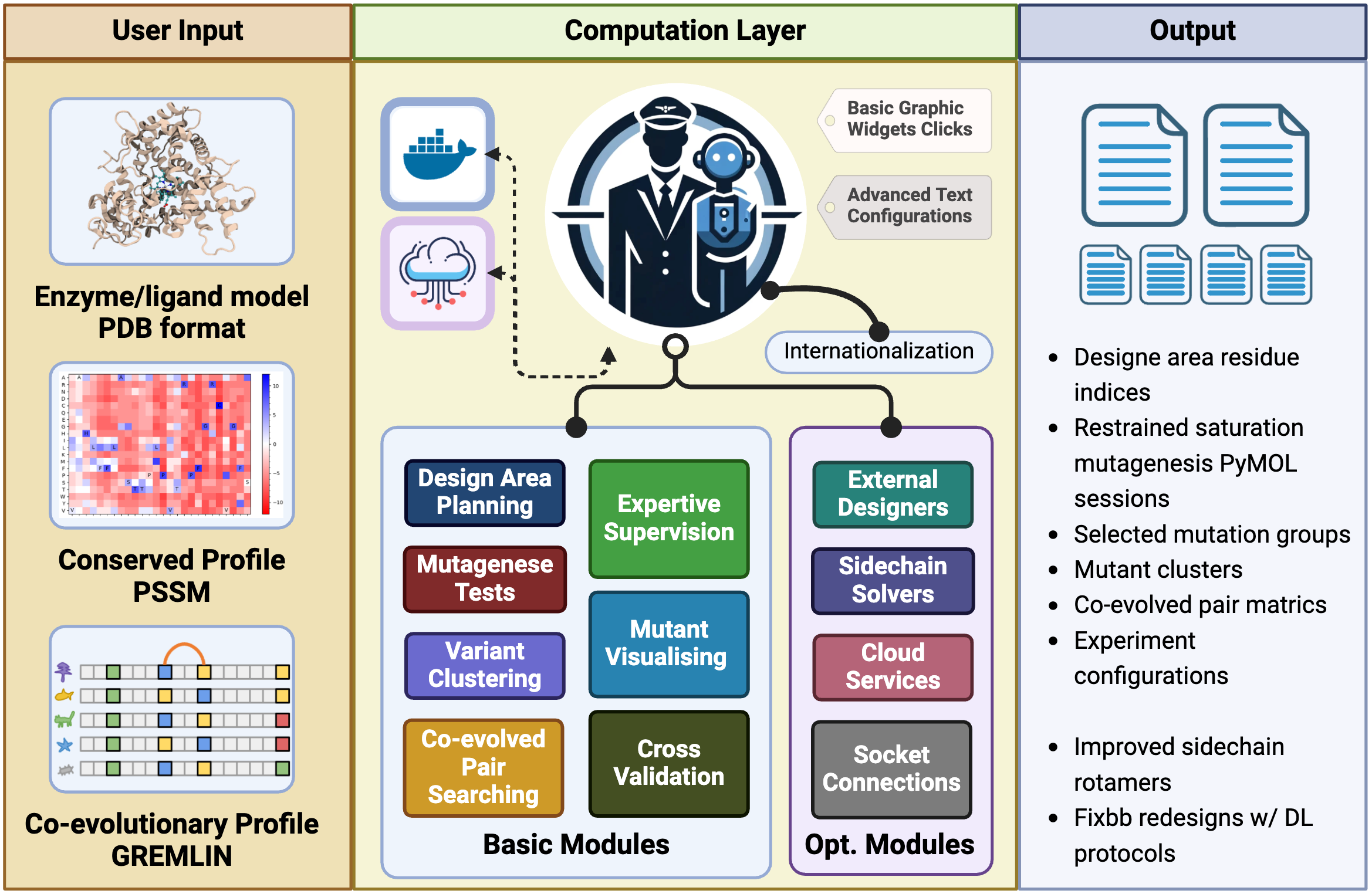
Key Features
In brief, the REvoDesign PyMOL plugin provides a set of essential tools to help protein designers with the following tasks:
-
Surface Residue Analysis: Identify surface residues exposed as solvent-accessible surface area (SASA) and design pocket identification based on substrates and/or cofactors, with customizable cutoffs.
-
Mutant Loading: Load available designable mutants through a PSSM-like table in CSV format, allowing for customizable rejections and preferences.
-
Human Knowledge Supervision: Perform human knowledge-supervised mutant selection within the PyMOL interface, utilizing structural views.
-
Scale Reduction: Reduce the scale of your design, making it suitable for low-throughput wet-lab validation by leveraging sequence clustering.
-
Visualization: Visualize mutant tables in PyMOL, whether they have been scored or not.
-
Co-Evolution Analysis: Search for possible inter-residue co-evolved residue pairs for effective mutants using the GREMLIN Markov random field profile.
REvoDesign is your indispensable companion in the intricate journey of enzyme redesign. Whether you are a seasoned protein designer or just beginning your exploration, REvoDesign Toolkit is here to simplify your workflow and enhance your enzyme engineering endeavors.
Please refer to the manual for detailed instructions on how to use the toolkit and make the most of its features.
For clustering method selection and extension details, see:
Installation
REvoDesign offers a user-friendly installation process using a graphical user interface (GUI).
Step 1: Install the REvoDesign Package Manager
Before installing the main program, you need to install the REvoDesign Package Manager as a PyMOL plugin.
-
Open PyMOL.
-
Navigate to Plugin > Plugin Manager and select Install New Plugin.
-
Choose Install from PyMOLWiki or any URL.
-
Paste the following URL:
https://gist.githubusercontent.com/YaoYinYing/c1e8bfe0fc0b9c60bf49ea04a550a044/raw/REvoDesign_PyMOL.py
-
Click Fetch.
-
Confirm the installation when prompted.
-
Set the installation location (use the default if unsure) and click OK.
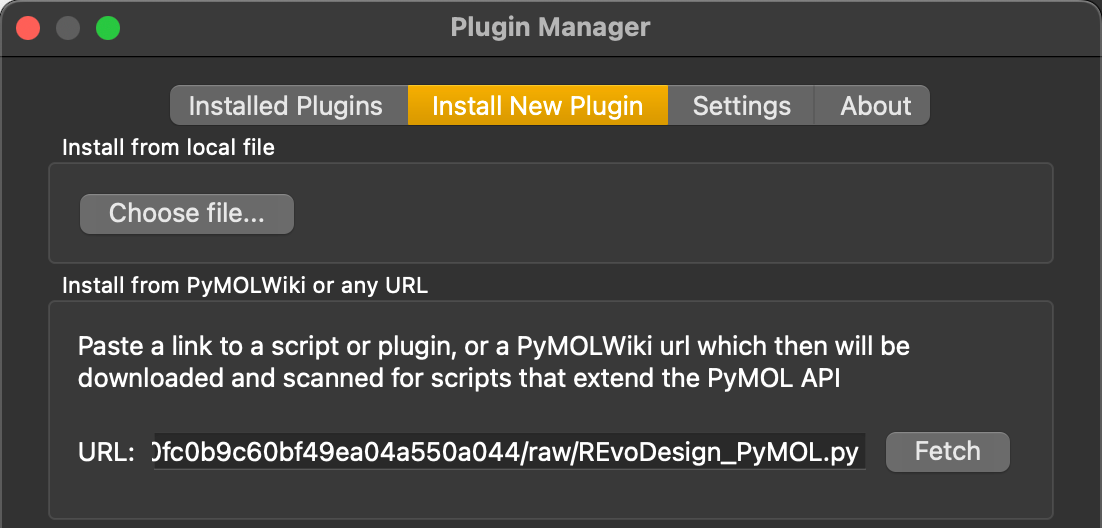
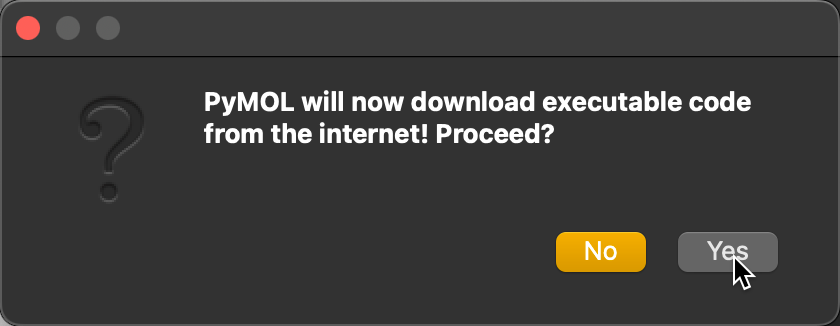
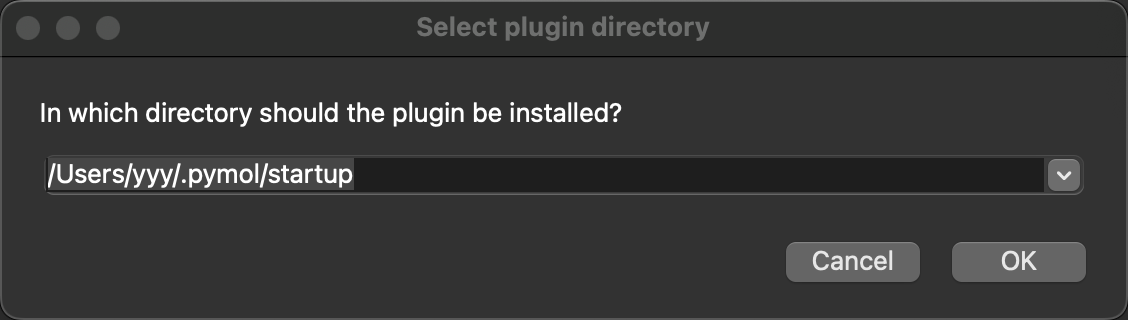
Once installed, the REvoDesign Package Manager will appear in the PyMOL menu.
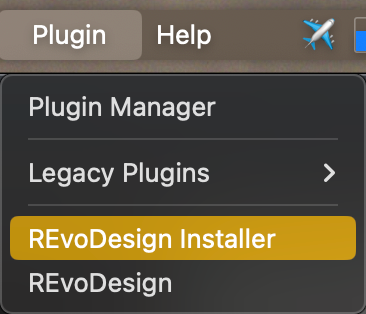
Step 2: Install the Main Program
The REvoDesign Package Manager simplifies the installation of the core REvoDesign program. It supports various installation methods and configurations:
Features
- Installation Sources:
- Repository: Install directly from the remote repository.
- Local clone/directory: Install from a local source code or cloned repository.
- Local file: Install from a
.zipor.tar.gzarchive.
- Options:
- Upgrade: Update to the latest release version.
- Verbose: Show detailed installation logs.
- Version/Commit: Install a specific version or commit from the repository.
- Network Control:
- Proxy Support: Configure HTTP, HTTPS, SOCKS5, or SOCKS5h proxies.
- Mirror: Use a PyPI mirror for installations.
- Extras:
- Basic: Default installation.
- Customized: Select additional features.
- Everything: Install all extras (excluding test packages).
- Cache: Choose a custom cache directory or use the default.
- Self-Upgrades: Upgrade the package manager and UI directly.
Installation Methods
-
Remote Repository: Select Repository and click Install.
-
Local Clone: Use Local clone to install from a local repository or unzipped source code.
-
Local File: Select Local file to install from a
.zipor.tar.gzfile. -
Specific Version/Commit: Check Version or Commit to install a specific release.
-
Customized/Extras: Use Customized to select specific features or Everything for a full installation.
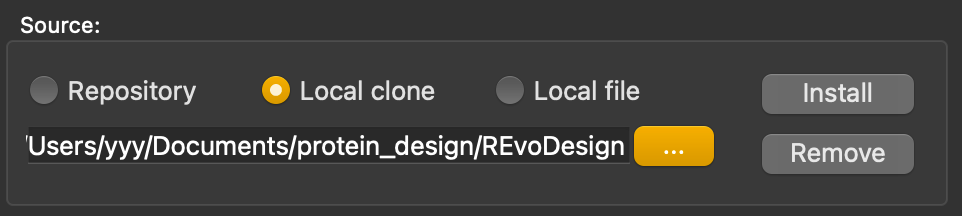
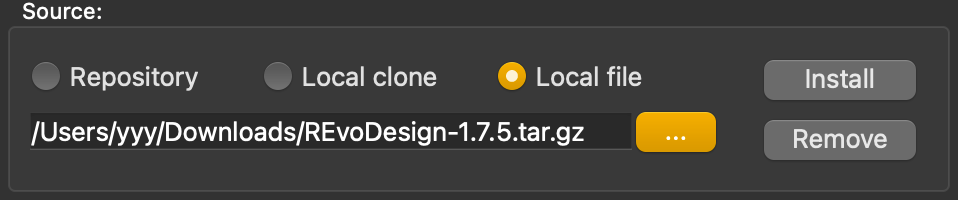
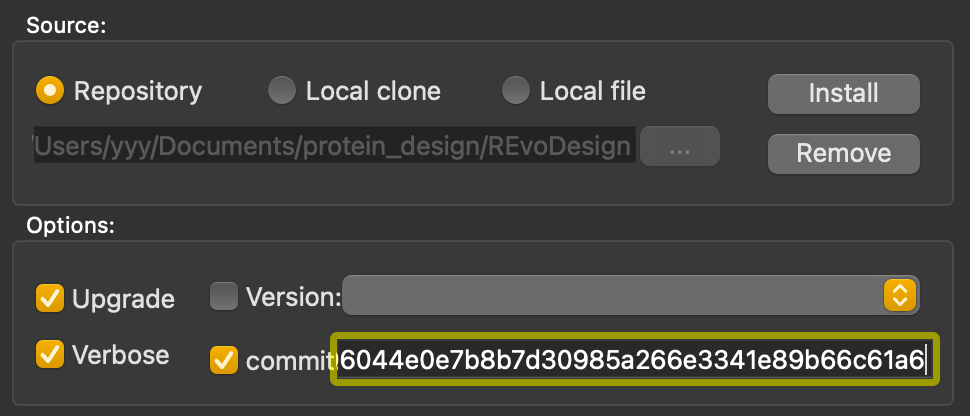
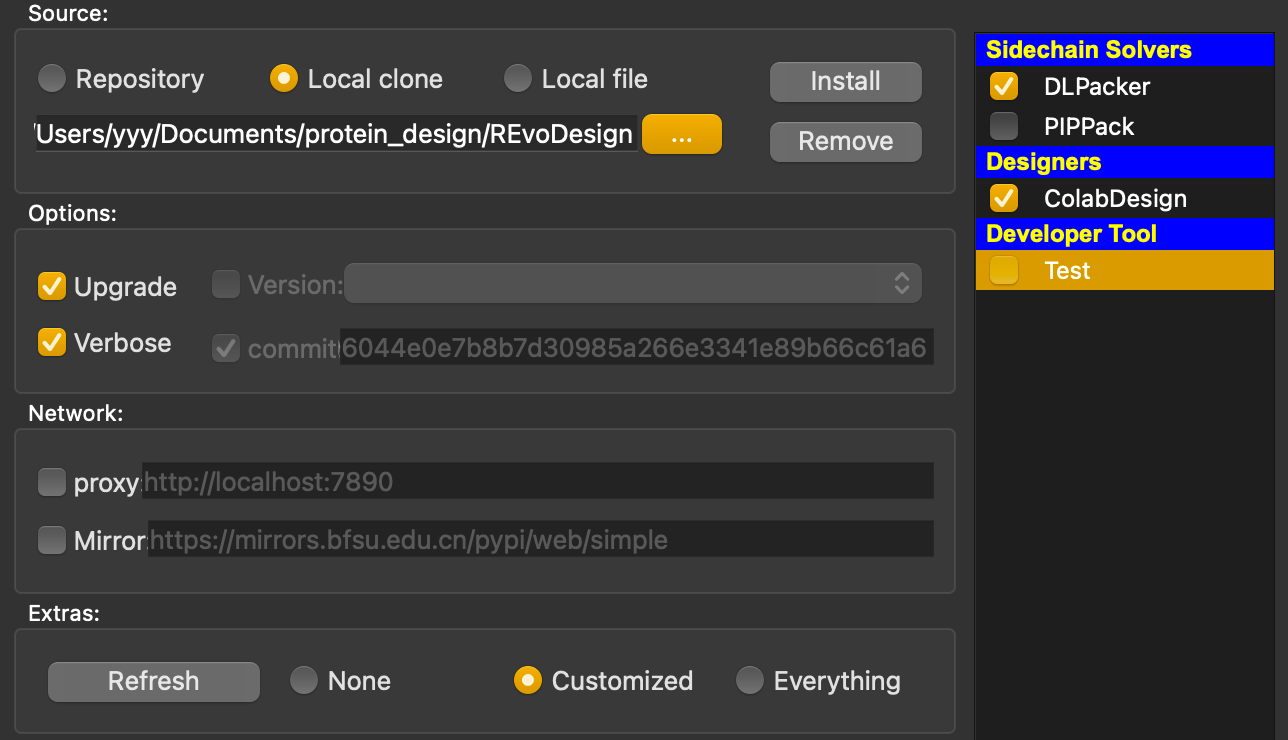
The typical installation process will take several minutes, depending on your network speed, as well as the extras you choose.
Uninstallation
Use the Remove button in the manager to uninstall. You can also remove selected extras.
Network Settings
Set up proxies and mirrors to bypass network restrictions. For example, create a SOCKS5 proxy using SSH:
ssh -D 7899 -C root@<your.vps.ip> -p<ssh-port>
Configure the proxy in the manager:
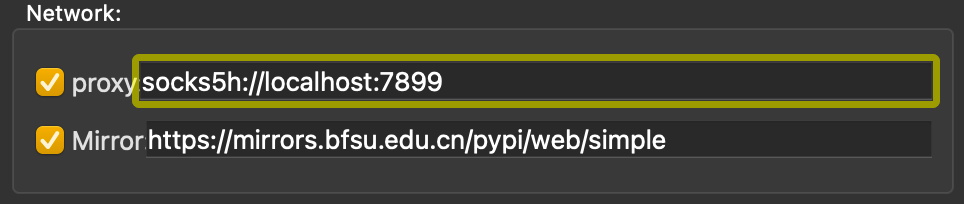
Self-Upgrades
Right-click any non-editing area of the manager and select Upgrade this manager to fetch the latest version.
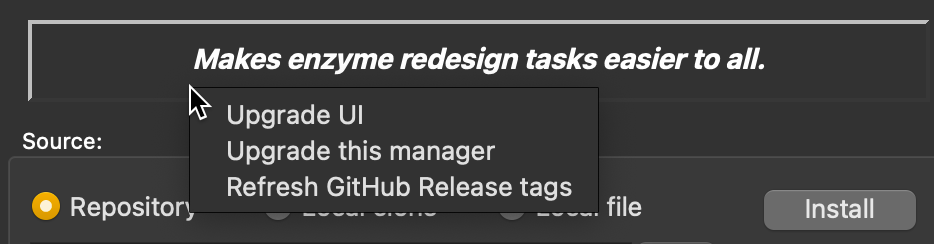
After confirming, the script will replace the existing manager with the updated version.
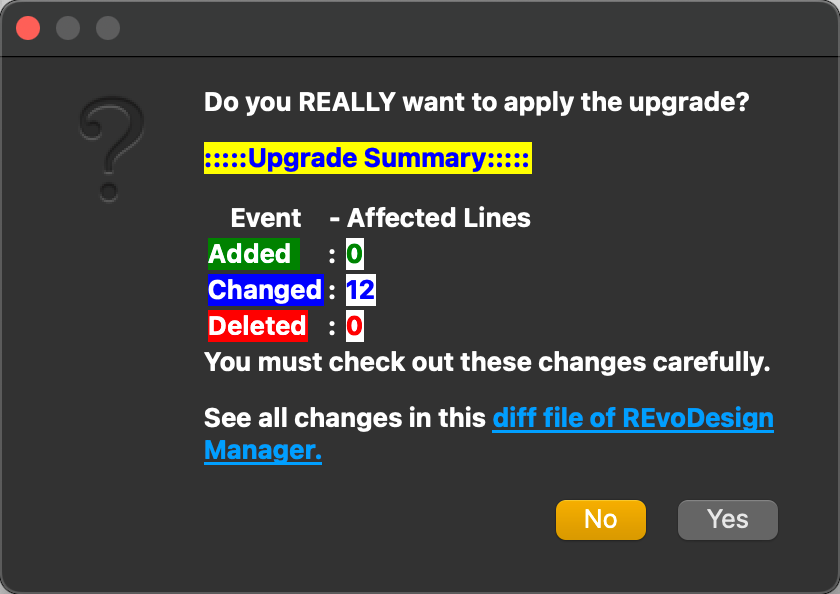
You are now ready to use REvoDesign for your enzyme redesign projects!
Extras table
For detailed plugin, please refer to the Extras table.
[!WARNING] ColabDesign uses Jax, which requires Python >= 3.9
[!IMPORTANT] Please make sure that modern PyMOL version is fetched from pymol-open-source channel, instead of obsolete PyMOL bundle (< v2.5.7, shipped with Python 3.7) from offical website or schrodinger's conda channel.
[!IMPORTANT] ALSO, for MacOS users work with Apple Silicon and PyMOL bundle >2.5.7,
jaxlibbuilded withAVXwill not work underRosetta-2. Please consider using native build ofpymol-open-sourceor buildingjaxlibfrom source.
Doc: Building jaxlib from source
Issue: CPU Support / Necessary AVX Instructions
- Getting started:
- In order to get started, you need to load/fetch a structure(
fetch 1SUO, for example) into your PyMOL session. - Click
Menu->REvoDesign->Import PyMOL Sessionto let REvoDesign find a designable molecule. Here is a keyboard shortcut:Ctrl+N. - Have fun!
- In order to get started, you need to load/fetch a structure(
Happy enzyme redesigning with REvoDesign! If you encounter any issues during installation or usage, please consult the documentation or seek assistance from REvoDesign toolkit's support resources.
Demo Cases
REvoDesign is tested on various test cases, which can be found in the tests/cases/tabs directory, with related test data under tests/data directory.
A detailed tutorial of using REvoDesign can be found as this manual.
Expected demo results and runtime
Please refer to the test cases and tutorial document.
Reproduce
To reproduce our data, please refer to our manuscript as well as the input data section below. Note that during software development, results may fluctuate. This does not affect the results and conclusion in our manuscript.
T5aH
Input Data
-
Sequence:
T5aH2.fasta -
docked structure:
T5aH2-HEM-T31_initial_4263.pdb -
Full PSSM GREMLIN archive:
T5aH2_wt_PSSM_GREMLIN_results.zip -
Pythia ddG scan result:
T5aH2-pythia-ddg.zip
Online tools
Timings
Most of the design tasks w/ REvoDesign will not take very long time, as the software is designed and optimized w/ the most common desktop machines. We recently added a thread pool management mechanism so that users can check and control the detailed wall time of their calculations.
Testing
REvoDesign uses pytest for testing. These cases cover from unit to integration testing. Tests are classified into three categories:
make fast-testfast tests: quick tests that run quickly and in parallel and can be run frequently.make serial-testserial tests: tests that should be run serially due to the resource consumption.make slow-testslow tests: tests that take a long time to run and should be run at very last order.
To run the tests, use the following command:
make all-test
Keyword tests can be run with the following command:
make kw-test PYTEST_KW='test_menu_window_pops' # single keyword
# or
make kw-test PYTEST_KW='"citable or citation"' # multiple keywords, should be in double quotes
Cleanup
Use this one-liner command to clean up the test workspace.
make clean
For more testing options, please refer to the Makefile in the root directory.
Expected Full testing time
Less than 35 minutes in total on GH Action runner, Ubuntu 24.04
Formatting
REvoDesign uses several tools for formatting. To format the code, use the following command:
make black
1 maintainer

Metadata
1 maintainer
Release files for REvoDesign 1.9.1
For a detailed explanation of source distributions (sdists) and built distributions (wheels), please see the package formats documentation.
Source distribution (sdist)
| File | Size | Uploaded | |
|---|---|---|---|
| revodesign-1.9.1.tar.gz | 605.0 kB | Details |
Built distribution (wheel)
| File | Interpreter | ABI | Platform | Reset |
|---|---|---|---|---|
| revodesign-1.9.1-py3-none-any.whl | Python 3 | none | any | Details |
Total release size: 1.3 MB
Release files / revodesign-1.9.1.tar.gz
| Download URL | revodesign-1.9.1.tar.gz |
|---|---|
| Size | 605.0 kB |
| Tags | Source |
|
SHA-256 checksum How to use checksums |
9462863ae3b7eaf3d001f23d5c92b2f7b6d383f1e2429b599f158cea37c22658
|
|
BLAKE2b-256 checksum How to use checksums |
77607240fe9e2b72a66197d39635e2e3a50b471bad2390f345ac1ad2b515a223
|
| Upload date | |
|
Uploaded using Trusted Publishing? What is trusted publishing? |
No |
| Uploaded via |
twine/7.0.0 CPython/3.12.13
|
Release files / revodesign-1.9.1-py3-none-any.whl
| Download URL | revodesign-1.9.1-py3-none-any.whl |
|---|---|
| Size | 688.8 kB |
| Tags | Python 3 |
|
SHA-256 checksum How to use checksums |
40d84c4fddf027640490e4c510b25dd5fceb9b5c58b3be1decdc0669e5b5e196
|
|
BLAKE2b-256 checksum How to use checksums |
68d83a95c484a3ae5b0d15700e0074c45d977711e6a91f8ae594caa6efd6a3fb
|
| Upload date | |
|
Uploaded using Trusted Publishing? What is trusted publishing? |
No |
| Uploaded via |
twine/7.0.0 CPython/3.12.13
|














