
This release is a pre-release and may not be stable for production use.
Rhylthyme CLI Runner
Command-line interface for validating and running Rhylthyme real-time program schedules, and for turning a plain-language request into one through the hosted Rhylthyme MCP server.
pip install rhylthyme
rhylthyme login
rhylthyme generate "roast chicken, potatoes and green beans for 6" -e kitchen --by 19:00 --with "one oven"
A timeline in five commands: a birthday party
Parents collect at 4:00. Working backwards from that: when does the cake go in the oven, when do the balloons go up, and do the pizzas and the cake ever want the oven at the same time?
pip install rhylthyme

# 1. a program: the party, the kitchen and the setup crew, 13 steps
curl -sO https://raw.githubusercontent.com/rhylthyme/rhylthyme-cli-runner/main/examples/recipe/birthday-party.json

# 2. is it well formed?
rhylthyme validate birthday-party.json --strict

# 3. any clashes, and what time does everything start if we finish at 4?
rhylthyme analyze birthday-party.json --finish-at 16:00
**Makespan:** 3h 10m across 3 tracks, 13 steps.
**Critical path:** Guests arrive → Party games → Pizza → Candles and cake → Piñata, until it breaks → Party bags and goodbyes
**Binding constraints:** step dependencies only — no resource or in-flight limit gates the critical path.
**Peak concurrency:** 2 steps at 10:00.
**Resource conflicts:** none.

**Tracks that finish early:** Kitchen (1h 10m early), Setup crew (50m early)

Start Sat 12:50, finish Sat 16:00 (local time)
  Sat 12:50  Bake the cake
  Sat 13:00  Balloons and banner
  Sat 13:25  Cake cools
  Sat 13:30  Hang the piñata
  Sat 13:50  Guests arrive
  Sat 14:05  Frost and decorate
  Sat 14:20  Party games
  Sat 14:35  Pizzas in the oven
  Sat 14:50  Fill party bags
  Sat 14:50  Pizza
  Sat 15:15  Candles and cake
  Sat 15:30  Piñata, until it breaks
  Sat 15:45  Party bags and goodbyes
# 4. a live timeline for the fridge door (or a phone): timers, cues, and you end the piñata when it breaks
rhylthyme publish birthday-party.json --open --image party-preview.png

# 5. a picture for the group chat, on the wall clock (needs Node.js)
rhylthyme render birthday-party.json -o birthday-party.png \
  --style web --palette vivid --label-overflow outside --start-at "$(date +%F)T12:50:00"
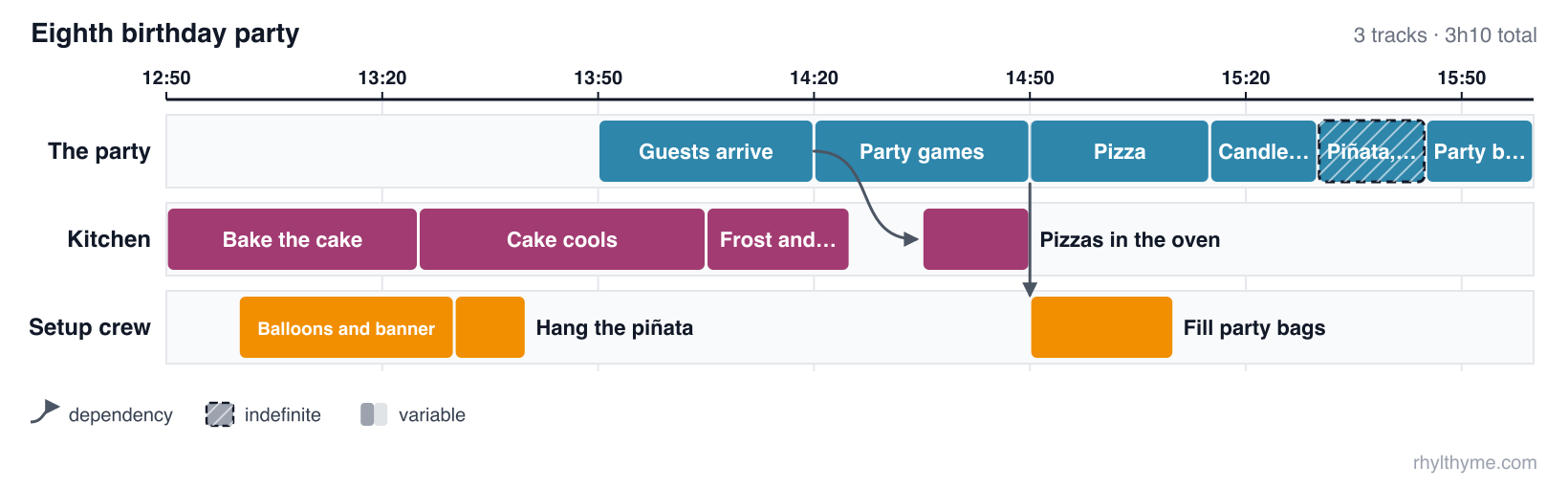
The pizzas go in 15 minutes after the games start, so they come out as the
games end; the party bags get filled while everyone is eating. Try
--finish-at 17:30, or turn the cake into a two-hour fruitcake ("seconds": "2h"
on bake) and analyze reports the clash: oven needs 2 but max is 1 from 1:45:00 to 2:00:00 (bake, heat-pizza). rhylthyme run birthday-party.json --time-scale 60 rehearses
the whole afternoon in the terminal at a minute per second.
This repository and rhylthyme-mcp
Two repositories do related things and are easy to confuse. This one is the command a person types. rhylthyme-mcp is the server an AI assistant talks to.
| rhylthyme-mcp | rhylthyme-cli-runner | |
|---|---|---|
| What it is | The MCP server: the tools an AI assistant calls | A command-line program: the rhylthyme command |
| Who uses it | Claude, ChatGPT, Cursor or any MCP client, on a person's behalf | A person at a terminal, a script, or CI |
| Where it runs | Hosted at mcp.rhylthyme.com; nothing to install |
On your machine: pip install rhylthyme |
| Language | JavaScript (Node 20+) | Python 3.12+ |
| Input | A program the assistant builds in conversation | A program file on disk (JSON or YAML) |
| Validate a program | validate_program |
rhylthyme validate (works offline) |
| Import a recipe or protocol | import_from_source |
rhylthyme import |
| Timing, conflicts, deadlines | analyze_schedule |
rhylthyme analyze (asks the server) |
| Publish a live timeline | visualize_schedule |
rhylthyme publish (asks the server) |
| Run a schedule with timers | no: it hands back a link to the web timeline | rhylthyme run, an interactive terminal runner |
| Recorded runs, calibration | reads runs saved to an account | records runs locally; rhylthyme runs, rhylthyme calibrate |
| Catalog search, account library | yes | no |
| Also in the repository | the rhylthyme-mcp PyPI package (a stdio bridge to the hosted server), the Claude plugin marketplace |
the Claude skill's source, the prompt-evaluation harness and its results, rhylthyme mcp-test |
How they fit together: this tool is one of the MCP server's clients.
rhylthyme analyze, publish, generate and mcp-test are MCP calls to
mcp.rhylthyme.com; rhylthyme validate, run, runs and calibrate never
touch the network. Each has its own validator for the same program schema
(Python here, JavaScript there), so a program is checked again when it is
published.
Use this repository if you have a program file and a terminal, want timers in the terminal, or keep run records. Use rhylthyme-mcp to connect Claude, ChatGPT or another assistant, or to read or self-host the server.
Two names to keep apart: rhylthyme-cli-runner on PyPI is this tool (command
rhylthyme); rhylthyme-mcp on PyPI is the server's stdio bridge (command
rhylthyme-mcp). The program format itself is defined in
rhylthyme-spec, with examples in
rhylthyme-examples.
Installation
From Source
# Clone the repository
git clone https://github.com/rhylthyme/rhylthyme-cli-runner.git
cd rhylthyme-cli-runner

# Install the package
pip install -e .

# Or install with development dependencies
pip install -e ".[dev]"
From PyPI
pip install rhylthyme            # this package, the importers and the renderer
pip install rhylthyme-cli-runner   # this package alone
Getting the Examples
The example programs referenced in this documentation are maintained in a separate repository. To use them:
Option 1: Clone the Examples Repository Alongside
# Navigate to the parent directory of rhylthyme-cli-runner
cd ..

# Clone the examples repository
git clone https://github.com/rhylthyme/rhylthyme-examples.git

# Run examples using relative paths
cd rhylthyme-cli-runner
rhylthyme run ../rhylthyme-examples/programs/breakfast_schedule.json
Option 2: Clone Examples as a Subdirectory
# From within the rhylthyme-cli-runner directory
git clone https://github.com/rhylthyme/rhylthyme-examples.git examples

# Run examples directly
rhylthyme run examples/programs/breakfast_schedule.json
Option 3: Download Individual Examples
# Download a specific example file
curl -O https://raw.githubusercontent.com/rhylthyme/rhylthyme-examples/main/programs/breakfast_schedule.json

# Run the downloaded file
rhylthyme run breakfast_schedule.json
Quick Start
The Rhylthyme CLI provides commands for working with real-time program schedules defined using the Rhylthyme JSON or YAML schema.
Generate a Program from Plain Language
generate sends your request to the hosted MCP server at
mcp.rhylthyme.com, which builds a validated multi-track program and
publishes it as a live timeline. Sign in once first; the session is kept
in ~/.config/rhylthyme/credentials.json and renews itself.
rhylthyme login     # opens rhylthyme.com in your browser

# Prints the Gantt chart, the itinerary and the live-timeline URL
rhylthyme generate "roast chicken, potatoes and green beans for 6" \
    -e kitchen --by 19:00 --with "one oven, four burners, one cook"

# From a file, save the program, then run it here in the terminal
rhylthyme generate -e lab -f western_blot.txt -o blot.json --run

# From stdin, print only the URL
pbpaste | rhylthyme generate -e events --by "doors at 18:30" -q
The server runs several model turns per request (20–60 s, capped per day).
Headless machines can set RHYLTHYME_TOKEN to an access token from
https://www.rhylthyme.com/mcp/auth instead of running login.
Validate a Program
Validate a program file against the schema to ensure it's properly formatted:
# Validate a JSON or YAML program file
rhylthyme validate my_program.json

# Validate with verbose output
rhylthyme validate my_program.json --verbose

# Validate with JSON output for CI/scripting
rhylthyme validate my_program.json --json

# Validate in strict mode (requires all tasks in resourceConstraints)
rhylthyme validate my_program.json --strict
Run a Program
Run a program with an interactive terminal UI for monitoring and controlling execution:
# Run a program file
rhylthyme run examples/programs/breakfast_schedule.json

# Run with automatic start (no manual trigger needed)
rhylthyme run examples/programs/breakfast_schedule.json --auto-start

# Run with a different time scale (2x faster)
rhylthyme run examples/programs/breakfast_schedule.json --time-scale 2.0

# Run with a specific environment
rhylthyme run examples/programs/breakfast_schedule.json --environment kitchen

# Run without validation (if you're sure the file is valid)
rhylthyme run examples/programs/breakfast_schedule.json --no-validate
Analyze and Publish a Program
Neither needs an account; both are computed by the hosted MCP server.
# Total length, critical path, resource conflicts
rhylthyme analyze examples/programs/breakfast_schedule.json

# When does each step start if breakfast is at 8:30?
rhylthyme analyze examples/programs/breakfast_schedule.json --finish-at 8:30am

# A live, shareable timeline with timers; prints the URL
rhylthyme publish examples/programs/breakfast_schedule.json
validate checks structure only. Two steps that want the only oven at the
same time pass validation; analyze reports them, and --strict makes that
a non-zero exit.
Optimize a Program
plan is an older stagger heuristic that reads the pre-0.2 program format; on
programs written with stepId and task (all current examples) it writes the
program back unchanged. Use analyze to find contention.
# Optimize a program and save to new file
rhylthyme plan examples/programs/breakfast_schedule.json optimized_breakfast.json

# Optimize with verbose output
rhylthyme plan examples/programs/breakfast_schedule.json optimized_breakfast.json --verbose
Work with Environments
List and validate environment catalogs:
# List all available environments
rhylthyme environments

# List environments in JSON format
rhylthyme environments --format json

# Validate all environment files
rhylthyme validate-environments

# Show information about a specific environment type
rhylthyme environment-info kitchen
Claude Skill
skills/rhylthyme is an Agent Skill
that teaches Claude (Claude Code, the Claude apps, the Agent SDK) to turn a
protocol, recipe or run sheet into a validated program with this CLI, check
it for conflicts, and hand back a live timeline. It follows the layout of
K-Dense scientific skills:
a SKILL.md plus references/.
The easiest install is the Claude Code plugin, which also connects the hosted MCP server:
/plugin marketplace add rhylthyme/rhylthyme-mcp
/plugin install rhylthyme@rhylthyme
Or copy the skill by hand:
# Claude Code, for one user
mkdir -p ~/.claude/skills
cp -r skills/rhylthyme ~/.claude/skills/

# or for one project
mkdir -p .claude/skills && cp -r skills/rhylthyme .claude/skills/
Then ask, for example, "time a Western blot so imaging is at 4 pm" or "two PCR
protocols, one thermocycler: when do I start each?". tests/test_skill.py
validates every program in the skill and checks that every command it names
exists.
Program File Examples
Simple Breakfast Schedule
{
  "programId": "breakfast-schedule",
  "name": "Breakfast Schedule",
  "description": "Coordinated breakfast preparation",
  "environmentType": "kitchen",
  "startTrigger": {
    "type": "manual"
  },
  "tracks": [
    {
      "trackId": "eggs",
      "name": "Scrambled Eggs",
      "steps": [
        {
          "stepId": "crack-eggs",
          "name": "Crack and Whisk Eggs",
          "startTrigger": {
            "type": "programStart"
          },
          "duration": {
            "type": "fixed",
            "seconds": 60
          }
        }
      ]
    }
  ],
  "resourceConstraints": [
    {
      "task": "stove-burner",
      "maxConcurrent": 2,
      "description": "Maximum stove burners"
    }
  ],
  "version": "1.0.0"
}
Interactive UI Controls
When running a program, the interactive UI provides these controls:
- Space: Start/stop the program
- Enter: Trigger manual steps
- Arrow keys: Navigate between steps
- q: Quit the program
- r: Refresh the display
- s: Sort by different criteria
Command Reference
rhylthyme generate [REQUEST...]
Turns a natural-language request into a program and a live timeline using
the hosted MCP server's import_text and visualize_schedule tools.
Requires rhylthyme login (or RHYLTHYME_TOKEN).
Options:
-e, --env:generic(default),kitchen,lab,eventsorgym--by TEXT: when everything must be finished, e.g.19:00--with TEXT: equipment and people limits, e.g.one oven, two cooks-f, --file PATH: read the request or source text from a file (-for stdin)-o, --output PATH: save the program JSON--run: run the program in the terminal UI afterwards--open: open the live timeline in a browser--no-publish: build the program only--json: print{url, program, ...}as JSON-q, --quiet: print only the URL
Environment: RHYLTHYME_TOKEN (access token, overrides the stored session),
RHYLTHYME_MCP_URL (default https://mcp.rhylthyme.com/mcp),
RHYLTHYME_SITE_URL (default https://www.rhylthyme.com).
rhylthyme mcp-test
Smoke-tests a Rhylthyme MCP server and exits 1 if any check fails. By
default it runs the read-only checks against all five hosted endpoints
(/mcp, /kitchen/mcp, /lab/mcp, /events/mcp, /gym/mcp):
| Check | What it proves |
|---|---|
initialize |
server name, protocol version, tools/resources/prompts capabilities, instructions |
tools |
core tools and the endpoint's one-shot tools are listed, each with a description and schema |
validate-good / validate-bad |
a valid program passes (including a type: "compound" trigger); a dangling step reference is rejected with a fix hint |
analyze |
makespan, critical path and wall-clock itinerary for a known program |
resources / prompts |
schema and guides are readable, a bundled example validates, plan_schedule substitutes its arguments |
json-accept |
clients that do not accept SSE (*/*, application/json) get JSON, not 406 |
bad-requests |
unknown method gives -32601, unknown tool gives an error, never a 5xx |
login-gate |
account tools refuse without a token and point at login |
catalog |
public search returns entries that load with a URL (empty catalog = warning) |
publish (--publish) |
visualize_schedule returns a URL on the right site; the page and PNG load |
generate (--generate) |
the model-backed import_text returns a program that validates (needs login) |
rhylthyme mcp-test                         # everything read-only
rhylthyme mcp-test -e lab --publish        # one endpoint, plus a real share
rhylthyme mcp-test -k catalog -k tools     # only some checks
rhylthyme mcp-test --url http://localhost:3000/mcp -e generic
rhylthyme mcp-test --json --strict         # cron / CI: warnings fail too
Requests carry mcp-test in the User-Agent so the hosted server logs the
errors these checks provoke without alerting anyone. The same suite is
importable (rhylthyme_cli_runner.remote.checks.run_suite), and
RHYLTHYME_MCP_LIVE=1 pytest tests/test_mcp_checks.py runs it live.
rhylthyme login / logout / whoami
login opens the rhylthyme.com sign-in page and receives the session on a
one-shot listener bound to 127.0.0.1; --token TOKEN stores a pasted
access token instead and --no-browser only prints the URL. whoami
shows the stored account and expiry; logout deletes the stored session.
rhylthyme validate
Validates program files against the schema.
Options:
--schema PATH: Path to schema file (default: built-in schema)--verbose, -v: Show detailed validation information
rhylthyme run
Runs programs with interactive terminal UI.
Options:
--schema PATH: Path to schema file (default: built-in schema)-e, --environment TEXT: Environment ID to use--time-scale FLOAT: Time scale factor (default: 1.0)--validate / --no-validate: Validate before running (default: True)--auto-start: Automatically start without manual trigger
rhylthyme analyze
Total length, critical path, what gates each link of it, resource conflicts and tracks that finish early. No sign-in; nothing is published.
Options:
--finish-at TEXT: when everything must be finished (19:00,7:30pmor ISO 8601); prints local clock times per step--start-at TEXT: when the program starts; ignored with--finish-at--strict: exit non-zero when there are resource conflicts--json: the full analysis
rhylthyme publish
Publishes a program (a file, an http(s) URL, or - for standard input) as a
live timeline and prints its URL. No sign-in.
A published timeline is reachable by anyone who has the link.
Options:
-e, --env:generic,kitchen,lab,events,gym(default: fromenvironmentType)-q, --quiet: print only the URL--json:url,shareId,imageUrl,makespanSeconds,warnings--image PATH: also save a PNG of the timeline--open: open it in a browser
rhylthyme import
Imports a recipe, protocol or slide deck as a program, validates it, and
writes <programId>.json. Needs rhylthyme-importers (included in
pip install rhylthyme).
rhylthyme import https://www.seriouseats.com/the-best-chili-recipe   # any of ~580 recipe sites
rhylthyme import 52772 -i themealdb --publish                        # a TheMealDB id, straight to a live timeline
rhylthyme import https://www.protocols.io/view/western-blot-...      # needs PROTOCOLS_IO_TOKEN
rhylthyme import https://raw.githubusercontent.com/Opentrons/Protocols/develop/protocols/007992/rna_isolation.ot2.apiv2.py   # an Opentrons protocol
rhylthyme import "Neapolitan Pizza.cook" -i cooklang
rhylthyme importers                                                  # what is installed
rhylthyme search "pad thai" -i spoonacular                           # then import a hit's URL
Options: -i IMPORTER (default: chosen from the URL), -o PATH,
--stdout, --publish (and --open), --no-validate. - reads pasted
source from stdin (with -i).
rhylthyme render
Draws a program as an SVG, PNG or PDF figure through the rhylthyme-timeline
package (included in pip install rhylthyme; needs Node.js 18+). Every
option of rhylthyme-render is accepted: rhylthyme render --help.
rhylthyme render dinner.json -o dinner.png --style web --palette vivid --color-by task
rhylthyme render blot.json -o figure.pdf --style publication --legend right
rhylthyme plan
An older stagger heuristic. It reads the pre-0.2 program format and leaves
programs written with stepId and task unchanged; use analyze to find
contention and edit the triggers.
Options:
--verbose, -v: Show detailed planning information
rhylthyme environments
Lists available environment catalogs.
Options:
--format, -f: Output format (table, json, yaml)
rhylthyme validate-environments
Validates environment catalog files.
Options:
--environments-dir PATH: Directory containing environment files--verbose, -v: Show detailed validation information
rhylthyme environment-info
Shows information about a specific environment type.
rhylthyme eval-prompts
Scores agent-authored programs against the expert gold set. See "Evaluating prompts" below for the full flag list.
Evaluating prompts
eval-prompts measures how well a prompt gets a model to author a
Rhylthyme program. It compares a predicted program with the expert gold
program of the same slug in rhylthyme-examples/gold/ and reports
per-component precision/recall: steps, durations, resources, actors,
relationships (triggers), track Rand index, an end-to-end pass and the
unsupported-step rate.
Two modes:
# Offline: score programs already on disk (no model calls, no cost).
rhylthyme eval-prompts --score-only \
  --gold ../rhylthyme-examples/gold --predicted /tmp/predicted

# Live: render a prompt pattern per gold source, call a model, extract
# the program JSON, validate it, score it.
rhylthyme eval-prompts \
  --gold ../rhylthyme-examples/gold \
  --model claude-haiku-4-5-20251001 --patterns baseline,four-turn
Patterns (--list-patterns):
| pattern | what it sends |
|---|---|
baseline |
The single plan_schedule message the MCP server sent before Phase 3, frozen in eval/patterns/baseline.py so the committed numbers stay reproducible. |
four-turn |
The four messages plan_schedule sends today, byte-copied from rhylthyme-server/mcp-api/prompts.js: T1 read-back → T2 model check → T3 extraction (steps + source spans, no relationships) → T4 relationships (tracks, triggers, the refined dependency question, then the program). |
Both patterns end in the same validate-and-repair loop and get the same
system prompt, so the only variable between them is the shape of the user
turns. four-turn also records the paper's 2/1/0 score for T1 and T2 in
results.json under extras (t1_score, t2_score): 2 when the reply
carries the expected JSON shape first time, 1 when a single retry turn
recovers it, 0 when it never does — plus unsupported_step_ids, the
steps the model itself marked inferred in T3.
Flags
| Flag | Meaning |
|---|---|
--gold PATH |
Gold set directory (required). |
--score-only |
Offline mode; needs --predicted. |
--predicted PATH |
Directory of predicted programs (<slug>.json or <slug>/program.json). |
--model ID |
Model id for a live run (required unless --score-only). Pin it; do not let it drift. |
--patterns NAMES |
Comma-separated prompt patterns (default baseline). --list-patterns prints the registry. |
--only SLUGS |
Comma-separated gold slugs to run; applied before --limit. |
--limit N |
Run only the first N gold programs (slug order). |
--concurrency N |
Programs run in parallel (default 1). |
--from-cache |
Never call the model: replay cached responses, and fail loudly on a missing key. |
--cache-dir PATH |
Where raw responses are cached (default <out>/cache). |
--max-fix-iterations N |
How many times Python-validator findings are sent back as the next user turn (default 2; 0 disables the fix loop). |
--max-tokens N |
max_tokens per model call (default 16000). |
--write-baseline PATH |
Also write {model, pattern, date, git_note, results} there. |
--out PATH |
Where results.json, results.md, responses/ and predicted/ are written (default ./eval-results). |
--format table|json |
What to print to stdout. |
--skip-js |
Skip the JavaScript validator even when node is available. |
--threshold FLOAT |
Minimum source-span overlap for two steps to match (default 0.5). |
--verbose, -v |
Per-program breakdown under the table. |
Sub-command eval-prompts compare gates a run against the committed
numbers instead of printing them:
| Flag | Meaning |
|---|---|
--baseline FILE |
The stored reference. Use eval/four-turn.json — that is what ships. |
--results FILE |
results.json from the run under test. |
--rel-f1-drop N |
Largest tolerated fall in relationships F1, in points (default 5). |
--e2e-drop N |
Largest tolerated fall in the end-to-end pass rate, in points (default 0: any drop fails). |
--allow-missing |
Do not fail when the results file is missing a program the reference has. |
--format table|json |
Diff table, or the same comparison as JSON. |
Cost. A live run spends real money: one call per turn per gold
program, plus one per retry and one per fix iteration. The published
baseline run cost $1.10 for 24 programs and 49 calls on
claude-haiku-4-5-20251001 (358k input / 148k output tokens); the
four-turn run over the same 24 cost $2.20 for 111 calls (969k / 246k)
— four turns instead of one, each carrying the whole conversation so far.
The run prints its own token totals and an estimated cost from the price
table in src/rhylthyme_cli_runner/eval/llm.py (prices as of
2026-06-24); an unpriced model reports unknown instead of a number.
--limit/--only keep a trial run cheap.
Cache. Every call is cached under --cache-dir (default
<out>/cache) keyed by sha256 of the model, the pattern name, the system
prompt and the full message list, so each turn of a multi-turn pattern is
cached separately and re-scoring never re-spends. --from-cache replays
and refuses to call the API; a missing key is an error naming the slug and
the key. The committed cache for both published runs is eval/cache/
(1.44 MB, 160 files). Only the completion is replayed, so the committed
files keep the completion in full and record the prompt side as digests
(system_sha256, messages_sha256) plus a role/length shape — the cache
is in the repository, so it is kept small on purpose.
Reading the table. One row per program, then a mean row:
program                               steps P/R/F1    dur acc  res P/R    actors  rel P/R/F1      tracks RI  e2e   unsupp
kitchen-weeknight-stir-fry            1.00/0.87/0.93  1.00     0.00/0.00  1.00    0.62/0.47/0.53  0.97       0.00  0.19
steps— matched by source-span overlap ≥--threshold, else by normalised name. Precision near 1.00 with low recall means the model wrote real steps but far fewer of them than the expert did (it lumps).dur acc— of matched steps, how many got the duration kind and value right.res P/R—resourceConstraints[].tasknames.actors— programactorscount (1 or 0).rel P/R/F1— triggers: same owning step, same anchor step, same type, offset within 10 %. This is the number the four-turn work in Phase 3 has to move; the paper this work follows found relationships are the weak component, and the baseline agrees.tracks RI— Rand index of the step-to-track partition.e2e— passes both validators, makespan within 10 % of gold, critical chain shares ≥ 50 % of gold's steps.unsupp— predicted steps with no gold match and no locatable span, as a share of predicted steps. Not counted as errors (PRD open question 4).
A program whose reply carried no parseable program, or one that still fails the validator after the fix loop, is scored zero on every component and listed under the table, so a failed run lowers the mean instead of shrinking the sample.
eval/baseline.json and eval/four-turn.json are the committed
numbers, in the same shape: the model pin, the pattern, the date, a git
note for the commit they were produced from, and the full per-program
results. eval/four-turn.json is the one CI gates on — it is the pattern
plan_schedule ships; eval/baseline.json is kept as the historical
single-message number so this table can show what the four turns bought.
Published numbers
All 24 gold programs, --max-fix-iterations 2, --concurrency 3, both
patterns on the same model on the same day.
baseline pattern, claude-haiku-4-5-20251001, 2026-09-14
(49 calls, $1.10):
| domain | n | steps P/R/F1 | dur acc | res P/R | actors | rel P/R/F1 | tracks RI | e2e | unsupp |
|---|---|---|---|---|---|---|---|---|---|
| kitchen | 10 | 0.90/0.43/0.56 | 0.88 | 0.50/0.48 | 0.90 | 0.38/0.20/0.25 | 0.78 | 0.00 | 0.47 |
| laboratory | 6 | 0.83/0.24/0.37 | 0.81 | 0.67/0.64 | 1.00 | 0.36/0.10/0.15 | 0.81 | 0.00 | 0.76 |
| event | 4 | 1.00/0.66/0.78 | 0.97 | 0.47/0.39 | 0.25 | 0.47/0.32/0.37 | 0.90 | 0.25 | 0.37 |
| fitness | 4 | 0.75/0.11/0.17 | 0.75 | 0.69/0.69 | 0.75 | 0.42/0.05/0.08 | 0.75 | 0.25 | 0.89 |
| overall | 24 | 0.88/0.37/0.48 | 0.85 | 0.57/0.54 | 0.79 | 0.39/0.17/0.22 | 0.80 | 0.08 | 0.60 |
four-turn pattern, same model, same 24 programs, 2026-09-14
(111 calls, $2.20; T1 and T2 scored 2 on every program, no retries):
| domain | n | steps P/R/F1 | dur acc | res P/R | actors | rel P/R/F1 | tracks RI | e2e | unsupp |
|---|---|---|---|---|---|---|---|---|---|
| kitchen | 10 | 0.94/0.98/0.96 | 0.94 | 0.58/0.59 | 1.00 | 0.68/0.67/0.67 | 0.94 | 0.60 | 0.01 |
| laboratory | 6 | 0.84/0.99/0.91 | 0.85 | 0.57/0.56 | 0.83 | 0.59/0.61/0.59 | 0.90 | 0.67 | 0.01 |
| event | 4 | 0.93/0.99/0.95 | 0.96 | 0.39/0.39 | 0.50 | 0.65/0.68/0.66 | 0.91 | 0.50 | 0.01 |
| fitness | 4 | 0.93/0.76/0.83 | 0.94 | 0.70/0.66 | 0.75 | 0.66/0.48/0.55 | 0.93 | 0.75 | 0.00 |
| overall | 24 | 0.91/0.95/0.92 | 0.92 | 0.56/0.56 | 0.83 | 0.65/0.62/0.63 | 0.93 | 0.62 | 0.01 |
Baseline vs four-turn, means over all 24 programs:
| metric | baseline | four-turn | change |
|---|---|---|---|
| steps precision | 0.88 | 0.91 | +0.04 |
| steps recall | 0.37 | 0.95 | +0.58 |
| steps F1 | 0.48 | 0.92 | +0.44 |
| durations accuracy | 0.85 | 0.92 | +0.06 |
| resources P/R | 0.57/0.54 | 0.56/0.56 | −0.00/+0.02 |
| actors accuracy | 0.79 | 0.83 | +0.04 |
| relationships F1 | 0.22 | 0.63 | +0.41 |
| tracks Rand index | 0.80 | 0.93 | +0.12 |
| end-to-end pass | 0.08 | 0.62 | +0.54 |
| unsupported-step rate | 0.60 | 0.01 | −0.59 |
| calls / cost | 49 / $1.10 | 111 / $2.20 | ×2.3 / ×2.0 |
The hypothesis holds on both numbers the PRD names, and by more on 24
programs than it did on the first 6: relationship F1 nearly triples
(0.22 → 0.63) and the end-to-end pass rate goes from 2/24 to 15/24.
The mechanism is extraction, not inference. The single-message prompt
lumps a source into just over a third of the steps the expert wrote
(recall 0.37) and fills the gaps with work the text does not support
(unsupported rate 0.60), so there is little left for a trigger to point
at — and its one end-to-end failure mode, a program that never passed the
validator at all, is the run's only missing prediction
(kitchen-two-burner-three-course-dinner, scored zero). Asking for the
steps and their source spans before any relationship exists raises
recall to 0.95 and all but eliminates unsupported steps (0.01); tracks
and triggers then follow (Rand index 0.80 → 0.93). The effect is largest
where the source is longest and most repetitive: baseline recall is 0.11
on the four fitness programs (interval sets it collapses into one step)
and 0.24 in the lab, and four-turn lifts both above 0.75. Resource
constraints are the one component the four turns do not move — naming
what a step occupies is a vocabulary problem, not a structure problem —
and actors stay a coin-flip on the event and fitness sources, where the
expert counts people the text never numbers.
Regression policy / re-baselining. CI re-runs the four-turn pattern
on the pinned model and fails on a relationships-F1 drop of more than 5
points or any end-to-end pass-rate drop against
eval/four-turn.json:
rhylthyme eval-prompts compare \
  --baseline eval/four-turn.json --results eval-results/results.json \
  --rel-f1-drop 5 --e2e-drop 0
It prints a metric-by-metric diff, names the programs that moved, warns
(rather than fails) when the two files disagree about the model, and
exits 1 on a regression. Growing the gold set is not a regression; a
program the results file is missing is, because a program that was not
run cannot be said not to have regressed (--allow-missing waives it).
Never widen a threshold to land a merge. Re-baseline quarterly to rotate
the model pin, and always in a single commit that updates the pin, both
JSON files, the cache and this table — see
development/contributing.md
for the procedure.
Reproduce both patterns, all 24 programs, without spending anything:
rhylthyme eval-prompts --gold ../rhylthyme-examples/gold \
  --model claude-haiku-4-5-20251001 --patterns baseline,four-turn \
  --concurrency 3 --max-fix-iterations 2 \
  --from-cache --cache-dir eval/cache --out /tmp/eval-replay
Prompt under test. eval/patterns/four_turn.py holds byte-identical
Python copies of the four templates in
rhylthyme-server/mcp-api/prompts.js, so the prompt the harness measures
is the prompt the MCP server ships. A parity test extracts the JS exports
with node and fails on any drift; check it by hand with
python -m rhylthyme_cli_runner.eval.patterns.four_turn
eval/patterns/baseline.py is frozen at the single-message prompt as of
Phase 2 and is deliberately not in step with today's index.js; that
is what keeps eval/baseline.json reproducible from the cache.
eval/patterns/baseline.md is its rendered copy (server instructions +
rhylthyme://guide/authoring + the plan_schedule message), regenerated
with python -m rhylthyme_cli_runner.eval.patterns.baseline; a test
fails if it goes stale.
Tests. The harness is unit-tested against a fake client; nothing in
make test calls an API. The one real-API test carries the llm marker
and is skipped unless RHYLTHYME_EVAL_LIVE=1:
make test-unit                 # excludes llm
RHYLTHYME_EVAL_LIVE=1 pytest -m llm      # one real call, opt in
Other models and a spending cap
--model also accepts models served through an OpenAI-compatible API. The
provider is picked from the model id and the key is read from the
environment:
| Model id | Provider | Key |
|---|---|---|
claude-* |
Anthropic | ANTHROPIC_API_KEY |
deepseek-* (e.g. deepseek-flash, deepseek-v4-pro) |
api.deepseek.com | DEEPSEEK_API_KEY |
qwen* |
Alibaba DashScope (international) | DASHSCOPE_API_KEY |
kimi-*, moonshot-* |
Moonshot | MOONSHOT_API_KEY |
glm-* |
Z.ai | ZAI_API_KEY |
anything with a slash, e.g. deepseek/deepseek-flash |
OpenRouter | OPENROUTER_API_KEY |
any id, with RHYLTHYME_EVAL_BASE_URL set |
that endpoint (vLLM, Ollama, ...) | RHYLTHYME_EVAL_API_KEY, optional for localhost |
Costs come from the price table in eval/llm.py (DeepSeek at its peak
rates, so estimates are upper bounds). For a model the table does not know,
set RHYLTHYME_EVAL_PRICE_IN and RHYLTHYME_EVAL_PRICE_OUT in USD per
million tokens.
eval/run_model_comparison.py runs a model under a hard budget. It runs one
gold program at a time, both prompts per program, records each program's
cost in eval/models/spend-ledger.json, and stops before the next program
could cross --cap. The ledger is cumulative across models and
invocations, and the script refuses a model with no known price (it would
be recorded as $0 and the cap would never trip).
One OpenRouter key reaches OpenAI, Qwen and Meta models (ids with a vendor prefix). Run the cheapest first and raise the cumulative cap as you go, so no single model can spend the whole allowance. Reasoning models need a higher per-call output ceiling than the default 16,000 tokens:
export OPENROUTER_API_KEY=...
L=eval/models/spend-ledger-openrouter.json
python eval/run_model_comparison.py --ledger $L --model meta-llama/llama-4-maverick --cap 0.80 --first-guess 0.05
python eval/run_model_comparison.py --ledger $L --model qwen/qwen3.8-flash --cap 2.00 --first-guess 0.08 --max-tokens 64000
python eval/run_model_comparison.py --ledger $L --model openai/gpt-5.6-luna --cap 4.50 --first-guess 0.15 --max-tokens 64000
python eval/compare_models.py
export DEEPSEEK_API_KEY=...
python eval/run_model_comparison.py --model deepseek-flash --cap 6.70 --dry-run
python eval/run_model_comparison.py --model deepseek-flash --cap 6.70
python eval/compare_models.py        # like-for-like table across every model run so far
Development
- Clone the repository
- Install development dependencies:
pip install -e ".[dev]" - Run tests:
pytest
License
Apache License 2.0
1 maintainer

Release files for rhylthyme-cli-runner 0.2.5a0
For a detailed explanation of source distributions (sdists) and built distributions (wheels), please see the package formats documentation.
Source distribution (sdist)
| File | Size | Uploaded | |
|---|---|---|---|
| rhylthyme_cli_runner-0.2.5a0.tar.gz | 346.7 kB | Details |
Built distribution (wheel)
| File | Interpreter | ABI | Platform | Reset |
|---|---|---|---|---|
| rhylthyme_cli_runner-0.2.5a0-py3-none-any.whl | Python 3 | none | any | Details |
Total release size: 600.9 kB
Release files / rhylthyme_cli_runner-0.2.5a0.tar.gz
| Download URL | rhylthyme_cli_runner-0.2.5a0.tar.gz |
|---|---|
| Size | 346.7 kB |
| Tags | Source |
|
SHA-256 checksum How to use checksums |
2edaad71461cf0097e66186864523f60c0b6ccf25db48ee29c62b75dbec09d80
|
|
BLAKE2b-256 checksum How to use checksums |
d3617be51fea8cb7810158a16317b155056606f0a52d20b6b2d62a56ed301c4d
|
| Upload date | |
|
Uploaded using Trusted Publishing? What is trusted publishing? |
No |
| Uploaded via |
twine/7.0.0 CPython/3.12.9
|
Release files / rhylthyme_cli_runner-0.2.5a0-py3-none-any.whl
| Download URL | rhylthyme_cli_runner-0.2.5a0-py3-none-any.whl |
|---|---|
| Size | 254.2 kB |
| Tags | Python 3 |
|
SHA-256 checksum How to use checksums |
a76b7769caac383d4a7b2b10231dcee4de734281d6fdffb12707b0fbe047d33b
|
|
BLAKE2b-256 checksum How to use checksums |
dd9fae22d516ceb79ceecdc5a080bb4b50e54064ee29a121e6c446827e9a6594
|
| Upload date | |
|
Uploaded using Trusted Publishing? What is trusted publishing? |
No |
| Uploaded via |
twine/7.0.0 CPython/3.12.9
|














