
This release is a pre-release and may not be stable for production use.
rhylthyme-galago


Run lab instruments from Rhylthyme programs through galago-tools, Science Corporation's open-source (Apache-2.0) gRPC drivers for more than 20 kinds of instrument: shakers, incubators, plate readers, imagers, liquid handlers and robot arms. galago-tools is the driver layer of Science's Galago lab-automation stack; this package lets Rhylthyme's planner and runner be the scheduler on top of it. It is an independent project, not affiliated with or endorsed by Science Corporation.
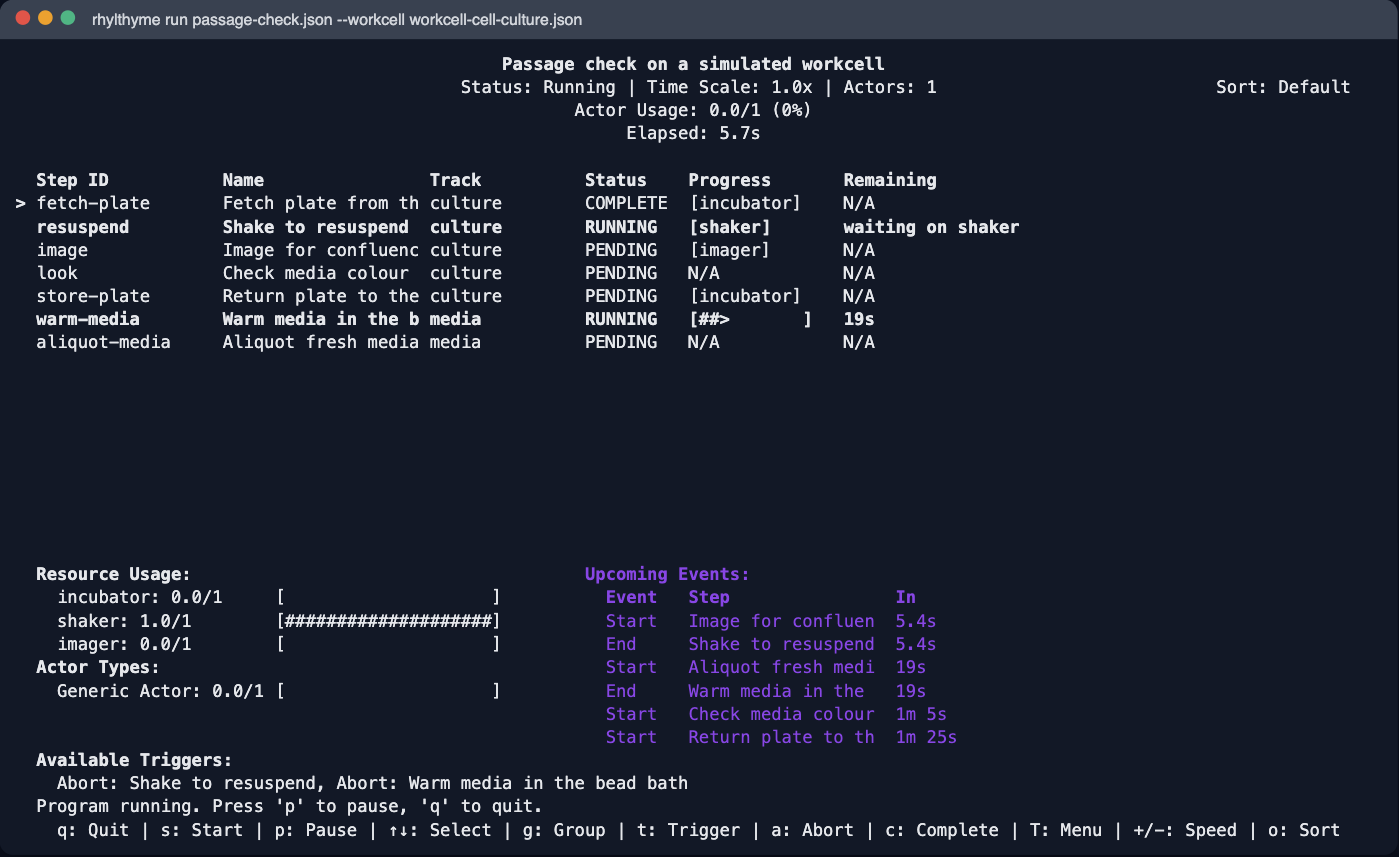
A step names a galago command; the runner sends it when the step starts, and the step ends when the instrument replies:
{
  "stepId": "shake",
  "name": "Shake at 1000 rpm",
  "instrument": {
    "tool": "shaker",
    "toolType": "bioshake",
    "command": "start_shake",
    "params": { "speed": 1000, "acceleration": 5, "duration": 5 }
  },
  "startTrigger": { "type": "afterStep", "stepId": "load-plate" }
}
Programs name tools by role. A local workcell file says where each tool listens, and stays on the lab machine:
{
  "id": "simulated-bench",
  "tools": [
    { "name": "shaker", "type": "bioshake", "host": "localhost", "port": 50710,
      "config": { "com_port": "COM3" } }
  ]
}
Status: alpha (plan; the
web live-view bridge is still to come). Tools run in galago's simulated mode
unless you pass --live.
Quick start (simulated, no hardware)
galago-tools needs Python 3.9; Rhylthyme needs 3.12+. They talk over gRPC, so each gets its own environment.
# 1. A simulated Bioshake from galago-tools
python3.9 -m venv .venv-galago
.venv-galago/bin/pip install galago-tools
.venv-galago/bin/galago-serve --tool bioshake --port 50710 &

# 2. Rhylthyme with instrument support
python3.12 -m venv .venv && source .venv/bin/activate
pip install "rhylthyme[galago]"

# 3. The example program, and a workcell pointing at that Bioshake
curl -sO https://raw.githubusercontent.com/rhylthyme/rhylthyme-galago/main/examples/shake-plate.json
curl -sO https://raw.githubusercontent.com/rhylthyme/rhylthyme-galago/main/examples/workcell-simulated.json

# 4. Run it: the tools are configured (simulated) and the run starts;
#    p pauses, q quits
rhylthyme run shake-plate.json --workcell workcell-simulated.json
While the command runs, the runner shows the step with a [shaker] badge and
"waiting on shaker" (screenshot above), and the shaker is held as a resource
until it replies. The run record (rhylthyme runs) marks it
endedBy: "instrument" and keeps every reply, retries included, with any data
the tool returned:
"instrument": {
  "tool": "shaker", "command": "start_shake",
  "replies": [
    { "attempt": 1, "at": 3.0, "code": "DRIVER_ERROR", "errorMessage": "lid open" },
    { "attempt": 2, "at": 41.2, "code": "SUCCESS", "metadata": { "wells": { "A1": 0.41 } } }
  ]
}
A three-tool example
examples/passage-check.json (in this repo) fetches a plate from a Liconic incubator, shakes it
on a Bioshake, images it on a Cytation, has someone check the media, and stores
it again, while media is warmed and aliquoted by hand on a second track:
for t in liconic:50721 bioshake:50722 cytation:50723; do
  .venv-galago/bin/galago-serve --tool ${t%%:*} --port ${t##*:} &
done
rhylthyme run examples/passage-check.json --workcell examples/workcell-cell-culture.json
It runs end to end in CI against these simulated servers
(tests/test_integration.py). The screenshot at the top of this page is this
program, a few seconds in: the plate has been fetched, the Bioshake is running,
and someone is warming media on the other track.
On the web
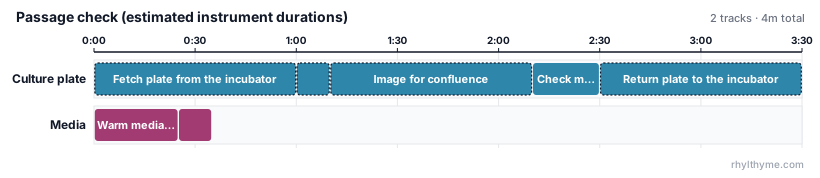
Programs with instrument steps validate, visualize and publish on
rhylthyme.com and through the
Rhylthyme MCP server like any other: instrument
steps carry a [tool] badge, and bars whose length is an estimate have a
dotted outline. Workcells are never uploaded.
![The web player: the shake step carries a [shaker] badge and a dotted outline](https://pypi-camo.freetls.fastly.net/a58ad1f550dbaba8e140983037695cf49f6580ef/68747470733a2f2f7261772e67697468756275736572636f6e74656e742e636f6d2f7268796c7468796d652f7268796c7468796d652d67616c61676f2f6d61696e2f646f63732f696d616765732f7765622d706c617965722e706e67)
galago-tools 0.19.9 cannot simulate an Opentrons run_program (its simulated
dispatch passes an argument RunProgram does not take, so the tool answers
DRIVER_ERROR); other Opentrons commands, and real OT-2 runs, are unaffected.
Real hardware
rhylthyme run shake.json --workcell lab.json --live
--live first lists each tool (address and current status, read without
configuring anything) and every instrument command the run will send, then asks
you to type live. Only then are the tools configured for real; the run starts
only if every tool reports READY. Scripts pass --confirm-live instead of
answering; without a terminal and without that flag, a live run is refused.
Workcell files stay on the lab machine: rhylthyme publish and rhylthyme analyze refuse them, programs name tools only by role, and run records hold no
tool addresses.
Tools are resources
Each tool a program uses is a resource of capacity 1, so two steps never send commands to the same shaker at once: the second waits until the first is done. A tool needs no person (actor) while it works, so hand steps and instrument steps run side by side. To let a tool take more than one command at a time, declare a constraint with its name:
"resourceConstraints": [{ "task": "shaker", "maxConcurrent": 2, "description": "two-deck shaker" }]
When an instrument fails
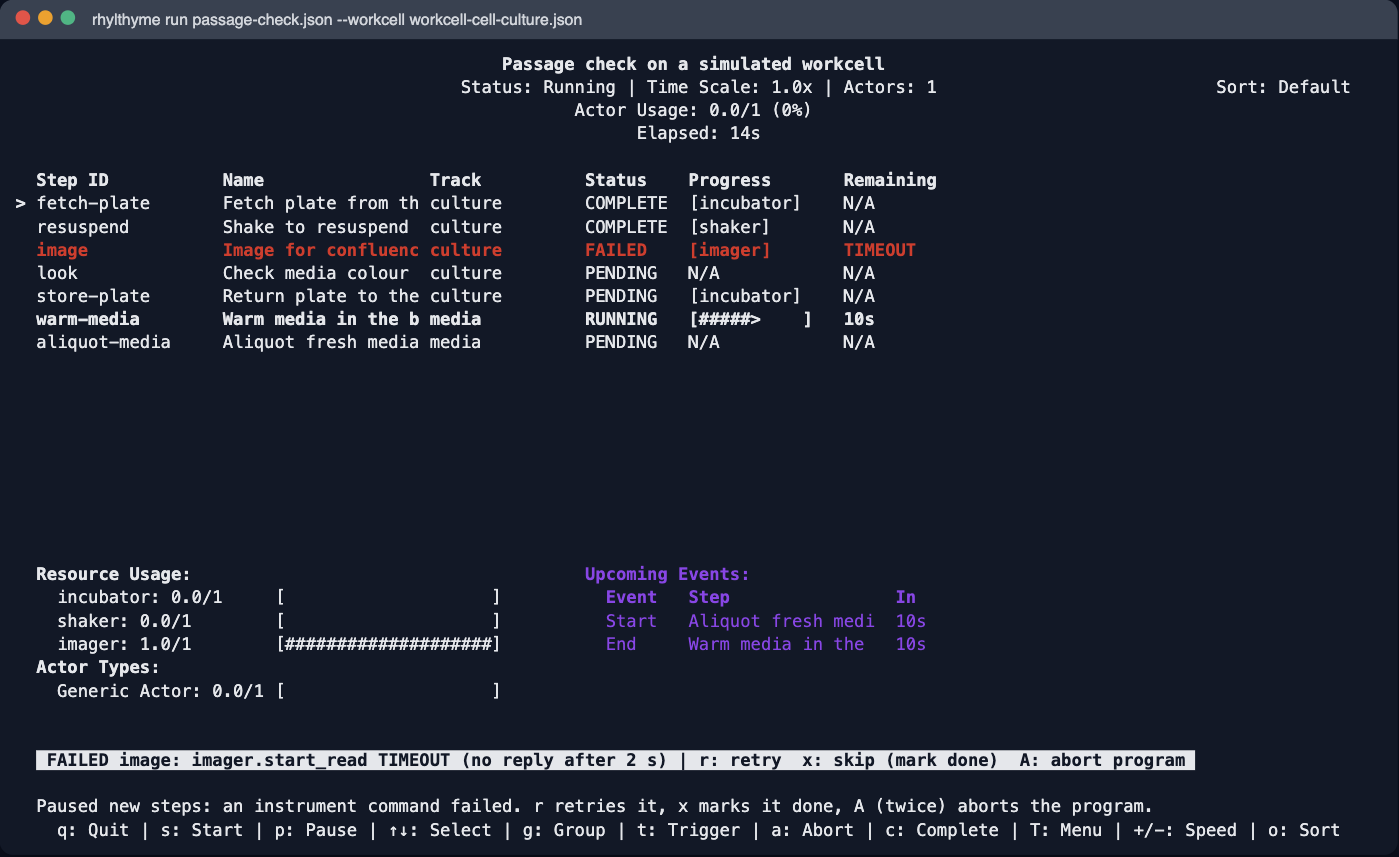
Any reply other than SUCCESS (a driver error, a tool that is unreachable or
not ready) and any command that outlives its timeoutSeconds marks the step
FAILED. Nothing new starts; steps already running on other tools finish. The
runner shows what failed (tool, command, response code, message) and waits:
rresends the command; if it succeeds the program carries on.xmarks the step done by hand (endedBy: "skipped") and releases what depends on it.Atwice aborts the program; the reason is kept in the run record (context.abortReason).
Ctrl-C stops the run at once and names any command still in flight.
Planning with instrument durations
An instrument step may leave out its duration: at run time it ends when the
tool replies. For planning, rhylthyme plan and rhylthyme analyze fill one in
and flag it in metadata.durationEstimate:
$ rhylthyme plan shake.json planned.json --workcell lab.json
Estimated instrument durations:
  shake: 5 s (from shaker EstimateDuration)
Makespan (by start triggers and durations): 11 s
The number comes from the tool's own EstimateDuration (with --workcell, for
tools that are already configured; planning never configures a tool), else a
duration-like command param (duration, timeout, ...), else 60 s. Authored
durations are never changed.
Checking programs
rhylthyme validate checks every instrument step's command and params against
galago's own definitions, naming the step, tool, command and field:
$ rhylthyme validate shake.json --workcell lab.json
  - [instrument_invalid_command] Step 'shake': shaker (bioshake) start_shake: unknown param 'rpm' (takes speed, acceleration, duration)
Without --workcell, steps are checked against their toolType; steps with
neither get an instrument_unchecked warning. With --workcell, it also reports
tools the workcell lacks and toolTypes that disagree with it. rhylthyme run
runs the same checks before configuring any tool.
From Python: rhylthyme_galago.validate_command(tool_type, command, params) and
check_program(program, workcell=None).
Development
pip install -e ".[dev]"
pytest                      # unit tests; integration tests need galago-serve
GALAGO_SERVE=/path/to/galago-serve pytest -m integration
The integration tests find galago-serve through GALAGO_SERVE, then
.venv-galago/bin/galago-serve, then PATH, and are skipped when none exists.
galago protos
proto/galago/ holds galago-tools' .proto files, copied verbatim and pinned in
proto/galago/UPSTREAM.json. The Python stubs in src/rhylthyme_galago/_gen/ are
generated from them under this package's namespace (the wire format is galago's own):
python scripts/refresh_protos.py --ref <galago-tools commit or tag>  # re-vendor + regenerate
python scripts/refresh_protos.py                                      # regenerate only
License
rhylthyme-galago is licensed under the Apache License 2.0.
It includes material from galago-tools, Copyright 2025 - Science Corporation, also licensed under the Apache License 2.0 (copy):
proto/galago/: galago-tools'.protofiles, unmodified, pinned inproto/galago/UPSTREAM.json;src/rhylthyme_galago/_gen/: Python generated from them, with the proto import paths moved under this package (each file says so in its header);catalog/galago-commands.json: a JSON description of their commands.
NOTICE lists these; the wheel and sdist carry LICENSE, NOTICE and
LICENSES/galago-tools-LICENSE. galago-tools itself is not bundled: you install
it separately, from Science Corporation.
1 maintainer

Release files for rhylthyme-galago 0.1.0a1
For a detailed explanation of source distributions (sdists) and built distributions (wheels), please see the package formats documentation.
Source distribution (sdist)
| File | Size | Uploaded | |
|---|---|---|---|
| rhylthyme_galago-0.1.0a1.tar.gz | 74.6 kB | Details |
Built distribution (wheel)
| File | Interpreter | ABI | Platform | Reset |
|---|---|---|---|---|
| rhylthyme_galago-0.1.0a1-py3-none-any.whl | Python 3 | none | any | Details |
Total release size: 190.7 kB
Release files / rhylthyme_galago-0.1.0a1.tar.gz
| Download URL | rhylthyme_galago-0.1.0a1.tar.gz |
|---|---|
| Size | 74.6 kB |
| Tags | Source |
|
SHA-256 checksum How to use checksums |
4dbf27b41979917afa1c7127d4677676ed8fd08df7b2e04029d43cc6a4ff555c
|
|
BLAKE2b-256 checksum How to use checksums |
4779c16b0e658b892fabf222728db1e182e579c09332dd8f4905a120c64e30bd
|
| Upload date | |
|
Uploaded using Trusted Publishing? What is trusted publishing? |
No |
| Uploaded via |
twine/7.0.0 CPython/3.12.14
|
Release files / rhylthyme_galago-0.1.0a1-py3-none-any.whl
| Download URL | rhylthyme_galago-0.1.0a1-py3-none-any.whl |
|---|---|
| Size | 116.1 kB |
| Tags | Python 3 |
|
SHA-256 checksum How to use checksums |
360a2e0d2bbdfc3b8baaf7df5f0a8198915d75793815ad389cb3e717079aecf0
|
|
BLAKE2b-256 checksum How to use checksums |
706190f8e47d9f8a3ef8ceee6ce62926779e704665836ab0380c7f4708c7f3f5
|
| Upload date | |
|
Uploaded using Trusted Publishing? What is trusted publishing? |
No |
| Uploaded via |
twine/7.0.0 CPython/3.12.14
|














