
RIA: Ratio Imaging Analyzer for biological quantification

Project description

Ratio Imaging Analyzer (RIA / 莉丫)











Meet RIA (or as we affectionately call her, "Li Ya / 莉丫").
RIA is an open-source tool built to solve a simple but annoying problem: Ratiometric analysis shouldn't be stuck on the microscope computer.
Ratiometric imaging (like FRET or sensors for Tryptophan/pH/Ca²⁺) is amazing for normalizing data, but analyzing it usually requires expensive commercial software (like MetaMorph or NIS-Elements) that is locked to a specific workstation with a dongle.
We built RIA so you can take your TIFF stacks, go to a coffee shop (or just your desk), and run rigorous analysis on your own laptop—no coding required.
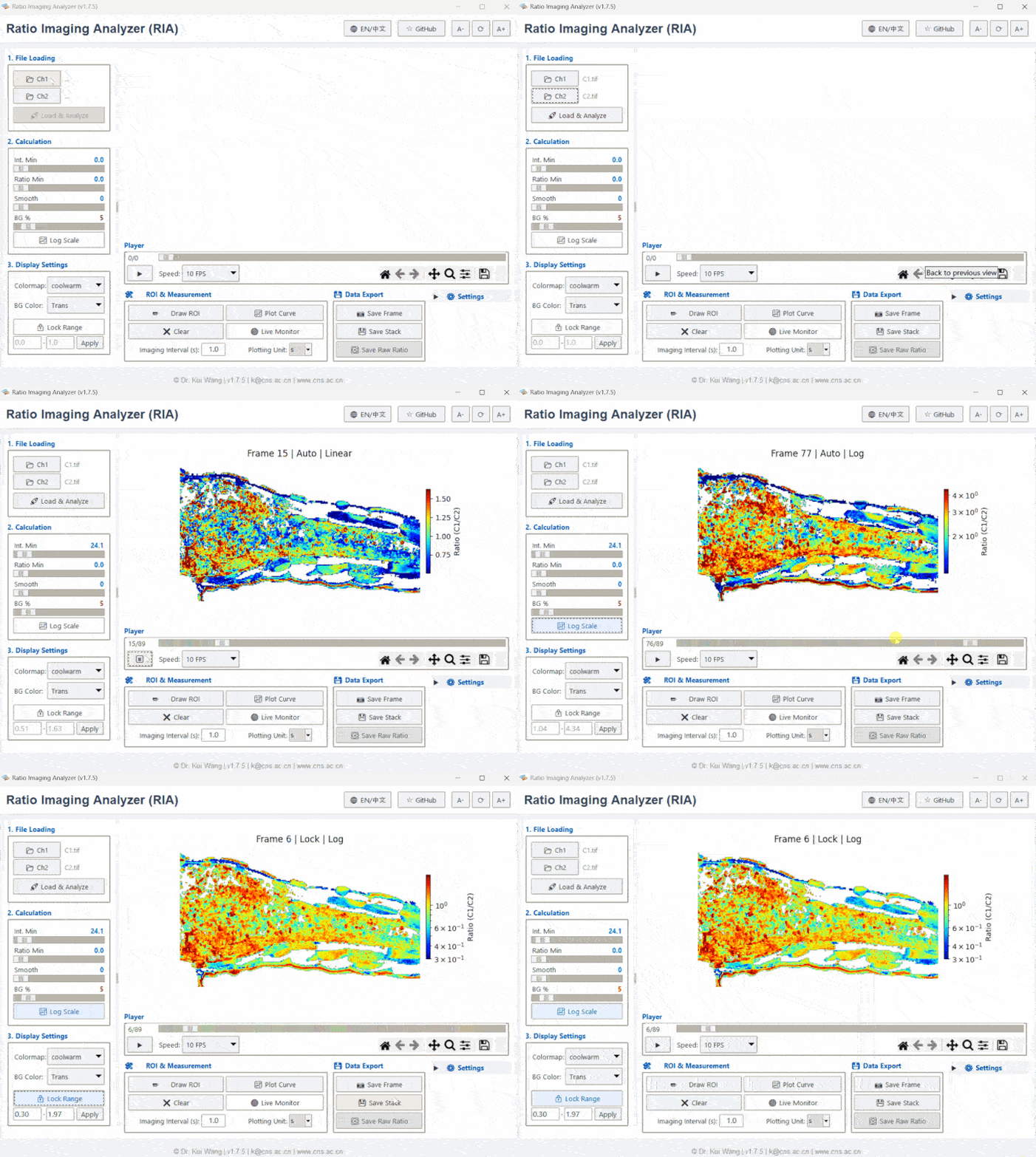
[Image of fluorescence ratiometric imaging process diagram]
💡 Why use RIA?
- Analysis Unchained: Stop queuing for the lab workstation. RIA is a standalone executable that runs on standard PCs.
- Math Done Right: Calculating ratios isn't just
A / B. Biological images have edges and noise. We implemented a normalized convolution algorithm that handlesNaN(Not a Number) values correctly. This means your data doesn't get eroded or corrupted at cell boundaries—a common issue in simple script-based analysis. - Zero Coding Needed: We know not everyone loves Python. RIA has a full GUI for background subtraction, thresholding, and dragging-and-dropping ROIs.
- Trust Your Data: We don't hide the numbers. You get the visual stacks, but you also get the raw float32 ratio data and time-series CSVs. You can take these straight to Prism, Origin, or Excel.
📁 Project Structure
RatioImagingAnalyzer/
├── data/               # Sample TIFFs so you can try it out immediately
├── paper/              # JOSS submission files
├── src/ria_gui         # The actual code
│   ├── main.py         # Start here
│   ├── gui.py          # The frontend logic
│   ├── processing.py   # The math/algorithm heavy lifting
│   └── components.py   # UI Widgets
├── tests/              # Automated tests to keep bugs away
└── requirements.txt    # Dependencies
🚀 Installation
Option 1: Install via PyPI (Recommended for Pythoners)
RIA is available on the Python Package Index. Open your terminal and run:
pip install ria-gui
Once installed, simply type the following command to launch the software:
ria
Option 2: Running from Source (Recommended for Developers/Reviewers)
-
Clone the repository:
git clone https://github.com/Epivitae/RatioImagingAnalyzer.git
cd RatioImagingAnalyzer
-
Install dependencies: It is recommended to use a virtual environment.
pip install -r requirements.txt
-
Run the application: The source code is located in the
srcdirectory:python src/ria_gui/main.py
Option 3: Standalone Executable (For End Users)
Check the Releases page to download the latest compiled .exe file for Windows. No Python installation is required.
📖 Usage Workflow
- Load Files:
- Supports both Single-Channel (Intensity) and Multi-Channel (Ratio) Tiff stacks.
- Drag & drop or browse files. RIA automatically detects the channel structure.
- Preprocessing:
- Motion Correction: Align shaky time-lapse data using the built-in ECC algorithm.
- Background: Set a global background subtraction (Percentile) or use a custom ROI.
- Visualization:
- Switch views between Ratio, Ch1, Ch2, or Aux channels using the toolbar.
- Analyze:
- Draw ROIs (Rectangle, Circle, Polygon).
- Click Plot Curve to see real-time intensity/ratio changes.
- Save & Export:
- Save Project: Save your session as a
.riafile. - Export Data: Copy data to clipboard or save processed images as Tiff stacks.
- Save Project: Save your session as a
🧪 Automated Testing
RIA v1.8.0 introduces a "Ghost Pilot" automated testing script powered by rich to ensure stability.
To run the visual E2E test demo:
python tests/auto_drive_rich.py
🤝 Contributing
Contributions are welcome! Please check the Issue Tracker or submit a Pull Request.
📄 License
Distributed under the MIT License. See LICENSE for more information.
Citation
If you use RIA in your research, please cite:
Wang, K. (2025). Ratio Imaging Analyzer (RIA): A Lightweight, Standalone Python Tool for Portable Fluorescence Analysis (v1.8.0). Zenodo. https://doi.org/10.5281/zenodo.18107966
Or use the BibTeX entry:
@software{Wang_RIA_2025,
  author = {Wang, Kui},
  title = {{Ratio Imaging Analyzer (RIA): A Lightweight, Standalone Python Tool for Portable Fluorescence Analysis}},
  month = dec,
  year = {2025},
  publisher = {Zenodo},
  version = {v1.8.0},
  doi = {10.5281/zenodo.18107966},
  url = {https://doi.org/10.5281/zenodo.18107966}
}
Release history Release notifications | RSS feed


Download files
Download the file for your platform. If you're not sure which to choose, learn more about installing packages.
Source Distribution
Built Distribution
Filter files by name, interpreter, ABI, and platform.
If you're not sure about the file name format, learn more about wheel file names.
Copy a direct link to the current filters
File details
Details for the file ria_gui-1.8.1.7.tar.gz.
File metadata
- Download URL: ria_gui-1.8.1.7.tar.gz
- Upload date:
- Size: 8.3 MB
- Tags: Source
- Uploaded using Trusted Publishing? No
- Uploaded via: twine/6.2.0 CPython/3.10.19
File hashes
| Algorithm | Hash digest | |
|---|---|---|
| SHA256 |
f5a895e113c49a0f3b534b395b89a22b73a7972df8eea18729e5119b60dfb1ff
|
|
| MD5 |
cb0bbfaa0c0f7814728b0c10164d5eed
|
|
| BLAKE2b-256 |
af478915aa880e7eec8f8fe00bdea9fd411b8d0e24408aa37e89e5d5f4e3c1e6
|
File details
Details for the file ria_gui-1.8.1.7-py3-none-any.whl.
File metadata
- Download URL: ria_gui-1.8.1.7-py3-none-any.whl
- Upload date:
- Size: 8.3 MB
- Tags: Python 3
- Uploaded using Trusted Publishing? No
- Uploaded via: twine/6.2.0 CPython/3.10.19
File hashes
| Algorithm | Hash digest | |
|---|---|---|
| SHA256 |
8e9d300cd456a1d3c0adc897122faa4691a498bb2646b2e2390dec85bbd78a4f
|
|
| MD5 |
843ab386ff4b51951f25ea7bc0cdb3a7
|
|
| BLAKE2b-256 |
227b4722a992a51b2b221bf7b06f34b36b1275b592ba52131f05b77baa8d605e
|






