
A Rich library powered editor that implements VS Code keybindings in TUI

Project description
Rich Editor
A rich library powered editor that implements VS Code keybindings in TUI
[!NOTE] Rich Editor is designed to work with ghostty in macOS only
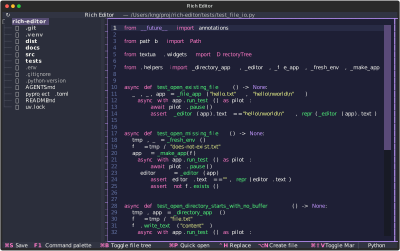
Python buffer: tests/test_file_io.py |
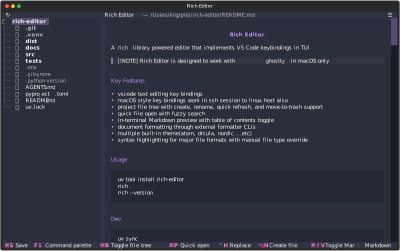
Markdown preview: README.md |
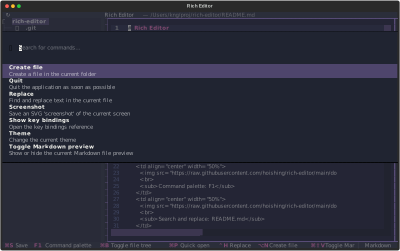
Command palette: F1 |
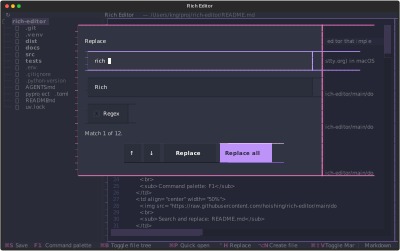
Search and replace: README.md |
Key Features
- vscode text editing key bindings
- macOS style key bindings work in ssh session to linux host also
- project file tree with create, rename, quick refresh, and move-to-trash support
- quick file open with fuzzy search
- in-terminal Markdown preview with table of contents toggle
- document formatting through external formatter CLIs
- multiple built-in theme(atom, drcula, nordic ...etc)
- syntax highlighting for major file formats with manual file type override
Usage
uv tool install rich-editor
rich .
rich --version
Dev
uv sync
uv run rich .
uv run python -m tests.runner
Key Bindings
Key bindings are generated from the YAML in src/rich_editor/bindings.yaml.
App shortcuts:
| Shortcut | Action |
|---|---|
⌘S |
Save |
⌘⇧P / F1 |
Command palette |
⌘B |
Toggle file tree |
⌘P |
Quick open |
⌃H |
Replace |
⌥N |
Create file |
⌘⇧V |
Toggle Markdown preview |
⌥⇧F |
Format document |
⌘R |
Refresh |
Editor shortcuts:
| Shortcut | Action |
|---|---|
⌥↑ |
Move line up |
⌥↓ |
Move line down |
⌥⇧↑ |
Copy line up |
⌥⇧↓ |
Copy line down |
⌘Enter |
Insert line below |
⌘⇧Enter |
Insert line above |
⌘] |
Indent line |
⌘[ |
Outdent line |
⌥⌫ |
Delete word left |
⌘⌫ |
Delete to line start |
⌘Z / ⌃Z |
Undo |
⌘⇧Z / ⌃Y |
Redo |
⌘X |
Cut |
⌘/ |
Toggle line comment |
⌥Z |
Toggle word wrap |
⌥⇧← |
Select word left |
⌥⇧→ |
Select word right |
⌘L |
Select line |
⌘⇧K |
Delete line |
⌘⇧← |
Select to line start |
⌘⇧→ |
Select to line end |
File tree shortcuts:
| Shortcut | Action |
|---|---|
← |
Collapse folder |
→ |
Expand folder |
Enter |
Rename selected file or folder |
Space |
Open file or toggle folder |
⌘⌫ / ⌃U |
Remove selected file or folder |
Esc |
Quit |
Settings
Rich Editor persists the selected Textual theme in settings.yaml under the user config directory: ~/Library/Application Support/rich-editor/settings.yaml
Markdown Preview
Use ⌘⇧V to toggle an in-terminal rendered preview for Markdown files. The preview uses the current editor buffer, so unsaved edits are shown without writing them to disk.
When Markdown preview is open, the header shows a ☰ button on the right. Click it to show or hide the Markdown table of contents. The button is hidden while editing the text buffer.
Syntax And File Types
Rich Editor detects syntax highlighting from the file extension and shows the active file type in the lower-right footer. Unknown extensions are treated as plain text.
Click the file type label to choose another language for the current buffer. Manual selection updates highlighting and language-aware commands such as toggle comment, but reopening or refreshing the file resets the type from the file extension.
Detected extensions include Python, JavaScript, TypeScript, TSX, Bash, HTML, CSS, JSON, Markdown, YAML, TOML, XML, SQL, Java, Go, and Rust.
Formatting
The ⌥⇧F shortcut formats the current buffer with external formatter CLIs:
- Python files use
ruff. - TOML files use
taplo. - XML files use
prettierwith@prettier/plugin-xml. - Other supported source/config formats use
prettier.
Install the required tools before using the shortcut:
bun add --global prettier @prettier/plugin-xml
brew install ruff taplo
Files unsupported by these tools are left unchanged and Rich Editor shows a warning.
Refresh
Use the ↻ title-bar button or ⌘R to refresh the workspace. Refresh reloads the file tree and reloads the current buffer from disk. If the buffer has unsaved edits, Rich Editor prompts to save, discard, or cancel before reloading.
Creating Files
Use ⌥N to create a file. Rich Editor prompts for the file name and supports nested relative paths such as notes/today.md.
When a folder is highlighted in the file tree, the new file is created inside that folder. Otherwise, the new file is created beside the currently open file. If no file is open, the new file is created in the project root.
If the requested file already exists, Rich Editor opens it without overwriting its contents.
Renaming Files And Folders
When the file tree is focused, Enter opens a rename prompt for the selected file or folder. Renaming keeps the open buffer connected to the renamed path when the current file, or a folder containing it, is renamed.
The project root cannot be renamed. Empty names, path separators, and duplicate target names are rejected in the prompt.
Moving Files To Trash
When the file tree is focused, ⌘⌫ removes the selected file or folder by moving it to Trash. The command palette also shows Move "<name>" to Trash for the selected file-tree item. Both paths ask for confirmation before moving the item.
On stock Ghostty, ⌘⌫ is delivered to terminal apps as ⌃U, so Rich Editor binds both forms for the file tree.
Limitations
- Textual textarea limitation:
- no multi-cursor editing
- no chord hotkey sequence such as
⌘K ⌘S
Ghostty hotkey conflicts
- some hotkeys are bound by Ghostty by default. eg.
⌘Z,⌘⇧Z,⌘Enter,⌘⇧Enter,⌘⇧V,⌘[,⌘],⌘⇧P,⌘W,⌘Q...etc - Rich Editor detects conflicted shortcuts at startup.
- Conflicted shortcuts are hidden from the footer until they are unbound in Ghostty config, unless the command has another available alternative.
- The key bindings popup marks conflicted shortcuts with
⚠️and shows a Ghostty config reminder. ⌘⇧PandF1are alternative hotkeys for the command palette.
Unbind Ghostty default keybindings
Ghostty keybindings can be unbound in the Ghostty config file. On macOS, use one of:
~/Library/Application Support/com.mitchellh.ghostty/config.ghostty~/Library/Application Support/com.mitchellh.ghostty/config~/.config/ghostty/config.ghostty~/.config/ghostty/config
Add one keybind = <trigger>=unbind line per conflicted shortcut you want to use in Rich Editor:
keybind = super+shift+v=unbind
keybind = super+[=unbind
keybind = super+]=unbind
keybind = super+enter=unbind
keybind = super+shift+enter=unbind
keybind = super+z=unbind
keybind = super+shift+z=unbind
The command palette can still be opened with F1. To use ⌘⇧P directly, also add:
keybind = super+shift+p=unbind
Then reload Ghostty config with ⌘⇧, or restart Ghostty. To inspect Ghostty's defaults before changing them:
ghostty +list-keybinds --default
Disable Ghostty font ligatures
Textual does not expose an app-side font ligature switch. To disable programming ligatures while using Rich Editor, add this to the same Ghostty config file:
font-feature = -calt


Download files
Download the file for your platform. If you're not sure which to choose, learn more about installing packages.
Source Distribution
Built Distribution
Filter files by name, interpreter, ABI, and platform.
If you're not sure about the file name format, learn more about wheel file names.
Copy a direct link to the current filters
File details
Details for the file rich_editor-1.1.0.tar.gz.
File metadata
- Download URL: rich_editor-1.1.0.tar.gz
- Upload date:
- Size: 106.0 kB
- Tags: Source
- Uploaded using Trusted Publishing? No
- Uploaded via: uv/0.11.8 {"installer":{"name":"uv","version":"0.11.8","subcommand":["publish"]},"python":null,"implementation":{"name":null,"version":null},"distro":{"name":"macOS","version":null,"id":null,"libc":null},"system":{"name":null,"release":null},"cpu":null,"openssl_version":null,"setuptools_version":null,"rustc_version":null,"ci":null}
File hashes
| Algorithm | Hash digest | |
|---|---|---|
| SHA256 |
332d6f2cb4607df010037b05a0c014332fe7b79a6a11ce0084904590c26d62f8
|
|
| MD5 |
bf6ca57f4097df806698edff4b33079a
|
|
| BLAKE2b-256 |
5dbb8361d21a7d3ccccb2df67b757737b7f2f721822f8d8e5aabc4ef67e0da93
|
File details
Details for the file rich_editor-1.1.0-py3-none-any.whl.
File metadata
- Download URL: rich_editor-1.1.0-py3-none-any.whl
- Upload date:
- Size: 34.3 kB
- Tags: Python 3
- Uploaded using Trusted Publishing? No
- Uploaded via: uv/0.11.8 {"installer":{"name":"uv","version":"0.11.8","subcommand":["publish"]},"python":null,"implementation":{"name":null,"version":null},"distro":{"name":"macOS","version":null,"id":null,"libc":null},"system":{"name":null,"release":null},"cpu":null,"openssl_version":null,"setuptools_version":null,"rustc_version":null,"ci":null}
File hashes
| Algorithm | Hash digest | |
|---|---|---|
| SHA256 |
7bb8400d0d2a78403cf10b8bc85adeedca9f8af6afbfae6547d0298aafa50512
|
|
| MD5 |
68a892d5221de9ffd46dff3ac908d448
|
|
| BLAKE2b-256 |
0fc14b1ed56d1e83ee87850dbde412defc4af42d619b8713156d01f86ef27fa4
|






