
richrelay




Ship Rich prints to syslog and other receivers, without losing logs when the receiver is down.
richrelay is an extension for Rich, not a fork. Your terminal output stays exactly as it is; every
rich.print, Console.print, Console.log, Console.print_exception, logging record and uncaught
exception is also sent to one or more remote receivers, formatted as RFC 5424, RFC 3164, JSON, GELF,
logfmt or plain text.
- Hooks:
rich.print,Console.print,Console.log,Console.print_exception,RichHandler(drop-inRichRelayHandler), anylogginglogger,sys.excepthook,threading.excepthook. - Formats: RFC 5424 (with structured data), RFC 3164 (BSD), JSON, GELF 1.1, logfmt, plain.
- Transports: UDP, TCP (octet-counting / newline / NUL framing), TLS, Unix datagram (
/dev/log). - Store-and-forward while the receiver is down, with hard size limits: in-memory, SQLite (durable, no extra dependency), Redis list, RabbitMQ queue.
- Redis cache: rolling list of the most recent events, independent of delivery.
- Multiple destinations at once, each with its own format, level filter and buffer.
- Non-blocking: your code only appends to an in-memory queue; a background thread does the I/O.
- Built-in receiver/viewer and CLI for testing (
richrelay listen,send,drain).
Why an extension? Rich has no log-shipping story and is not open to this kind of change right now.
richrelayworks purely by wrapping public Rich entry points, so it needs nothing from upstream.
Install
pip install richrelay                 # core: SQLite + memory buffers, UDP/TCP/TLS
pip install "richrelay[redis]"        # + RedisBuffer / RedisCache
pip install "richrelay[rabbitmq]"     # + RabbitMQBuffer
pip install "richrelay[all]"
Python 3.9+, Rich 12+. Windows, Linux and macOS.
Quick start
import logging
import rich
from rich.console import Console
import richrelay

relay = richrelay.setup(
    [
        "udp://127.0.0.1:514?format=rfc3164",
        # TCP + durable SQLite spool: nothing is lost while 10.0.0.5 is down
        "tcp://10.0.0.5:514?format=rfc5424&buffer=sqlite%3A%2F%2F%2Fspool.db%3Fmax_mb%3D50",
    ],
    app_name="myapp",
    facility="local0",
    attach_logging=True,        # also forward the root logger
)

rich.print("[bold green]started[/bold green]")          # terminal + syslog
Console().log("loaded config", {"debug": True})          # terminal + syslog
logging.getLogger("db").error("connection lost")         # forwarded
try:
    1 / 0
except ZeroDivisionError:
    Console().print_exception()                          # full traceback relayed (ERROR)
relay.info("direct API", user="alice")                   # extra keys -> structured data
# uncaught exceptions are relayed at CRITICAL and flushed before the interpreter exits
Try it locally with the bundled viewer:
richrelay listen --udp 5514 --tcp 5514          # terminal 1: colored live viewer
richrelay send -d "udp://127.0.0.1:5514?format=rfc5424" -l warning "hello"   # terminal 2
setup() with no arguments reads whitespace-separated URLs from $RICHRELAY_URLS.
Architecture
flowchart LR
    subgraph app["Your application"]
        A1["rich.print / Console.print"]
        A2["Console.log"]
        A3["Console.print_exception"]
        A4["logging / RichHandler"]
        A5["sys.excepthook / threading.excepthook"]
        A6["relay.info(...)"]
    end
    A1 & A2 & A3 --> P["patch_rich()<br/>plain-text capture"]
    A4 --> H["RelayHandler / RichRelayHandler"]
    A5 --> X["install_excepthook()"]
    P & H & X & A6 --> E(["Event"])
    E --> R{{"Relay<br/>fan-out"}}
    R --> C1["Channel 1<br/>format: RFC 5424"]
    R --> C2["Channel 2<br/>format: RFC 3164"]
    R --> C3["Channel 3<br/>format: JSON"]
    R -. "every event" .-> RC[("RedisCache<br/>recent N")]
    C1 --> T1["TCP / TLS"]
    C2 --> T2["UDP"]
    C3 --> T3["TCP"]
    C1 -. "receiver down" .-> B1[("SQLite spool")]
    C3 -. "receiver down" .-> B3[("Redis list or<br/>RabbitMQ queue")]
    T1 --> S1["rsyslog / syslog-ng / Graylog / ..."]
    T2 --> S2["any UDP receiver"]
    T3 --> S3["Logstash / Vector / custom"]
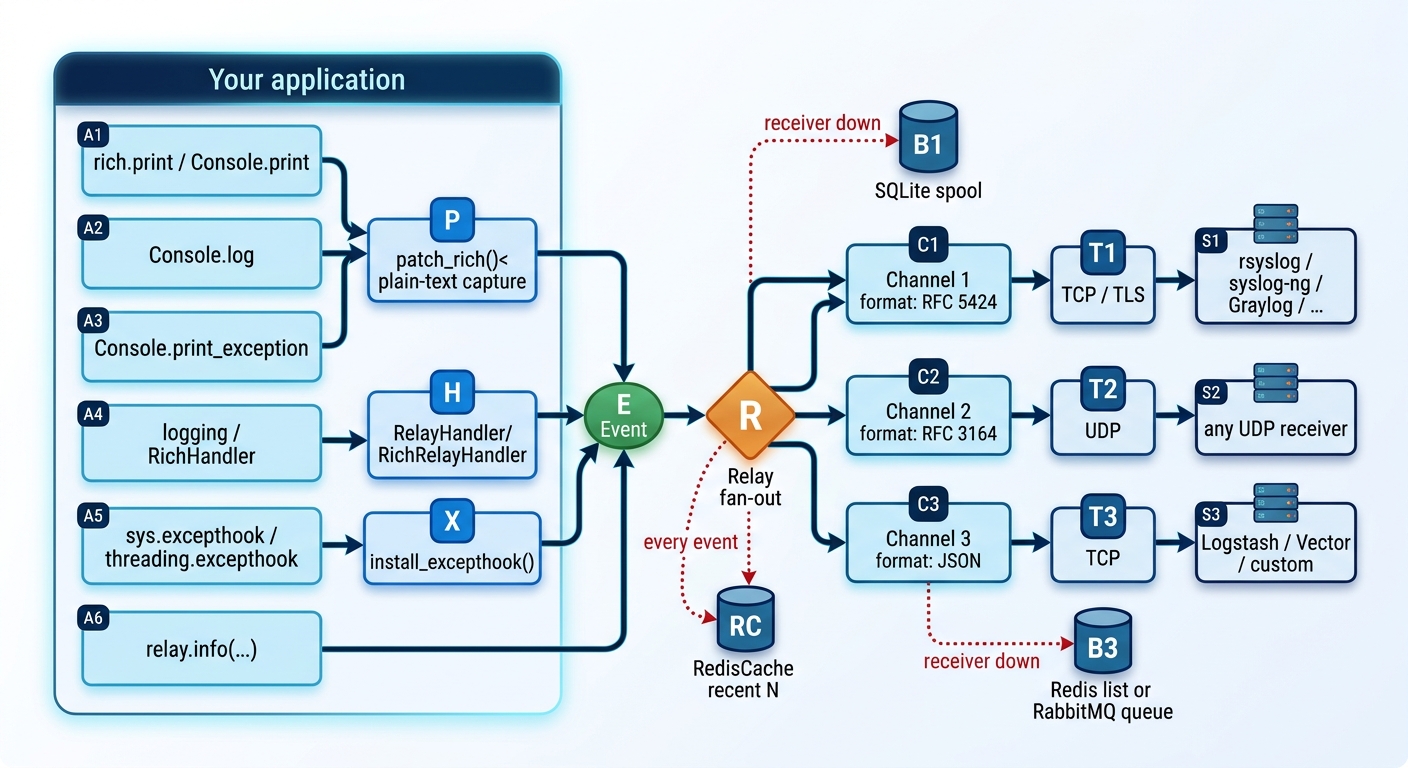
Every destination is an independent channel (own thread, formatter, transport, buffer), so one dead receiver never delays another.
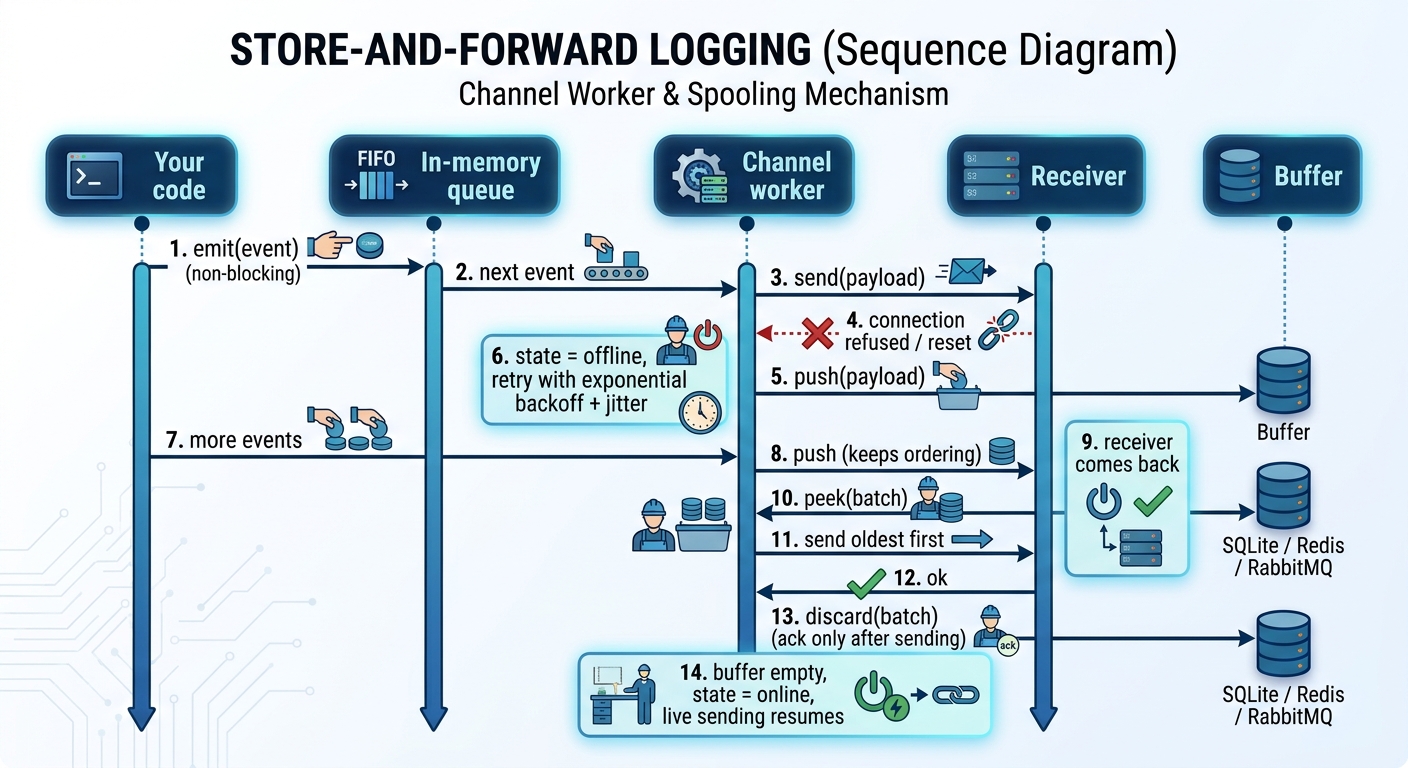
Store-and-forward
sequenceDiagram
    autonumber
    participant App as Your code
    participant Q as In-memory queue
    participant W as Channel worker
    participant RX as Receiver
    participant BUF as Buffer (SQLite / Redis / RabbitMQ)

    App->>Q: emit(event)  (non-blocking)
    Q->>W: next event
    W->>RX: send(payload)
    RX--xW: connection refused / reset
    W->>BUF: push(payload)
    Note over W: state = offline, retry with exponential backoff + jitter
    App->>Q: more events
    W->>BUF: push (keeps ordering)
    Note over RX: receiver comes back
    W->>BUF: peek(batch)
    W->>RX: send oldest first
    RX-->>W: ok
    W->>BUF: discard(batch)  (ack only after sending)
    Note over W: buffer empty, state = online, live sending resumes
Channel state machine
stateDiagram-v2
    [*] --> Online
    Online --> Offline: send fails
    Offline --> Offline: retry fails and backoff doubles
    Offline --> Draining: retry timer fires
    Draining --> Offline: send fails again
    Draining --> Online: buffer empty
    Online --> [*]: close() flushes, then stores whatever is unsent
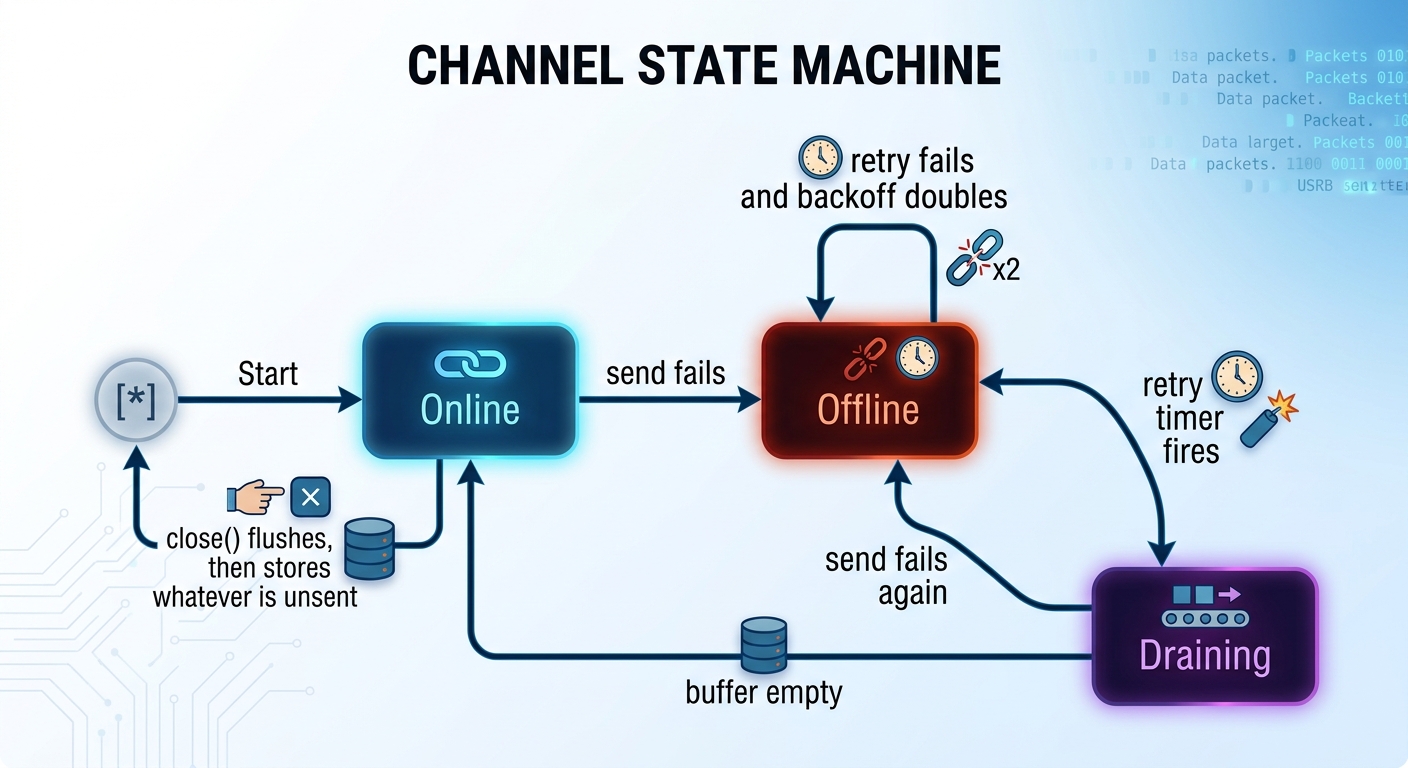
If the buffer itself fails (Redis down, broker down, disk error), events fall back to a bounded in-memory spill list and are still delivered as soon as the receiver is reachable.
Hooking Rich
| What you call | What is relayed | Default level |
|---|---|---|
rich.print(...), Console.print(...), print_json, rule |
Rendered as plain text (no ANSI, 200 columns) | INFO |
Console.log(...) |
Plain text; file/func of the real caller added |
INFO |
Console.print_exception() |
Type: message + full Python traceback |
ERROR |
logging (via RelayHandler / RichRelayHandler) |
record.getMessage(), traceback, extra= fields |
record level |
| Uncaught exception (main thread or thread) | Message + traceback, then flush | CRITICAL |
richrelay.setup([...], print_level=logging.DEBUG, log_level=logging.INFO,
                exception_level=logging.ERROR, capture_width=120,
                console_filter=lambda console: not console.is_jupyter,
                rich_traceback=True)   # also calls rich.traceback.install()
Output that renders to nothing (for example Live / Progress control codes) is not relayed. Patching is
reversible: with richrelay.patch_rich(relay): ... or richrelay.shutdown().
Use RichRelayHandler instead of RichHandler:
logging.basicConfig(level="INFO", handlers=[RichRelayHandler(rich_tracebacks=True, relay=relay)])
Formats
format= |
Wire format | TCP framing (default) |
|---|---|---|
rfc5424 (5424, syslog) |
<PRI>1 TIMESTAMP HOST APP PROCID MSGID [SD] MSG, UTC microsecond timestamps |
octet-counting (RFC 6587) |
rfc3164 (3164, bsd) |
<PRI>Mmm dd hh:mm:ss HOST TAG[PID]: MSG, local time |
newline (LF in message becomes #012) |
json |
one JSON object per message | newline |
gelf |
GELF 1.1 JSON (Graylog) | NUL-terminated |
logfmt |
ts=... level=info msg="..." |
newline |
plain |
timestamp LEVEL logger: message |
newline |
Override with ?framing=octet|newline|null|none. RFC 5424 structured data uses the SD-ID
richrelay@32473; 32473 is the IANA number reserved for documentation. For production, use your own
Private Enterprise Number: make_formatter("rfc5424", sd_id="myapp@<PEN>").
Facility is configurable per destination (facility="local0"), severity is derived from the level
(DEBUG 7, INFO 6, 25 = NOTICE 5, WARNING 4, ERROR 3, CRITICAL 2).
Messages are shrunk to max_bytes (UDP/Unix 8192, TCP 1 MiB; override per destination) by trimming the
traceback first, then the message, so JSON stays valid and the header intact.
Destinations
from richrelay import Relay, udp, tcp, tls, unix

Relay([
    udp("syslog.lan", 514, format="rfc3164", facility="daemon"),
    tcp("10.0.0.5", 514, format="rfc5424", min_level=30),
    tls("logs.example.com", 6514, ca_file="ca.pem", cert_file="client.pem", key_file="client.key"),
    unix("/dev/log"),                                   # POSIX only
])
URL form (also usable in $RICHRELAY_URLS):
udp://host:514?format=rfc3164&facility=local3&level=warning&max_bytes=4096
tcp://host:514?format=json&framing=newline&name=main
tls://host:6514?verify=1&ca=/etc/ssl/ca.pem&cert=client.pem&key=client.key
unix:///dev/log
...&buffer=<URL-encoded buffer URL>
Buffers (what happens while the receiver is down)
| Buffer | Survives restart | Bound | Extra dependency | Use it for |
|---|---|---|---|---|
MemoryBuffer (default spill) |
no | items, bytes | none | short outages |
SQLiteBuffer |
yes | items, bytes | none (stdlib) | the non-Redis/RabbitMQ option |
RedisBuffer |
yes (per Redis persistence) | items | redis |
shared queue, several producers |
RabbitMQBuffer |
yes (durable queue) | items (broker-side) | pika |
existing RabbitMQ infrastructure |
from richrelay import Relay, tcp, SQLiteBuffer, RedisBuffer, RabbitMQBuffer

tcp("10.0.0.5", 514, buffer=SQLiteBuffer("spool.db", max_items=100_000, max_bytes=64*1024*1024,
                                            overflow="drop_oldest"))
tcp("10.0.0.5", 514, buffer=RedisBuffer("redis://localhost:6379/0", key="logs:spool", max_items=200_000))
tcp("10.0.0.5", 514, buffer=RabbitMQBuffer("amqp://guest:guest@localhost/%2F", queue="logs.spool"))
- Order is preserved: buffered events are always replayed before new ones.
overflow:drop_oldest(default, keep the newest) ordrop_newest(keep the oldest). Dropped counts are inrelay.stats()(not tracked for RabbitMQdrop_oldest, where the broker discards).- Backoff:
backoff_initial=1.0doubling tobackoff_max=60.0seconds, with jitter. - Ack-after-send: Redis/RabbitMQ/SQLite entries are removed only after the receiver accepted them. A crash mid-replay re-sends (at-least-once, so duplicates are possible).
- A message that can never be sent (e.g. a datagram over the path MTU limit) is dropped and counted in
dropped_permanentinstead of blocking the queue forever. - RabbitMQ: the queue is declared with
x-max-length/x-overflow; changing them for an existing queue needs the queue deleted first (RabbitMQ rejects redeclaring with different arguments).
Redis as a cache
from richrelay import Relay, RedisCache
cache = RedisCache("redis://localhost:6379/0", key="logs:recent", max_items=1000, ttl=3600)
relay = Relay([...], caches=[cache])
cache.recent(20)      # newest first, JSON strings
Cache writes are best effort and never retried; failures are counted in relay.stats()["caches"].
Delivery guarantees and limits (read this)
- UDP is fire and forget. The sender only learns the receiver is gone when an ICMP "port unreachable"
comes back, which surfaces on a later send (Linux:
ECONNREFUSED, Windows:WSAECONNRESET), and firewalls often drop ICMP entirely. Buffering works for UDP only on a best-effort basis. For lossless forwarding use TCP or TLS. - TCP/syslog has no application-level ack. richrelay detects a peer that closed the connection before sending and reconnects, but bytes written just before an undetected failure may be lost. This is inherent to syslog over TCP, not specific to this library.
- MemoryBuffer is lost on exit. Use SQLite/Redis/RabbitMQ if that matters. On exit,
close()makes a last delivery attempt; anything still undeliverable stays in the persistent buffer. - GELF is sent uncompressed and without UDP chunking; keep GELF-over-UDP messages small or use TCP.
- SQLite: use one process per spool file (size counters are kept in memory).
- fork(): worker threads do not survive a fork; create the relay after forking (e.g. in each gunicorn/multiprocessing worker).
richrelaydoes not log throughlogginginternally; internal errors are counted instats()and a rate-limited line goes to stderr, so attachingRelayHandlerto the root logger cannot loop.
Operations
relay.flush(5)          # everything handed over (sent or buffered)
relay.wait_drained(30)  # retry now, wait until buffers are empty
relay.stats()           # sent / buffered / replayed / dropped / state / last_error per destination
relay.close()           # also registered with atexit
CLI:
richrelay send  -d "tcp://host:514?buffer=sqlite%3A%2F%2F%2Ftmp%2Fs.db" -l error "disk full"
richrelay drain -d "tcp://host:514?buffer=sqlite%3A%2F%2F%2Ftmp%2Fs.db" --timeout 60   # exit 1 if not empty
richrelay listen --udp 5514 --tcp 5514 [--tls-cert c.pem --tls-key k.pem] [--json | --raw]
Development
pip install -e ".[dev]"
ruff check . && pytest
CI runs on Linux/Windows/macOS for Python 3.9 to 3.13 and against real Redis and RabbitMQ services.
Releases: bump src/richrelay/_version.py, tag vX.Y.Z, and the Publish to PyPI workflow uploads
using PyPI Trusted Publishing (one-time setup is described at the top of .github/workflows/publish.yml).
License
(MIT)[LICENSE]
👤 Author


1 maintainer

Metadata
1 maintainer
Release files for richrelay 1.0.2
For a detailed explanation of source distributions (sdists) and built distributions (wheels), please see the package formats documentation.
Source distribution (sdist)
| File | Size | Uploaded | Provenance | Actions |
|---|---|---|---|---|
| richrelay-1.0.2.tar.gz | 40.0 kB | With provenance | Details for richrelay-1.0.2.tar.gz |
Built distribution (wheel)
| File | Interpreter | ABI | Platform | Actions Reset |
|---|---|---|---|---|
| richrelay-1.0.2-py3-none-any.whl | Python 3 | none | any | Details for richrelay-1.0.2-py3-none-any.whl |
Total release size: 79.6 kB
Release files / richrelay-1.0.2.tar.gz
| Download URL | richrelay-1.0.2.tar.gz |
|---|---|
| Size | 40.0 kB |
| Tags | Source |
|
SHA-256 checksum How to use checksums |
b4a16b04a8f0ca271d5476411ae8f5340e50b25c3567869749edb0728203e92c
|
|
BLAKE2b-256 checksum How to use checksums |
408b9b94d9ecbc5e84da0b6746ee7bd5ad3d0d826e4cb281cf56c6a94de78a15
|
| Upload date | |
|
Uploaded using Trusted Publishing? What is trusted publishing? |
Yes |
| Uploaded via |
twine/7.0.0 CPython/3.13.16
|
Provenance
Provenance describes where a file came from. On PyPI, provenance is shared via attestations, which provide a verifiable record of the build or publishing details. View details, limitations and caveats.


PyPI Publish Attestation
PyPI verified that this artifact, at this checksum, originated from the publisher listed below.
Signed by GitHub Actions, verified by PyPI on Oct 28, 2026.
Transparency logRelease files / richrelay-1.0.2-py3-none-any.whl
| Download URL | richrelay-1.0.2-py3-none-any.whl |
|---|---|
| Size | 39.6 kB |
| Tags | Python 3 |
|
SHA-256 checksum How to use checksums |
85719b6d5356dec8b1e72d4e2cc4ff33a6a34c0f5bc2574dc52e7fcd811b15ae
|
|
BLAKE2b-256 checksum How to use checksums |
8d0e59c3c0bf661eb27f7493192e98766d85795be3dcb5658b4123ef038b2b21
|
| Upload date | |
|
Uploaded using Trusted Publishing? What is trusted publishing? |
Yes |
| Uploaded via |
twine/7.0.0 CPython/3.13.16
|
Provenance
Provenance describes where a file came from. On PyPI, provenance is shared via attestations, which provide a verifiable record of the build or publishing details. View details, limitations and caveats.
PyPI Publish Attestation
PyPI verified that this artifact, at this checksum, originated from the publisher listed below.
Signed by GitHub Actions, verified by PyPI on Oct 28, 2026.
Transparency logSecurity for richrelay 1.0.2
Provenance
Provenance describes where a file came from. On PyPI, provenance is shared via attestations, which provide a verifiable record of the build or publishing details. View details, limitations and caveats.
Full provenance
Both files in this release have been uploaded with provenance metadata.
Attestation for richrelay-1.0.2.tar.gz
PyPI Publish Attestation
PyPI verified that this artifact, at this checksum, originated from the publisher listed below.
Signed by GitHub Actions, verified by PyPI on Oct 28, 2026.
Transparency logA note on package security
PyPI is a repository for distributing packages, not a service for auditing them. While third-party security researchers and our staff do their best to detect and remove malicious packages, PyPI cannot guarantee the quality, security or suitability of any given package.
To learn more about protecting yourself from malicious actors, visit our package security documentation.














