
Rich UI
An interactive command-line UI module built on top of Rich for customizable UI components.
Rich UI is a Python module that allows you to build interactive command-line interfaces with a modern, colorful, and fully customizable appearance. It leverages the power of Rich to provide features such as syntax-highlighted code displays, interactive tree and table views, input prompts with completion, and selection menus.
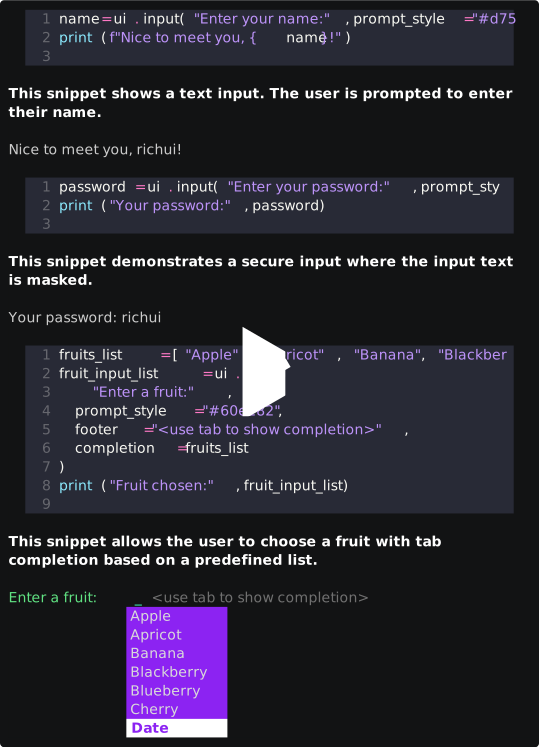
Table of Contents
Features
- Interactive Components: Includes tree views, tables, single and multi-select menus, secure input prompts, and confirm dialogs.
- Custom Configuration: Easily configure UI elements such as cursor style, prompt style, footer style, and more.
- Syntax Highlighting: Display text with syntax highlighting (support: rich markup, ansii colors, hex colors).
- Completion Support: Input fields with support for auto-completion from lists or dictionaries.
Installation
Install richui with pip:
pip install richui
Install richui from sources:
git clone https://github.com/iqbalmh18/richui
cd richui
pip3 install .
Quick Start
import Richui and Config class
from richui import Richui, Config
Custom Configuration Example
This snippet defines a custom configuration for Richui, including styling options for various UI components.
custom_config = Config(
    cursor="➠",
    bracket="(",
    checkmark="●",
    title_style="bold white on #f33581",
    title_justify="center",
    value_style="#f72fcb",
    cursor_style="#40fab9",
    prompt_style="bold #4afd86",
    checkmark_style="#40fab9",
    option_style="#ffffff",
    selection_style="#fa9732",
    selected_style="#25f38d",
    footer_style="#707070",
    guide_style="#65fc8e",
    completion_style="white on #5efda9",
    completion_second_style="italic #5efda9 on #3f3f3f",
    text_width=50,
    padding=(0, 2)
)
Set custom_config to Richui
ui = Richui(custom_config)
Description: This example uses a custom configuration for Rich UI. The above snippet defines styling options for the UI components.
Tree View Example
This snippet displays a tree view of nested data.
tree_data = {
    "Programming": {
        "Language": {
            "Python": [
                "Hacking",
                "Scraping"
            ],
            "Bash": "Scripting"
        },
        "CodeEditor": {
            "Nano": "Nano is a simple command-line text editor.",
            "Acode": "Acode is a lightweight code editor for Android."
        }
    },
    "Country": {
        "ID": "Indonesia"
    }
}
ui.tree(tree_data, title="Data", text_wrap=True)
Description: The code above displays a tree view of nested data using Rich UI.
Table Example
This snippet creates a table to display key information about the Rich UI project.
table_data = {
    "Name": "Rich UI",
    "Version": "1.0.0",
    "Description": "A customizable command-line UI module built on top of the Rich library.",
    "License": "MIT",
    "Source": "https://github.com/iqbalmh18/Richui"
}
ui.table(table_data, title=" Rich UI ", text_wrap=True)
Description: The above snippet creates a table that displays key information about the Rich UI project.
Text Input Example
This snippet shows a text input prompt where the user is asked to enter their name.
name = ui.input("Enter your name:", prompt_style="#d75ff8", footer="<press enter to continue>")
print(f"Nice to meet you, {name}!")
Description: This snippet shows a text input prompt for the user's name.
Secure Input (Password) Example
This snippet demonstrates a secure input prompt where the entered text is masked.
password = ui.input("Enter your password:", prompt_style="#269def", footer="<secure input: enter to continue>", secure=True)
print("Your password:", password)
Description: The code above demonstrates a secure input prompt.
Input with Completion (List) Example
This snippet allows the user to choose a fruit with tab-completion based on a predefined list.
fruits_list = ["Apple", "Apricot", "Banana", "Blackberry", "Blueberry", "Cherry", "Date"]
fruit_input_list = ui.input(
    "Enter a fruit:",
    prompt_style="#60e282",
    footer="<use tab to show completion>",
    completion=fruits_list
)
print("Fruit chosen:", fruit_input_list)
Description: This snippet allows selection from a list with auto-completion.
Input with Completion (Dictionary) Example
This snippet demonstrates an input prompt with completion using a dictionary, where the keys are used for matching.
countries = {
    "United States": "New York",
    "Indonesian": "Jakarta",
    "Germany": "Berlin",
    "France": "Paris",
    "Japan": "Tokyo"
}
country_input = ui.input(
    "Enter a country:",
    prompt_style="#f83d3d",
    footer="<use tab to show completion>",
    completion=countries,
    completion_style="white on #f84a53",
    completion_second_style="italic #f84a53 on #3f3f3f"
)
print("Country chosen:", country_input)
Description: This snippet demonstrates an input prompt with completion using a dictionary.
Single Select Example
This snippet shows a single select menu where the user selects one programming language.
language = ["Bash", "Ruby", "Python", "Javascript"]
selected_action = ui.select(language, prompt="Select a programming language:", prompt_style="bold", return_index=False)
print("Selected programming language:", selected_action)
Description: The code above presents a single select menu.
Multi-Select Example
This snippet presents a multi-select menu for choosing favorite colors.
color_options = ["[red]Red[/]", "[green]Green[/]", "[blue]Blue[/]", "[yellow]Yellow[/]", "[purple]Purple[/]"]
selected_colors = ui.select(
    color_options,
    prompt="Select your favorite colors:",
    prompt_style="bold #39f782",
    footer="<use space and arrow keys to toggle>",
    multi_select=True,
)
print("Selected colors:", selected_colors)
Description: This snippet presents a multi-select menu.
Confirm Example
This snippet displays a confirmation prompt to the user.
confirm = ui.confirm("Do you think [bold]Rich UI[/] is cool?", footer="<press enter to confirm>")
print("Confirmed:", confirm)
Description: The code above displays a confirmation prompt to the user.
Running the Example
The interactive demo is contained in the module and can be run as follows:
python3 -m richui.example
This command will display each code snippet with syntax highlighting and an accompanying description.
1 maintainer

Metadata
1 maintainer
Release files for richui 1.0.0
For a detailed explanation of source distributions (sdists) and built distributions (wheels), please see the package formats documentation.
Source distribution (sdist)
| File | Size | Uploaded | Provenance | Actions |
|---|---|---|---|---|
| richui-1.0.0.tar.gz | 12.5 kB | With provenance | Details for richui-1.0.0.tar.gz |
Built distribution (wheel)
| File | Interpreter | ABI | Platform | Actions Reset |
|---|---|---|---|---|
| richui-1.0.0-py3-none-any.whl | Python 3 | none | any | Details for richui-1.0.0-py3-none-any.whl |
Total release size: 24.8 kB
Release files / richui-1.0.0.tar.gz
| Download URL | richui-1.0.0.tar.gz |
|---|---|
| Size | 12.5 kB |
| Tags | Source |
|
SHA-256 checksum How to use checksums |
9cfce1b139b463546ee162806fbcc3d4c99bcb27604e956b752bd763abaf0e5d
|
|
BLAKE2b-256 checksum How to use checksums |
90ad2d67ff0f9c77b4a1afd1bbc4f1367ab0fb562943b632700e8967af90aeb8
|
| Upload date | |
|
Uploaded using Trusted Publishing? What is trusted publishing? |
Yes |
| Uploaded via |
twine/6.1.0 CPython/3.13.7
|
Provenance
Provenance describes where a file came from. On PyPI, provenance is shared via attestations, which provide a verifiable record of the build or publishing details. View details, limitations and caveats.


PyPI Publish Attestation
PyPI verified that this artifact, at this checksum, originated from the publisher listed below.
Signed by GitHub Actions, verified by PyPI on Mar 28, 2026.
Transparency logRelease files / richui-1.0.0-py3-none-any.whl
| Download URL | richui-1.0.0-py3-none-any.whl |
|---|---|
| Size | 12.3 kB |
| Tags | Python 3 |
|
SHA-256 checksum How to use checksums |
234020929f6fcb0b08110cbdeaacd1a4b664a74b186fc86404a3bb45aba46e63
|
|
BLAKE2b-256 checksum How to use checksums |
6fa4dff2c0a626728c4713a306300d8d2e62b8a70aad2bae22c3c0d44796867e
|
| Upload date | |
|
Uploaded using Trusted Publishing? What is trusted publishing? |
Yes |
| Uploaded via |
twine/6.1.0 CPython/3.13.7
|
Provenance
Provenance describes where a file came from. On PyPI, provenance is shared via attestations, which provide a verifiable record of the build or publishing details. View details, limitations and caveats.
PyPI Publish Attestation
PyPI verified that this artifact, at this checksum, originated from the publisher listed below.
Signed by GitHub Actions, verified by PyPI on Mar 28, 2026.
Transparency logSecurity for richui 1.0.0
Provenance
Provenance describes where a file came from. On PyPI, provenance is shared via attestations, which provide a verifiable record of the build or publishing details. View details, limitations and caveats.
Full provenance
Both files in this release have been uploaded with provenance metadata.
Attestation for richui-1.0.0.tar.gz
PyPI Publish Attestation
PyPI verified that this artifact, at this checksum, originated from the publisher listed below.
Signed by GitHub Actions, verified by PyPI on Mar 28, 2026.
Transparency logA note on package security
PyPI is a repository for distributing packages, not a service for auditing them. While third-party security researchers and our staff do their best to detect and remove malicious packages, PyPI cannot guarantee the quality, security or suitability of any given package.
To learn more about protecting yourself from malicious actors, visit our package security documentation.













