




 Ridal — Speeding up Ground Penetrating Radar (GPR) processing
The aim of ridal is to quickly and accurately process GPR data.
In one command, most data can be processed in pre-set profiles or with custom filter settings, and batch modes allow for sequences of datasets to be processed with the same settings.
It can be used from the command line, from Python, or through a browser GUI for looking at and interpreting the results.
Built in rust with a high focus on testing and performance, ridal may be for you if large data volumes and strange fileformats are common issues.
The name is a take on the loosely defined "Data Abstraction Library" (DAL) projects like GDAL and PDAL, but for radar.
A near-term goal of Ridal is to enable easy conversion between formats, such as ridal convert input.rad output.dzt (this is not yet implemented).
Much of the functionality has been inspired from the projects RGPR and ImpDAR; both of which are more mature projects. For example, Ridal currently only works on Malå (.rd3), GSSI (.dzt) and pulseEKKO (.dt1) radar formats. For many uses, these will more likely be the tools for you!
Notes
- Prior to Feb. 2026, this program was called
rsgpr. - The CLI/Python interface changed completely in version 0.5. See Issue #82 for more info.
Installation
Requirements
cargo(only for the CLI; not the python package). Easiest installed using rustup.gdal(optional, for sampling heights from DEMs). For Debian or derivatives, this meansgdal-bin.proj(optional, for CRS support other than WGS84 UTM Zones). For Debian or derivatives, this meansproj-bin.
Using cargo, the ridal CLI can be installed (after installing the requirements):
cargo install ridal
with nix, the flake can be used without worrying about the requirements above:
inputs = {
  ridal.url = "github:erikmannerfelt/ridal";
};
or in an ephemeral shell:
nix shell github:erikmannerfelt/ridal
Python
There's an early implementation of a Python package:
pip install ridal
>>> import ridal
# Print useful info as a dictionary
>>> ridal.info("path/to/file.rad")
'{...}'
# Process and save to a file
>>> ridal.process("path/to/file.rad", steps=["zero_corr", "auto_gain"], output="processed.nc")
# Process and load into memory
>>> ridal.process("path/to/file.rad", steps=["zero_corr"], return_dataset=True, return_dataset_format="xarray")
<xarray.Dataset> Size: ...
Dimensions:     (y: ..., x: ...)
Coordinates:
...
# Only load into memory with no processing
>>> ridal.read("path/to/file.rad", return_dataset_format="xarray")
<same as above>
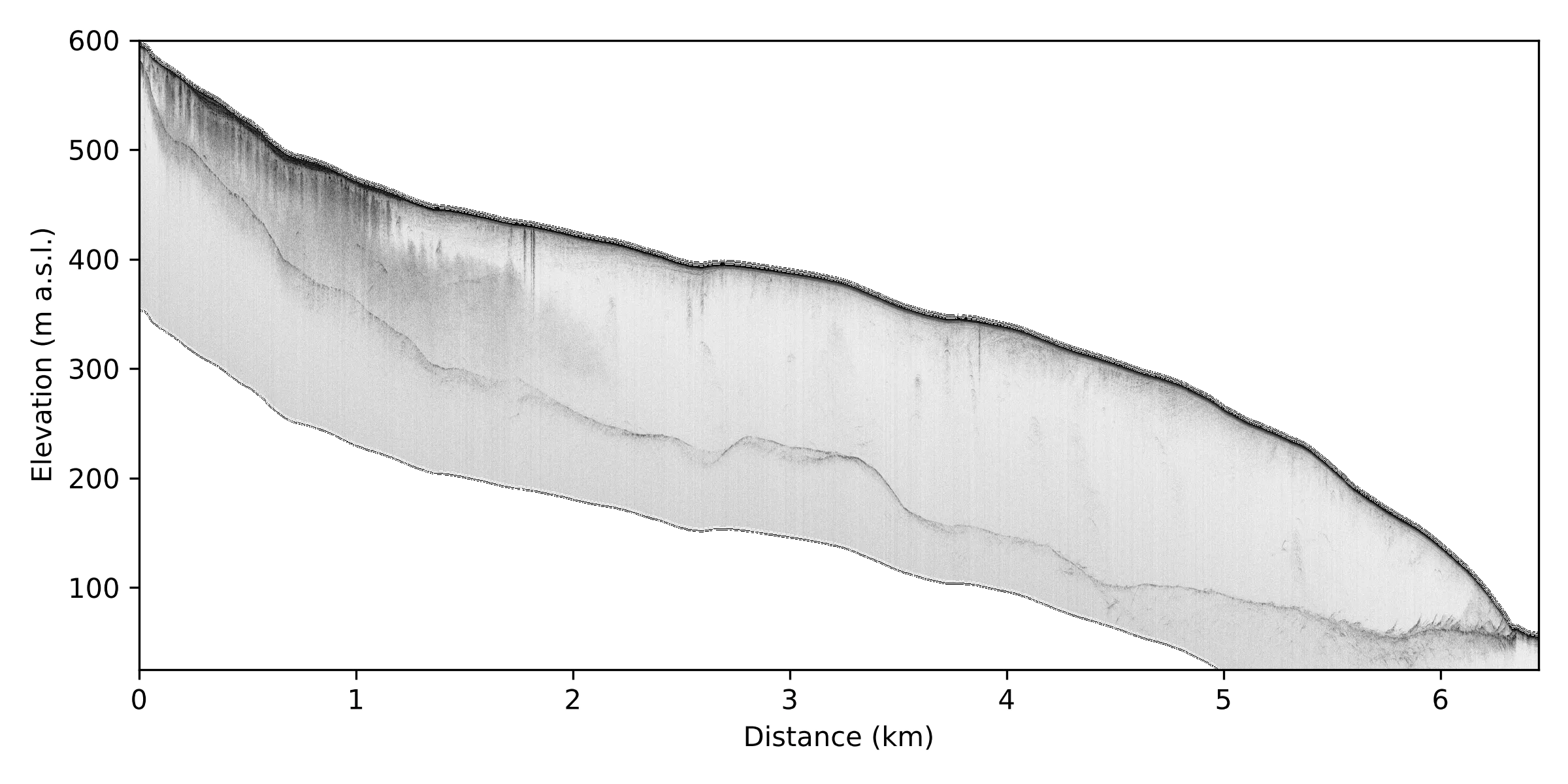
See scripts/render_kroppbreen.py for an example of how it can be used.
Simple CLI usage
See the help page of ridal for info on how to interact with the CLI:
ridal -h
To toggle useful information on a file, the info subcommand shows the metadata and a summary of the location data:
ridal info DAT_001_A1.rd3
Processing a file using the default processing profile:
ridal process DAT_001_A1.rd3 --default
All processing steps are shown in the steps.md file. It can also be printed with ridal steps.
A processing step pipeline is defined using ridal process file.rad --steps "zero_corr,dewow,..." or using a file: --steps steps.txt:
subset(1 100) # Comments are supported!
zero_corr
dewow

correct_topography
The output will be a NetCDF file with the same name but an .nc suffix.
By default, the output is saved in the same directory as the input.
For more control, the output directory and/or filename can be controlled with -o or --output.
To process multiple files in "batch mode", provide a "glob" pattern as the filename.
Optionally, for many sequential files, the --merge argument allows merging multiple files into one.
ridal batch-process data/*.rd3 --merge "10 min" --default -o output/
A profile renderer is available with the -r argument.
This will be saved in the same location as the output file as a JPG if another filename is not given.
Files that are already processed can be rendered on their own with the render subcommand:
ridal render processed.nc -o profile.png
The browser GUI
New in version 0.6.0.
Processed files can be looked at in a browser:
ridal gui path/to/processed/
Every Ridal .nc file below that directory is found and listed, grouped by survey, with a map of where each survey's lines were collected.
Opening one gives a zoomable view of the radargram, where the cursor reports the trace number, the distance along the line, the two-way travel time and the depth, and a map shows where on the ground that point is.
Radargrams are rendered where Ridal runs, and only the parts being looked at, so files larger than memory are not a problem.
Reflectors can also be picked in the browser, which needs somewhere to keep them: a project. Making one in the directory with the processed files is all that is required:
cd my_survey/
ridal project init
ridal gui
Without a path, ridal gui looks for the project by searching upwards from the current directory.
Picked layers can be exported as points, as GeoJSON or CSV, from the browser or with ridal interp export.
ridal gui is for looking at your own files on your own computer, and it stops when you do.
To keep a project up for longer, or to share it with colleagues, ridal server start binds a fixed port instead:
ridal server start my_survey/ --port 8000
Everyone who reaches that address is the same anonymous user until the project has accounts. The first account is made from the command line, since there is no one to ask for permission yet:
ridal project user add erik --role admin
This prints a single-use invite link to send to that person, which is where they set their own password.
Ridal does not encrypt anything itself, so serving a project beyond your own machine means leaving it on 127.0.0.1 and putting a reverse proxy in front of it.
The proxy needs two settings that its defaults get wrong for radargrams (#248). With nginx:
location / {
    proxy_pass http://127.0.0.1:8000;

    # nginx refuses a request body over 1 MB by default, which every
    # radargram exceeds. It does so before Ridal sees the upload, so what
    # reaches the browser is nginx's 413 rather than anything Ridal can
    # explain. Ridal already caps uploads itself, against `max_bytes` under
    # `[radargrams]` in ridal.toml, and says what it refused and why -- so
    # removing the limit here leaves one cap rather than two, and the one
    # that can describe itself.
    client_max_body_size 0;

    # Ridal checks an upload against that cap as the bytes arrive. Left on,
    # nginx buffers the whole file to its own disk before passing on a
    # byte, so an over-cap upload costs a full transfer and a second copy on
    # the proxy before anything refuses it.
    proxy_request_buffering off;

    # A radargram takes longer to upload than the default 60s.
    client_body_timeout 300s;
    proxy_read_timeout 300s;
    proxy_send_timeout 300s;
}
Ridal cannot detect or work around a limit imposed in front of it, so if an upload fails with a message about the web server in front of Ridal, this is the section to check.
Papers using Ridal
- Kleber et al. (2023): Groundwater springs formed during glacial retreat are a large source of methane in the high Arctic
- Harcourt et al. (2026): Surging glaciers in Svalbard: Observing their distribution, characteristics and evolution
- Kleber et al. (2026): Subglacial geology and thermal conditions regulate methane emissions from Svalbard glaciers
... and many others in preparation/review
1 maintainer

Metadata
1 maintainer
Release files for ridal 0.7.1
For a detailed explanation of source distributions (sdists) and built distributions (wheels), please see the package formats documentation.
Built distributions (wheels)
| File | Reset | |||
|---|---|---|---|---|
| ridal-0.7.1-cp314-cp314-win_amd64.whl | CPython 3.14 | CPython 3.14 | Windows x86-64 | Details |
| ridal-0.7.1-cp314-cp314-manylinux_2_39_x86_64.whl | CPython 3.14 | CPython 3.14 | Linux glibc 2.39+ x86-64 | Details |
| ridal-0.7.1-cp314-cp314-macosx_11_0_arm64.whl | CPython 3.14 | CPython 3.14 | macOS 11.0+ ARM64 | Details |
| ridal-0.7.1-cp313-cp313-win_amd64.whl | CPython 3.13 | CPython 3.13 | Windows x86-64 | Details |
| ridal-0.7.1-cp313-cp313-manylinux_2_39_x86_64.whl | CPython 3.13 | CPython 3.13 | Linux glibc 2.39+ x86-64 | Details |
| ridal-0.7.1-cp313-cp313-macosx_11_0_arm64.whl | CPython 3.13 | CPython 3.13 | macOS 11.0+ ARM64 | Details |
| ridal-0.7.1-cp312-cp312-win_amd64.whl | CPython 3.12 | CPython 3.12 | Windows x86-64 | Details |
| ridal-0.7.1-cp312-cp312-manylinux_2_39_x86_64.whl | CPython 3.12 | CPython 3.12 | Linux glibc 2.39+ x86-64 | Details |
| ridal-0.7.1-cp312-cp312-macosx_11_0_arm64.whl | CPython 3.12 | CPython 3.12 | macOS 11.0+ ARM64 | Details |
| ridal-0.7.1-cp311-cp311-win_amd64.whl | CPython 3.11 | CPython 3.11 | Windows x86-64 | Details |
| ridal-0.7.1-cp311-cp311-manylinux_2_39_x86_64.whl | CPython 3.11 | CPython 3.11 | Linux glibc 2.39+ x86-64 | Details |
| ridal-0.7.1-cp311-cp311-macosx_11_0_arm64.whl | CPython 3.11 | CPython 3.11 | macOS 11.0+ ARM64 | Details |
Total release size: 58.6 MB
Release files / ridal-0.7.1-cp314-cp314-win_amd64.whl
| Download URL | ridal-0.7.1-cp314-cp314-win_amd64.whl |
|---|---|
| Size | 5.7 MB |
| Tags | CPython 3.14 Windows x86-64 |
|
SHA-256 checksum How to use checksums |
880c70dcb60d46efe762a7c8c03c36ac3e408e9a74db63ceeef61e7b2fed46ac
|
|
BLAKE2b-256 checksum How to use checksums |
06faf7ac93e96a29d979fc211e4ebd9b8b15f2bc0472c655fcef42c36af6f707
|
| Upload date | |
|
Uploaded using Trusted Publishing? What is trusted publishing? |
No |
| Uploaded via |
uv/0.12.22 {"installer":{"name":"uv","version":"0.12.22","subcommand":["publish"]},"python":null,"implementation":{"name":null,"version":null},"distro":{"name":"Ubuntu","version":"24.04","id":"noble","libc":null},"system":{"name":null,"release":null},"cpu":null,"openssl_version":null,"setuptools_version":null,"rustc_version":null,"ci":true}
|
Release files / ridal-0.7.1-cp314-cp314-manylinux_2_39_x86_64.whl
| Download URL | ridal-0.7.1-cp314-cp314-manylinux_2_39_x86_64.whl |
|---|---|
| Size | 4.6 MB |
| Tags | CPython 3.14 Linux glibc 2.39+ x86-64 |
|
SHA-256 checksum How to use checksums |
0edf27d5c8f955d8597de193e2339cd70b9853da1910d207c38e560eaafcbed3
|
|
BLAKE2b-256 checksum How to use checksums |
560a48ed1018d7c8cc5c77c230f27331ce47627d75e13e3def26b09b09babc38
|
| Upload date | |
|
Uploaded using Trusted Publishing? What is trusted publishing? |
No |
| Uploaded via |
uv/0.12.22 {"installer":{"name":"uv","version":"0.12.22","subcommand":["publish"]},"python":null,"implementation":{"name":null,"version":null},"distro":{"name":"Ubuntu","version":"24.04","id":"noble","libc":null},"system":{"name":null,"release":null},"cpu":null,"openssl_version":null,"setuptools_version":null,"rustc_version":null,"ci":true}
|
Release files / ridal-0.7.1-cp314-cp314-macosx_11_0_arm64.whl
| Download URL | ridal-0.7.1-cp314-cp314-macosx_11_0_arm64.whl |
|---|---|
| Size | 4.3 MB |
| Tags | CPython 3.14 macOS 11.0+ ARM64 |
|
SHA-256 checksum How to use checksums |
8754de8592e135693d768d089006cd296176df851b3bf9a10fdf8fdb35125401
|
|
BLAKE2b-256 checksum How to use checksums |
8ae323aeace89fde7a0ba480e3180342ce97ec68a927ff377b51da69eea92006
|
| Upload date | |
|
Uploaded using Trusted Publishing? What is trusted publishing? |
No |
| Uploaded via |
uv/0.12.22 {"installer":{"name":"uv","version":"0.12.22","subcommand":["publish"]},"python":null,"implementation":{"name":null,"version":null},"distro":{"name":"Ubuntu","version":"24.04","id":"noble","libc":null},"system":{"name":null,"release":null},"cpu":null,"openssl_version":null,"setuptools_version":null,"rustc_version":null,"ci":true}
|
Release files / ridal-0.7.1-cp313-cp313-win_amd64.whl
| Download URL | ridal-0.7.1-cp313-cp313-win_amd64.whl |
|---|---|
| Size | 5.7 MB |
| Tags | CPython 3.13 Windows x86-64 |
|
SHA-256 checksum How to use checksums |
261e8104bdfee3e8b874e717fa86ec15c81d37600d2f6ae3dbdb49aee8cee968
|
|
BLAKE2b-256 checksum How to use checksums |
536b1e2ad004c0dd745a1fa779f1af82124e5c2f492276c07e63753a0701bbab
|
| Upload date | |
|
Uploaded using Trusted Publishing? What is trusted publishing? |
No |
| Uploaded via |
uv/0.12.22 {"installer":{"name":"uv","version":"0.12.22","subcommand":["publish"]},"python":null,"implementation":{"name":null,"version":null},"distro":{"name":"Ubuntu","version":"24.04","id":"noble","libc":null},"system":{"name":null,"release":null},"cpu":null,"openssl_version":null,"setuptools_version":null,"rustc_version":null,"ci":true}
|
Release files / ridal-0.7.1-cp313-cp313-manylinux_2_39_x86_64.whl
| Download URL | ridal-0.7.1-cp313-cp313-manylinux_2_39_x86_64.whl |
|---|---|
| Size | 4.6 MB |
| Tags | CPython 3.13 Linux glibc 2.39+ x86-64 |
|
SHA-256 checksum How to use checksums |
26eaf45710895786bf3651b54129a558aea2f8bd7558012781f13ab3623c49ed
|
|
BLAKE2b-256 checksum How to use checksums |
a2687ae214c8dee5e7508240b5f858a215bfd2945b4cd56cddaad87d83e3f1db
|
| Upload date | |
|
Uploaded using Trusted Publishing? What is trusted publishing? |
No |
| Uploaded via |
uv/0.12.22 {"installer":{"name":"uv","version":"0.12.22","subcommand":["publish"]},"python":null,"implementation":{"name":null,"version":null},"distro":{"name":"Ubuntu","version":"24.04","id":"noble","libc":null},"system":{"name":null,"release":null},"cpu":null,"openssl_version":null,"setuptools_version":null,"rustc_version":null,"ci":true}
|
Release files / ridal-0.7.1-cp313-cp313-macosx_11_0_arm64.whl
| Download URL | ridal-0.7.1-cp313-cp313-macosx_11_0_arm64.whl |
|---|---|
| Size | 4.3 MB |
| Tags | CPython 3.13 macOS 11.0+ ARM64 |
|
SHA-256 checksum How to use checksums |
a77ea97a2457f28938197e179f20424721817bc24067cb1412f321458150913e
|
|
BLAKE2b-256 checksum How to use checksums |
cd8677cef3e01dfb38a96707383a1081c715a4a29337cccaf4fb6d4ab50cc383
|
| Upload date | |
|
Uploaded using Trusted Publishing? What is trusted publishing? |
No |
| Uploaded via |
uv/0.12.22 {"installer":{"name":"uv","version":"0.12.22","subcommand":["publish"]},"python":null,"implementation":{"name":null,"version":null},"distro":{"name":"Ubuntu","version":"24.04","id":"noble","libc":null},"system":{"name":null,"release":null},"cpu":null,"openssl_version":null,"setuptools_version":null,"rustc_version":null,"ci":true}
|
Release files / ridal-0.7.1-cp312-cp312-win_amd64.whl
| Download URL | ridal-0.7.1-cp312-cp312-win_amd64.whl |
|---|---|
| Size | 5.7 MB |
| Tags | CPython 3.12 Windows x86-64 |
|
SHA-256 checksum How to use checksums |
0dcec75e50a69a67931be086d54f455c48b340ccb98000f389bf42cd991183ec
|
|
BLAKE2b-256 checksum How to use checksums |
738755658c4842677b8a6b338df1762497f17704575d34fcacbeb4ca760380a7
|
| Upload date | |
|
Uploaded using Trusted Publishing? What is trusted publishing? |
No |
| Uploaded via |
uv/0.12.22 {"installer":{"name":"uv","version":"0.12.22","subcommand":["publish"]},"python":null,"implementation":{"name":null,"version":null},"distro":{"name":"Ubuntu","version":"24.04","id":"noble","libc":null},"system":{"name":null,"release":null},"cpu":null,"openssl_version":null,"setuptools_version":null,"rustc_version":null,"ci":true}
|
Release files / ridal-0.7.1-cp312-cp312-manylinux_2_39_x86_64.whl
| Download URL | ridal-0.7.1-cp312-cp312-manylinux_2_39_x86_64.whl |
|---|---|
| Size | 4.6 MB |
| Tags | CPython 3.12 Linux glibc 2.39+ x86-64 |
|
SHA-256 checksum How to use checksums |
fecdd2c4b18504b6a24d4f9111cf82eb74f925d1a9a6f929235e3562869ad7d9
|
|
BLAKE2b-256 checksum How to use checksums |
91979617c40949722330a36e568f614313903f22e6d15e0b17b36653077a0f39
|
| Upload date | |
|
Uploaded using Trusted Publishing? What is trusted publishing? |
No |
| Uploaded via |
uv/0.12.22 {"installer":{"name":"uv","version":"0.12.22","subcommand":["publish"]},"python":null,"implementation":{"name":null,"version":null},"distro":{"name":"Ubuntu","version":"24.04","id":"noble","libc":null},"system":{"name":null,"release":null},"cpu":null,"openssl_version":null,"setuptools_version":null,"rustc_version":null,"ci":true}
|
Release files / ridal-0.7.1-cp312-cp312-macosx_11_0_arm64.whl
| Download URL | ridal-0.7.1-cp312-cp312-macosx_11_0_arm64.whl |
|---|---|
| Size | 4.3 MB |
| Tags | CPython 3.12 macOS 11.0+ ARM64 |
|
SHA-256 checksum How to use checksums |
0424433ec52ad95e0cf06f6e3bdf58600d1a1584f79d4fb1b8c43d91ee11173e
|
|
BLAKE2b-256 checksum How to use checksums |
a974ef1395b149f58fa1ea8fd553a671e7fa16502c3009eafe465308543b1799
|
| Upload date | |
|
Uploaded using Trusted Publishing? What is trusted publishing? |
No |
| Uploaded via |
uv/0.12.22 {"installer":{"name":"uv","version":"0.12.22","subcommand":["publish"]},"python":null,"implementation":{"name":null,"version":null},"distro":{"name":"Ubuntu","version":"24.04","id":"noble","libc":null},"system":{"name":null,"release":null},"cpu":null,"openssl_version":null,"setuptools_version":null,"rustc_version":null,"ci":true}
|
Release files / ridal-0.7.1-cp311-cp311-win_amd64.whl
| Download URL | ridal-0.7.1-cp311-cp311-win_amd64.whl |
|---|---|
| Size | 5.7 MB |
| Tags | CPython 3.11 Windows x86-64 |
|
SHA-256 checksum How to use checksums |
58a6b2b58deaf5d5423b1960cb07175b222cca9df3bf576b8928e4e1db31959e
|
|
BLAKE2b-256 checksum How to use checksums |
564101f314fa1be4efd135e3442aaa4b2d9093d893ad1b38cf8c52a5cfb9a88f
|
| Upload date | |
|
Uploaded using Trusted Publishing? What is trusted publishing? |
No |
| Uploaded via |
uv/0.12.22 {"installer":{"name":"uv","version":"0.12.22","subcommand":["publish"]},"python":null,"implementation":{"name":null,"version":null},"distro":{"name":"Ubuntu","version":"24.04","id":"noble","libc":null},"system":{"name":null,"release":null},"cpu":null,"openssl_version":null,"setuptools_version":null,"rustc_version":null,"ci":true}
|
Release files / ridal-0.7.1-cp311-cp311-manylinux_2_39_x86_64.whl
| Download URL | ridal-0.7.1-cp311-cp311-manylinux_2_39_x86_64.whl |
|---|---|
| Size | 4.6 MB |
| Tags | CPython 3.11 Linux glibc 2.39+ x86-64 |
|
SHA-256 checksum How to use checksums |
324f66d1e1a7654991640b350210b5f8c8d18f829b544a9383a93eb725b40252
|
|
BLAKE2b-256 checksum How to use checksums |
5160500a5fd091b8c1f45b9a524a9d6480dd6d44c1a0a72da7fbcf33fabc275a
|
| Upload date | |
|
Uploaded using Trusted Publishing? What is trusted publishing? |
No |
| Uploaded via |
uv/0.12.22 {"installer":{"name":"uv","version":"0.12.22","subcommand":["publish"]},"python":null,"implementation":{"name":null,"version":null},"distro":{"name":"Ubuntu","version":"24.04","id":"noble","libc":null},"system":{"name":null,"release":null},"cpu":null,"openssl_version":null,"setuptools_version":null,"rustc_version":null,"ci":true}
|
Release files / ridal-0.7.1-cp311-cp311-macosx_11_0_arm64.whl
| Download URL | ridal-0.7.1-cp311-cp311-macosx_11_0_arm64.whl |
|---|---|
| Size | 4.3 MB |
| Tags | CPython 3.11 macOS 11.0+ ARM64 |
|
SHA-256 checksum How to use checksums |
fa6d97911c77566e9623f66d985b3ed51bf8a1ebf4a3730158ef770365dda6ea
|
|
BLAKE2b-256 checksum How to use checksums |
ac35aeb07a91848111830bd622f7bf2f0ff523ba555f2837c1add556e4d9c36f
|
| Upload date | |
|
Uploaded using Trusted Publishing? What is trusted publishing? |
No |
| Uploaded via |
uv/0.12.22 {"installer":{"name":"uv","version":"0.12.22","subcommand":["publish"]},"python":null,"implementation":{"name":null,"version":null},"distro":{"name":"Ubuntu","version":"24.04","id":"noble","libc":null},"system":{"name":null,"release":null},"cpu":null,"openssl_version":null,"setuptools_version":null,"rustc_version":null,"ci":true}
|
Security for ridal 0.7.1
Provenance
Provenance describes where a file came from. On PyPI, provenance is shared via attestations, which provide a verifiable record of the build or publishing details. View details, limitations and caveats.
No provenance found
None of the files in this release were uploaded with provenance metadata.
A note on package security
PyPI is a repository for distributing packages, not a service for auditing them. While third-party security researchers and our staff do their best to detect and remove malicious packages, PyPI cannot guarantee the quality, security or suitability of any given package.
To learn more about protecting yourself from malicious actors, visit our package security documentation.














