
$ rideology2gpx
A simple command line program to transform log files obtained with the Kawasaki Rideology App into .gpx files.
Refrences
Requirements
- Python 3.6+
Installation
From the Python package index (PyPI)
Run:
$ pip3 install rideology2gpx
From source
Download from Github
Standing inside the folder, run:
$ pip3 install -r requirements.txt
For install the dependencies and then run:
$ pip3 install .
Usage
user@host:~/tmp/rideology2gpx$ rideology2gpx --help
Usage: rideology2gpx [OPTIONS] [CSV_FILE] [OUTPUT_DIR]

  A simple command line program to transform log files obtained with the
  Kawasaki Rideology App into GPX files.

  CSV_FILE - File obtained with the Kawasaki Rideology App.
  OUTPUT_DIR - Optional output directory where the files will be created.

  For more info: https://github.com/jbokser/rideology2gpx
  Author: Juan S. Bokser <juan.bokser@gmail.com>
  Version: 1.1b3

Options:
  -v, --version                   Show version and exit.
  -d, --date [%Y-%m-%d %H:%M:%S]  Starting datetime for the track in the GPX
                                  files.
  -g, --graph                     Make graphs and md report.
  -s, --starting-chop X           Cut the first X kilometres.  [0<=x<=10]
  -e, --ending-chop X             Cut the last X kilometres.  [0<=x<=10]
  -a, --acceleration MIN_SPEED MAX_SPEED
                                  Filters waypoints to only what is included
                                  between the speeds.
  -h, --help                      Show this message and exit.
user@host:~/tmp/rideology2gpx$ rideology2gpx example/ride.csv -d "1979-08-09 09:25:00"
Make file 'example/ride.gpx'... Ok
Make file 'example/ride_gear_shifts.gpx'... Ok
Make file 'example/ride_speed_shifts.gpx'... Ok
Make file 'example/ride_report.txt'... Ok

From gas station to next gas station
==== === ======= == ==== === =======

Max engine speed:  3846 rpm
Max wheel speed:   60 km/h
Max water temp:    101 ℃
Avg idle speed:    1202 rpm
Avg speed:         30 km/h
Total time:        0:07:49
Distance:          1.87 km
Starting point:    S034°30′29.52″ E058°28′46.70″
Ending point:      S034°29′53.65″ E058°29′02.93″

Max for each gear
--- --- ---- ----

  Gear    rpm    km/h
     1   3137      29
     2   3611      45
     3   3784      58
     4   3846      60

user@host:~/tmp/rideology2gpx$
Why? (The rationale behind this)
Mainly used by me to get info from my bike.
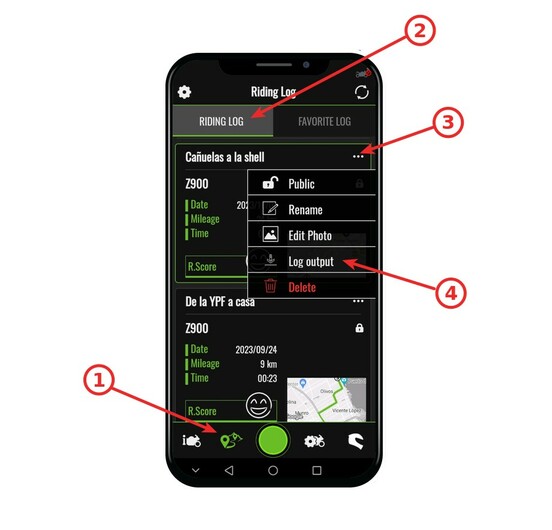
Obtain the log files from Kawasaki Rideology App
Author
1 maintainer

Metadata
1 maintainer
Release files for rideology2gpx 1.1
For a detailed explanation of source distributions (sdists) and built distributions (wheels), please see the package formats documentation.
Source distribution (sdist)
| File | Size | Uploaded | Provenance | |
|---|---|---|---|---|
| rideology2gpx-1.1.tar.gz | 23.3 kB | Without provenance | Details |
Built distribution (wheel)
| File | Interpreter | ABI | Platform | Reset |
|---|---|---|---|---|
| rideology2gpx-1.1-py3-none-any.whl | Python 3 | none | any | Details |
Total release size: 48.1 kB
Release files / rideology2gpx-1.1.tar.gz
| Download URL | rideology2gpx-1.1.tar.gz |
|---|---|
| Size | 23.3 kB |
| Tags | Source |
|
SHA-256 checksum How to use checksums |
90727817d1aaf16180b78224fbefba02337aba8ed7feae652a025efc5a5929f4
|
|
BLAKE2b-256 checksum How to use checksums |
1346f88844f14471a7b00e40a80dcb655174e22f1a7251c6dd8275589a49cb81
|
| Upload date | |
|
Uploaded using Trusted Publishing? What is trusted publishing? |
No |
| Uploaded via |
twine/5.0.0 CPython/3.12.2
|
Release files / rideology2gpx-1.1-py3-none-any.whl
| Download URL | rideology2gpx-1.1-py3-none-any.whl |
|---|---|
| Size | 24.8 kB |
| Tags | Python 3 |
|
SHA-256 checksum How to use checksums |
ed2f122ea1e19af1e117ce9cd227546fa499b577c3614bda1d5c742a9afded59
|
|
BLAKE2b-256 checksum How to use checksums |
c1a7d59c81d648fc730406d67c5e3a7219da13216c9643b8f8626562bdfad01a
|
| Upload date | |
|
Uploaded using Trusted Publishing? What is trusted publishing? |
No |
| Uploaded via |
twine/5.0.0 CPython/3.12.2
|
Security for rideology2gpx 1.1
Provenance
Provenance describes where a file came from. On PyPI, provenance is shared via attestations, which provide a verifiable record of the build or publishing details. View details, limitations and caveats.
No provenance found
None of the files in this release were uploaded with provenance metadata.
A note on package security
PyPI is a repository for distributing packages, not a service for auditing them. While third-party security researchers and our staff do their best to detect and remove malicious packages, PyPI cannot guarantee the quality, security or suitability of any given package.
To learn more about protecting yourself from malicious actors, visit our package security documentation.














