
ridgenine




Ridgeline plots for plotnine, inspired by the ggridges package for ggplot2.
Ridgeline plots display the distribution of a continuous variable across multiple categories as a series of overlapping density curves — useful for comparing many distributions at once in a compact, readable layout.
Installation
pip
pip install ridgenine
uv
uv add ridgenine
Quick start
from plotnine import ggplot, aes
from ridgenine import geom_density_ridges, theme_ridges

(
    ggplot(df, aes("value", "category"))
    + geom_density_ridges()
    + theme_ridges()
)
Examples
Density ridges
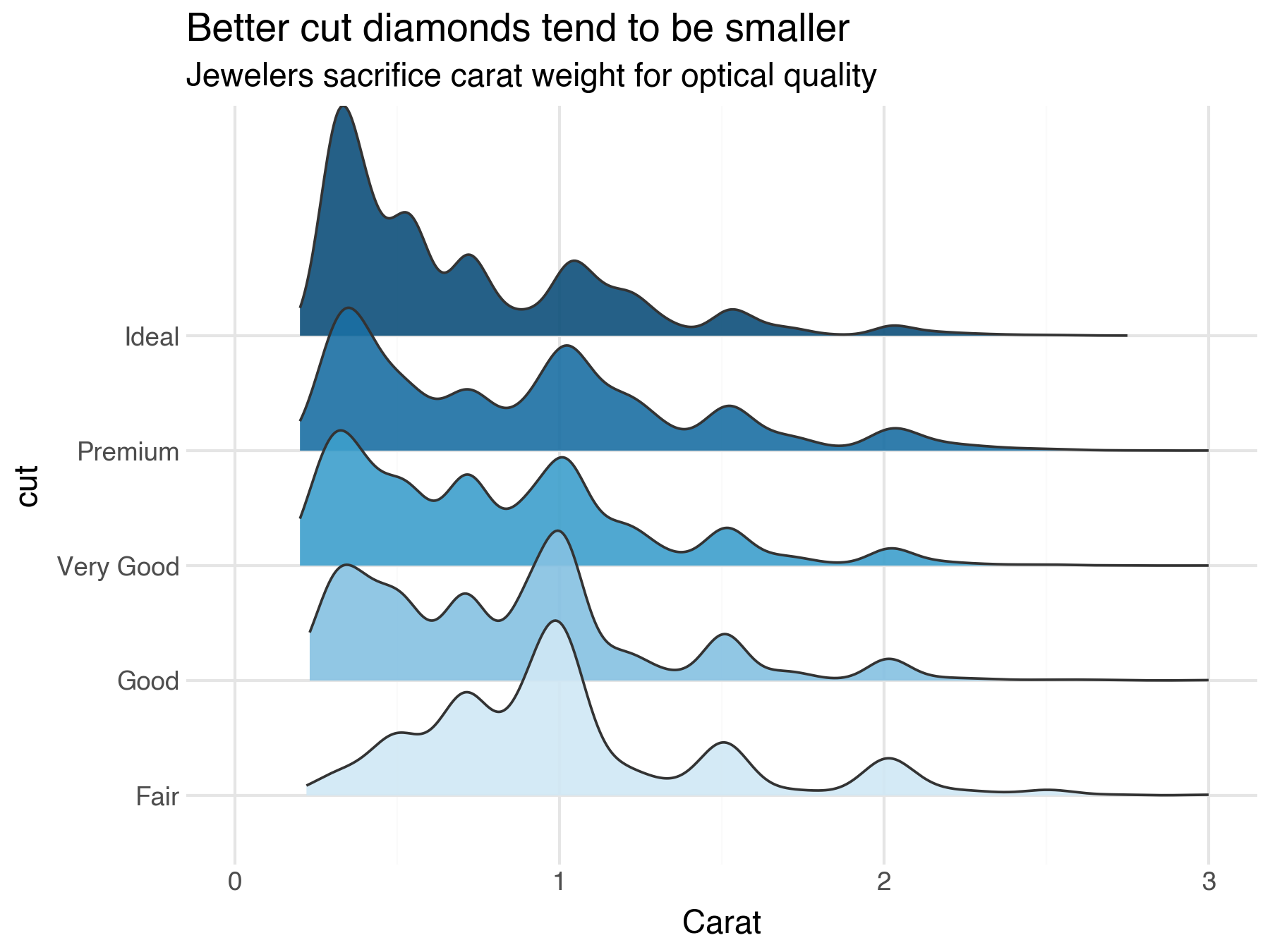
geom_density_ridges estimates a kernel density for each category and draws
it as a filled ridge. The scale parameter controls overlap: scale=1 means
the tallest ridge exactly reaches the next category's baseline; values above 1
cause overlap, values below 1 leave gaps. Pair with theme_ridges() for a
clean, purpose-built look.
Here, a sequential fill palette reinforces the ordering — darker blue means higher cut quality — revealing that better-cut diamonds tend to be smaller.
import pandas as pd
from plotnine import ggplot, aes, scale_fill_manual, scale_x_continuous
from plotnine.data import diamonds
from ridgenine import geom_density_ridges

cut_order = ["Fair", "Good", "Very Good", "Premium", "Ideal"]
diamonds["cut"] = pd.Categorical(diamonds["cut"], categories=cut_order, ordered=True)

(
    ggplot(diamonds, aes("carat", "cut", fill="cut"))
    + geom_density_ridges(scale=2.0, alpha=0.9, trim=True)
    + scale_fill_manual(values=["#d0e8f5", "#85c1e2", "#3d9fcc", "#1a6fa3", "#0d4f7a"])
    + scale_x_continuous(limits=(0, 3))
)
Gradient fills
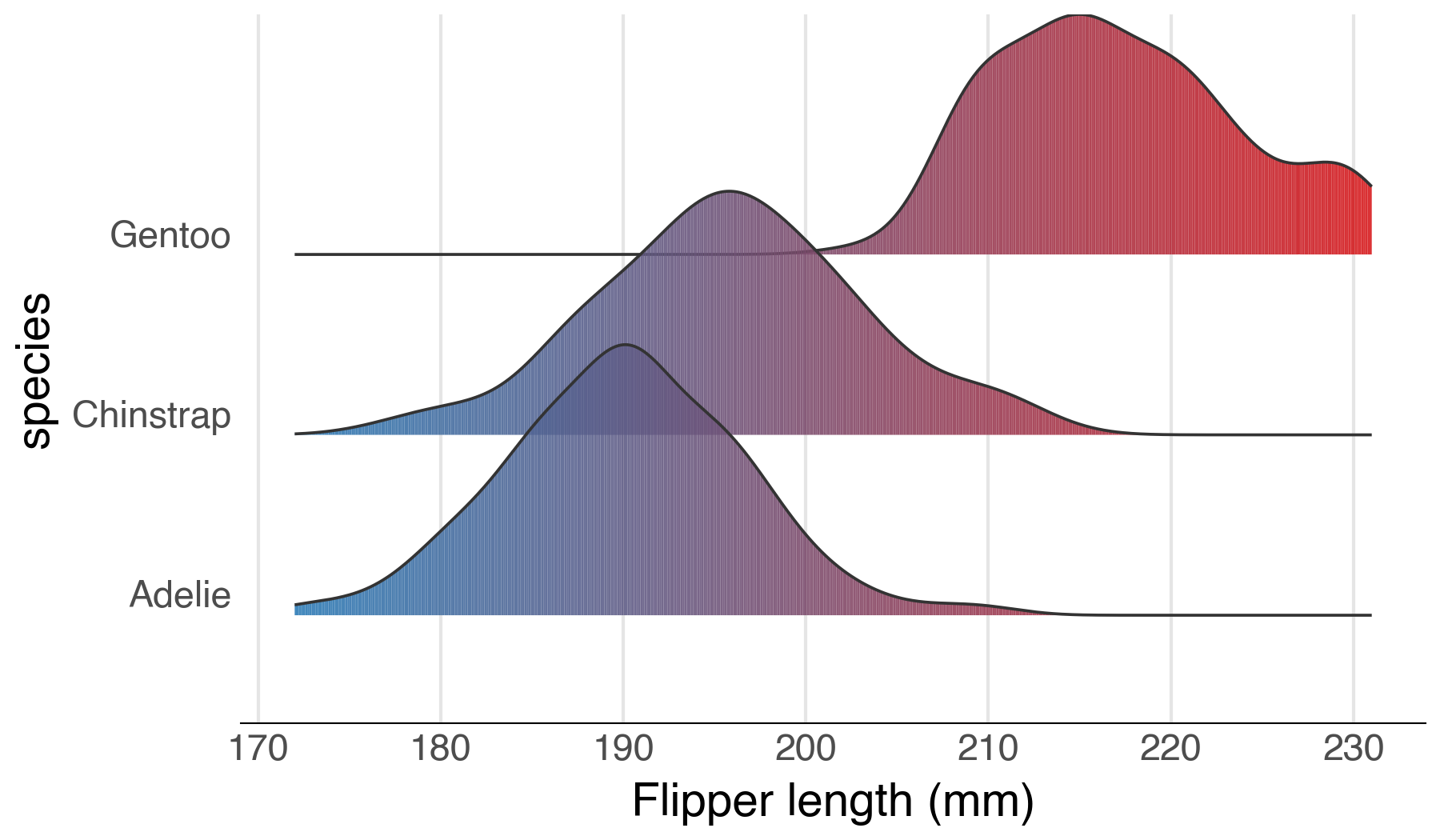
geom_density_ridges_gradient allows the fill colour to vary continuously
along each ridge. By default, fill is mapped to x position. Pair it with a
continuous colour scale for smooth gradients, or map fill to
after_stat("quantile") for discrete quantile bands.
from plotnine import ggplot, aes, scale_fill_gradient
from plotnine.data import penguins
from plotnine.mapping.evaluation import after_stat
from ridgenine import geom_density_ridges_gradient

(
    ggplot(penguins.dropna(), aes("flipper_length_mm", "species", fill=after_stat("x")))
    + geom_density_ridges_gradient(scale=1.5)
    + scale_fill_gradient(low="#2c7bb6", high="#d7191c")
)
Quantile lines
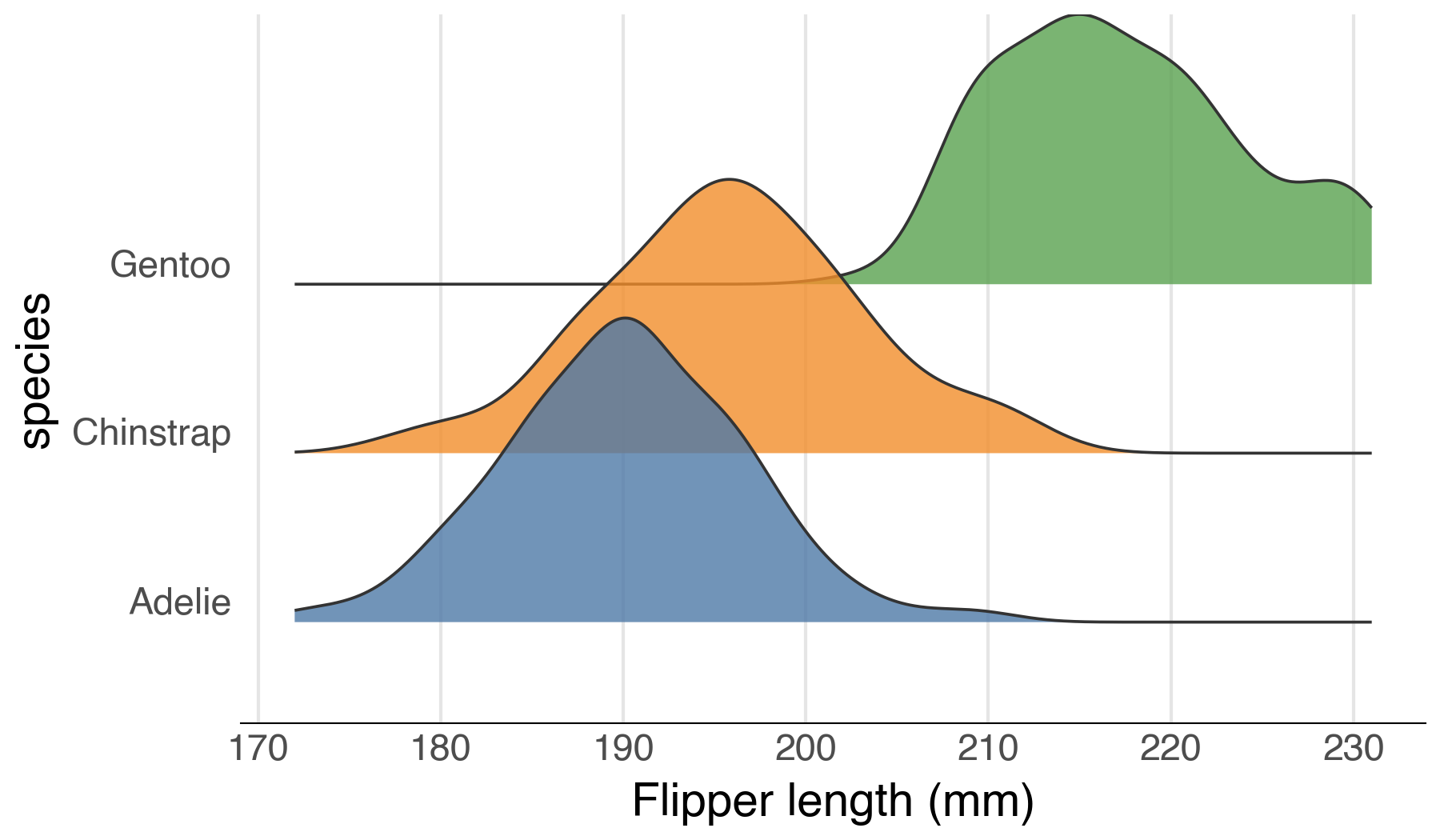
Draw vertical lines at quantile boundaries within each ridge using
quantile_lines=True. By default, lines are drawn at the 25th, 50th,
and 75th percentiles. Use quantiles to customise the cut points.
from plotnine import ggplot, aes, scale_fill_manual
from plotnine.data import penguins
from ridgenine import geom_density_ridges

(
    ggplot(penguins.dropna(), aes("flipper_length_mm", "species", fill="species"))
    + geom_density_ridges(scale=1.5, alpha=0.7, quantile_lines=True)
    + scale_fill_manual(values=["#4E79A7", "#F28E2B", "#59A14F"])
)
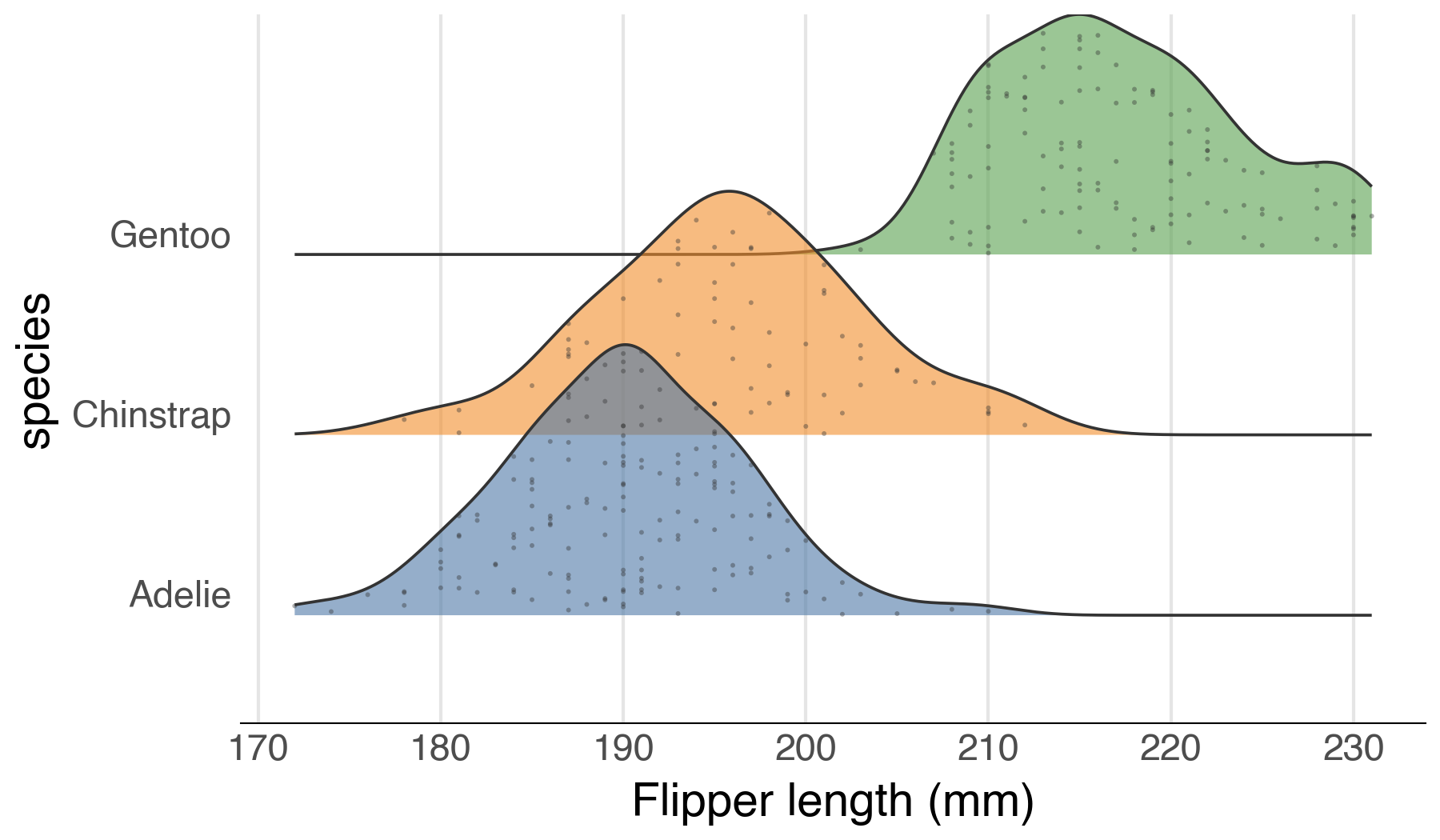
Jittered points
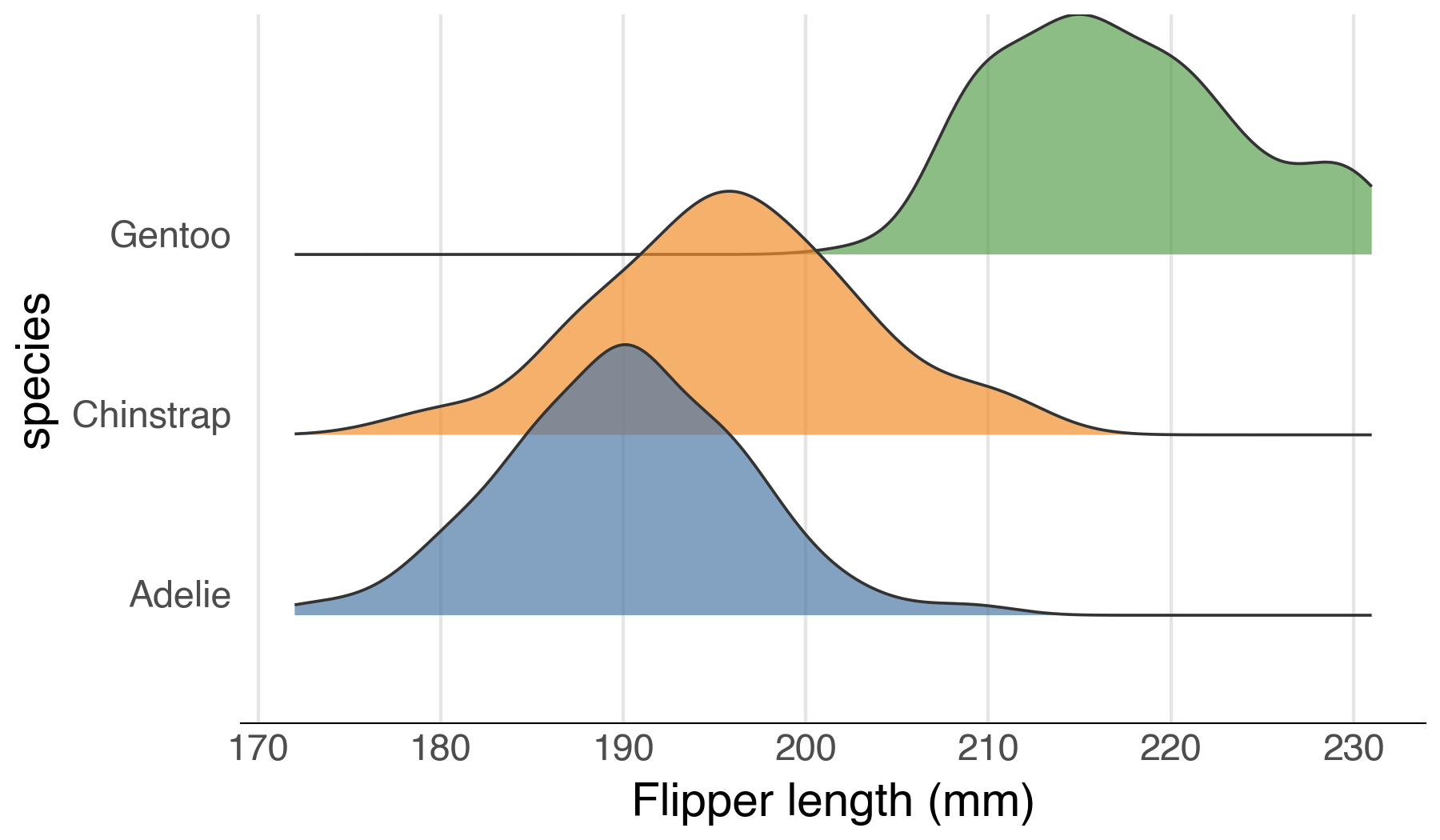
Show the raw data points scattered within each ridge envelope using
jittered_points=True. Point appearance is controlled with point_size,
point_alpha, point_color, and point_shape.
from plotnine import ggplot, aes, scale_fill_manual
from plotnine.data import penguins
from ridgenine import geom_density_ridges

(
    ggplot(penguins.dropna(), aes("flipper_length_mm", "species", fill="species"))
    + geom_density_ridges(
        scale=1.5, alpha=0.6,
        jittered_points=True, point_size=0.5, point_alpha=0.4,
    )
    + scale_fill_manual(values=["#4E79A7", "#F28E2B", "#59A14F"])
)
Histogram ridges
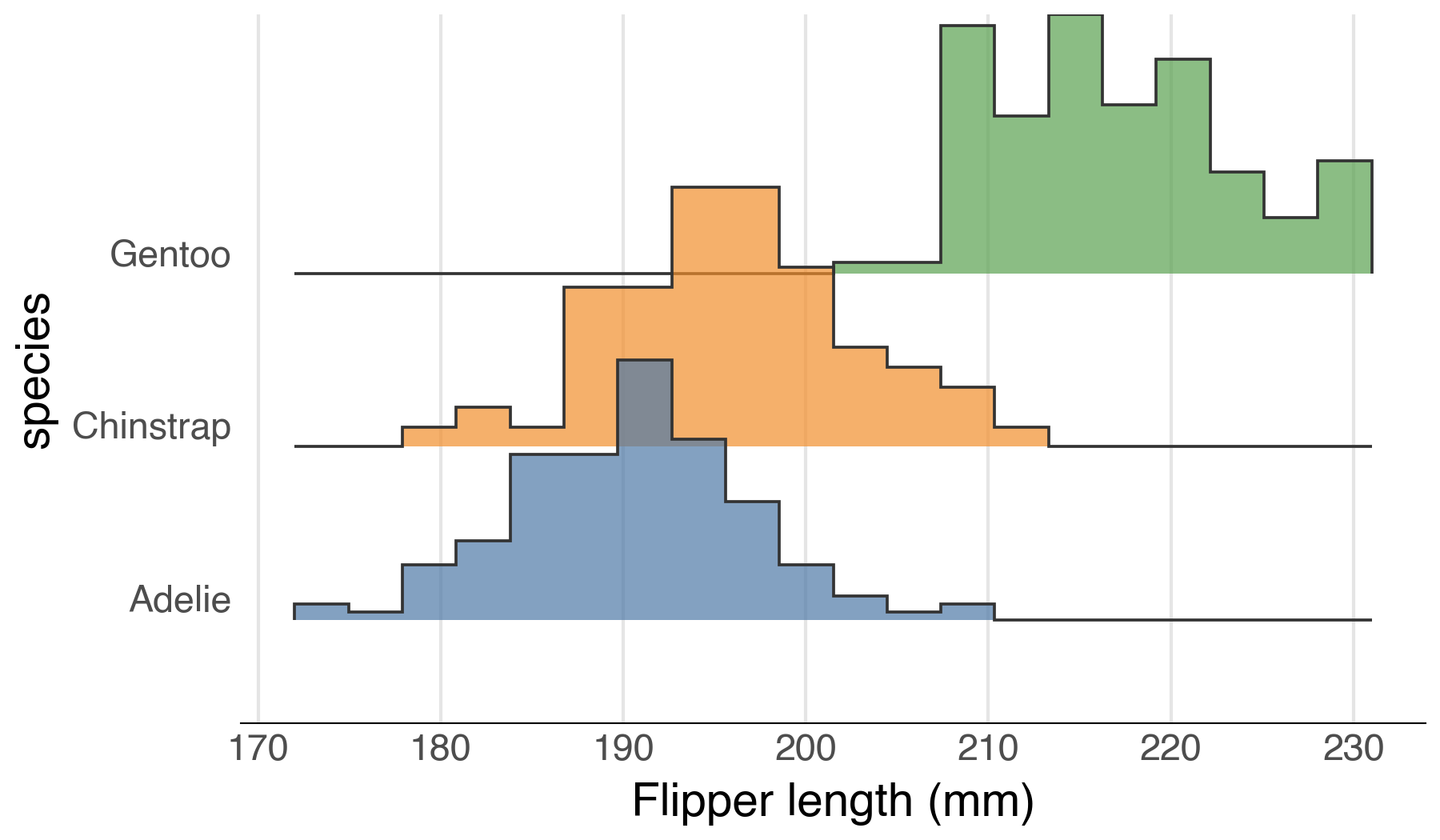
Use stat_binline with geom_ridgeline for histogram-style stepped
ridgelines instead of smooth KDE curves.
from plotnine import ggplot, aes, scale_fill_manual
from plotnine.data import penguins
from ridgenine import geom_ridgeline

(
    ggplot(penguins.dropna(), aes("flipper_length_mm", "species", fill="species"))
    + geom_ridgeline(stat="binline", bins=20, scale=1.5, alpha=0.7)
    + scale_fill_manual(values=["#4E79A7", "#F28E2B", "#59A14F"])
)
Faceting
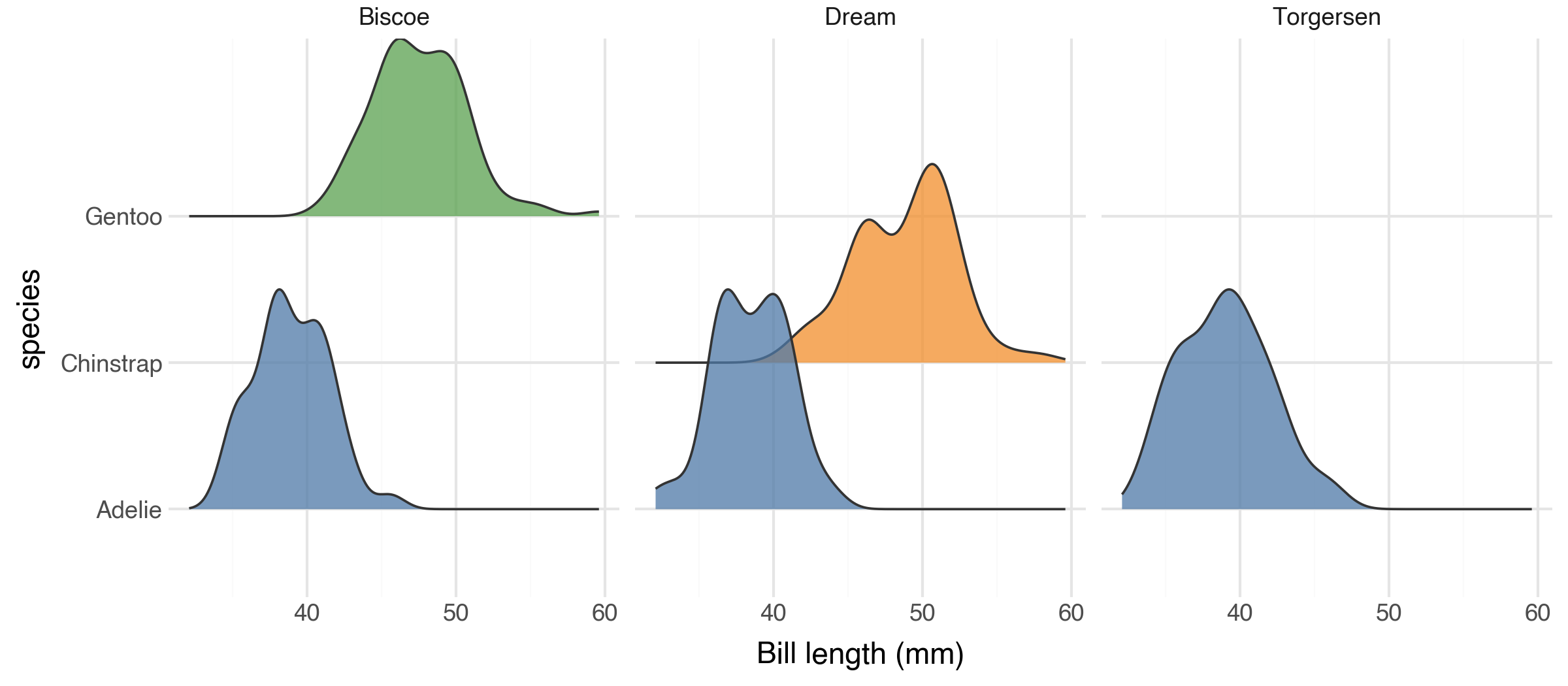
geom_density_ridges composes naturally with the rest of plotnine's grammar,
including facet_wrap and facet_grid.
from plotnine import ggplot, aes, facet_wrap, scale_fill_manual
from plotnine.data import penguins
from ridgenine import geom_density_ridges

(
    ggplot(penguins.dropna(), aes("bill_length_mm", "species", fill="species"))
    + geom_density_ridges(scale=1.5, alpha=0.75)
    + scale_fill_manual(values=["#4E79A7", "#F28E2B", "#59A14F"])
    + facet_wrap("island")
)
Outline types
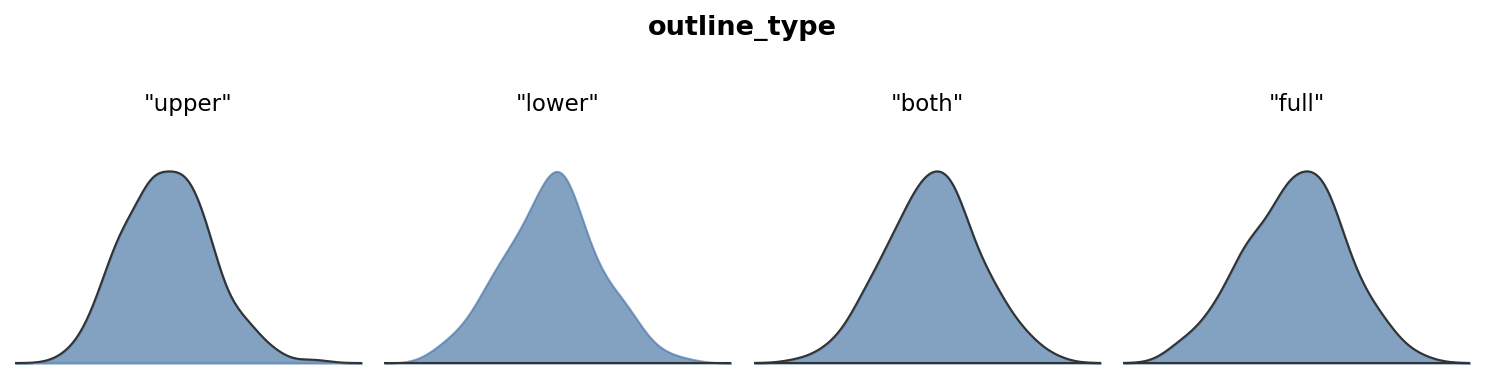
The outline_type parameter controls which boundary of the ridge is stroked.
From left to right: "upper" (default), "lower", "both", "full".
API
geom_density_ridges
The primary geom. Computes a KDE for each y category and draws it as a
filled ridge.
| Parameter | Default | Description |
|---|---|---|
scale |
1.0 |
Ridge height multiplier. Values > 1 cause overlap. |
rel_min_height |
0 |
Clip density tails below this fraction of the panel-wide peak to the baseline. E.g. 0.01 removes the bottom 1% of each ridge's tails. |
panel_scaling |
True |
If True, normalise heights per panel. If False, normalise globally so ridge heights are comparable across facets. |
quantile_lines |
False |
If True, draw vertical lines at quantile boundaries within each ridge. |
quantiles |
None |
An integer k for k equal-probability bands, or a list of floats (e.g. [0.25, 0.5, 0.75]). Defaults to [0.25, 0.5, 0.75] when quantile_lines=True. |
jittered_points |
False |
If True, draw raw data points jittered within each ridge. |
point_shape |
"o" |
Marker shape for jittered points. |
point_size |
0.5 |
Size of jittered points. |
point_alpha |
1.0 |
Opacity of jittered points. |
point_color |
None |
Colour of jittered points. None uses the ridge outline colour. |
point_seed |
42 |
Random seed for reproducible jitter positions. |
kernel |
"gaussian" |
KDE kernel (same options as stat_density). |
bw |
"nrd0" |
Bandwidth or bandwidth method. |
adjust |
1 |
Bandwidth multiplier. |
trim |
False |
Trim density to the data range of each group. |
n |
512 |
Number of density evaluation points per group. |
gridsize |
None |
Number of equally-spaced grid points for KDE evaluation. If None, falls back to n. |
cut |
3 |
Grid extension past data range in multiples of bw. |
clip |
(-inf, inf) |
Drop x values outside this range before fitting. |
bounds |
(-inf, inf) |
Domain boundaries for boundary-bias correction. |
outline_type |
"upper" |
Which boundary to stroke: "upper", "lower", "both", "full". |
The height aesthetic defaults to after_stat("ndensity") (density
normalised to [0, 1] across the whole panel). Override it to use raw density
or counts:
from plotnine.mapping.evaluation import after_stat

# Area proportional to number of observations
ggplot(df, aes("x", "y", height=after_stat("count"))) + geom_density_ridges()
geom_density_ridges_gradient
Like geom_density_ridges, but renders each ridge as a series of thin
vertical strips so that the fill colour can vary along the x-axis. Map
fill=after_stat("x") for a smooth gradient, or
fill=after_stat("quantile") for discrete quantile bands.
Accepts the same KDE and outline_type parameters as geom_density_ridges.
Does not support quantile_lines or jittered_points.
geom_ridgeline
Lower-level geom for pre-computed heights. Requires x, y, and height
aesthetics. The height value at each x point controls how far above the
category baseline the ridge extends. Accepts the same scale and
outline_type parameters as geom_density_ridges.
stat_density_ridges
The stat underlying geom_density_ridges. Can be used independently to
attach density computation to another geom. Produces density, ndensity,
count, scaled, n, and quantile columns.
stat_binline
Bins x values into a histogram and produces a step-function suitable for
geom_ridgeline. A discrete alternative to KDE.
| Parameter | Default | Description |
|---|---|---|
bins |
30 |
Number of bins. |
binwidth |
None |
Width of each bin. Overrides bins. |
center |
None |
Center of one of the bins. |
boundary |
None |
Boundary between two bins. |
breaks |
None |
Explicit bin edges. Overrides bins and binwidth. |
pad |
True |
Add zero-height points at the extremes. |
theme_ridges
A clean theme designed for ridgeline plots, analogous to ggridges::theme_ridges.
Removes horizontal grid lines (obscured by the ridges), keeps subtle vertical
guides, and uses a slightly larger base font size.
| Parameter | Default | Description |
|---|---|---|
font_size |
14 |
Base font size in points. |
line_size |
0.5 |
Thickness of axis lines and tick marks. |
grid |
True |
If False, remove vertical grid lines for a completely clean background. |
Contributing
Contributions are welcome! To get started:
# Clone the repository
git clone https://github.com/briandconnelly/ridgenine.git
cd ridgenine

# Install in development mode
uv sync

# Install pre-commit hooks
uvx pre-commit install

# Run the test suite
uv run pytest

# Lint and format
uv run ruff check src/ tests/
uv run ruff format src/ tests/
Please open an issue before starting work on large changes so we can discuss the approach. All pull requests should include tests and maintain the existing coverage threshold (95%).
Credits
ridgenine is a port of ggridges by Claus O. Wilke to the Python / plotnine ecosystem.
License
1 maintainer

Metadata
1 maintainer
Release files for ridgenine 0.1.1
For a detailed explanation of source distributions (sdists) and built distributions (wheels), please see the package formats documentation.
Source distribution (sdist)
| File | Size | Uploaded | |
|---|---|---|---|
| ridgenine-0.1.1.tar.gz | 858.1 kB | Details |
Built distribution (wheel)
| File | Interpreter | ABI | Platform | Reset |
|---|---|---|---|---|
| ridgenine-0.1.1-py3-none-any.whl | Python 3 | none | any | Details |
Total release size: 878.1 kB
Release files / ridgenine-0.1.1.tar.gz
| Download URL | ridgenine-0.1.1.tar.gz |
|---|---|
| Size | 858.1 kB |
| Tags | Source |
|
SHA-256 checksum How to use checksums |
883366139f5b9993ca228195f85168d32f09399c1a351d31b6ade7488275cfb1
|
|
BLAKE2b-256 checksum How to use checksums |
18cc9c3e17df87e296d2e841e8f955d703ae6950b5de62fb4dc2a9abddb3de82
|
| Upload date | |
|
Uploaded using Trusted Publishing? What is trusted publishing? |
No |
| Uploaded via |
uv/0.10.9 {"installer":{"name":"uv","version":"0.10.9","subcommand":["publish"]},"python":null,"implementation":{"name":null,"version":null},"distro":{"name":"macOS","version":null,"id":null,"libc":null},"system":{"name":null,"release":null},"cpu":null,"openssl_version":null,"setuptools_version":null,"rustc_version":null,"ci":null}
|
Release files / ridgenine-0.1.1-py3-none-any.whl
| Download URL | ridgenine-0.1.1-py3-none-any.whl |
|---|---|
| Size | 20.0 kB |
| Tags | Python 3 |
|
SHA-256 checksum How to use checksums |
ac8ccc10b73ac5ab3dced5227523da17b82c21933e7a8fd5d818a0b61a7bc19e
|
|
BLAKE2b-256 checksum How to use checksums |
907a015e7c92c2cbe045bdf1e02bc10cb37f7310693f0f5bd5377f628be612d8
|
| Upload date | |
|
Uploaded using Trusted Publishing? What is trusted publishing? |
No |
| Uploaded via |
uv/0.10.9 {"installer":{"name":"uv","version":"0.10.9","subcommand":["publish"]},"python":null,"implementation":{"name":null,"version":null},"distro":{"name":"macOS","version":null,"id":null,"libc":null},"system":{"name":null,"release":null},"cpu":null,"openssl_version":null,"setuptools_version":null,"rustc_version":null,"ci":null}
|














