
ridi-check
See what a model or prompt update really changed in your assistant's answers, before you ship it.



A new model or an edited prompt can change what your assistant or agent answers without anyone noticing: average accuracy barely moves while individual answers flip. ridi-check runs the old and the new version on the same questions, more than once, and shows which answers changed and which of those changes hold on re-run. You need no test set, no answer key and no model judge.
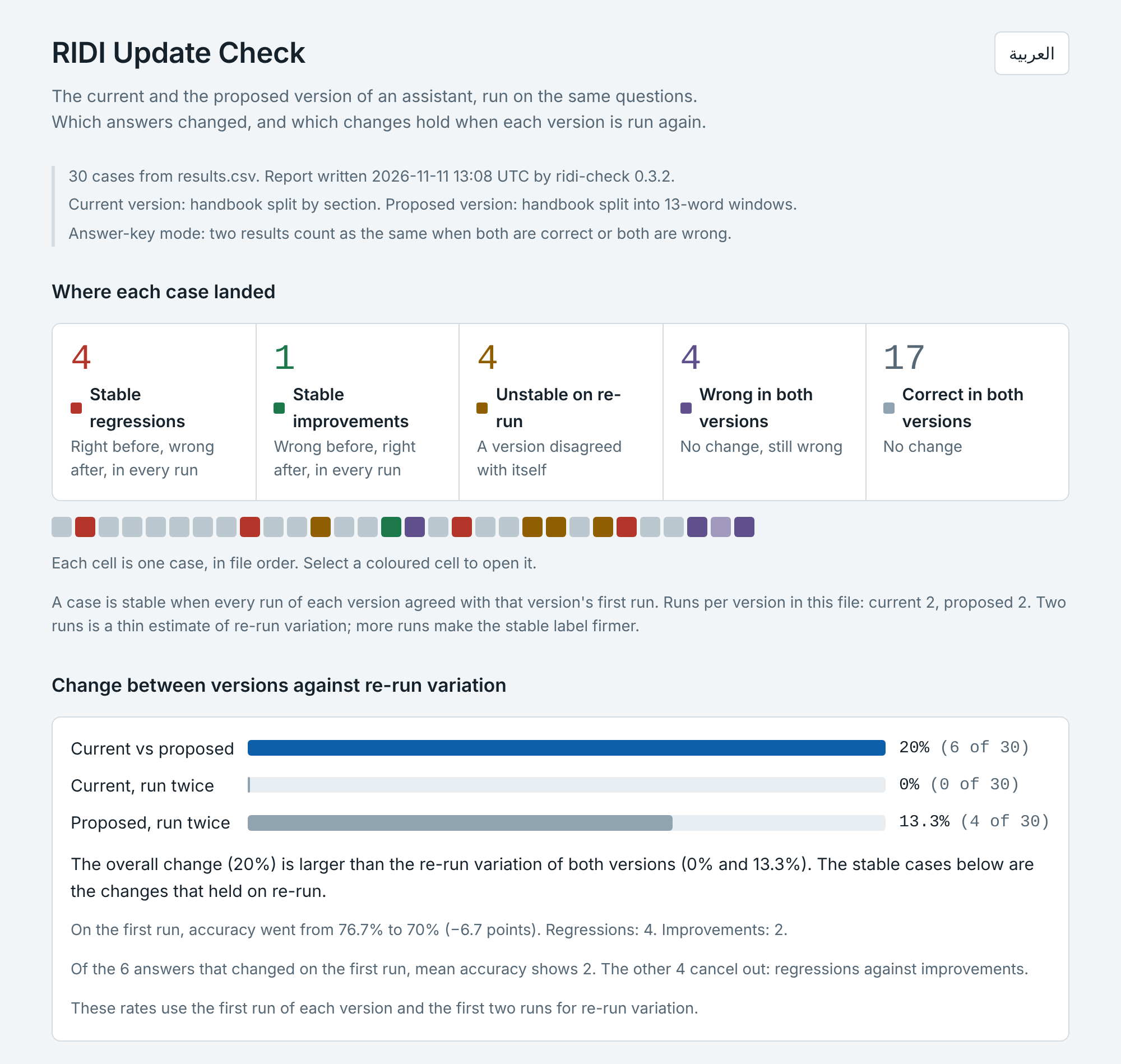
Try it in your browser, with nothing to install: adeebnoor.github.io/ridi-check. It opens on two synthetic examples: a library handbook, and one with invented drug names (illustration only) where mean accuracy rises while three answers break in every run.
What you will see · Who it is for · Start in one minute · Use it in CI · Connect your assistant · FAQ · Roadmap · Limitations · Reference
What you will see
In your terminal or CI log, ridi-check gate lists every answer that was right and is now wrong in
every run, and exits 1 so the pipeline stops:
ridi-check gate: ridi-demo/ridi-out/results.csv, 30 cases, answer-key mode
stable_regression  case q02
stable_regression  case q09
stable_regression  case q18
stable_regression  case q25
counts: stable_regression=4 stable_improvement=1 regression_unconfirmed=0 improvement_unconfirmed=0 unstable=4 wrong_both=4 correct_both=17 incomplete=0
stable regressions: 4 (limit 0) - over the limit
gate: a limit was exceeded
In the report, each changed case shows the question, both answers, what the second run gave and the passages only one version used:
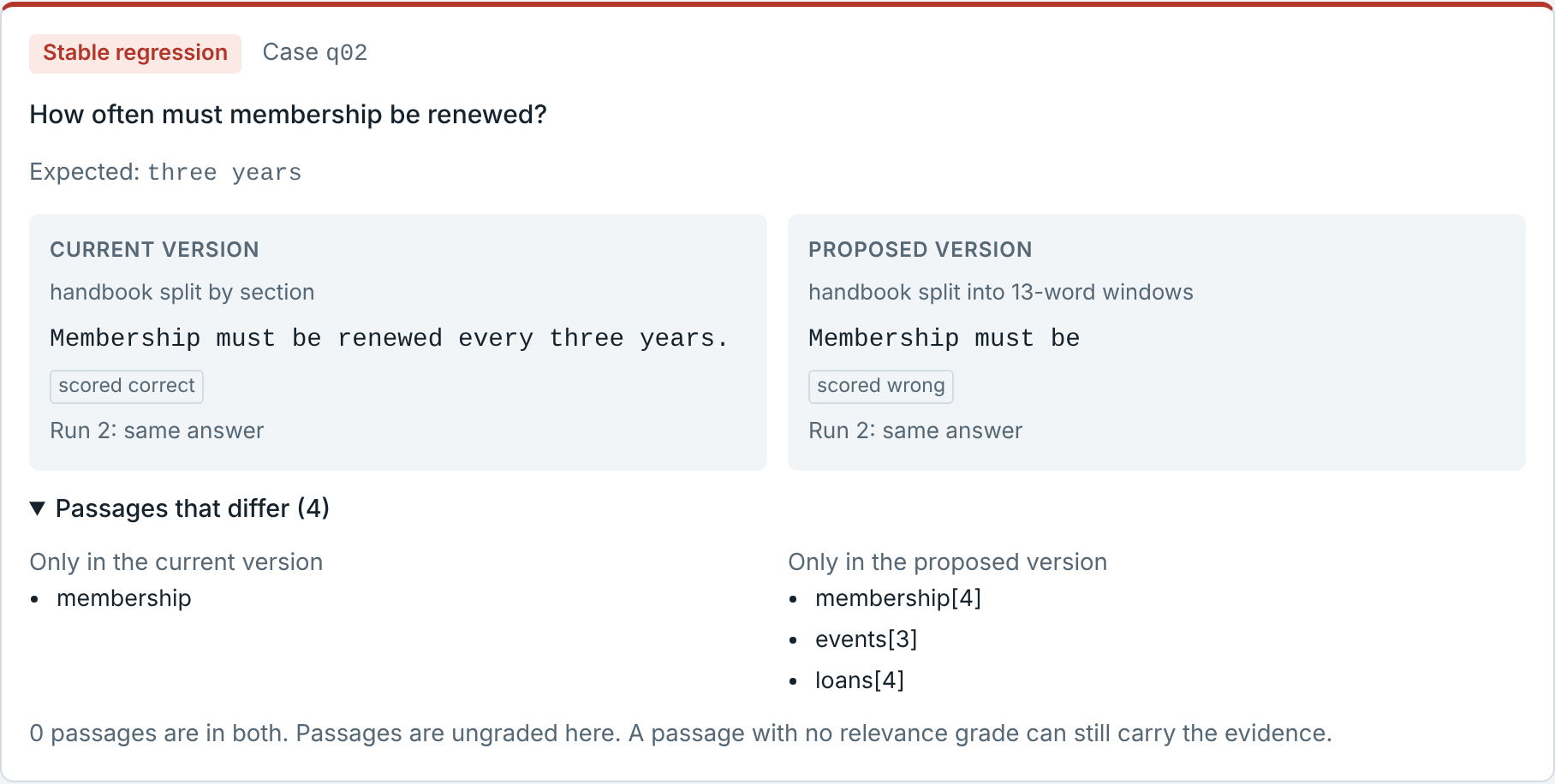
Every question ends in one group:
| Group | Meaning |
|---|---|
| Stable regression | right before, wrong after, in every run: an answer your update broke |
| Stable improvement | wrong before, right after, in every run |
| Stable change | no answer key: a different answer in every run, for you to judge |
| Unstable on re-run | a version disagreed with itself, so the difference is not evidence about the update |
| Wrong in both | no change, still wrong; listed separately |
The report is one self-contained HTML file. It works offline, on a phone, in light and dark, in English and
Arabic. The numbers above come from ridi-check demo, which uses synthetic data.
Who it is for
- You are about to swap the model, edit the prompt or change retrieval and want to know which answers move, not only whether an average moved.
- You have questions but no answer key. The report shows what changed; you judge only the changes that held on re-run.
- You want a CI check that fails when an answer that was right becomes wrong in every run.
- You only have answers in a spreadsheet. The browser version reads pasted cells and needs no install.
It is not for proving that answers are correct or that a system is ready to deploy, or for explaining why an answer changed. Agents that use tools or keep state can be wrapped, but that has not been tried on a production agent. See Limitations and the use cases.
Start in one minute
Python 3.10 or later, no dependencies. The demo needs no network and no API key; its data is synthetic.
pip install ridi-check
ridi-check demo --open
Then check your own assistant:
ridi-check init my-check
It writes questions.csv, my_assistant.py (one function to fill in), ridi-check.json and
ASK_YOUR_AI.md, a prompt that lets your AI coding assistant do the wiring. In that folder, try five
questions with ridi-check run --limit 5, then run everything with ridi-check run. The
user guide walks through each step and how to read the report.
No install at all: open the browser version and paste your results (CSV text or cells copied from a spreadsheet). Your data stays in the page: it sends nothing anywhere. To use it offline, download the single file web/ridi-update-check.html.
Development version: pip install git+https://github.com/adeebnoor/ridi-check installs the latest commit instead of the
latest release.
Use it in CI
- run: pip install ridi-check
- run: ridi-check run --config ridi-check.json     # calls both versions, writes ridi-out/results.csv
- run: ridi-check gate ridi-out/results.csv        # exits 1 on a stable regression
A complete GitHub Actions workflow to copy: examples/ci/ridi-check.yml.
gate prints counts and the offending cases; it never prints a verdict about your system. By default it
does not count answers that did not hold on re-run; where a wrong answer is costly, add --max-unstable 0,
and --max-answer-changes 0 to count answers that changed while their score stayed the same.
Limits such as --max-stable-regressions 2 are in the reference.
Connect your assistant
ridi-check has no model provider built in. Your assistant is the system under test, reached through one function:
def answer(question: str) -> dict:
    return {"answer": "text", "context": ["doc-12", "doc-40"]}   # context is optional
| Your assistant is… | Pass it as |
|---|---|
| importable from Python | python:module:function |
| a program in any language | command:<shell command> (question on stdin, JSON or text on stdout) |
| an HTTP service | http://…, or a JSON file that describes the request and the reply |
Ready-made examples in examples/adapters: an OpenAI-compatible HTTP
API (no code), the Claude API through its official SDK, and a shell command with curl. Each reads its key
from an environment variable and is tested against a local stand-in server.
The two versions should differ only in what the update changes. Details: developer guide.
FAQ
Do I need a test set or an answer key? No. Without an expected column the report shows which answers
differ and you judge only the stable changes. With one, it speaks of regressions and improvements.
Does my data go anywhere? No. ridi-check calls only your assistant and writes local files. The report and the browser version make no network request.
Does it use a model to judge answers? No. A judge adds its own error. Scoring is exact match after normalisation, or a function you write.
How many questions and runs? 30 to 100 real user questions is a good first set. Two runs per version is the minimum for the stable label; use more when the decision is expensive. Calls = questions × 2 × runs.
Almost everything is "unstable" or "changed". Why? Your assistant words the same answer differently each
time. Add expected answers with a scoring function, or use --similarity 0.9. Word overlap does not
know which word matters, so do not use it where one word decides, such as a dose or a verdict.
Which providers and frameworks does it support? Any. It talks to a function, a command or an HTTP endpoint, not to a provider.
Can I use it on an agent? Yes, wrapped as one function: a question or a whole scripted conversation goes
in, the final answer comes out, and the tool calls are returned as context, so the report shows which
calls only one version made. examples/adapters
has a working stand-in agent. It has not been tried on a production agent yet.
What happens when my provider limits or refuses calls? A Retry-After header is obeyed when it asks
for up to 120 seconds, and no other call starts during that wait. HTTP 400, 401, 402, 403 and 404 are not
tried again, unless the refusal itself carries Retry-After. After ten refusals in a row (a used-up quota,
a missing key, a rate limit) the run stops with exit status 2, and the same command continues from there
later. A failure that belongs to one question, such as a 400, a 500 or a timeout, is recorded and never
stops the run. This was tried live against one free public model service: its limit arrived as HTTP 402
with Retry-After, and 48 calls all finished, five of them on a second attempt after waits of 3 to 42
seconds. That is one service on one day; yours may behave differently.
Details.
Can I open the CSV files in Excel? Yes. A cell that starts with =, +, - or @ is written with an
apostrophe in front ('=1+1), so a spreadsheet does not run answer text as a formula. The tool takes the
apostrophe off again when it reads the file, and raw_outputs.jsonl keeps every answer as it was given.
Going the other way, save your sheet as "CSV UTF-8"; Excel's "Unicode Text" is read too, and other
encodings are refused with a message that says how to save the file.
Roadmap
No dates and no promises; this is what is planned and what is not.
- Done: a release on PyPI, a hosted browser version, adapter examples for common APIs.
- Next: fixes and examples that real use asks for. Nothing else is scheduled.
- Being considered: intervals for the rates, multi-turn conversations, tool-using agents, more report languages.
- Not planned: model-based judging, or any hosted service that receives your data.
Tell us what you need in an issue.
Limitations
- It finds change, not correctness. A version that is wrong the same way every time looks stable, and cases wrong in both versions are listed separately.
- Without an answer key or your judgment, a difference is a change, not a regression.
- Passages are shown as they differ and are not graded; an ungraded passage can still carry the evidence.
- Two runs is a thin estimate of re-run variation. More runs make the stable label firmer.
- It is not a readiness or safety certificate. No output says a system is fit to deploy; the gate prints counts and the decision stays yours.
- Agents that use tools or keep state have a documented pattern and a stand-in example, but the tool has not been tried on a production agent. Not in this version: model-based judging, statistical tests.
- Size was measured on Linux with Python 3.13 and Chromium only, not on Windows or macOS. There, 100,000
cases with three runs of each version take about 6 seconds and 318 MB in
report; the HTML report for them is 17.9 MB and opens in under a second, fifty cards at a time; the browser version reads the same file in about 6 seconds and uses about 1.4 GB; and a cell above 64 MB is refused with a message. The measured limits have the full table.
Documentation
- User guide: step by step, and how to read the report
- Use cases: thirteen situations and how to set each one up
- Developer guide: adapters, files, CI, library use
- Reference: every command and option,
results.csv, the labelling rules - بالعربية: دليل الاستخدام · حالات الاستخدام · دليل المطورين
ridi-check follows the RIDI method.
Contributing
Bug reports, questions and pull requests are welcome: see CONTRIBUTING.md and the changelog. Everyone taking part follows the code of conduct. Report a vulnerability privately, as SECURITY.md describes.
Licence
MIT. See LICENSE.
1 maintainer

Metadata
1 maintainer
Release files for ridi-check 0.6.0
For a detailed explanation of source distributions (sdists) and built distributions (wheels), please see the package formats documentation.
Source distribution (sdist)
| File | Size | Uploaded | Provenance | Actions |
|---|---|---|---|---|
| ridi_check-0.6.0.tar.gz | 66.9 kB | With provenance | Details for ridi_check-0.6.0.tar.gz |
Built distribution (wheel)
| File | Interpreter | ABI | Platform | Actions Reset |
|---|---|---|---|---|
| ridi_check-0.6.0-py3-none-any.whl | Python 3 | none | any | Details for ridi_check-0.6.0-py3-none-any.whl |
Total release size: 135.0 kB
Release files / ridi_check-0.6.0.tar.gz
| Download URL | ridi_check-0.6.0.tar.gz |
|---|---|
| Size | 66.9 kB |
| Tags | Source |
|
SHA-256 checksum How to use checksums |
58c9a208ad1a13bbf365eb75b1a7c13e9d0f8e3fb3c99014c4b3344be29ffde5
|
|
BLAKE2b-256 checksum How to use checksums |
eb2091a8e6d4e76995c1ecef3c3cd7bb4063dbc460f867906120358c911eda7d
|
| Upload date | |
|
Uploaded using Trusted Publishing? What is trusted publishing? |
Yes |
| Uploaded via |
twine/7.0.0 CPython/3.13.16
|
Provenance
Provenance describes where a file came from. On PyPI, provenance is shared via attestations, which provide a verifiable record of the build or publishing details. View details, limitations and caveats.


PyPI Publish Attestation
PyPI verified that this artifact, at this checksum, originated from the publisher listed below.
Signed by GitHub Actions, verified by PyPI on Nov 12, 2026.
Transparency logRelease files / ridi_check-0.6.0-py3-none-any.whl
| Download URL | ridi_check-0.6.0-py3-none-any.whl |
|---|---|
| Size | 68.1 kB |
| Tags | Python 3 |
|
SHA-256 checksum How to use checksums |
65ac61aedc4e0c0e31efd9f9fd80c3d70d9970ed461846192453f31ba085b066
|
|
BLAKE2b-256 checksum How to use checksums |
93ae13d4f680fa609fc27ec024f7737fea195dee038019728701fef7076f288e
|
| Upload date | |
|
Uploaded using Trusted Publishing? What is trusted publishing? |
Yes |
| Uploaded via |
twine/7.0.0 CPython/3.13.16
|
Provenance
Provenance describes where a file came from. On PyPI, provenance is shared via attestations, which provide a verifiable record of the build or publishing details. View details, limitations and caveats.
PyPI Publish Attestation
PyPI verified that this artifact, at this checksum, originated from the publisher listed below.
Signed by GitHub Actions, verified by PyPI on Nov 12, 2026.
Transparency logSecurity for ridi-check 0.6.0
Provenance
Provenance describes where a file came from. On PyPI, provenance is shared via attestations, which provide a verifiable record of the build or publishing details. View details, limitations and caveats.
Full provenance
Both files in this release have been uploaded with provenance metadata.
Attestation for ridi_check-0.6.0.tar.gz
PyPI Publish Attestation
PyPI verified that this artifact, at this checksum, originated from the publisher listed below.
Signed by GitHub Actions, verified by PyPI on Nov 12, 2026.
Transparency logA note on package security
PyPI is a repository for distributing packages, not a service for auditing them. While third-party security researchers and our staff do their best to detect and remove malicious packages, PyPI cannot guarantee the quality, security or suitability of any given package.
To learn more about protecting yourself from malicious actors, visit our package security documentation.














