
rigol-ds1000z
In addition to this README, I have also written a blog post about this application.
An oscilloscope user interface that never leaves the terminal.
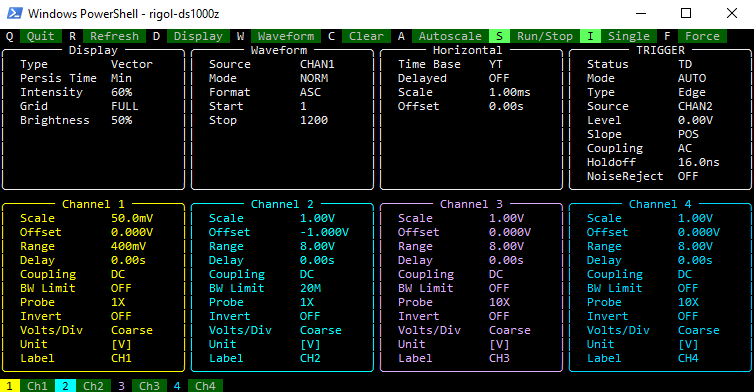
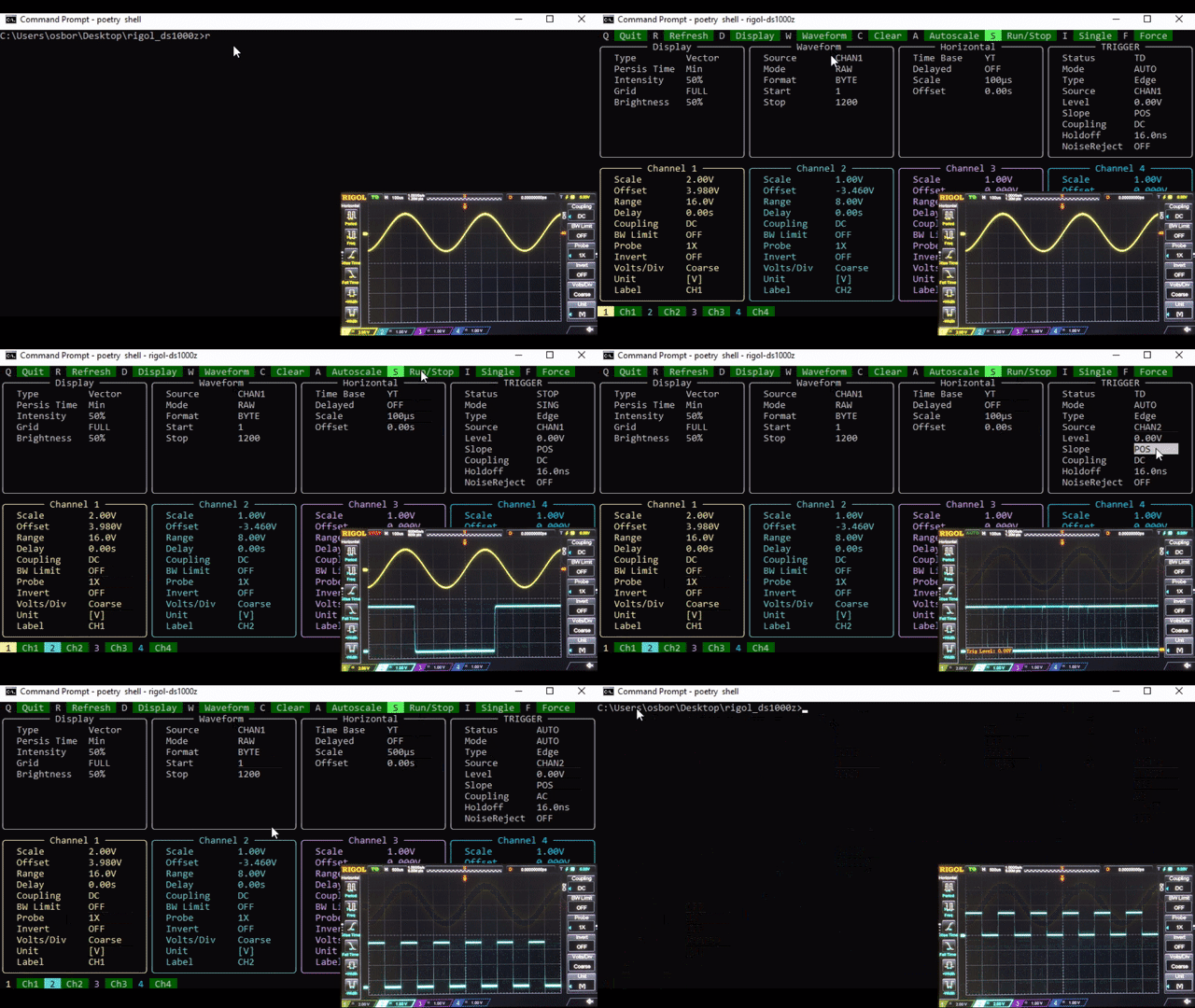
A simple command line tool for grabbing data and pictures.
rigol-ds1000z --help
rigol-ds1000z --visa rsrc --display path/to/file.png
rigol-ds1000z --visa rsrc --waveform src path/to/file.csv
Unless a VISA resource is specified with the --visa argument, the CLI will search for a Rigol DS1000Z series oscilloscope and connect to the first one it finds.
The CLI can capture and save to file an image of the display (--display) or the waveform data of the specified source channel (--waveform).
A compact Python interface for automating test procedures.
See the provided examples and read the documentation.
from rigol_ds1000z import Rigol_DS1000Z
from rigol_ds1000z import process_display, process_waveform
from time import sleep

with Rigol_DS1000Z() as oscope:
    # reset to defaults and print the IEEE 488.2 instrument identifier
    oscope.rst()
    print(oscope.idn())

    # configure channel 2, the timebase, and the trigger
    channel = oscope.channel(2, probe=10, scale=1, coupling="AC", display=True)
    timebase = oscope.timebase(main_scale=200e-6)
    trigger = oscope.trigger(mode="EDGE", edge_source=2, coupling="DC", edge_level=0)

    # wait three seconds then single trigger
    oscope.single()
    sleep(3)

    # capture the display image
    display = oscope.display()
    process_display(display, show=True)

    # plot the channel 2 waveform data
    waveform = oscope.waveform(source=2)
    process_waveform(waveform, show=True)
Installation instructions and notes to the user.
pip install rigol-ds1000z
Version 1.0.0 requires Python 3.14 or newer. The terminal interface still uses Textual 0.1.18.
Migrating from 0.3.0
- IEEE 488.2 commands are methods: use
oscope.rst()andoscope.idn()in place ofoscope.ieee(rst=True)and its returned fields. - Edge trigger arguments and results use
edge_source,edge_slope, andedge_level. Noise rejection usesnreject. - Display brightness uses
wbrightnessandgbrightness. Useoscope.clear()to clear the display. - Measurement results are in
.item; usecounter_sourceand.counter_valuefor the frequency counter, andstatistic_item=("MAX", "VPP")for statistics. - Returned namedtuple field order has changed; access results by field name.
Available on PyPI. This package uses PyVISA to communicate with the oscilloscope. The user will have to install some VISA backend library for their operating system such as National Instrument's VISA library or libusb (this package supports both the "@ivi" and "@py" PyVISA backends transparently).
This software has been tested on Windows (Command Prompt and PowerShell), although it should be possible to run in other shells and/or operating systems. For best visual performance, a default of white text on a black background is recommended.
Reset and autoscale block on the IEEE 488.2 *OPC? query until the instrument reports the operation complete, so no fixed sleep is inserted. The user may still find that they require additional settle time after certain command sequences (for example, after arming a single-trigger acquisition before reading the trigger status).
Software development and references.
Rigol DS1000Z programming manual.
| Command Category | Coverage |
|---|---|
| AUToscale, etc. | YES |
| ACQuire | YES |
| CALibrate | no |
| CHANnel | YES |
| CURSor | no |
| DECoder | no |
| DISPlay | YES |
| ETABle | no |
| FUNCtion | no |
| IEEE 488.2 | YES |
| LA | no |
| LAN | no |
| MATH | no |
| MASK | no |
| MEASure | YES |
| REFerence | no |
| STORage | no |
| SYSTem | no |
| TIMebase | YES |
| TRIGger | PARTIAL |
| WAVeform | YES |
- Package management by Poetry.
- Automated processing hooks by pre-commit.
- Code formatting in compliance with PEP8 by isort, black, and flake8.
- Static type checking in compliance with PEP484 by mypy.
- Test execution with random ordering and code coverage analysis by pytest.
- Automated documentation generation by sphinx.
Installing the development environment requires running the following command sequence.
poetry install
poetry run pre-commit install
In order for all tests to pass channel 2 must be connected to the calibration square wave.
1 maintainer

Metadata
1 maintainer
Release files for rigol-ds1000z 1.0.0
For a detailed explanation of source distributions (sdists) and built distributions (wheels), please see the package formats documentation.
Source distribution (sdist)
| File | Size | Uploaded | Provenance | Actions |
|---|---|---|---|---|
| rigol_ds1000z-1.0.0.tar.gz | 23.8 kB | Without provenance | Details for rigol_ds1000z-1.0.0.tar.gz |
Built distribution (wheel)
| File | Interpreter | ABI | Platform | Actions Reset |
|---|---|---|---|---|
| rigol_ds1000z-1.0.0-py3-none-any.whl | Python 3 | none | any | Details for rigol_ds1000z-1.0.0-py3-none-any.whl |
Total release size: 54.8 kB
Release files / rigol_ds1000z-1.0.0.tar.gz
| Download URL | rigol_ds1000z-1.0.0.tar.gz |
|---|---|
| Size | 23.8 kB |
| Tags | Source |
|
SHA-256 checksum How to use checksums |
3cee7ac24709ded0e5c052bc2538fe5297fe81c0a8bc3187fa7139df7fe549f0
|
|
BLAKE2b-256 checksum How to use checksums |
11233af7e2faaabcdd1808fded6595a0d558ac266411418fb187ac43966883b5
|
| Upload date | |
|
Uploaded using Trusted Publishing? What is trusted publishing? |
No |
| Uploaded via |
poetry/2.5.1 CPython/3.13.1 Windows/11
|
Release files / rigol_ds1000z-1.0.0-py3-none-any.whl
| Download URL | rigol_ds1000z-1.0.0-py3-none-any.whl |
|---|---|
| Size | 31.0 kB |
| Tags | Python 3 |
|
SHA-256 checksum How to use checksums |
cb7485d2753044054c4253416220a10bd744fe2a15066ce509b68d29f9d3dc7d
|
|
BLAKE2b-256 checksum How to use checksums |
a7a6e4face1f3eead8ebf4c364e5c1b3b321b016d91e831aae6efefb174bb237
|
| Upload date | |
|
Uploaded using Trusted Publishing? What is trusted publishing? |
No |
| Uploaded via |
poetry/2.5.1 CPython/3.13.1 Windows/11
|
Security for rigol-ds1000z 1.0.0
Provenance
Provenance describes where a file came from. On PyPI, provenance is shared via attestations, which provide a verifiable record of the build or publishing details. View details, limitations and caveats.
No provenance found
None of the files in this release were uploaded with provenance metadata.
A note on package security
PyPI is a repository for distributing packages, not a service for auditing them. While third-party security researchers and our staff do their best to detect and remove malicious packages, PyPI cannot guarantee the quality, security or suitability of any given package.
To learn more about protecting yourself from malicious actors, visit our package security documentation.














