
rijksplotlib
A datavizualization compliance library for RWS Datalab
The goal of this package is to easily transform your standard matplotlib figures (left) to better, recognizable and accessible ones (right).
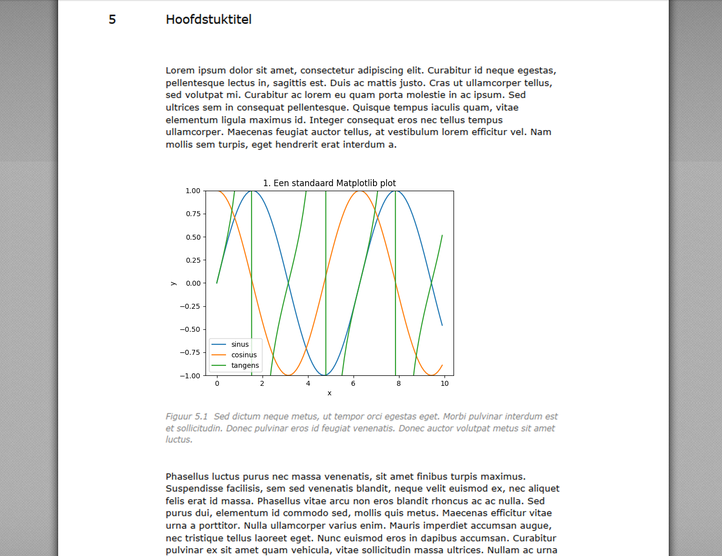
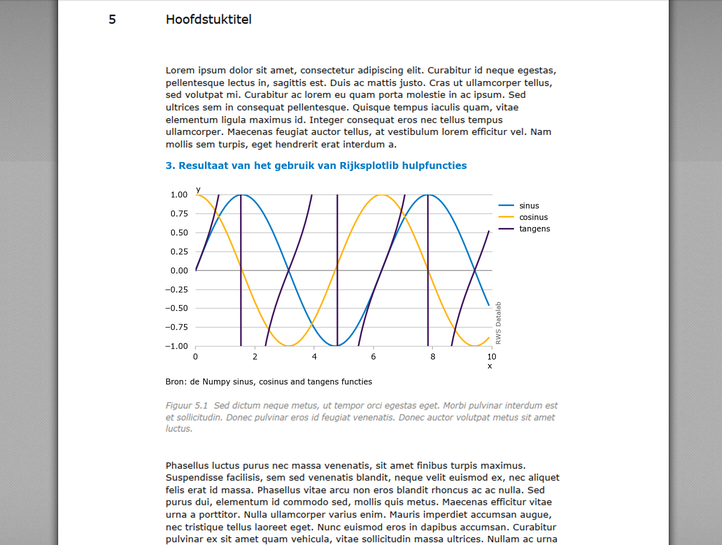
With just a few lines of code, the text in the figure is aligned with the text in an RWS report and the graph dimensions are optimized. Furthermore, the colors and other styling elements are updated to conform to the Rijkshuisstijl and RWS huisstijl.
Documentation
You can find the documentation for Rijksplotlib on our GitLab pages
Installation
To install the rijksplotlib package, you need to have Python 3.10 or higher installed.
pip install rijksplotlibWant to install the Pylint rules included in rijksplotlib in your CI/CD pipeline? Have a look at the CI/CD setup guide.
Installing from source
If you want to work on the rijksplotlib codebase, you’ll probably want to install from source. Or if you simply want to try out the latest features before they are released. To install rijksplotlib from source, run this command in your terminal:
git clone https://gitlab.com/rwsdatalab/public/codebase/tools/rijksplotlib.git
cd rijksplotlib
pip install .
Run tests (including coverage) with:
pip install ".[dev]"
pytest
Documentation and examples can be generated with:
pip install ".[doc]"
make --directory=doc html # if using Windows use .\doc\make.bat htmlGetting started
Plot your figure in the way you are used to. Then, use rlt.show() or rlt.savefig instead of using plt.show() or plt.savefig() to show or save the figure.
import rijksplotlib.pyplot as rlt

# plot your graph here #

rlt.show()
# or #
rlt.savefig()
This package helps you optimize your figures for RWS reports. Using the rijksplotlib.pyplot.show or rijksplotlib.pyplot.savefig helper functions, it provides feedback when you are missing elements necessary for a good figure. Furthermore, the resulting figure fits precisely within the RWS report preset margins. When you place your figure in a report, the font sizes of all elements are readable and fit in with the rest of the text well.
For more background information on making representative and good figures, see the Stijlgids Datavisualisatie RWS (intranet).
License
Copyright 2023 Rijkswaterstaat

Licensed under the Apache License, Version 2.0 (the "License");
you may not use this file except in compliance with the License.
You may obtain a copy of the License at

   http://www.apache.org/licenses/LICENSE-2.0

Unless required by applicable law or agreed to in writing, software
distributed under the License is distributed on an "AS IS" BASIS,
WITHOUT WARRANTIES OR CONDITIONS OF ANY KIND, either express or implied.
See the License for the specific language governing permissions and
limitations under the License.1 maintainer

Metadata
1 maintainer
Release files for rijksplotlib 1.0.5
For a detailed explanation of source distributions (sdists) and built distributions (wheels), please see the package formats documentation.
Source distribution (sdist)
| File | Size | Uploaded | Provenance | Actions |
|---|---|---|---|---|
| rijksplotlib-1.0.5.tar.gz | 29.3 kB | Without provenance | Details for rijksplotlib-1.0.5.tar.gz |
Built distribution (wheel)
| File | Interpreter | ABI | Platform | Actions Reset |
|---|---|---|---|---|
| rijksplotlib-1.0.5-py3-none-any.whl | Python 3 | none | any | Details for rijksplotlib-1.0.5-py3-none-any.whl |
Total release size: 55.2 kB
Release files / rijksplotlib-1.0.5.tar.gz
| Download URL | rijksplotlib-1.0.5.tar.gz |
|---|---|
| Size | 29.3 kB |
| Tags | Source |
|
SHA-256 checksum How to use checksums |
e231ac49ef1cda45d43690c43af01c05a01df1531ee7971e2cf37903a997caff
|
|
BLAKE2b-256 checksum How to use checksums |
5198e32e22b64d67959817f5c28496e6c63acf3bf5b19441c26cad8e175df3c3
|
| Upload date | |
|
Uploaded using Trusted Publishing? What is trusted publishing? |
No |
| Uploaded via |
twine/5.1.1 CPython/3.10.12
|
Release files / rijksplotlib-1.0.5-py3-none-any.whl
| Download URL | rijksplotlib-1.0.5-py3-none-any.whl |
|---|---|
| Size | 25.9 kB |
| Tags | Python 3 |
|
SHA-256 checksum How to use checksums |
a7a688d08068a39b807f6abec7e0bc6e4bf96713d465534895d208bc20e54674
|
|
BLAKE2b-256 checksum How to use checksums |
cd51033d672ef63d7c8237158021830676b22c1623d9d8222b6c459533154154
|
| Upload date | |
|
Uploaded using Trusted Publishing? What is trusted publishing? |
No |
| Uploaded via |
twine/5.1.1 CPython/3.10.12
|
Security for rijksplotlib 1.0.5
Provenance
Provenance describes where a file came from. On PyPI, provenance is shared via attestations, which provide a verifiable record of the build or publishing details. View details, limitations and caveats.
No provenance found
None of the files in this release were uploaded with provenance metadata.
A note on package security
PyPI is a repository for distributing packages, not a service for auditing them. While third-party security researchers and our staff do their best to detect and remove malicious packages, PyPI cannot guarantee the quality, security or suitability of any given package.
To learn more about protecting yourself from malicious actors, visit our package security documentation.














