




rimopy
ROLO Implementation for Moon photometry Observation (RIMO), in Python.
About the project
rimopy is a Python package that implements the RIMO (ROLO Implementation for Moon photometry
Observation) lunar-irradiance model for night-time aerosol optical depth (AOD) retrieval from lunar
photometry (Barreto et Al., 2019). It also includes the RIMO Correction Factor (RCF), an empirical
adjustment that improves AOD retrieval accuracy (Román et al., 2020). RIMO builds on the ROLO
(RObotic Lunar Observatory) model of lunar spectral irradiance (Kieffer & Stone, 2005).
Getting started
Prerequisites
- python >= 3.8
Kernels
In order to use the package, a directory with all the needed SPICE kernels must be downloaded.
That directory must contain the same elements as rimopy/tests/kernels, and the execution must
be allowed to read and write from that directory.
Alternatively, kernels can be downloaded manually from the following urls:
- https://naif.jpl.nasa.gov/pub/naif/JUNO/kernels/spk/de421.bsp
- https://naif.jpl.nasa.gov/pub/naif/pds/wgc/kernels/pck/earth_070425_370426_predict.bpc
- https://naif.jpl.nasa.gov/pub/naif/generic_kernels/fk/planets/earth_assoc_itrf93.tf
- https://naif.jpl.nasa.gov/pub/naif/generic_kernels/pck/earth_latest_high_prec.bpc
- https://naif.jpl.nasa.gov/pub/naif/generic_kernels/fk/satellites/moon_080317.tf
- https://naif.jpl.nasa.gov/pub/naif/generic_kernels/pck/moon_pa_de421_1900-2050.bpc
- https://naif.jpl.nasa.gov/pub/naif/generic_kernels/lsk/naif0011.tls
- https://naif.jpl.nasa.gov/pub/naif/generic_kernels/pck/pck00010.tpc
Installation
You can install rimopy either from the source directory (for development) or directly from PyPI.
From source (editable mode):
pip install -e .
From PyPI (recommended):
pip install rimopy
Usage
The main entry point is eli.get_irradiance. It returns the modeled extraterrestrial lunar irradiance (ELI)
for one or more wavelengths (in nanometers) and observation geometries.
The irradiance is calculated at the top of the atmosphere and can be returned either in Wm⁻² or Wm⁻²/nm, depending on the configuration.
For example, to compute the irradiance per nanometer at 500 nm and 550 nm for Valladolid (Spain) on 2022-01-17 at 03:00 UTC:
from rimopy import eli

wavelengths = [500, 550]
earth_point = eli.EarthPoint(41.652251, -4.7245321, "2022-01-17 03:00:00", altitude=700)
kernels_path = "./kernels"
eli_settings = eli.ELISettings(per_nm=True)

result = eli.get_irradiance(
    wavelengths,
    earth_data=earth_point,
    kernels_path=kernels_path,
    eli_settings=eli_settings,
)

# result:
# array([[3.05176826e-06],
#        [3.25669721e-06]])
Customization
The calculations can be customized via the ELISettings and the choice of the extraterrestrial solar irradiance (ESI) model.
For example, to calculate irradiance per nanometer applying the RIMO correction factor (apply_correction=True) and using
the original Wehrli (1985) dataset for solar irradiance:
from rimopy import eli, esi
from rimopy.types import MissingRCFBehavior

wavelengths = [500, 550]
earth_point = eli.EarthPoint(41.652251, -4.7245321, "2022-01-17 03:00:00", altitude=700)
kernels_path = "./kernels"

calc = esi.ESICalculatorWehrli(
    esi.WehrliFile.ORIGINAL_WEHRLI,
    esi.ESIMethod.LINEAR_INTERPOLATION,
)

eli_settings = eli.ELISettings(
    apply_correction=True,
    adjust_apollo=True,
    per_nm=True,
    missing_rcf=MissingRCFBehavior.WARN,
)

result = eli.get_irradiance(
    wavelengths,
    earth_data=earth_point,
    kernels_path=kernels_path,
    esi_calc=calc,
    eli_settings=eli_settings,
)

# WARNING:root:RCF not available for the wavelengths: [550.0]
# result:
# array([[3.29045832e-06],
#        [3.25669721e-06]])
Main function
All high-level irradiance calculations are performed through eli.get_irradiance.
It automatically handles all geometry input modes:
- Precomputed
MoonDatas - Geographic coordinates (
EarthPoint+ kernels) - Extra observer kernels
Configuration options
ELISettings
ELISettings is a dataclass containing the configuration parameters that control
how the Extraterrestrial Lunar Irradiance (ELI) is calculated.
Attributes:
- apply_correction :
bool, default False IfTrue, multiply the modeled irradiance by the RIMO Correction Factor (RCF) for each CIMEL wavelength (i.e., apply the empirical correction derived in Román et al. 2020). IfFalse, return the raw RIMO irradiance (no correction). - adjust_apollo :
bool, default True IfTrue, adjust the ROLO model reflectance using Apollo spectra. The Apollo spectra were obtained from lunar samples of the Apollo 16 mission. - per_nm :
bool, default True IfTrue, the output ELI is given inW·m^-2·nm^-1; otherwise, it is given inW·m^-2. - missing_rcf :
MissingRCFBehavior, defaultMissingRCFBehavior.ERRORBehavior when at least one requested wavelength has no RCF available andapply_correctionisTrue.MissingRCFBehavior.ERROR- raise aValueErrorlisting the offending wavelengths.MissingRCFBehavior.WARN- issue a warning and return uncorrected values for those wavelengths.MissingRCFBehavior.IGNORE- silently return uncorrected values for those wavelengths.MissingRCFBehavior.NEAREST- return the RCF of the closest wavelength with an existing one.
ESICalculator
ESICalculator is the interface of which implementations contain the functions that calculate the extraterrestrial
solar irradiance. This calculations will vary depending on the implementation.
Currently there are two implementations: ESICalculatorWehrli and ESICalculatorCustom.
ESICalculatorWehrli uses 1985 Wehrli Standard Extraterrestrial Solar Irradiance Spectrum as the base data. Its attributes are:
- wehrli_file: Wehrli data source that will be used in the calculation of the ESI. It could be the original data or some filtered data. The default value is "ASC_WEHRLI", the Wehrli data passed throught some filters, and it's the one used in AEMET's RimoApp and others. Although it's the default value, it might not be the best for obtaining "Wm⁻²" data, as in this file the solar irradiance in "Wm⁻²" is obtained from the "Wm⁻²/nm" data, instead of having passed the original "Wm⁻²" data through the same filters.
- method: Interpolation method that will be used in the calculation of the ESI. The default one is "LINEAR_INTERPOLATION".
- gaussian_filter_params: Parameters for the gaussian filter method, in case that that one is the chosen one. It contains the radius and the standard deviation, which by default both are equal to one.
ESICalculatorCustom allowes the user to input a custom spectrum. Its parameters are:
- wavelengths_nm: Wavelengths of the custom spectrum
- irradiances: Extraterrestrial solar irradiances for each wavelength in
wavelengths_nm. Its units (Wm⁻² or Wm⁻²/nm) depends onper_nm. - per_nm: If True,
irradiancesmust be specified in Wm⁻²/nm. If False, in Wm⁻². Default is True.
Roadmap
- Add validation tests based on output from AEMET RimoApp or CAELIS RIMO using precomputed lunar geometries to remove the need for SPICE kernels during testing.
- Add unit tests for all submodules.
- Implement a TSIS-based
ESICalculator.
Structure
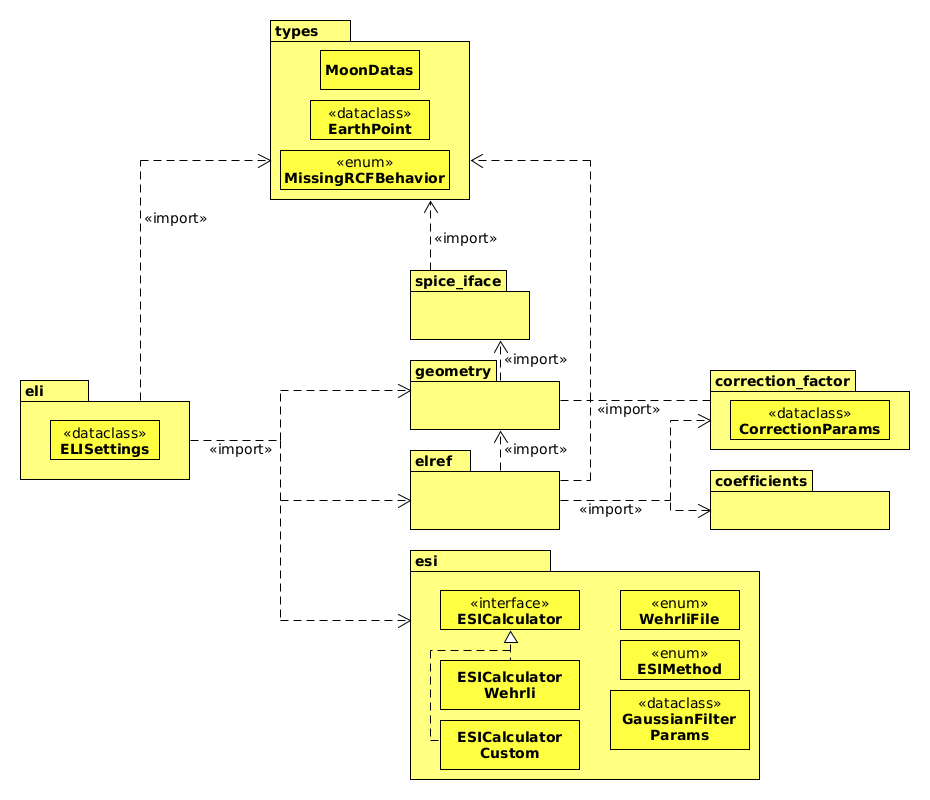
The package is divided in multiple modules, each dealing with different calculations and functionalities:
- eli: Main module, which calculates the Extraterrestrial Lunar Irradiance for a given input.
- elref: Calculates the Extraterrestrial Lunar Reflectance following RIMO.
- esi: Calculates the Extraterrestrial Solar Irradiance using data from Wehrli 1985. The methodology for calculating this data can be chosen by the user, creating an instance of ESICalculator selecting the methodology and data source they want.
- coefficients: Contains the coefficient data from the ROLO model.
- correction_factor: Calculates the RIMO correction factor (RCF) as stated in RIMO papers.
- geometry: Manages the conversion between the different accepted geometry inputs to the standard
MoonDatas. - spice_iface: Encapsulates the access to functionalities from SPICE Toolbox.
- types: Contains types, like MoonData class, which represents some of the needed data for the calculation of extraterrestrial lunar irradiance.
Development Guide
Setting up the environment
To set up the development environment, install the pre-commit hooks as follows:
pre-commit install
This ensures that code style checks and formatting rules are automatically applied before each commit.
Build
Build the package with the following command:
python3 -m build
This command creates a distribution package under the dist/ directory, which can be uploaded to PyPI or used for testing installations.
Testing
Currently, the only tests available are the ones at rimopy/tests/test_eli_aemet.py, which
tests rimopy against output from AEMET's RimoApp.
RimoApp output test-suit can be run directly:
./rimopy/tests/test_eli_aemet.py
Or using pytest, if installed:
pytest -v
Tests must be run in an environment where
rimopyis installed or available.
Authors
- Javier Gatón Herguedas - Maintainer - GOA-UVa
License
Distributed under the LGPL-v3 License. See LGPL v3 for more information.
References
- Barreto, Á., Román, R., Cuevas, E., Pérez-Ramírez, D., Berjón, A. J., Kouremeti, N., Kazadzis, S., Gröbner, J., Mazzola, M., Toledano, C., Benavent-Oltra, J. A., Doppler, L., Juryšek, J., Almansa, A. F., Victori, S., Maupin, F., Guirado-Fuentes, C., González, R., Vitale, V., Goloub, P., Blarel, L., Alados-Arboledas, L., Woolliams, E., Taylor, S., Antuña, J. C., & Yela, M. (2019). Evaluation of night-time aerosols measurements and lunar irradiance models in the frame of the first multi-instrument nocturnal intercomparison campaign. Atmospheric Environment, 202, 190–211. https://doi.org/10.1016/j.atmosenv.2019.01.006.
- Román, R., González, R., Toledano, C., Barreto, Á., Pérez-Ramírez, D., Benavent-Oltra, J. A., Olmo, F. J., Cachorro, V. E., Alados-Arboledas, L., & de Frutos, Á. M. (2020). Correction of a lunar-irradiance model for aerosol optical depth retrieval and comparison with a star photometer. Atmospheric Measurement Techniques, 13(11), 6293–6310. https://doi.org/10.5194/amt-13-6293-2020.
- Kieffer, H. H., & Stone, T. C. (2005). The spectral irradiance of the Moon. The Astronomical Journal, 129(6), 2887–2901. https://doi.org/10.1086/430185.
1 maintainer

Metadata
1 maintainer
Release files for rimopy 0.4.2
For a detailed explanation of source distributions (sdists) and built distributions (wheels), please see the package formats documentation.
Source distribution (sdist)
| File | Size | Uploaded | |
|---|---|---|---|
| rimopy-0.4.2.tar.gz | 26.3 MB | Details |
Built distribution (wheel)
| File | Interpreter | ABI | Platform | Reset |
|---|---|---|---|---|
| rimopy-0.4.2-py3-none-any.whl | Python 3 | none | any | Details |
Total release size: 52.4 MB
Release files / rimopy-0.4.2.tar.gz
| Download URL | rimopy-0.4.2.tar.gz |
|---|---|
| Size | 26.3 MB |
| Tags | Source |
|
SHA-256 checksum How to use checksums |
353fed640fea5a808882868e5d0cfcf8749d4f5379539485d0630c3513ca471a
|
|
BLAKE2b-256 checksum How to use checksums |
405170b3d21dba649c0fb2c3c371e1c3b5393364702fe1424946cbcd07d9ea2a
|
| Upload date | |
|
Uploaded using Trusted Publishing? What is trusted publishing? |
No |
| Uploaded via |
twine/6.2.0 CPython/3.9.25
|
Release files / rimopy-0.4.2-py3-none-any.whl
| Download URL | rimopy-0.4.2-py3-none-any.whl |
|---|---|
| Size | 26.1 MB |
| Tags | Python 3 |
|
SHA-256 checksum How to use checksums |
64807531af9d2ddc7a1d46a877062bb41ac6a3ee50584255ac81062fe41332dc
|
|
BLAKE2b-256 checksum How to use checksums |
be1e4b71b94a300be41409e64539b4b21af28ebdb3ad167a16eab9c3e069efa0
|
| Upload date | |
|
Uploaded using Trusted Publishing? What is trusted publishing? |
No |
| Uploaded via |
twine/6.2.0 CPython/3.9.25
|














