
RippleRack
See the ripple before you make the splash.


RippleRack is a local-first simulator for datacenters and data pipelines. You describe your racks, servers, services and pipelines in a single YAML file and RippleRack tells you what happens when something changes:
- 🧬 Semantic versioning for data: diff two versions of a schema and get
patch/minor/major, the full list of changes and the version you should have declared. - 🌊 Cascading impact analysis: walk the dependency graph to find every downstream pipeline, service and dashboard, which consumers actually break and how severe the whole change is. Compare two versions of a whole datacenter file to review a change before you merge it.
- 🏗️ Infrastructure simulation: push the load up, take a server down and see what overloads and what goes offline with it.
Everything runs locally from a text file. There are no agents, no cloud accounts and no databases.
Status: alpha. The CLI and the engines work and are tested. The file format and the JSON output may still change before 1.0; JSON changes bump
schemaVersionand are listed in the changelog.
In 10 seconds
From a checkout (see Installation):
# What breaks if orders-ingest renames `amount` to `amount_cents`?
uv run ripplerack impact examples/mini_datacenter.yaml -p orders-ingest \
  -s examples/changes/orders_v2.yaml --format json \
  | jq -c '{severity, broken: [.brokenConsumers[].pipeline]}'
# {"severity":"critical","broken":["customer-360","orders-enriched"]}

# Gate a pull request on a change to the whole datacenter (exit code 2 if a consumer breaks)
uv run ripplerack diff examples/mini_datacenter.yaml examples/mini_datacenter_v2.yaml --fail-on-breaking
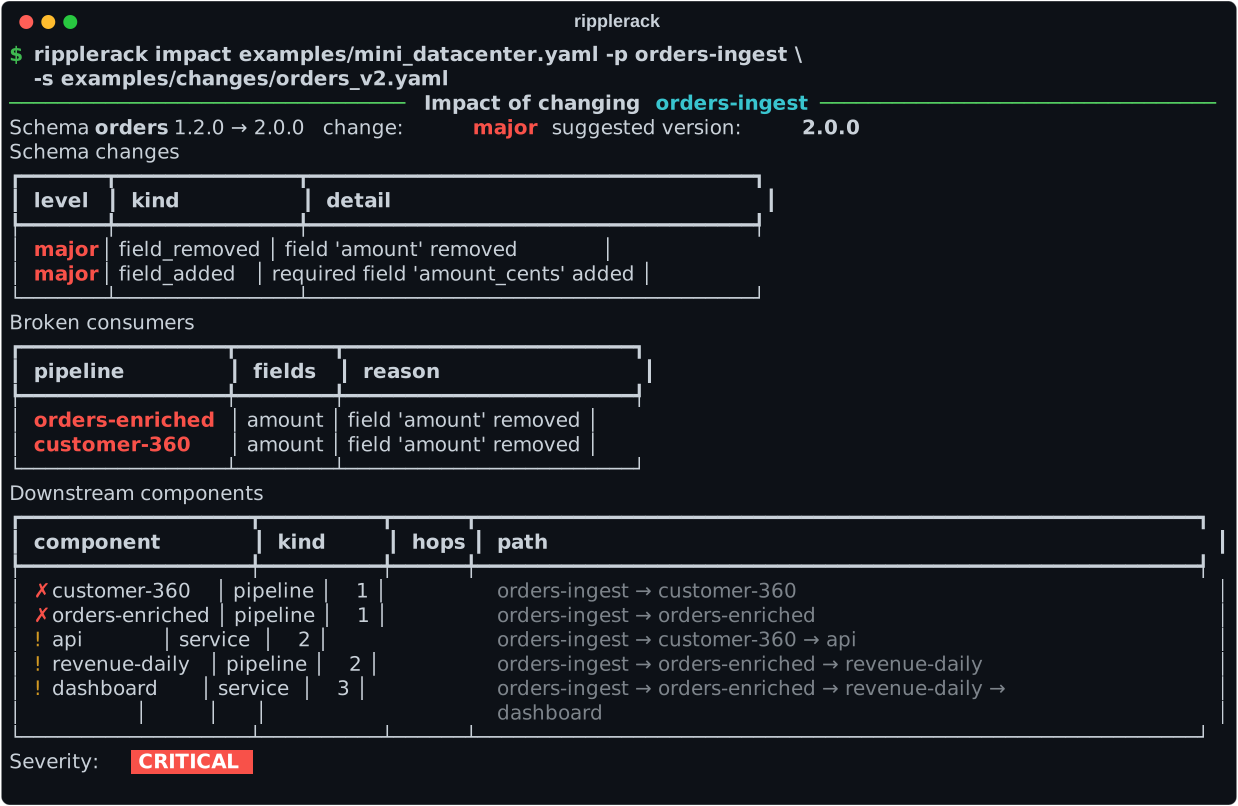
Without --format json, impact prints tables for people:
Why?
Infrastructure tools model machines. Data catalogs model tables. Schema registries model compatibility. In real life a renamed column on a Kafka topic breaks a Spark job, which empties a dashboard, which pages someone at 3 AM. RippleRack puts all of that in one graph, so the question "what breaks if I ship this?" has a concrete answer. You can run it before merging, inside CI, or just to learn how these systems fit together.
Installation
RippleRack requires Python 3.11+. Install it from PyPI:
pip install ripplerack
ripplerack --help
With uv, install it as a tool, or run it once without installing it:
uv tool install ripplerack
uvx ripplerack --help
To work on RippleRack itself, or to try what is not released yet, use a checkout:
git clone https://github.com/IzanVil/RippleRack.git
cd RippleRack
uv sync
uv run ripplerack --help
Documentation
| Guide | What you will find |
|---|---|
| Datacenter file format | The YAML you write and the validation rules |
| Concepts | The impact graph, the schema SemVer rules, severity, diff and simulate |
| Output formats | The JSON documents, error codes, exit codes and Mermaid diagrams |
| RippleRack in CI | The command as a gate, the Markdown report and the GitHub Action that comments on a pull request |
| Importing schemas | ripplerack import: turn a JSON Schema into a schema file, the translation rules, warnings and known limitations |
| Importing Avro schemas | import --from avro: the same for an .avsc file, choosing one record of many, and its known limitations |
| Importing SQL | import --from sql: the same for the CREATE TABLE of a dump, with a dialect, choosing one table of many, and its known limitations |
| Changelog | What changed in each version |
| Contributing | Setup, checks and conventions |
Quick tour
The repository ships with examples/mini_datacenter.yaml:
2 racks, 3 servers, 5 services and 4 pipelines forming an order analytics
stack. The commands below are written as they run in a checkout (uv run ripplerack ...); if you
installed RippleRack with pip or uv tool, leave out uv run and download that file first.
validate: check the file
uv run ripplerack validate examples/mini_datacenter.yaml
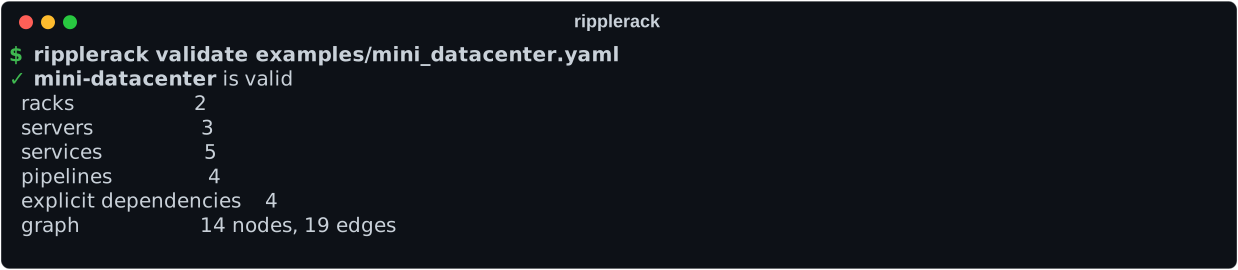
This checks types, unique ids, references between components, the fields that consumers read and dependency cycles. Typos in keys are reported instead of being silently ignored.
graph: look at the dependency graph
uv run ripplerack graph examples/mini_datacenter.yaml            # tree in the terminal
uv run ripplerack graph examples/mini_datacenter.yaml -F dot -o dc.dot   # Graphviz
uv run ripplerack graph examples/mini_datacenter.yaml -F json    # machine readable
uv run ripplerack graph examples/mini_datacenter.yaml -F mermaid # Mermaid flowchart
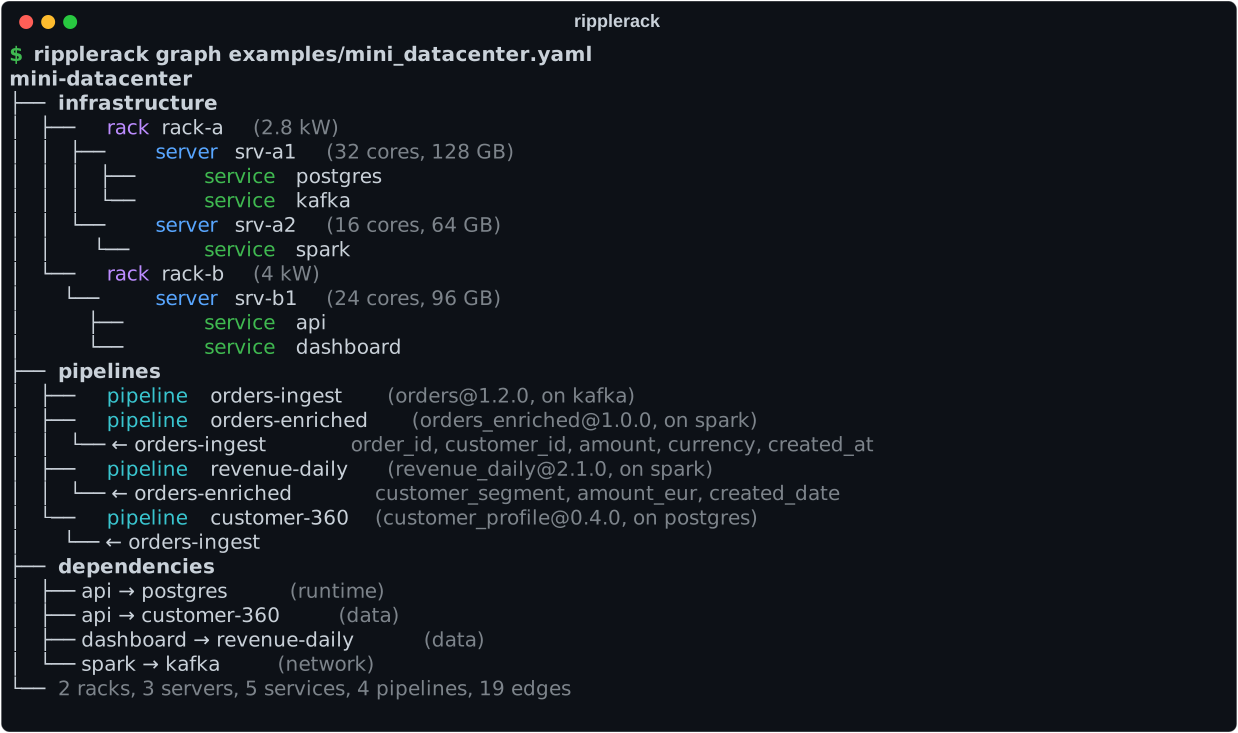
The default is a tree in the terminal:
-F mermaid prints a Mermaid flowchart: racks and servers are
nested boxes, services and pipelines have their own shapes, and arrows are labelled with
the relation. Paste it between mermaid code fences in any Markdown file (GitHub renders
it) or save it with -o graph.mmd and render it with mmdc.
impact: what breaks if this schema changes?
uv run ripplerack impact examples/mini_datacenter.yaml \
  --pipeline orders-ingest \
  --schema examples/changes/orders_v2.yaml
─────────────────────── Impact of changing orders-ingest ───────────────────────
Schema orders 1.2.0 → 2.0.0   change: major   suggested version: 2.0.0
Schema changes
┏━━━━━━━┳━━━━━━━━━━━━━━━┳━━━━━━━━━━━━━━━━━━━━━━━━━━━━━━━━━━━━━┓
┃ level ┃ kind          ┃ detail                              ┃
┡━━━━━━━╇━━━━━━━━━━━━━━━╇━━━━━━━━━━━━━━━━━━━━━━━━━━━━━━━━━━━━━┩
│ major │ field_removed │ field 'amount' removed              │
│ major │ field_added   │ required field 'amount_cents' added │
└───────┴───────────────┴─────────────────────────────────────┘
Broken consumers
┏━━━━━━━━━━━━━━━━━┳━━━━━━━━┳━━━━━━━━━━━━━━━━━━━━━━━━┓
┃ pipeline        ┃ fields ┃ reason                 ┃
┡━━━━━━━━━━━━━━━━━╇━━━━━━━━╇━━━━━━━━━━━━━━━━━━━━━━━━┩
│ orders-enriched │ amount │ field 'amount' removed │
│ customer-360    │ amount │ field 'amount' removed │
└─────────────────┴────────┴────────────────────────┘
Downstream components
┏━━━━━━━━━━━━━━━━━━━┳━━━━━━━━━━┳━━━━━━┳━━━━━━━━━━━━━━━━━━━━━━━━━━━━━━━━━━━━━━━━━━━━━━━━━━━━━━━━━━━━━┓
┃ component         ┃ kind     ┃ hops ┃ path                                                        ┃
┡━━━━━━━━━━━━━━━━━━━╇━━━━━━━━━━╇━━━━━━╇━━━━━━━━━━━━━━━━━━━━━━━━━━━━━━━━━━━━━━━━━━━━━━━━━━━━━━━━━━━━━┩
│ ✗ customer-360    │ pipeline │    1 │ orders-ingest → customer-360                                │
│ ✗ orders-enriched │ pipeline │    1 │ orders-ingest → orders-enriched                             │
│ ! api             │ service  │    2 │ orders-ingest → customer-360 → api                          │
│ ! revenue-daily   │ pipeline │    2 │ orders-ingest → orders-enriched → revenue-daily             │
│ ! dashboard       │ service  │    3 │ orders-ingest → orders-enriched → revenue-daily → dashboard │
└───────────────────┴──────────┴──────┴─────────────────────────────────────────────────────────────┘
Severity:  CRITICAL
Try the other examples in examples/changes/:
| file | what it shows | severity |
|---|---|---|
orders_v1_3_0.yaml |
optional field added | low |
orders_sneaky_patch.yaml |
field dropped but shipped as a patch: RippleRack warns that the version is too low | high |
orders_v2.yaml |
field renamed with a type change, so the break cascades | critical |
Add --fail-on-breaking to exit with code 2 whenever a consumer breaks. You
can use it as a gate in CI.
Diagram of the impact
--format mermaid draws the whole graph with the impact highlighted: the changed pipeline
(purple), the consumers that break (red), everything downstream of them that is at risk
(orange), and the arrows along the way. This is the orders_v2.yaml change from above:
flowchart LR
  %% mini-datacenter
  %% impact of changing orders-ingest: critical
  subgraph rack_rack_a["rack-a"]
    subgraph srv_srv_a1["srv-a1"]
      svc_postgres("postgres")
      svc_kafka("kafka")
    end
    subgraph srv_srv_a2["srv-a2"]
      svc_spark("spark")
    end
  end
  subgraph rack_rack_b["rack-b"]
    subgraph srv_srv_b1["srv-b1"]
      svc_api("api")
      svc_dashboard("dashboard")
    end
  end
  subgraph grp_pipelines["pipelines"]
    pl_orders_ingest{{"orders-ingest<br/>schema 1.2.0"}}
    pl_orders_enriched{{"orders-enriched<br/>schema 1.0.0"}}
    pl_revenue_daily{{"revenue-daily<br/>schema 2.1.0"}}
    pl_customer_360{{"customer-360<br/>schema 0.4.0"}}
  end
  svc_postgres -->|runs| pl_customer_360
  svc_postgres -->|runtime| svc_api
  svc_kafka -->|runs| pl_orders_ingest
  svc_kafka -->|network| svc_spark
  svc_spark -->|runs| pl_orders_enriched
  svc_spark -->|runs| pl_revenue_daily
  pl_orders_ingest -->|feeds| pl_orders_enriched
  pl_orders_ingest -->|feeds| pl_customer_360
  pl_orders_enriched -->|feeds| pl_revenue_daily
  pl_revenue_daily -->|data| svc_dashboard
  pl_customer_360 -->|data| svc_api
  classDef service fill:#e8f5e9,stroke:#2e7d32,color:#1b5e20
  class svc_postgres,svc_kafka,svc_spark service
  classDef changed fill:#ede7f6,stroke:#4527a0,stroke-width:4px,color:#311b92
  class pl_orders_ingest changed
  classDef broken fill:#ffcdd2,stroke:#c62828,stroke-width:3px,color:#b71c1c
  class pl_orders_enriched,pl_customer_360 broken
  classDef atRisk fill:#ffe0b2,stroke:#ef6c00,stroke-width:2px,color:#e65100
  class svc_api,svc_dashboard,pl_revenue_daily atRisk
  style srv_srv_a1 fill:#e8eaf6,stroke:#283593,color:#1a237e
  style srv_srv_a2 fill:#e8eaf6,stroke:#283593,color:#1a237e
  style rack_rack_a fill:#f3e5f5,stroke:#6a1b9a,color:#4a148c
  style srv_srv_b1 fill:#e8eaf6,stroke:#283593,color:#1a237e
  style rack_rack_b fill:#f3e5f5,stroke:#6a1b9a,color:#4a148c
  linkStyle 6,7 stroke:#c62828,stroke-width:3px
  linkStyle 8,9,10 stroke:#ef6c00,stroke-width:3px
JSON output for CI
--format json (-F json) prints a stable, versioned JSON document instead of
tables, ready for jq or any CI tooling:
uv run ripplerack impact examples/mini_datacenter.yaml -p orders-ingest \
  -s examples/changes/orders_v2.yaml --format json \
  | jq -c '{severity, broken: [.brokenConsumers[].pipeline]}'
{"severity":"critical","broken":["customer-360","orders-enriched"]}
Every document starts with an envelope (schemaVersion, tool, command) and
all keys are camelCase. If the command fails, stdout stays empty and stderr gets a
JSON error with a stable error.code, such as file_not_found or
unknown_pipeline. The full contract, the error codes and the exit codes are
documented in docs/output-formats.md.
Markdown for pull requests
--format markdown (-F markdown) writes a report to paste in the comment of a pull request:
the schema change and the consumers that break in tables, what is at risk, the long lists folded
and a diagram of the impact that GitHub draws.
uv run ripplerack impact examples/mini_datacenter.yaml -p orders-ingest \
  -s examples/changes/orders_v2.yaml -F markdown
Names that come from your files are written as code, so none of them can mention anybody or break
the comment, and the report is shortened to fit the 65,536 characters GitHub allows. See
docs/output-formats.md for the layout and its options, and
docs/ci.md for the GitHub Action that posts it on every pull
request and keeps one comment up to date.
diff: what does this change do to my datacenter?
uv run ripplerack diff examples/mini_datacenter.yaml examples/mini_datacenter_v2.yaml
Compares two datacenter files and reports what was added, removed and modified, which
dependencies changed, and the impact of every schema change on the pipelines that read
it. Components are matched by id, so reordering a file is not a change.
──────────── Diff examples/mini_datacenter.yaml → examples/mini_datacenter_v2.yaml ─────────────
mini-datacenter → mini-datacenter
2 added · 0 removed · 3 modified · 1 schema change(s) · 1 broken consumer(s)
Components
┏━━━┳━━━━━━━━━━┳━━━━━━━━━━━━━━━━━┳━━━━━━━━━━━━━━━━━━━━━━━━━━━━━━━━━━━━━━━━━━━━━━┓
┃   ┃ kind     ┃ id              ┃ details                                      ┃
┡━━━╇━━━━━━━━━━╇━━━━━━━━━━━━━━━━━╇━━━━━━━━━━━━━━━━━━━━━━━━━━━━━━━━━━━━━━━━━━━━━━┩
│ + │ service  │ redis           │ on srv-b1                                    │
│ + │ pipeline │ orders-audit    │ runs on postgres                             │
│ ~ │ server   │ srv-b1          │ memory_gb: 96 → 64                           │
│ ~ │ pipeline │ orders-enriched │ inputs: orders-ingest: -amount +amount_cents │
│ ~ │ pipeline │ orders-ingest   │ schema.version: 1.2.0 → 2.0.0                │
│   │          │                 │ schema.fields: changed (see below)           │
└───┴──────────┴─────────────────┴──────────────────────────────────────────────┘
Dependencies
┏━━━┳━━━━━━━━━━━━━━━┳━━━━━━━━━━━━━━━━┓
┃   ┃ dependency    ┃ kind           ┃
┡━━━╇━━━━━━━━━━━━━━━╇━━━━━━━━━━━━━━━━┩
│ + │ api → redis   │ runtime        │
│ ~ │ spark → kafka │ network → data │
└───┴───────────────┴────────────────┘

orders-ingest
Schema orders 1.2.0 → 2.0.0   change: major   suggested version: 2.0.0
Schema changes
┏━━━━━━━┳━━━━━━━━━━━━━━━┳━━━━━━━━━━━━━━━━━━━━━━━━━━━━━━━━━━━━━┓
┃ level ┃ kind          ┃ detail                              ┃
┡━━━━━━━╇━━━━━━━━━━━━━━━╇━━━━━━━━━━━━━━━━━━━━━━━━━━━━━━━━━━━━━┩
│ major │ field_removed │ field 'amount' removed              │
│ major │ field_added   │ required field 'amount_cents' added │
└───────┴───────────────┴─────────────────────────────────────┘
Broken consumers
┏━━━━━━━━━━━━━━┳━━━━━━━━┳━━━━━━━━━━━━━━━━━━━━━━━━┓
┃ pipeline     ┃ fields ┃ reason                 ┃
┡━━━━━━━━━━━━━━╇━━━━━━━━╇━━━━━━━━━━━━━━━━━━━━━━━━┩
│ customer-360 │ amount │ field 'amount' removed │
└──────────────┴────────┴────────────────────────┘
At risk: api
Severity:  HIGH
Here orders-enriched was updated in the same change to read amount_cents, so it is
fine. customer-360 was not touched and reads every field, so it breaks, and api,
which depends on it, is at risk. orders-audit is new and was written against the new
schema, so it is never reported.
Add --format json for the documented JSON or
--fail-on-breaking to exit with code 2 when a consumer breaks, which makes the
command a good pull request gate:
git show main:datacenter.yaml > /tmp/base.yaml
uv run ripplerack diff /tmp/base.yaml datacenter.yaml --fail-on-breaking
import: write the schema from a JSON Schema, an Avro schema or a SQL table
uv run ripplerack import examples/schemas/orders_v2.schema.json --from json-schema --version 2.0.0
name: orders
version: 2.0.0
fields:
  - {name: order_id, type: integer}
  - {name: customer_id, type: integer}
  - {name: amount_cents, type: integer, description: Order total in cents}
  - {name: currency, type: string}
  - {name: created_at, type: timestamp}
  - {name: coupon_code, type: string, nullable: true}
The output is a schema file, so nobody has to write it by hand and it goes straight into
impact. This one is exactly examples/changes/orders_v2.yaml, so the report is the same
critical one as above:
uv run ripplerack impact examples/mini_datacenter.yaml --pipeline orders-ingest \
  --schema <(uv run ripplerack import examples/schemas/orders_v2.schema.json --from json-schema --version 2.0.0)
Properties that required lists become required fields and the others become nullable;
references inside the file are followed; objects and arrays become json fields. What cannot
be represented is an error, or with --lenient a json field and a warning, and
additionalProperties: false and unevaluatedProperties: false are reported as warnings. The
import guide has the translation rules and the
known limitations.
The same schema written in Avro gives the same file:
uv run ripplerack import examples/schemas/orders_v2.avsc --from avro --version 2.0.0
A union with null becomes nullable, a logical type such as timestamp-millis becomes
timestamp, an enum keeps its symbols in the description, and a file that defines several
records is told which to read with --select. A union of several types is an error, or with
--lenient a json field and a warning. The Avro guide has the rules and
its known limitations.
So does a table of a SQL file:
uv run ripplerack import examples/schemas/orders_v2.sql --from sql --version 2.0.0
A column is nullable unless it is NOT NULL, part of the primary key or a counter; a DECIMAL
with no decimals is an integer; the comment of a column is its description, and an enum keeps
its values there. A dump with many tables is told which to read with --select, and a file that
is not standard SQL which --dialect it is written in (postgres, mysql, sqlite,
snowflake...). A type with no equivalent, such as a geometry, is an error, or with --lenient
a json field and a warning. The SQL guide has the rules and its
known limitations.
simulate: load surges and failures
uv run ripplerack simulate examples/mini_datacenter.yaml --load 1.5
uv run ripplerack simulate examples/mini_datacenter.yaml --load 1.5 --fail srv-a2
The second command, with srv-a2 taken down:
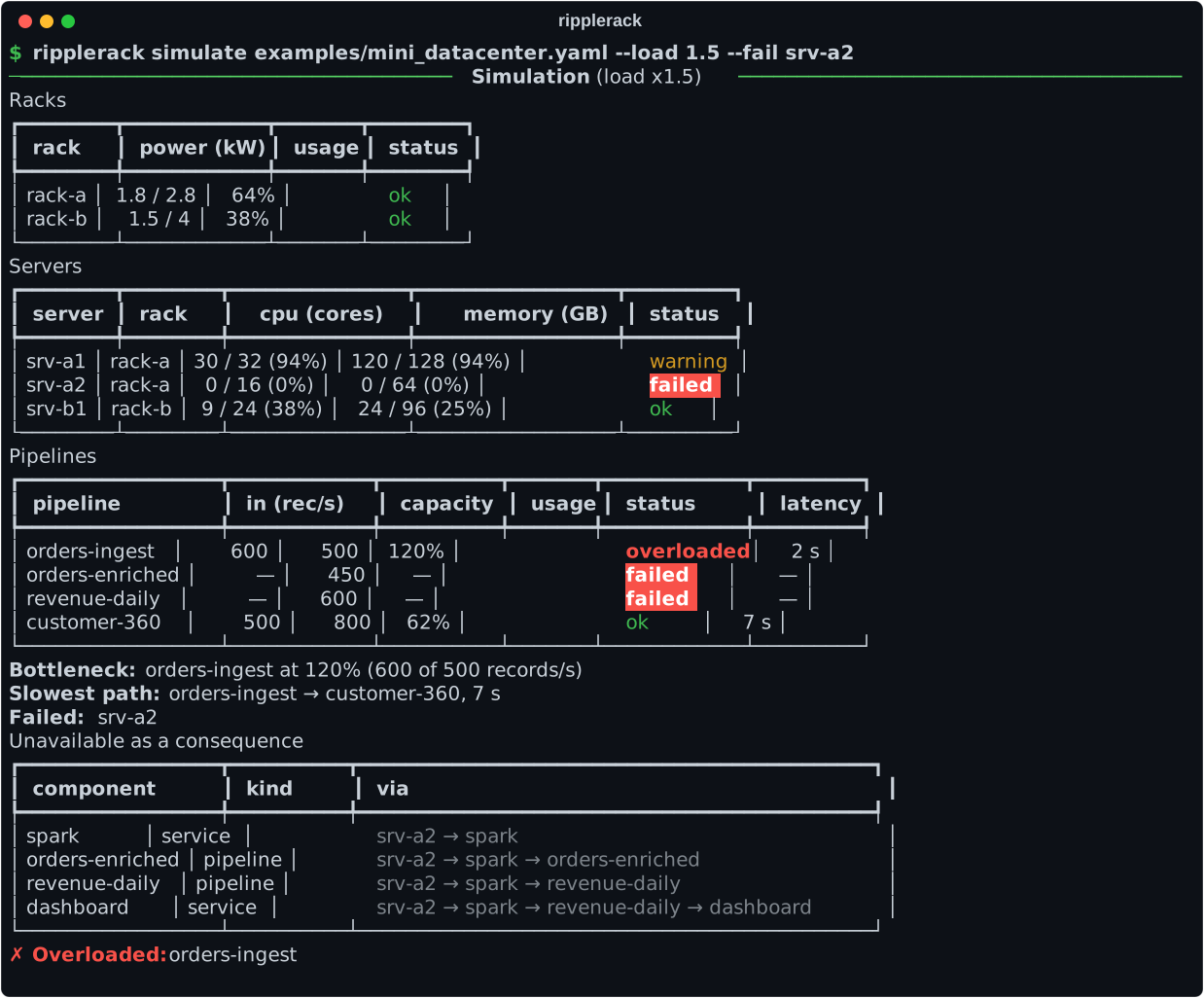
--load scales every service's CPU/memory demand and every server's power draw.
--fail (repeatable) takes a component down along with everything that depends
on it. Each rack and server is then reported as ok, warning (≥ 80%),
overloaded (> 100%) or failed.
How it works
flowchart LR
  yaml[/"datacenter.yaml<br/>(one or two files)"/] --> parse["parse and validate<br/>Pydantic models"]
  parse --> dag["dependency graph<br/>NetworkX"]
  jsonschema[/"JSON Schema"/] -->|"import"| schema
  avro[/"Avro schema"/] -->|"import"| schema
  sql[/"SQL file"/] -->|"import"| schema
  schema[/"new schema.yaml"/] --> semver["schema SemVer diff<br/>patch, minor, major"]
  dag --> impact["impact<br/>blast radius, broken consumers, severity"]
  semver --> impact
  dag --> diff["diff<br/>added, removed, modified, impact"]
  semver --> diff
  dag --> simulate["simulate<br/>load and failures"]
  impact --> out(["tables, JSON, Mermaid"])
  diff --> out
  simulate --> out
Each module has one job; the concepts guide explains the ideas behind them.
| module | responsibility |
|---|---|
models.py |
Pydantic v2 models (Datacenter, Rack, Server, Service, Pipeline, Schema, SchemaField, Dependency) and reference validation |
parser.py |
YAML loading, user-facing errors, cycle detection |
graph.py |
Graph construction plus DOT/JSON export |
mermaid.py |
Mermaid flowchart export, with optional impact highlighting |
semver.py |
Schema diff, change levels, version bumping |
impact.py |
Blast radius, broken consumers, severity |
diff.py |
Comparison of two datacenter files: components, dependencies, schema impact |
importers/ |
Schema importers (JSON Schema, Avro and SQL) and the YAML writer for what they read |
report.py |
Versioned JSON documents for CI (impact and diff results, errors) |
simulate.py |
Capacity and failure simulation |
display.py |
Rich tables and trees for the text output of the commands |
cli.py |
Typer command line: loads the input, calls the engine, prints the result |
Development
uv sync
uv run pytest           # tests
uv run ruff check .     # lint
uv run ruff format --check .   # formatting ("uv run ruff format ." fixes it)
uv run mypy src tests   # strict type checking
CI runs all of the above on Python 3.11, 3.12, 3.13 and 3.14.
Roadmap
- Throughput and latency modelling for pipelines
- Web UI to explore the graph
Ideas and contributions are welcome. Please open an issue to discuss them. See CONTRIBUTING.md for the development workflow and CHANGELOG.md for release notes. Everyone taking part is expected to follow the Code of Conduct; please report vulnerabilities privately, as described in SECURITY.md.
License
1 maintainer

Metadata
1 maintainer
Release files for ripplerack 0.2.4
For a detailed explanation of source distributions (sdists) and built distributions (wheels), please see the package formats documentation.
Source distribution (sdist)
| File | Size | Uploaded | Provenance | Actions |
|---|---|---|---|---|
| ripplerack-0.2.4.tar.gz | 83.8 kB | Without provenance | Details for ripplerack-0.2.4.tar.gz |
Built distribution (wheel)
| File | Interpreter | ABI | Platform | Actions Reset |
|---|---|---|---|---|
| ripplerack-0.2.4-py3-none-any.whl | Python 3 | none | any | Details for ripplerack-0.2.4-py3-none-any.whl |
Total release size: 177.0 kB
Release files / ripplerack-0.2.4.tar.gz
| Download URL | ripplerack-0.2.4.tar.gz |
|---|---|
| Size | 83.8 kB |
| Tags | Source |
|
SHA-256 checksum How to use checksums |
dccefe8bd7761b6be4f317d5a4516ded156fac18a9143589ed0a3e8124d879a0
|
|
BLAKE2b-256 checksum How to use checksums |
6a23eb1fdae6c67e7d243cb1d087365b2220feee3bd06e3dc6ef8afb2a126bef
|
| Upload date | |
|
Uploaded using Trusted Publishing? What is trusted publishing? |
Yes |
| Uploaded via |
uv/0.13.5 {"installer":{"name":"uv","version":"0.13.5","subcommand":["publish"]},"python":null,"implementation":{"name":null,"version":null},"distro":{"name":"Ubuntu","version":"26.04","id":"resolute","libc":null},"system":{"name":null,"release":null},"cpu":null,"openssl_version":null,"setuptools_version":null,"rustc_version":null,"ci":true}
|
Release files / ripplerack-0.2.4-py3-none-any.whl
| Download URL | ripplerack-0.2.4-py3-none-any.whl |
|---|---|
| Size | 93.2 kB |
| Tags | Python 3 |
|
SHA-256 checksum How to use checksums |
06f86da38d853cadb4cb5d6b1f04689ab4d268976ab09363497c8ec563566f79
|
|
BLAKE2b-256 checksum How to use checksums |
57884da5549dd1a027954a224a2d9949ccf947b258661da379f07b7a24cbe16d
|
| Upload date | |
|
Uploaded using Trusted Publishing? What is trusted publishing? |
Yes |
| Uploaded via |
uv/0.13.5 {"installer":{"name":"uv","version":"0.13.5","subcommand":["publish"]},"python":null,"implementation":{"name":null,"version":null},"distro":{"name":"Ubuntu","version":"26.04","id":"resolute","libc":null},"system":{"name":null,"release":null},"cpu":null,"openssl_version":null,"setuptools_version":null,"rustc_version":null,"ci":true}
|
Security for ripplerack 0.2.4
Provenance
Provenance describes where a file came from. On PyPI, provenance is shared via attestations, which provide a verifiable record of the build or publishing details. View details, limitations and caveats.
No provenance found
None of the files in this release were uploaded with provenance metadata.
A note on package security
PyPI is a repository for distributing packages, not a service for auditing them. While third-party security researchers and our staff do their best to detect and remove malicious packages, PyPI cannot guarantee the quality, security or suitability of any given package.
To learn more about protecting yourself from malicious actors, visit our package security documentation.













