
A Toolkit for Reinforcement Learning in Card Games

Project description
RLCard: A Toolkit for Reinforcement Learning in Card Games







RLCard is a toolkit for Reinforcement Learning (RL) in card games. It supports multiple card environments with easy-to-use interfaces for implementing various reinforcement learning and searching algorithms. The goal of RLCard is to bridge reinforcement learning and imperfect information games. RLCard is developed by DATA Lab at Rice and Texas A&M University, and community contributors.
- Official Website: https://www.rlcard.org
- Tutorial in Jupyter Notebook: https://github.com/datamllab/rlcard-tutorial
- Paper: https://arxiv.org/abs/1910.04376
- Video: YouTube
- GUI: RLCard-Showdown
- Dou Dizhu Demo: Demo
- Resources: Awesome-Game-AI
- Related Project: DouZero Project
- Zhihu: https://zhuanlan.zhihu.com/p/526723604
- Miscellaneous Resources:
- Check out our open-sourced Large Time Series Model (LTSM)!
- Have you heard of data-centric AI? Please check out our data-centric AI survey and awesome data-centric AI resources!
Community:
- Slack: Discuss in our #rlcard-project slack channel.
- QQ Group: Join our QQ group to discuss. Password: rlcardqqgroup
- Group 1: 665647450
- Group 2: 117349516
News:
- We have updated the tutorials in Jupyter Notebook to help you walk through RLCard! Please check RLCard Tutorial.
- All the algorithms can suppport PettingZoo now. Please check here. Thanks the contribtuion from Yifei Cheng.
- Please follow DouZero, a strong Dou Dizhu AI and the ICML 2021 paper. An online demo is available here. The algorithm is also integrated in RLCard. See Training DMC on Dou Dizhu.
- Our package is used in PettingZoo. Please check it out!
- We have released RLCard-Showdown, GUI demo for RLCard. Please check out here!
- Jupyter Notebook tutorial available! We add some examples in R to call Python interfaces of RLCard with reticulate. See here
- Thanks for the contribution of @Clarit7 for supporting different number of players in Blackjack. We call for contributions for gradually making the games more configurable. See here for more details.
- Thanks for the contribution of @Clarit7 for the Blackjack and Limit Hold'em human interface.
- Now RLCard supports environment local seeding and multiprocessing. Thanks for the testing scripts provided by @weepingwillowben.
- Human interface of NoLimit Holdem available. The action space of NoLimit Holdem has been abstracted. Thanks for the contribution of @AdrianP-.
- New game Gin Rummy and human GUI available. Thanks for the contribution of @billh0420.
- PyTorch implementation available. Thanks for the contribution of @mjudell.
Contributors
The following games are mainly developed and maintained by community contributors. Thank you!
- Gin Rummy: @billh0420
- Bridge: @billh0420
Thank all the contributors!





























Cite this work
If you find this repo useful, you may cite:
Zha, Daochen, et al. "RLCard: A Platform for Reinforcement Learning in Card Games." IJCAI. 2020.
@inproceedings{zha2020rlcard,
  title={RLCard: A Platform for Reinforcement Learning in Card Games},
  author={Zha, Daochen and Lai, Kwei-Herng and Huang, Songyi and Cao, Yuanpu and Reddy, Keerthana and Vargas, Juan and Nguyen, Alex and Wei, Ruzhe and Guo, Junyu and Hu, Xia},
  booktitle={IJCAI},
  year={2020}
}
Installation
Make sure that you have Python 3.6+ and pip installed. We recommend installing the stable version of rlcard
with pip:
pip3 install rlcard
The default installation will only include the card environments. To use PyTorch implementation of the training algorithms, run
pip3 install rlcard[torch]
If you are in China and the above command is too slow, you can use the mirror provided by Tsinghua University:
pip3 install rlcard -i https://pypi.tuna.tsinghua.edu.cn/simple
Alternatively, you can clone the latest version with (if you are in China and Github is slow, you can use the mirror in Gitee):
git clone https://github.com/datamllab/rlcard.git
or only clone one branch to make it faster:
git clone -b master --single-branch --depth=1 https://github.com/datamllab/rlcard.git
Then install with
cd rlcard
pip3 install -e .
pip3 install -e .[torch]
We also provide conda installation method:
conda install -c toubun rlcard
Conda installation only provides the card environments, you need to manually install Pytorch on your demands.
Examples
A short example is as below.
import rlcard
from rlcard.agents import RandomAgent

env = rlcard.make('blackjack')
env.set_agents([RandomAgent(num_actions=env.num_actions)])

print(env.num_actions)  # 2
print(env.num_players)  # 1
print(env.state_shape)  # [[2]]
print(env.action_shape)  # [None]

trajectories, payoffs = env.run()
RLCard can be flexibly connected to various algorithms. See the following examples:
- Playing with random agents
- Deep-Q learning on Blackjack
- Training CFR (chance sampling) on Leduc Hold'em
- Having fun with pretrained Leduc model
- Training DMC on Dou Dizhu
- Evaluating Agents
- Training Agents on PettingZoo
Demo
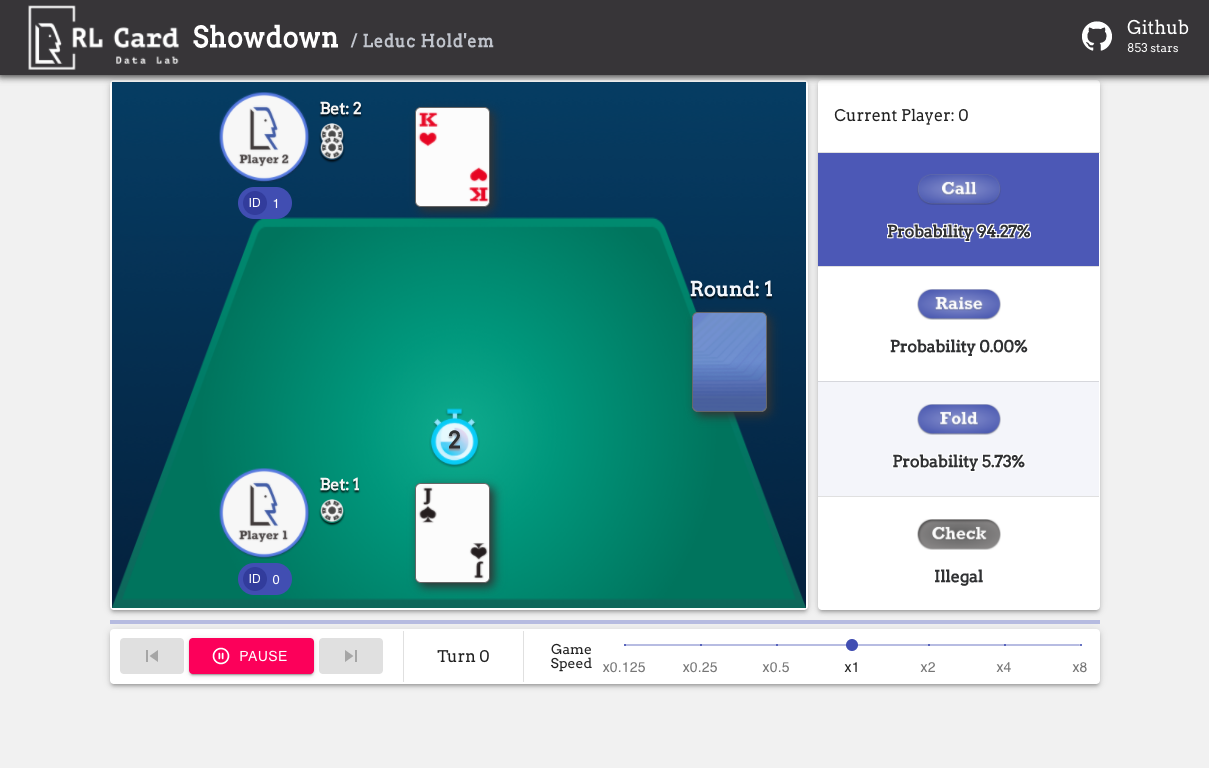
Run examples/human/leduc_holdem_human.py to play with the pre-trained Leduc Hold'em model. Leduc Hold'em is a
simplified version of Texas Hold'em. Rules can be found here.
>> Leduc Hold'em pre-trained model

>> Start a new game!
>> Agent 1 chooses raise

=============== Community Card ===============
┌─────────┐
│░░░░░░░░░│
│░░░░░░░░░│
│░░░░░░░░░│
│░░░░░░░░░│
│░░░░░░░░░│
│░░░░░░░░░│
│░░░░░░░░░│
└─────────┘
===============   Your Hand    ===============
┌─────────┐
│J        │
│         │
│         │
│    ♥    │
│         │
│         │
│        J│
└─────────┘
===============     Chips      ===============
Yours:   +
Agent 1: +++
=========== Actions You Can Choose ===========
0: call, 1: raise, 2: fold

>> You choose action (integer):
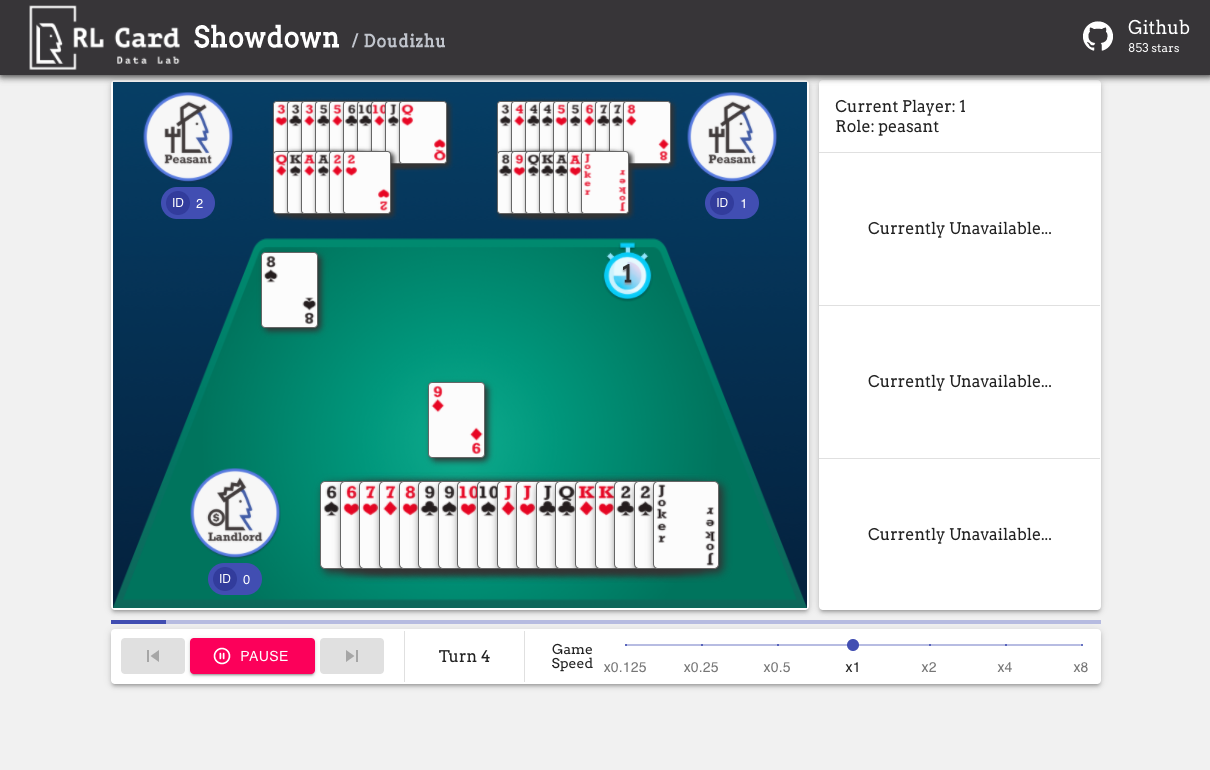
We also provide a GUI for easy debugging. Please check here. Some demos:
Available Environments
We provide a complexity estimation for the games on several aspects. InfoSet Number: the number of information sets;
InfoSet Size: the average number of states in a single information set; Action Size: the size of the action
space. Name: the name that should be passed to rlcard.make to create the game environment. We also provide the
link to the documentation and the random example.
| Game | InfoSet Number | InfoSet Size | Action Size | Name | Usage |
|---|---|---|---|---|---|
| Blackjack (wiki, baike) | 10^3 | 10^1 | 10^0 | blackjack | doc, example |
| Leduc Hold’em (paper) | 10^2 | 10^2 | 10^0 | leduc-holdem | doc, example |
| Limit Texas Hold'em (wiki, baike) | 10^14 | 10^3 | 10^0 | limit-holdem | doc, example |
| Dou Dizhu (wiki, baike) | 10^53 ~ 10^83 | 10^23 | 10^4 | doudizhu | doc, example |
| Mahjong (wiki, baike) | 10^121 | 10^48 | 10^2 | mahjong | doc, example |
| No-limit Texas Hold'em (wiki, baike) | 10^162 | 10^3 | 10^4 | no-limit-holdem | doc, example |
| UNO (wiki, baike) | 10^163 | 10^10 | 10^1 | uno | doc, example |
| Gin Rummy (wiki, baike) | 10^52 | - | - | gin-rummy | doc, example |
| Bridge (wiki, baike) | - | - | bridge | doc, example |
Supported Algorithms
| Algorithm | example | reference |
|---|---|---|
| Deep Monte-Carlo (DMC) | examples/run_dmc.py | [paper] |
| Deep Q-Learning (DQN) | examples/run_rl.py | [paper] |
| Neural Fictitious Self-Play (NFSP) | examples/run_rl.py | [paper] |
| Counterfactual Regret Minimization (CFR) | examples/run_cfr.py | [paper] |
Pre-trained and Rule-based Models
We provide a model zoo to serve as the baselines.
| Model | Explanation |
|---|---|
| leduc-holdem-cfr | Pre-trained CFR (chance sampling) model on Leduc Hold'em |
| leduc-holdem-rule-v1 | Rule-based model for Leduc Hold'em, v1 |
| leduc-holdem-rule-v2 | Rule-based model for Leduc Hold'em, v2 |
| uno-rule-v1 | Rule-based model for UNO, v1 |
| limit-holdem-rule-v1 | Rule-based model for Limit Texas Hold'em, v1 |
| doudizhu-rule-v1 | Rule-based model for Dou Dizhu, v1 |
| gin-rummy-novice-rule | Gin Rummy novice rule model |
API Cheat Sheet
How to create an environment
You can use the the following interface to make an environment. You may optionally specify some configurations with a dictionary.
- env = rlcard.make(env_id, config={}): Make an environment.
env_idis a string of a environment;configis a dictionary that specifies some environment configurations, which are as follows.seed: DefaultNone. Set a environment local random seed for reproducing the results.allow_step_back: DefaultFalse.Trueif allowingstep_backfunction to traverse backward in the tree.- Game specific configurations: These fields start with
game_. Currently, we only supportgame_num_playersin Blackjack, .
Once the environemnt is made, we can access some information of the game.
- env.num_actions: The number of actions.
- env.num_players: The number of players.
- env.state_shape: The shape of the state space of the observations.
- env.action_shape: The shape of the action features (Dou Dizhu's action can encoded as features)
What is state in RLCard
State is a Python dictionary. It consists of observation state['obs'], legal actions state['legal_actions'], raw
observation state['raw_obs'] and raw legal actions state['raw_legal_actions'].
Basic interfaces
The following interfaces provide a basic usage. It is easy to use but it has assumtions on the agent. The agent must follow agent template.
- env.set_agents(agents):
agentsis a list ofAgentobject. The length of the list should be equal to the number of the players in the game. - env.run(is_training=False): Run a complete game and return trajectories and payoffs. The function can be used
after the
set_agentsis called. Ifis_trainingisTrue, it will usestepfunction in the agent to play the game. Ifis_trainingisFalse,eval_stepwill be called instead.
Advanced interfaces
For advanced usage, the following interfaces allow flexible operations on the game tree. These interfaces do not make any assumtions on the agent.
- env.reset(): Initialize a game. Return the state and the first player ID.
- env.step(action, raw_action=False): Take one step in the environment.
actioncan be raw action or integer;raw_actionshould beTrueif the action is raw action (string). - env.step_back(): Available only when
allow_step_backisTrue. Take one step backward. This can be used for algorithms that operate on the game tree, such as CFR (chance sampling). - env.is_over(): Return
Trueif the current game is over. Otherewise, returnFalse. - env.get_player_id(): Return the Player ID of the current player.
- env.get_state(player_id): Return the state that corresponds to
player_id. - env.get_payoffs(): In the end of the game, return a list of payoffs for all the players.
- env.get_perfect_information(): (Currently only support some of the games) Obtain the perfect information at the current state.
Library Structure
The purposes of the main modules are listed as below:
- /examples: Examples of using RLCard.
- /docs: Documentation of RLCard.
- /tests: Testing scripts for RLCard.
- /rlcard/agents: Reinforcement learning algorithms and human agents.
- /rlcard/envs: Environment wrappers (state representation, action encoding etc.)
- /rlcard/games: Various game engines.
- /rlcard/models: Model zoo including pre-trained models and rule models.
More Documents
For more documentation, please refer to the Documents for general introductions. API documents are available at our website.
Contributing
Contribution to this project is greatly appreciated! Please create an issue for feedbacks/bugs. If you want to contribute codes, please refer to Contributing Guide. If you have any questions, please contact Daochen Zha with daochen.zha@rice.edu.
Acknowledgements
We would like to thank JJ World Network Technology Co.,LTD for the generous support and all the contributions from the community contributors.
Release history Release notifications | RSS feed

Download files
Download the file for your platform. If you're not sure which to choose, learn more about installing packages.
Source Distribution
Built Distribution
Filter files by name, interpreter, ABI, and platform.
If you're not sure about the file name format, learn more about wheel file names.
Copy a direct link to the current filters
File details
Details for the file rlcard_datasdeepak7-1.2.0.tar.gz.
File metadata
- Download URL: rlcard_datasdeepak7-1.2.0.tar.gz
- Upload date:
- Size: 288.0 kB
- Tags: Source
- Uploaded using Trusted Publishing? No
- Uploaded via: twine/6.1.0 CPython/3.12.6
File hashes
| Algorithm | Hash digest | |
|---|---|---|
| SHA256 |
7ef25d059fbeea6af339a581bd28b90158bb54c717cd44d85339d718f25fe435
|
|
| MD5 |
0a3772fc58f4408ea2e90105eb1fa590
|
|
| BLAKE2b-256 |
72076683b56f6afeb21bfe73d9c2aafad8addc0e01149f2d751bf711b647ecdf
|
File details
Details for the file rlcard_datasdeepak7-1.2.0-py3-none-any.whl.
File metadata
- Download URL: rlcard_datasdeepak7-1.2.0-py3-none-any.whl
- Upload date:
- Size: 357.1 kB
- Tags: Python 3
- Uploaded using Trusted Publishing? No
- Uploaded via: twine/6.1.0 CPython/3.12.6
File hashes
| Algorithm | Hash digest | |
|---|---|---|
| SHA256 |
35d8c1c8d56173509b94b4cf626d0c9f8e0def153bda5fef1865d15369cd2c9a
|
|
| MD5 |
35c2c3188add113d55dc366177152317
|
|
| BLAKE2b-256 |
5390cd82593ac57259a5925e65c1f22ab5c48d3f6739ca32e48f945f34be993d
|






