
RLM Code: Research Playground & Evaluation OS for Recursive Language Model Agentic Systems

Project description
RLM Code












Run LLM-powered agents in a REPL loop, benchmark them, and compare results.
RLM Code implements the Recursive Language Models (RLM) approach from the 2025 paper release. Instead of stuffing your entire document into the LLM's context window, RLM stores it as a Python variable and lets the LLM write code to analyze it, chunk by chunk, iteration by iteration. This is dramatically more token-efficient for large inputs.
RLM Code wraps this algorithm in an interactive terminal UI with built-in benchmarks, trajectory replay, and observability.
Release v0.1.7
This release adds HALO-style trace analysis as a new RLM environment.
- New
trace_analysisenvironment for diagnosing agent harness failures from OTel-shaped JSONL traces - Sidecar trace indexing with dataset overview, query, count, search, full-trace view, and selected-span view actions
- Bounded payload handling for large traces, including oversized summaries and higher-cap surgical span reads
/rlmhelp/docs updated forenv=trace_analysis- Dedicated trace analysis docs under the Core Engine section
Example:
/rlm run "Find systemic harness failures trace=./traces.jsonl" env=trace_analysis steps=6
Documentation

Install
uv tool install "rlm-code[tui,llm-all]"
This installs rlm-code as a globally available command with its own isolated environment. You get the TUI and all LLM provider clients (OpenAI, Anthropic, Gemini).
Requirements:
- Python 3.11+
uv(recommended) orpip- one model route (BYOK API key or local server like Ollama)
- one secure execution backend (Docker recommended; Monty optional)
Don't have uv? Install it first:
curl -LsSf https://astral.sh/uv/install.sh | sh
Alternative: install with pip
pip install rlm-code[tui,llm-all]
Quick Start
1. Launch
mkdir -p ~/my-project && cd ~/my-project
rlm-code
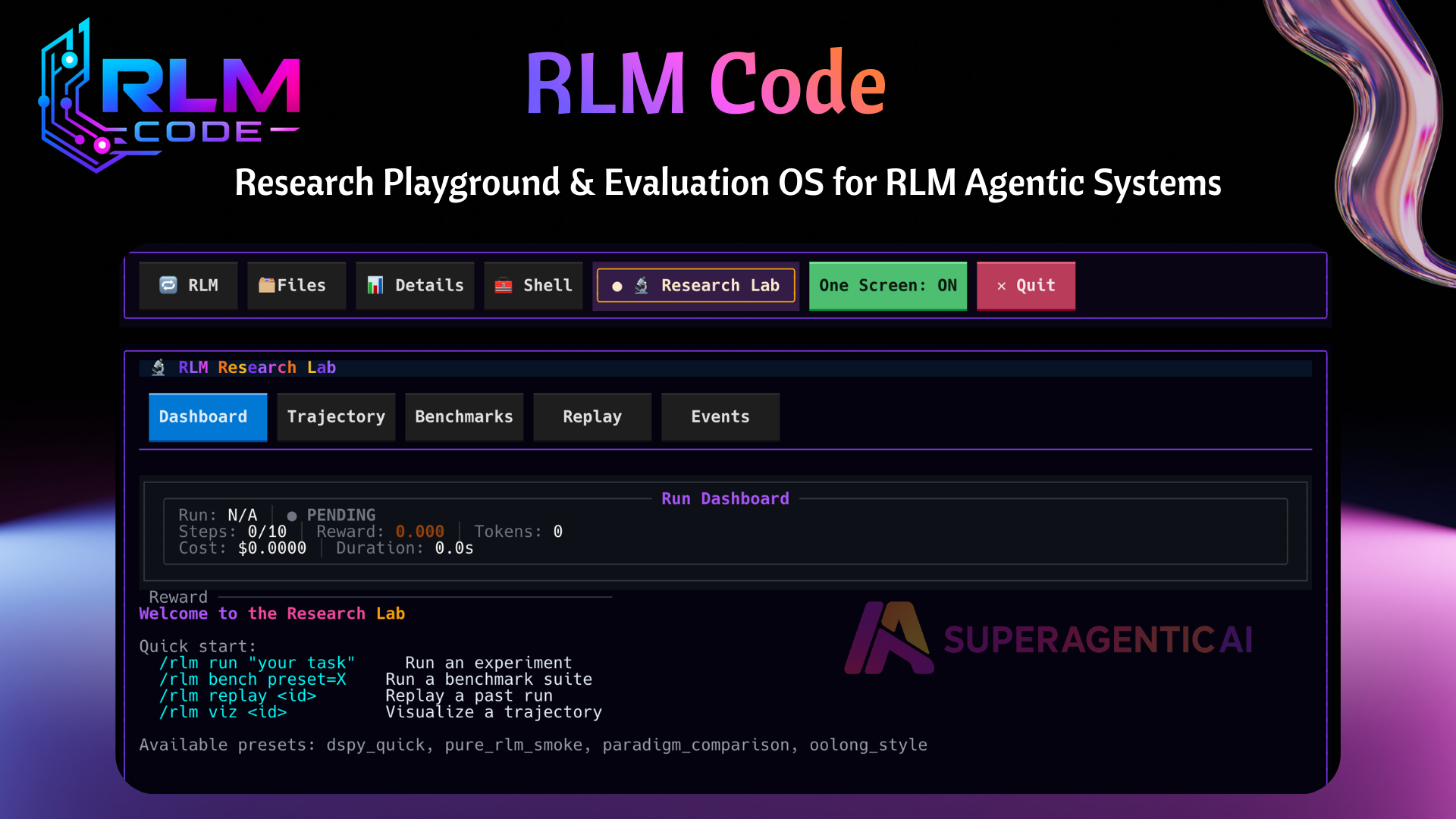
This opens the terminal UI. You'll see a chat input at the bottom and tabs across the top.
2. Connect to an LLM
Type one of these in the chat input:
/connect anthropic claude-opus-4-6
or
/connect openai gpt-5.3-codex
or
/connect gemini gemini-2.5-flash
or for a free local model via Ollama:
/connect ollama llama3.2
You need the matching API key in your environment (
ANTHROPIC_API_KEY,OPENAI_API_KEY,GEMINI_API_KEY) or in a.envfile in your project directory. Ollama needs no key, just a running Ollama server.
Follow the interactive path with just /connect command instead: Check it worked:
/status
3. Run your first RLM task
/rlm run "Write a Python function that finds the longest common subsequence of two strings"
This starts the RLM loop: the LLM writes code in a sandboxed REPL, executes it, sees the output, writes more code, and iterates until it calls FINAL(answer) with the result.
4. Run a benchmark
Benchmarks let you measure how well a model performs on a set of tasks:
/rlm bench preset=pure_rlm_smoke
This runs 3 test cases through the RLM loop and scores the results.
See all available benchmarks:
/rlm bench list
5. View results
Use the Research tab (Ctrl+5) for live benchmark and trajectory views.
After at least two benchmark runs, export a compare report:
/rlm bench report candidate=latest baseline=previous format=markdown
6. Replay a session step-by-step
/rlm status
/rlm replay <run_id>
Walk through the last run one step at a time, see what code the LLM wrote, what output it got, and what it did next.
7. Use RLM Code as a coding agent (local/BYOK/ACP)
RLM Code can also be used as a coding-agent harness in the TUI, Just like Claude Code, Codex etc. It has mimimal harnesss to steer the model to write the code.
/harness tools
/harness run "fix failing tests and add regression test" steps=8 mcp=on
ACP is supported too:
/connect acp
/harness run "implement feature X with tests" steps=8 mcp=on
Notes:
- In Local/BYOK connection modes, likely coding prompts in chat can auto-route to harness.
- In ACP mode, auto-routing is intentionally off; use
/harness run ...explicitly.
8. CodeMode with UTCP and Cloudflare MCP
Use these server entries in your project rlm_config.yaml:
mcp_servers:
  utcp-codemode:
    name: utcp-codemode
    description: "Local CodeMode MCP bridge"
    enabled: true
    auto_connect: false
    timeout_seconds: 30
    retry_attempts: 3
    transport:
      type: stdio
      command: npx
      args:
        - "@utcp/code-mode-mcp"

  cloudflare-codemode:
    name: cloudflare-codemode
    description: "Cloudflare MCP via remote bridge"
    enabled: true
    auto_connect: false
    timeout_seconds: 30
    retry_attempts: 3
    transport:
      type: stdio
      command: npx
      args:
        - "mcp-remote"
        - "https://mcp.cloudflare.com/mcp"
UTCP path (native CodeMode in current release):
/mcp-connect utcp-codemode
/mcp-tools utcp-codemode
/harness run "analyze this repo, find TODO/FIXME, and create report.json" steps=3 mcp=on strategy=codemode mcp_server=utcp-codemode
Cloudflare path (recommended strategy today):
/mcp-connect cloudflare-codemode
/mcp-tools cloudflare-codemode
/harness run "list available tools and run one safe read-only action, then summarize in 3 bullets" steps=3 mcp=on strategy=tool_call mcp_server=cloudflare-codemode
Notes:
- On first Cloudflare connect,
mcp-remotemay ask for interactive authentication. - In this release,
strategy=codemodeexpects thesearch_tools+call_tool_chainbridge contract. - If a remote MCP server exposes a different tool contract, use
strategy=tool_call.
How the RLM Loop Works
Traditional LLM usage: paste your document into the prompt, ask a question, hope the model doesn't lose details in the middle.
RLM approach:
- Your document is stored as a Python variable
contextin a REPL - The LLM writes code to process it (e.g.,
len(context),context[:5000],context.split('\n')) - The code runs, and the LLM sees the output
- The LLM writes more code based on what it learned
- Repeat until the LLM calls
FINAL("here is my answer")
This means the LLM can handle documents much larger than its context window, because it reads them in chunks through code rather than all at once through the prompt.
What This Is (and Is Not)
RLM Code is:
- a research playground for recursive/model-assisted coding workflows
- a benchmarking and replay tool for reproducible experiments
RLM Code is not:
- a no-config consumer chat app
- guaranteed cheap (recursive runs can be expensive)
- safe to run with unrestricted execution settings
Use secure backend defaults (/sandbox profile secure) for normal use.
Key Commands
| Command | What it does |
|---|---|
/connect <provider> <model> |
Connect to an LLM |
/model |
Interactive model picker |
/status |
Show connection status |
/sandbox profile secure |
Apply secure sandbox defaults (Docker-first + strict pure RLM) |
/rlm run "<task>" |
Run a task through the RLM loop |
/rlm bench preset=<name> |
Run a benchmark preset |
/rlm bench list |
List available benchmarks |
/rlm bench compare |
Compare latest benchmark run with previous run |
/rlm abort [run_id|all] |
Cancel active run(s) cooperatively |
/harness run "<task>" |
Run tool-using coding harness loop |
/rlm replay |
Step through the last run |
/rlm chat "<question>" |
Ask the LLM a question about your project |
/help |
Show all available commands |
Cost and Safety Guardrails
Start bounded:
/rlm run "small scoped task" steps=4 timeout=30 budget=60
For benchmarks, start with small limits:
/rlm bench preset=dspy_quick limit=1
If a run is going out of hand:
/rlm abort all
What You Can Do With It
- Analyze large documents: Feed in a 500-page PDF and ask questions, then the LLM reads it in chunks via code
- Compare models: Run the same benchmark with different providers and see who scores higher
- Compare paradigms: Test Pure RLM vs CodeAct vs Traditional approaches on the same task
- Debug agent behavior: Replay any run step-by-step to see exactly what the agent did
- Track experiments: Every run is logged with metrics, tokens used, and trajectory
Supported LLM Providers
| Provider | Latest Models | Setup |
|---|---|---|
| Anthropic | claude-opus-4-6, claude-sonnet-4-5-20250929 |
ANTHROPIC_API_KEY env var |
| OpenAI | gpt-5.3-codex, gpt-5.2-pro |
OPENAI_API_KEY env var |
gemini-2.5-pro, gemini-2.5-flash |
GEMINI_API_KEY or GOOGLE_API_KEY env var |
|
| Ollama | llama3.2, qwen2.5-coder:7b |
Running Ollama server at localhost:11434 |
Configuration
Create an rlm_config.yaml in your project directory to customize settings:
name: my-project

models:
  openai_api_key: null
  openai_model: gpt-5.3-codex

default_model: gpt-5.3-codex

sandbox:
  runtime: docker
  superbox_profile: secure
  superbox_auto_fallback: true
  superbox_fallback_runtimes: [docker, daytona, e2b]
  pure_rlm_backend: docker
  pure_rlm_strict: true
  pure_rlm_allow_unsafe_exec: false

rlm:
  default_benchmark_preset: dspy_quick
  benchmark_pack_paths: []
Or generate a full sample config:
/init
Development Setup
git clone https://github.com/SuperagenticAI/rlm-code.git
cd rlm-code
uv sync --all-extras
uv run pytest
Project Structure
rlm_code/
  rlm/              # Core RLM engine (runner, environments, policies)
  ui/               # Terminal UI (Textual-based TUI)
  mcp/              # MCP server for tool integration
  models/           # LLM provider adapters
  sandbox/          # Sandboxed code execution
  harness/          # Tool-using coding harness (/harness)
Resources
Full docs: https://superagenticai.github.io/rlm-code/
Contributing
See CONTRIBUTING.md.
License
Apache-2.0
Brought to You by Superagentic AI


Download files
Download the file for your platform. If you're not sure which to choose, learn more about installing packages.
Source Distribution
Built Distribution
Filter files by name, interpreter, ABI, and platform.
If you're not sure about the file name format, learn more about wheel file names.
Copy a direct link to the current filters
File details
Details for the file rlm_code-0.1.7.tar.gz.
File metadata
- Download URL: rlm_code-0.1.7.tar.gz
- Upload date:
- Size: 779.3 kB
- Tags: Source
- Uploaded using Trusted Publishing? No
- Uploaded via: twine/6.1.0 CPython/3.12.7
File hashes
| Algorithm | Hash digest | |
|---|---|---|
| SHA256 |
68db0155cb4e13bed77962f5960f46eccd3b30b3f922072df347bdddb5c4f9b9
|
|
| MD5 |
6baa1d9f49c5a609e76eab5d67e77b2d
|
|
| BLAKE2b-256 |
a6284a45e6edd7ead9bcfce5fddb99360c266a70ea1e32f35d1a8a954dbc957b
|
File details
Details for the file rlm_code-0.1.7-py3-none-any.whl.
File metadata
- Download URL: rlm_code-0.1.7-py3-none-any.whl
- Upload date:
- Size: 798.7 kB
- Tags: Python 3
- Uploaded using Trusted Publishing? No
- Uploaded via: twine/6.1.0 CPython/3.12.7
File hashes
| Algorithm | Hash digest | |
|---|---|---|
| SHA256 |
02bc8cc94e4e5df12bc9a50db05a3a93a1f685becb60dc4d73fc87008680e45b
|
|
| MD5 |
e6e86224eb3051db12180f02101ab194
|
|
| BLAKE2b-256 |
b776b34680b421ded08626eda1f2b52d73fc63f6d1b7b39c5b357563c5fc85b1
|






