
rmclient
A local web UI and CLI for your own rmfakecloud
server: push books to your reMarkable, organise the document tree, preview
notebooks, download originals, and find duplicates — all from your laptop,
talking to your cloud over its /ui/api endpoints.
Nothing runs on the server and nothing is installed on the device: rmclient is just another API consumer. Everything is a single Python process; the web UI is plain HTML/CSS/JS with no build chain and no external resources, so it works offline.
Status: works against rmfakecloud v0.0.31, which is the only version it
has been tested on. The endpoint contract and its pitfalls are documented in
spike/REPORT.md.
What you get
| Push | Notebook preview |
|---|---|
 |
 |
| Page | What it does |
|---|---|
/ |
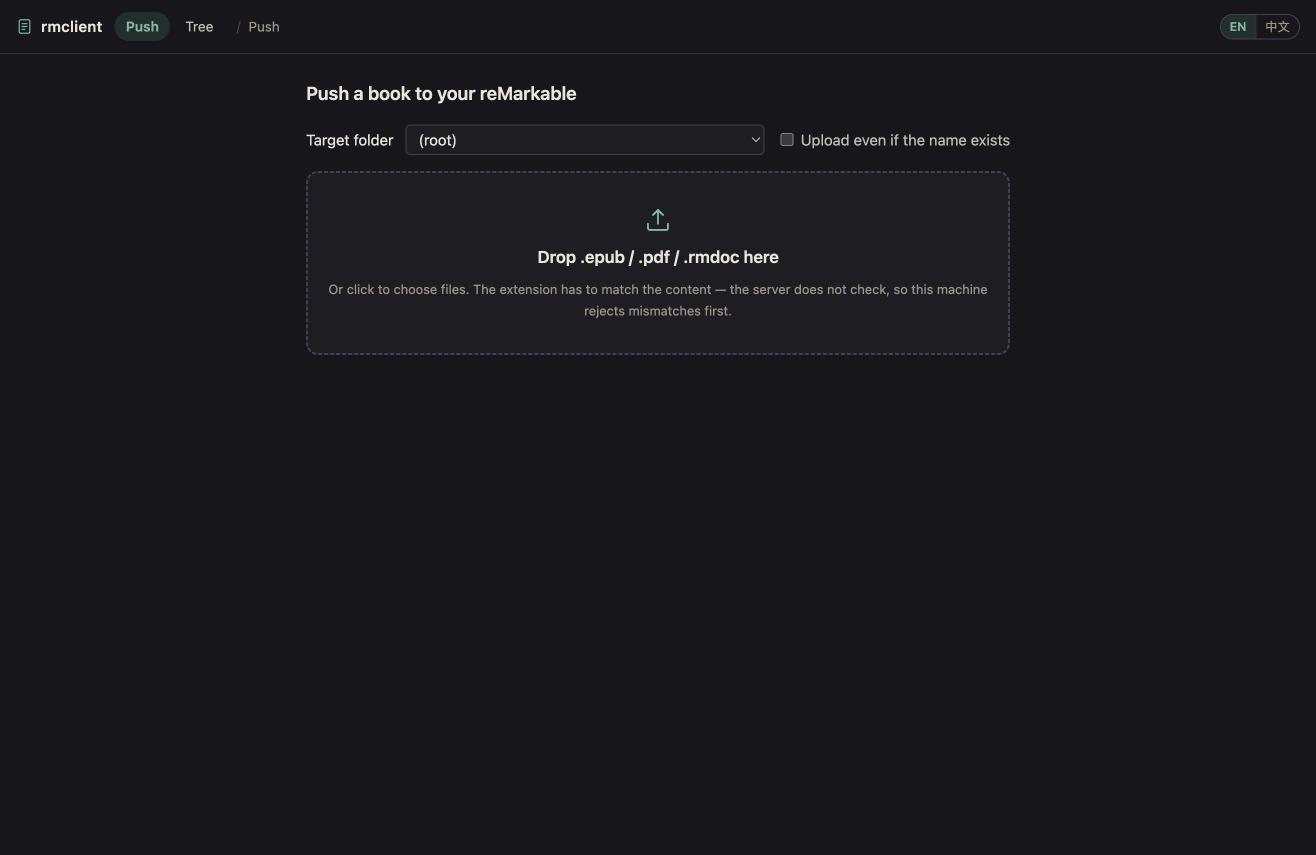
Drag epub/pdf/rmdoc in, pick a target folder, upload. Per-file progress and results. |
/tree |
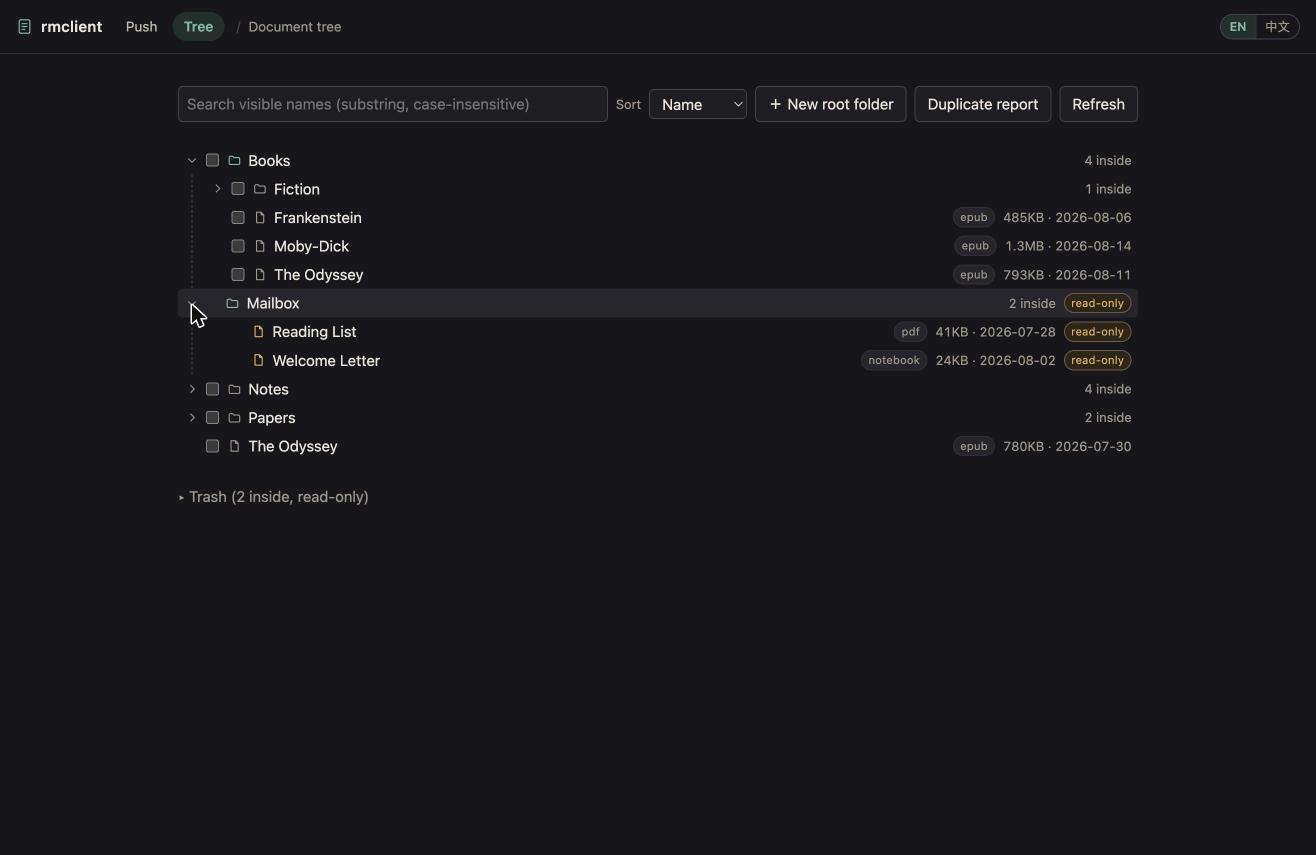
The whole document tree: search, sort, create/rename/move/delete (single or multi-select), upload into any folder, download originals (or the whole .rmdoc package — that is where device annotations live), duplicate report. |
/preview/<id> |
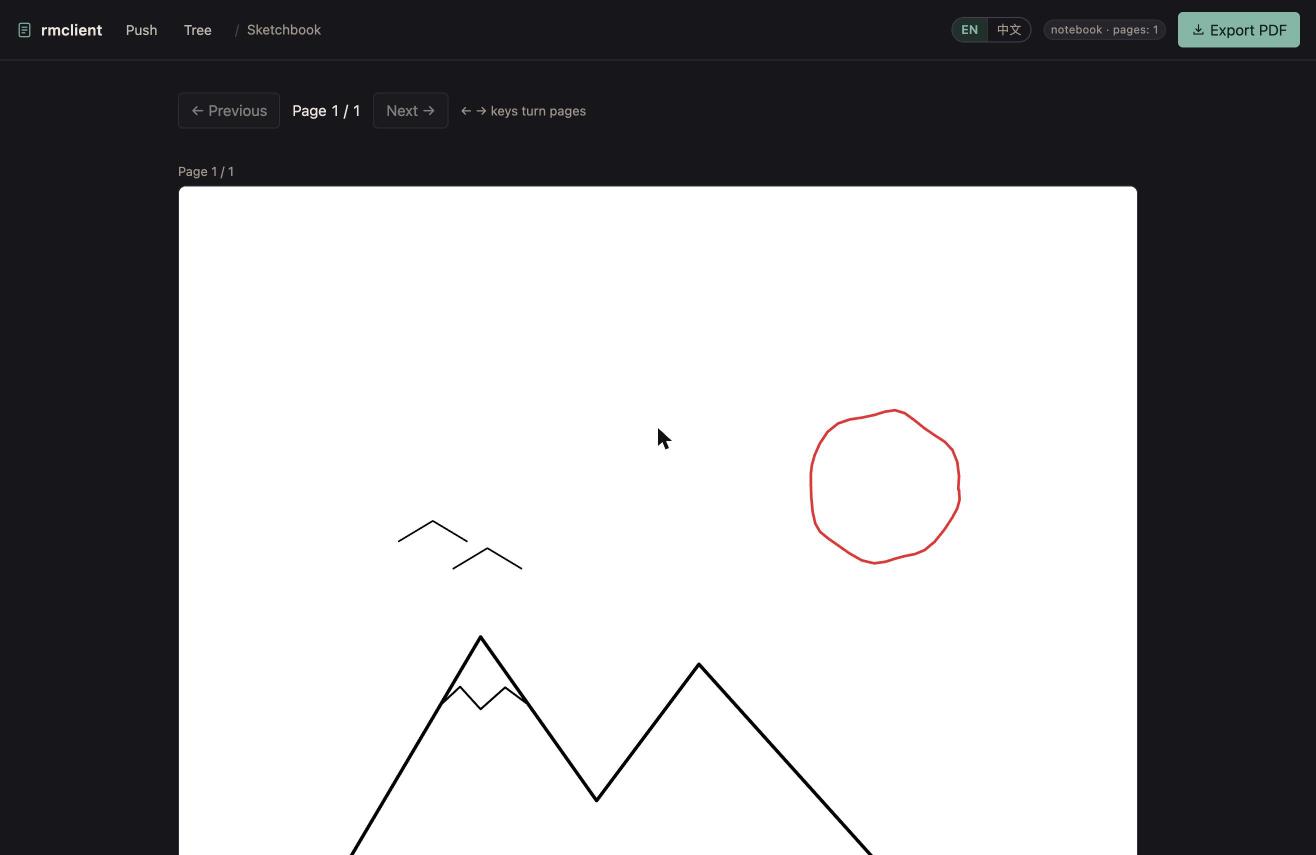
Render a notebook's pages as SVG, page through them, export the whole notebook as PDF. |
The CLI also works without the browser:
rmclient push book.epub                    # into the root
rmclient push book.epub --to Books/CS      # into a folder, addressed by visible name
rmclient push book.epub --to Books --force # push even though a same-named book exists
rmclient serve --port 8000                 # start the web UI
Try it without a server
You do not need an rmfakecloud server — or any credentials — to see what this looks like:
uvx rmclient demo                # → http://127.0.0.1:8001
uvx rmclient demo --port 9000
(from a clone: uv run rmclient demo)
That starts the real web UI against an in-memory demo cloud. Uploading, moving, renaming, the delete plan, the resurrection re-check, the duplicate report, notebook preview and PDF export all run through the same code as a real deployment — there is just no socket underneath, so nothing leaves your machine. State lives in memory and is thrown away when you stop the process.
The dataset is public-domain titles only (The Odyssey, Moby-Dick,
On Computable Numbers, …), so it is safe to screenshot for documentation —
no real library is ever involved. It is arranged to show the things that are
easy to miss:
- a locked
Mailboxfolder — every write into it is refused, reading is not; - two duplicate groups, one with a copy inside the locked folder;
- notebooks with synthetic handwriting, so preview and PDF export are real;
- delete
Notes/Sketchbook, then hit Resurrection re-check: the demo device pushes it back under its original UUID, exactly once (see Safety notes).
Quickstart
Install uv, then:
uvx rmclient demo            # try the UI offline, no server needed
uvx rmclient setup           # point it at your rmfakecloud server
uvx rmclient serve --open    # open your own library in the browser
setup asks for your server URL, e-mail and password, writes them to
~/.config/rmclient/config.toml (the password goes to its own file, mode 600),
and then signs in for real and reports how many entries your root holds — so you
find out immediately whether it works, not on your first upload.
Nothing is installed on your reMarkable or on the server, and no configuration
is needed at all for demo.
Configuration
rmclient setup is the easy path. Everything it writes can also be set by hand.
Sources are consulted in this order, and taken as a whole — rmclient never
mixes credentials from one source with a URL from another:
1. Environment variables — best for CI and containers:
| Variable | Default | Meaning |
|---|---|---|
RMCLIENT_URL |
— | Your rmfakecloud base URL, including the scheme. Trailing slash is ignored. |
RMCLIENT_USER |
— | Login e-mail. |
RMCLIENT_PASSWORD |
— | Password, used literally. |
RMCLIENT_PASSWORD_FILE |
— | Path to a file holding the password; its contents are stripped. Use this or RMCLIENT_PASSWORD, not both. |
RMCLIENT_LOCKED_FOLDERS |
Mailbox |
Comma-separated root-level folder names to protect. Set to an empty string to lock nothing. |
RMCLIENT_DATA_DIR |
XDG state dir | Where the deletion journal is kept. |
2. ~/.config/rmclient/config.toml ($XDG_CONFIG_HOME wins if set):
url = "https://cloud.example.com"
user = "you@example.com"
# password_file = "/some/other/path"   # default: ~/.config/rmclient/password
The password is never stored here — it lives in its own file. Putting a
password key in config.toml is a hard error, not a silent fallback.
3. A local fallback for the deployment this was originally built against
(documented in CLAUDE.md), used only when those files actually exist.
If a source is present but incomplete — say config.toml names a server but no
user — rmclient stops and says so rather than borrowing credentials from the
next source down. Pointing one server's URL at another server's password is
exactly the accident that guard exists to prevent.
Credentials are read from the environment or from disk and are never logged,
never printed, and never written to the repository. The deletion journal lives
in ~/.local/state/rmclient/deleted.json.
Localization
The web UI ships in English (default) and Chinese, and the language is a per-browser choice — nothing on the server changes.
- Every page has an
EN / 中文switch in the top bar. Your pick is stored inlocalStorageunderrmclient.langand applies to all three pages. - With nothing stored, the language comes from
navigator.language: anything starting withzhgets Chinese, everything else gets English. - The CLI is English only; server error messages are English too. The pages
turn the error's
reasoncode into a localized headline and show the server's ownmessageunderneath as the detail. - Document types on badges (
notebook,epub,pdf) are data, not UI text, and are never translated.
Adding a language
Everything lives in rmclient/pages/i18n.js — one
file, no build step:
- Copy the whole
"en"block insideSTRINGS, rename the key to your BCP-47 base tag ("de","ja", …), and translate the values. Keep every key, and keep the{braces}placeholders exactly as they are. - Set
"lang.label"to the text you want on the switcher button. The switcher is generated fromObject.keys(STRINGS), so nothing else needs editing. - Optionally teach
detect()about your tag for auto-detection. Without that, your language is still reachable from the switcher.
STRINGS is written as strict JSON on purpose: uv run pytest tests/test_i18n.py parses it and fails if any dictionary is missing a key or a
placeholder that English has.
Locked folders
A locked folder is a root-level folder whose entire subtree is read-only:
- it is shown in the tree, marked with a lock, and gets no write controls;
- it is excluded from every bulk operation and has no selection checkbox;
- create / rename / move / delete / upload are refused for anything inside it, and the check runs server-side, not just in the UI;
- read-only access is still allowed: you can preview and download its documents.
Nested folders with the same name are not locked — only the root-level one is.
Safety notes
These come out of real testing against a live server; the details, with
evidence, are in spike/REPORT.md.
- Deletion is permanent and reaches the device. There is no trash on the server side of this operation: a delete removes the document and the device drops its copy on the next sync. rmclient always shows the full subtree it is about to delete before you confirm, deletes deepest-first (the server does not cascade), and only ever deletes UUIDs from an explicit allow-list.
- Deleted documents can come back. If the device has local changes for a
document, its next sync pushes that document back with the same UUID.
rmclient records every deletion in
~/.local/state/rmclient/deleted.jsonand keeps a "check for resurrection" panel on the tree page, because the race only becomes visible a sync cycle later. - Upload correctness is the client's job. The server dispatches purely on
the file extension (
.pdf,.epub,.rmdoc), does not look at the content, and rejects unknown extensions with an HTTP 500 whose real reason is in the body. rmclient validates the extension and the content locally (EPUB OCF structure, PDF/zip magic) and refuses to send a mismatch. - Duplicate uploads are never merged. Uploading the same file name twice produces two independent documents with the same visible name. rmclient warns and requires an explicit confirmation instead of silently doubling a book.
- Renaming is implicit in moving. The move endpoint overwrites the name unconditionally, so rmclient always sends the original name back when you only meant to move something.
- The duplicate report never deletes anything. It groups documents by visible name and shows you where they are; which copy to keep is your call.
- "Download" gives you the original, not your annotations. For an epub you
annotated on the device, the package also contains a device-generated PDF
rendition carrying the ink; use the package download (
?package=1) to get it.
API contract at a glance
What rmclient relies on, and the trap attached to each endpoint. Full evidence
in spike/REPORT.md.
| Operation | Endpoint | The catch |
|---|---|---|
| Log in | POST /ui/api/login |
The response body is the JWT; send it back as Authorization: Bearer, not as a cookie. |
| List tree | GET /ui/api/documents |
Reads use lower-case keys, writes return upper-case ones. A freshly uploaded document's type echoes its name — don't trust it. |
| Upload | POST /ui/api/documents/upload |
Dispatch is 100% on the file extension (.pdf/.epub/.rmdoc); content is never checked. Unsupported extensions come back as HTTP 500 with the reason in the body. |
| Move / rename | PUT /ui/api/documents |
name is overwritten unconditionally, so a pure move must send the old name back. parentId: "" means the root. |
| Delete | DELETE /ui/api/documents/{id} |
Permanent, no trash, and it propagates to the device. A device with local changes can push the document back under the same UUID. |
| Export | GET /ui/api/documents/{id}?type=rmdoc |
A zip with the original bytes intact. The .content inside is the only reliable fileType. |
Compatibility
- Tested only against rmfakecloud v0.0.31. Other versions may differ; the
observed contract is written down in
spike/REPORT.md. - Authentication uses
Authorization: Bearerrather than cookies. - If your server sits behind a Cloudflare tunnel, note the 100 MB limit per request on the free edge: exporting a large notebook or downloading a large book can hit it. Exports are also buffered whole in memory and run under a 120 s read timeout.
- A document's
sizein the tree is the sum of all its blobs, not the size of the original file.
Known limitations
servelogs in once and never renews the session, so a long-running instance starts returning 401 once the JWT expires. Restart the process.- Every write re-reads the document tree; fine for a personal library, not optimised for huge ones.
- The trash is displayed read-only: no restore, no empty.
How it got here
Each round was verified against a live server before the next one started; the
contract findings live in spike/REPORT.md.
| Round | What landed |
|---|---|
| spike | Proved the whole path — laptop → self-hosted cloud → device — with a real EPUB, and wrote down the /ui/api contract and every trap in it. |
| M0 | The API client library: login, list tree, create folder, upload, move, delete, export — with each documented pitfall encoded as a guard and pinned by offline tests. |
| M1 | Pushing books: the rmclient push CLI and the drag-and-drop page, sharing one validation and upload path. Duplicate-upload semantics probed (REPORT §10). |
| M2 | Tree browsing and management: create, rename, move, delete — with the full subtree shown before an irreversible delete, a deletion journal, and a resurrection re-check. Move-to-root sentinel probed (§11). |
| M3 | Notebook preview: .rm v6 parsing via rmscene, per-page SVG rendering, whole-notebook PDF export. |
| v1 | The content manager: search and sort, multi-select batch move and delete, original/package download, whole-library duplicate report (§12). |
| UI | A design pass across all three pages: CSS-token design system with dark mode, one shared topbar, sticky toolbar, floating batch dock, toasts, skeletons, keyboard paging. |
| i18n | English by default with Chinese kept complete: one shared string table, a top-bar language switch, localized headlines for server error codes, and an English CLI. |
| demo | An offline demo: the real UI on an in-memory cloud with a public-domain dataset, so the project can be tried — and screenshotted — without a server. |
| v0.2 | Installable: rmclient demo / setup / serve --open, a config.toml written by an interactive wizard, state under XDG, and a test that proves the wheel really ships the pages. No clone, no environment variables. |
Repository layout
rmclient/
  config.py     server URL, credentials, locked folders (env vars first)
  models.py     tree model, both key spellings, locked-folder helpers
  api.py        the /ui/api client, with the guards that matter
  validate.py   extension + content checks before any upload
  push.py       target checks, duplicate detection, upload
  manage.py     create / rename / move / delete policy, deletion plans
  render.py     rmdoc → pages → SVG / PDF, original extraction
  journal.py    deletion records, kept in the XDG state directory
  wizard.py     the `rmclient setup` wizard
  demo.py       the in-memory demo cloud and its public-domain dataset
  cli.py        rmclient push / serve / setup / demo
  web.py        FastAPI routes
  pages/        push.html (drag and drop), tree.html (manager),
                preview.html (notebook viewer), app.css (shared design tokens),
                i18n.js (string table + t(), shared by all three pages)
scripts/        demo_serve.py — thin shim, kept for older docs; use `rmclient demo`
                dump_tree.py  — read-only tree dump
spike/          feasibility work and REPORT.md, the endpoint contract
tests/          offline test suite
Development
Running from a clone:
git clone https://github.com/xxxxxthhh/rmclient && cd rmclient
uv sync

uv run rmclient demo             # offline demo, no configuration
uv run rmclient setup            # configure your own server
uv run rmclient serve --open
uv run python scripts/dump_tree.py   # read-only dump of the whole tree
uv run pytest # offline test suite; never touches a real server
The tests use httpx.MockTransport and FastAPI's TestClient throughout,
including synthetic .rm scene data for the renderer, so the whole suite runs
without credentials.
The scripts under spike/ do write to a real server. They confine themselves to
a temporary rmclient-spike-<random> folder and clean up after themselves.
License
MIT licensed — see LICENSE.
1 maintainer

Metadata
1 maintainer
Release files for rmclient 0.2.1
For a detailed explanation of source distributions (sdists) and built distributions (wheels), please see the package formats documentation.
Source distribution (sdist)
| File | Size | Uploaded | |
|---|---|---|---|
| rmclient-0.2.1.tar.gz | 274.9 kB | Details |
Built distribution (wheel)
| File | Interpreter | ABI | Platform | Reset |
|---|---|---|---|---|
| rmclient-0.2.1-py3-none-any.whl | Python 3 | none | any | Details |
Total release size: 356.6 kB
Release files / rmclient-0.2.1.tar.gz
| Download URL | rmclient-0.2.1.tar.gz |
|---|---|
| Size | 274.9 kB |
| Tags | Source |
|
SHA-256 checksum How to use checksums |
7ba1e704710f9573b5ff8bc6c4acf60790734c02e611958a0eed5f28cfd9fed7
|
|
BLAKE2b-256 checksum How to use checksums |
df61dd341c974f6ba47faf5b661d0e4d60938578b5ccfe18c3f821cfc9ddd41a
|
| Upload date | |
|
Uploaded using Trusted Publishing? What is trusted publishing? |
Yes |
| Uploaded via |
twine/7.0.0 CPython/3.13.14
|
Provenance
Provenance describes where a file came from. On PyPI, provenance is shared via attestations, which provide a verifiable record of the build or publishing details. View details, limitations and caveats.


PyPI Publish Attestation
PyPI verified that this artifact, at this checksum, originated from the publisher listed below.
Signed by GitHub Actions, verified by PyPI on Aug 29, 2026.
Transparency logRelease files / rmclient-0.2.1-py3-none-any.whl
| Download URL | rmclient-0.2.1-py3-none-any.whl |
|---|---|
| Size | 81.7 kB |
| Tags | Python 3 |
|
SHA-256 checksum How to use checksums |
f7c85603423fc37008ef0fa451f617b94c713bdb62cb00176f18f919f2aa82be
|
|
BLAKE2b-256 checksum How to use checksums |
bb96d2862ffb19d15fa46eead8ec958558653167b1d03fb4387770c276f171d4
|
| Upload date | |
|
Uploaded using Trusted Publishing? What is trusted publishing? |
Yes |
| Uploaded via |
twine/7.0.0 CPython/3.13.14
|
Provenance
Provenance describes where a file came from. On PyPI, provenance is shared via attestations, which provide a verifiable record of the build or publishing details. View details, limitations and caveats.
PyPI Publish Attestation
PyPI verified that this artifact, at this checksum, originated from the publisher listed below.
Signed by GitHub Actions, verified by PyPI on Aug 29, 2026.
Transparency log













