
Road Agent
A Python framework for modeling mobile agents.
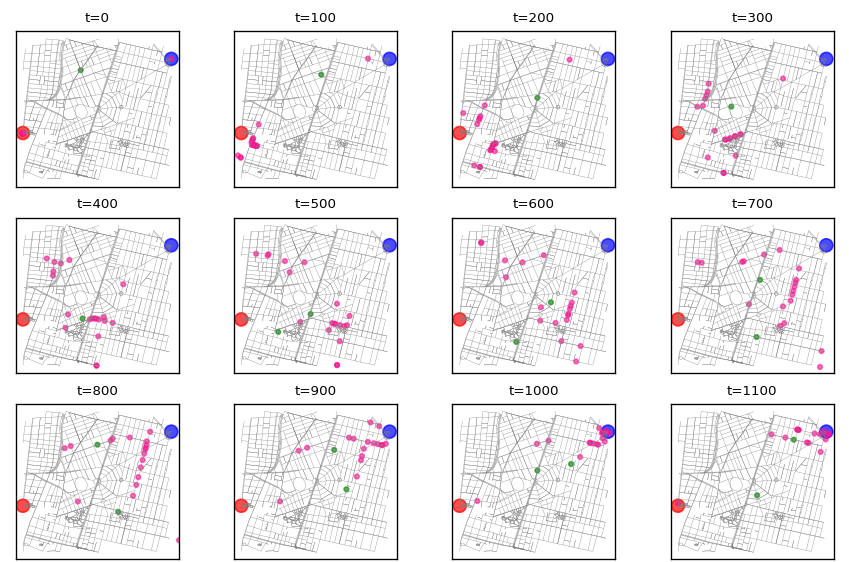
Create simulations of mobile agents, to be run on real-world maps. Like the game of tag described in the docs, some of whose frames are shown below.
- The Road Agent framework is distributed with two router alternatives:
NXRouter, wich uses shortest paths computed with the NetworkX library.
BRouter wich uses a BRouter server to query routes.
NXRouter is simpler but easier to run. BRouter is very robust but it requires the installation and running of the BRouter server which is a java program and maybe a long download, but routes are more realistic.
Read the full documentation.


Short example simulation
This is a veery short stub just to show the main feature of the agent class, which is to navigate a map, in this case using routes computed using NetworkX’s shortest_path.
To create a simulation one must extend the Agent class with the behaviours under study. This example just does an empty extension.
A more interesting simulation is included in this Jupyter Notebook.
Maybe this binder will work:

from LatLon import LatLon
from road_agent import Agent
from road_agent.router import NXRouter
import osmnx as ox

G = ox.graph_from_point((19.3838,-99.1758), distance=1000)
router = NXRouter(G)
r = router.get_route(points=points, speed=3)

# extend Agent class to code behaviours specific to your mobile agent
class Bike(Agent):
    pass

point = LatLon(19.3881769, -99.1794493)
dest = LatLon(19.3858363, -99.1767216)

# create bike instance
b = Bike(point=point, dest=dest)

# create route using NetworkX
b.update_route()

# traverse agent's route, step by step
for t in range(len(b.route)):
    b.step()
Installation
Install library using pip:
$ pip install road-agent
Install optional dependency: BRouter
Agents may use BRouter for routing, which can use several different profiles for routing and is specially good creating routes for riding bikes. It is a java program, which runs in a web server. Here’s how to install a local server.
BRouters needs data files for its routing algorithm. Download data files (rd5) into segments4 dir. You may copy-paste these steps to download them all, but beware: it’s about 5.2 gigabytes:
mkdir -p ~/opt/brouter/segments4
cd ~/opt/brouter/segments4
wget https://gitlab.com/rgarcia-herrera/road-agent/raw/master/get_segments.sh
wget https://gitlab.com/rgarcia-herrera/road-agent/raw/master/segments.txt
chmod +x get_segments.sh
./get_segments.sh
Download and unzip BRouter (replace ~/opt/ with your preferred install dir and 1_4_11 with latest version):
cd ~/opt/brouter
wget http://brouter.de/brouter_bin/brouter_1_4_11.zip
unzip brouter_1_4_11.zip
chmod +x ./standalone/server.sh
Run server.sh to start BRouter server.
1 maintainer

Metadata
1 maintainer
Release files for road-agent 1.0.1
For a detailed explanation of source distributions (sdists) and built distributions (wheels), please see the package formats documentation.
Source distribution (sdist)
| File | Size | Uploaded | Provenance | Actions |
|---|---|---|---|---|
| road_agent-1.0.1.tar.gz | 6.4 kB | Without provenance | Details for road_agent-1.0.1.tar.gz |
Built distribution (wheel)
| File | Interpreter | ABI | Platform | Actions Reset |
|---|---|---|---|---|
| road_agent-1.0.1-py2-none-any.whl | Python 2 | none | any | Details for road_agent-1.0.1-py2-none-any.whl |
Total release size: 25.3 kB
Release files / road_agent-1.0.1.tar.gz
| Download URL | road_agent-1.0.1.tar.gz |
|---|---|
| Size | 6.4 kB |
| Tags | Source |
|
SHA-256 checksum How to use checksums |
c8c023a4edb3fa5a53503cf825fd402c444cb16d15ab4406098d301a51a46007
|
|
BLAKE2b-256 checksum How to use checksums |
1b19a219df760a7de48262bf1383b8fc2cbe67d0c982e408c51d7622b380a5c6
|
| Upload date | |
|
Uploaded using Trusted Publishing? What is trusted publishing? |
No |
| Uploaded via |
twine/1.13.0 pkginfo/1.5.0.1 requests/2.21.0 setuptools/41.0.0 requests-toolbelt/0.9.1 tqdm/4.31.1 CPython/2.7.13
|
Release files / road_agent-1.0.1-py2-none-any.whl
| Download URL | road_agent-1.0.1-py2-none-any.whl |
|---|---|
| Size | 19.0 kB |
| Tags | Python 2 |
|
SHA-256 checksum How to use checksums |
730f23209ffa8a202df24d0908bd61bf407e64aaee6046a94d2758bdb63188a8
|
|
BLAKE2b-256 checksum How to use checksums |
ba14c6fa416cac4706530611af62f230f31f73f422bb1a17a37c72a90d22bb14
|
| Upload date | |
|
Uploaded using Trusted Publishing? What is trusted publishing? |
No |
| Uploaded via |
twine/1.13.0 pkginfo/1.5.0.1 requests/2.21.0 setuptools/41.0.0 requests-toolbelt/0.9.1 tqdm/4.31.1 CPython/2.7.13
|
Security for road-agent 1.0.1
Provenance
Provenance describes where a file came from. On PyPI, provenance is shared via attestations, which provide a verifiable record of the build or publishing details. View details, limitations and caveats.
No provenance found
None of the files in this release were uploaded with provenance metadata.
A note on package security
PyPI is a repository for distributing packages, not a service for auditing them. While third-party security researchers and our staff do their best to detect and remove malicious packages, PyPI cannot guarantee the quality, security or suitability of any given package.
To learn more about protecting yourself from malicious actors, visit our package security documentation.














