
This release is a pre-release and may not be stable for production use.
Robinhood Portfolio Manager




Description
A python CLI that allows a Robinhood user to easily allocate and divide his capital on different stocks.
Disclaimer
This tool is intended to simplify and enhance user experience. It does not in any means convey financial advice, and the author is not responsible for any loss that might incur due to it's usage. USE AT YOUR OWN RISK.
Installation
Use the package manager pip to install robinhood-portfolio-manager.
$ pip install robinhood-portfolio-manager
Getting Started
To be able to login to Robinhood, you will need to enable multi-factor authentication and use the MFA code while logging in. Refer to this section of robin-stocks.
For convenience, you can add your username, password, and MFA code as environment variables using the following names:
ROBINHOOD_USERNAME ROBINHOOD_PASSWORD ROBINHOOD_TOTP
If you prefer to provide the credentials at runtime, you can do so using the -c or --credentials flag:
$ ropoma --credentials <username> <password> <totp>
Do not confuse the MFA code with the 6 digit authentication code. They are different.
First run
Before you can use the script, you will need to create a watchlist in Robinhood called Portfolio (case sensitive), that will hold all the stocks you would to have as part of your portfolio.
The first time you run the script, you will need to use the -g [option] or --generate_file [option] flag. This will generate an excel file (recommended for better styling and viewing) or a CSV file. To generate an excel file, run:
$ ropoma --generate_file excel
or:
$ ropoma --generate_file csv
to generate a CSV file.
Note: If both excel and CSV file exist, precedency will be given to the excel file.
After generating the excel/CSV file, you will have to configure the allocation for each stock. The generated file can be found in the Documents directory on Windows and in the user's home folder on Linux/Mac.
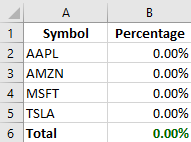
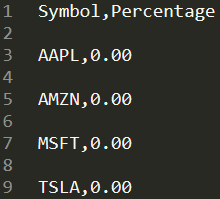
Example
Let's say I would like my portfolio to consist of 4 different stocks:
AAPL AMZN MSFT TSLA
I would start by creating a watchlist on Robinhood called Portfolio that would hold those 4 stocks.
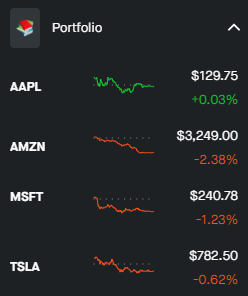
I would then run:
$ ropoma --generate_file excel
to generate an excel file, or:
$ ropoma --generate_file csv
to generate a CSV file.
The generated file can be found in the Documents directory on Windows and in the user's home folder on Linux/Mac.
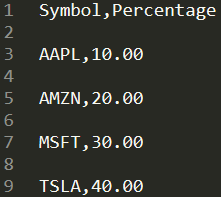
I would like to allocate 10% to AAPL, 20% to AMZN, 30% to MSFT, and finally, 40% to TSLA. Therefore, I would configure my excel/CSV file as follows:
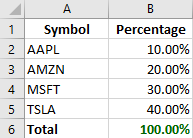
Finally, I would like rebalance my portfolio to match my allocations. To do so, I would run:
$ ropoma --rebalance --simulation
It's good practice to run the tool using the -s or --simulation flag. This allows me to check the log file and make sure that the buy/sell orders are correct. The log file will be created in the same directory as excel/CSV file, and will be named Robinhood.log.

If the log file looks good, I would then re-run the script without the --simulation flag to execute the buy/sell orders.
$ ropoma --rebalance
For other supported functions, check the usage section.
Usage
To view all available functions:
$ ropoma -h
$ ropoma --help
To generate excel file:
$ ropoma -g excel
$ ropoma --generate_file excel
To generate csv file:
$ ropoma -g csv
$ ropoma --generate_file excel
To get planned investments (per the excel/CSV file):
$ ropoma -n
$ ropoma --get_new_investments
To get current investments (stocks currently held):
$ ropoma -o
$ ropoma -get_current_investments
To sell all stocks currently held:
$ ropoma -p
$ ropoma --sell_all_stocks
To cancel all open orders:
$ ropoma -a all
$ ropoma --cancel_open_orders all
To cancel all open sell orders:
$ ropoma -a sell
$ ropoma --cancel_open_orders sell
To cancel all open buy orders:
$ ropoma -a buy
$ ropoma --cancel_open_orders buy
For developers:
To execute the test() function:
$ ropoma -d
$ ropoma --debug
The test function can be overwritten to test sub-functions of the module.
Contributing
Pull requests are welcome. For major changes, please open an issue first to discuss what you would like to change.
Please make sure to update tests as appropriate.
Donations


License

1 maintainer

Metadata
1 maintainer
Release files for robinhood-portfolio-manager 0.0b10
For a detailed explanation of source distributions (sdists) and built distributions (wheels), please see the package formats documentation.
Source distribution (sdist)
| File | Size | Uploaded | |
|---|---|---|---|
| robinhood_portfolio_manager-0.0b10.tar.gz | 11.6 kB | Details |
Built distribution (wheel)
| File | Interpreter | ABI | Platform | Reset |
|---|---|---|---|---|
| robinhood_portfolio_manager-0.0b10-py3-none-any.whl | Python 3 | none | any | Details |
Total release size: 21.7 kB
Release files / robinhood_portfolio_manager-0.0b10.tar.gz
| Download URL | robinhood_portfolio_manager-0.0b10.tar.gz |
|---|---|
| Size | 11.6 kB |
| Tags | Source |
|
SHA-256 checksum How to use checksums |
3c5b6cedccc7693a03935dcfbf6c93b5b9a9dc5725b6622e02cffa7e4a0b6b5d
|
|
BLAKE2b-256 checksum How to use checksums |
e05d51f1d69c4069515a289ffc975b42ef22e9c00b0c561959536bad2c077f4b
|
| Upload date | |
|
Uploaded using Trusted Publishing? What is trusted publishing? |
No |
| Uploaded via |
twine/3.3.0 pkginfo/1.7.0 requests/2.24.0 setuptools/53.0.0 requests-toolbelt/0.9.1 tqdm/4.57.0 CPython/3.9.0
|
Release files / robinhood_portfolio_manager-0.0b10-py3-none-any.whl
| Download URL | robinhood_portfolio_manager-0.0b10-py3-none-any.whl |
|---|---|
| Size | 10.1 kB |
| Tags | Python 3 |
|
SHA-256 checksum How to use checksums |
5779891691e2f3c8501ec31a5875566c0b007baf394210223f7e34ea312144dc
|
|
BLAKE2b-256 checksum How to use checksums |
3cae5f24507990af3bb97804914bfd12ba103d133901d49b03ab9ec32ad08caf
|
| Upload date | |
|
Uploaded using Trusted Publishing? What is trusted publishing? |
No |
| Uploaded via |
twine/3.3.0 pkginfo/1.7.0 requests/2.24.0 setuptools/53.0.0 requests-toolbelt/0.9.1 tqdm/4.57.0 CPython/3.9.0
|














