
This release is a pre-release and may not be stable for production use.
roblox-headless-renderer
See Roblox files without opening Studio.
Pictures and plain facts about your UI and 3D builds, in seconds, from the command line.




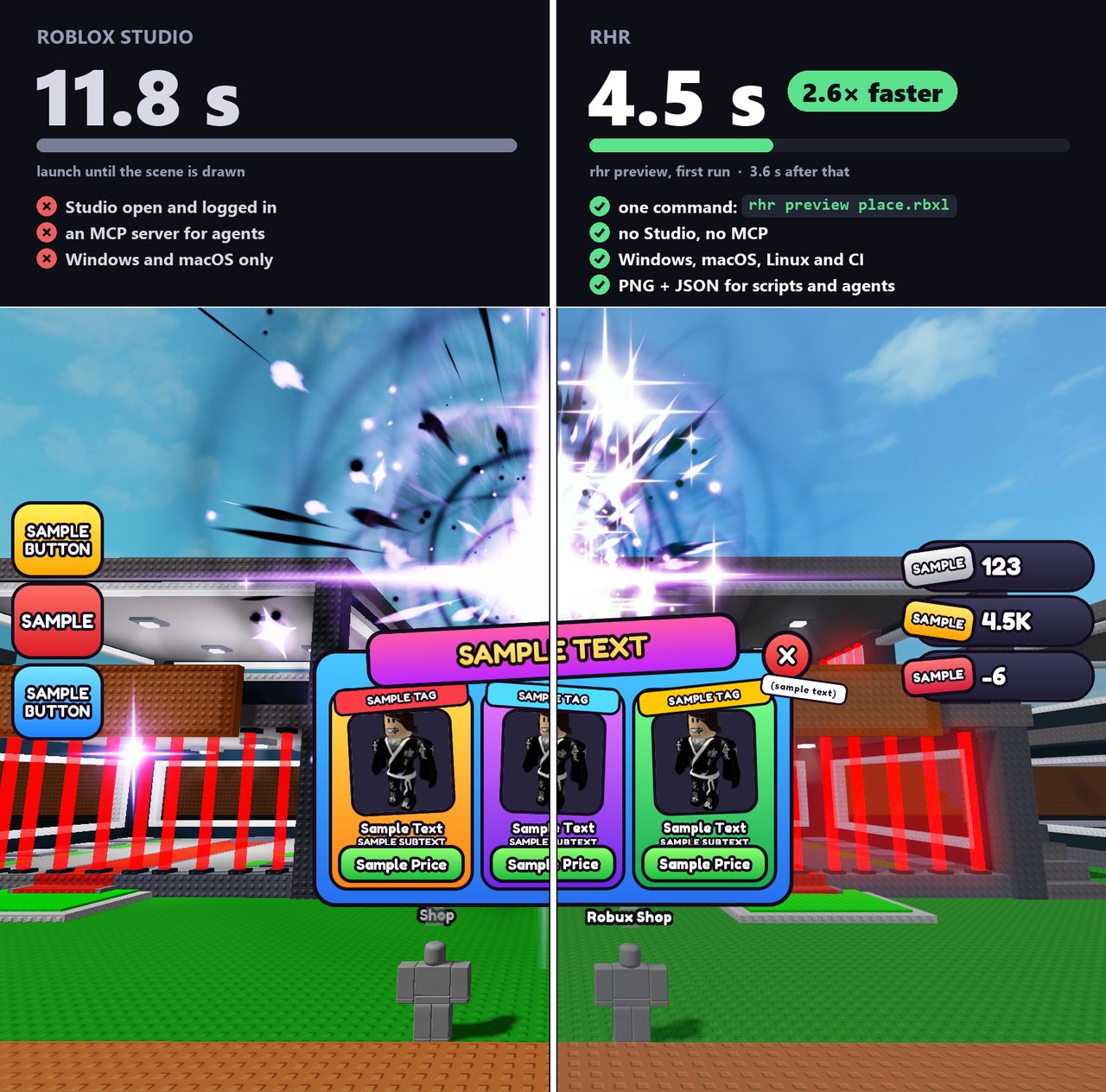
Point rhr at a Roblox file (.rbxm, .rbxmx, .rbxl, .rbxlx), a Rojo project, a UI
story or a Creator Store link, and it tells you what's there: a PNG to look at, and JSON
that says where everything is, what's clickable, and what looks broken.
It was built for AI agents that make Roblox games and need to check their own work, and it's just as handy when you want a quick look at a file, a free model or a pull request without starting Studio. It runs on Windows, macOS and Linux, including CI and cloud sandboxes: no display, GPU or running Studio needed.
Quick start
uv tool install roblox-headless-renderer # or: pip install --pre roblox-headless-renderer
Then, on any file of yours:
rhr ui     MyGame.rbxl --out ui.png          # the screen UI, as a PNG
rhr scene  MyGame.rbxl --out world.png       # the 3D world, as a PNG
rhr check  MyGame.rbxl                       # UI mistakes a player would notice
That's it: no setup step. The first run fetches anything missing (see
what gets downloaded). Just want to try it once? uvx roblox-headless-renderer ui MyGui.rbxmx --out gui.png
runs it without installing anything.
This is the 1.0 release candidate. It's fast and ready to use, and we'd love your feedback before the final 1.0: open an issue, ideally with a small file that shows the problem.
What it can tell you
| You want to know… | Run |
|---|---|
| What does my UI look like? | rhr ui game.rbxl --out ui.png |
| …just the shop screen, cropped? | rhr ui game.rbxl --only StarterGui/Shop --fit --out shop.png |
| …on a phone? | rhr ui game.rbxl --device phone --out phone.png |
| Is anything broken? Text spilling out, buttons off screen, unreadable colours? | rhr check game.rbxl |
| Where exactly is every element? | rhr layout game.rbxl |
| What gets clicked at this pixel? | rhr hitmap game.rbxl --at 960,540 |
| What does my build look like? | rhr scene game.rbxl --view iso --out build.png |
| …from several sides at once? | rhr scene game.rbxl --views iso,front,top --out build.png |
| The world, in-world UI and screen UI together? | rhr preview game.rbxl --out frame.png |
| Can I fly around it? | rhr view game.rbxl (opens a page that redraws when the file changes) |
| Is this free model safe to insert? | rhr inspect <asset id or link> (flags backdoors, loadstring, webhooks…) |
| Icons for a folder of pets or items? | rhr icons models/ --out-dir icons |
| UI built with React-lua, Fusion or plain Luau? | rhr ui src/Shop.story.luau (any UI Labs, Hoarcekat or Flipbook story) |
Anywhere a file goes, you can also pass a Rojo project folder or a Roblox asset id
or link. rhr --help and rhr <command> --help list every option.
An example
The repo's examples/shop.rbxmx
has one deliberate mistake. rhr check examples/shop.rbxmx finds it:
{
  "check": "text-wider-than-box",
  "detail": "text is 413px wide in a 148px box with TextWrapped off: it spills out",
  "paths": ["ShopGui/Shop/Items/Item5/ItemName"],
  "severity": "warning"
}
For AI agents
rhr is a plain command-line tool: an agent runs it from its shell, and it costs nothing
in the agent's context until it's used. Every JSON output is small, carries a schema
name, and uses the same paths you pass back in.
Claude Code and Codex: install the skill, and the agent knows when and how to use it.
rhr skill --install .claude/skills # this project; ~/.claude/skills for all of them
Any other agent: paste this into your project's AGENTS.md.
## Seeing the UI and builds
Use `rhr` (roblox-headless-renderer) to check Roblox UI and 3D work without Studio:
`rhr check <target>` after each edit (exit 1 = error findings; `--baseline before.json`
for only what the edit added), `rhr layout <target> --path <screen>` for rects,
`rhr ui <target> --only <screen> --fit --max-size 800 --out shot.png` to look, and
`rhr check <target> --devices all` before done. The target is the project, a
`*.story.luau`, or the place file when the UI is saved in Studio. `rhr skill` prints
the full guide.
The full agent guide, with which command answers which question and how far to trust
each one, is docs/AGENTS.md.
How accurate is it?
- UI layout matches Studio. Positions and sizes are within 2 px of Studio's on every test place.
- Pictures are previews. They're close enough to spot mistakes, not a pixel copy of
Roblox. Anything
rhrcan't draw faithfully, it says so in its output instead of guessing quietly. Here's what's approximated. - It doesn't run your game. Scripts, physics and animation don't run, so you see
files as they're saved. (Effects are the exception:
rhrplays common VFX setups itself and shows them at their fullest moment.)
Details
Setup details: what gets downloaded, and the Studio login
You need Python 3.12+. The first command that needs one of these downloads it once
into rhr's cache and says so:
- Lune (reads XML files and fetches assets) and Rojo (for Rojo projects). Copies
already on your
PATHare used first. - A browser for 3D.
rhruses the Chrome, Edge, Brave or Chromium you already have, or downloads a small headless one (about 100 MB).
rhr setup fetches the tools ahead of time (--browser for the browser too), and
rhr doctor shows what was found. --offline or RHR_OFFLINE=1 never downloads anything.
Studio login. If Roblox Studio is installed and signed in (it doesn't have to be
running), rhr uses it to download the meshes, images and material textures a file
needs, the same way Studio does. Your login never leaves the machine except to Roblox,
and rhr never prints or stores it.
No Studio (CI, a cloud agent)? Set RHR_ROBLOX_API_KEY to an Open Cloud user key
with the legacy-asset:manage permission. With neither, everything still works; some
meshes become boxes and materials use look-alike textures, and rhr tells you.
Bare Linux needs a few system libraries. On Ubuntu:
libegl1 libgl1, plus for the downloaded browser libnss3 libatk-bridge2.0-0t64 libgbm1 libxkbcommon0 libxcomposite1 libxdamage1 libxrandr2 libcups2t64 libasound2t64 libpango-1.0-0.
Good to know: closed screens, place files, stories and more
- Screens your code opens. UI is drawn as saved, so a shop that starts hidden isn't
drawn.
--show <path>opens one, and--only <path>draws it alone. - Place files. Only StarterGui's screens are drawn; templates kept in
ReplicatedStorage are listed, and
--all-guisdraws them too. - The top bar. UI is laid out below Roblox's 58 px top bar, as in a running game.
--topbar-height 0matches Studio's edit view. - Stories run your code, with your project's modules. That's fine for your own project; don't run stories from untrusted pull requests in CI outside a sandbox.
- Rojo projects that only map code hold no UI; point
rhrat the place file instead. The error says so. - Exit codes:
0done,1only fromcheck(error findings),2failed or had nothing to draw, with the reason on stderr. - Cache: everything goes to one folder, kept under 2 GB.
rhr cacheshows it,RHR_CACHE_DIRmoves it.
Speed: why it's quick, and how to make it quicker
The first command starts a small background server that keeps everything loaded, so
later commands on the same file cost little more than the work itself. It updates
itself when rhr is upgraded and stops after 20 idle minutes (rhr server stop stops
it now). 3D renders reuse a warm browser the same way.
rhr batch check a.rbxl + layout a.rbxl + ui a.rbxlruns several commands in one go.rhr scene --views iso,front,topdraws several views from one build.RHR_PROFILE=1prints where the time went.
More in docs/performance.md.
Contributing
Bug reports with a small file attached are the most useful thing you can send.
To work on rhr itself:
git clone https://github.com/TabooHarmony/roblox-headless-renderer && cd roblox-headless-renderer
python -m venv .venv && . .venv/bin/activate      # Windows: .venv\Scripts\activate
pip install -e ".[dev]" && rhr setup
python -m pytest -m smoke                           # a quick check; drop -m smoke for everything
docs/GOAL.md describes where the project is heading, and
docs/interface-1.0.md is the full list of commands, outputs and settings.
License
Apache 2.0. Bundled third-party code and fonts are listed in
THIRD_PARTY_NOTICES.md.
Not affiliated with or endorsed by Roblox Corporation. Roblox is a trademark of Roblox Corporation.
1 maintainer

Metadata
1 maintainer
Release files for roblox-headless-renderer 1.0.0rc1
For a detailed explanation of source distributions (sdists) and built distributions (wheels), please see the package formats documentation.
Source distribution (sdist)
| File | Size | Uploaded | |
|---|---|---|---|
| roblox_headless_renderer-1.0.0rc1.tar.gz | 12.4 MB | Details |
Built distribution (wheel)
| File | Interpreter | ABI | Platform | Reset |
|---|---|---|---|---|
| roblox_headless_renderer-1.0.0rc1-py3-none-any.whl | Python 3 | none | any | Details |
Total release size: 24.8 MB
Release files / roblox_headless_renderer-1.0.0rc1.tar.gz
| Download URL | roblox_headless_renderer-1.0.0rc1.tar.gz |
|---|---|
| Size | 12.4 MB |
| Tags | Source |
|
SHA-256 checksum How to use checksums |
d52997e91aa06fa433d61d456faef15baade7df125d8cca322ffcac199001fe3
|
|
BLAKE2b-256 checksum How to use checksums |
aa492cc6c66fca62e84e037840083b8eca868d60249d139a6eae8435c79ab005
|
| Upload date | |
|
Uploaded using Trusted Publishing? What is trusted publishing? |
Yes |
| Uploaded via |
twine/7.0.0 CPython/3.13.14
|
Provenance
Provenance describes where a file came from. On PyPI, provenance is shared via attestations, which provide a verifiable record of the build or publishing details. View details, limitations and caveats.


PyPI Publish Attestation
PyPI verified that this artifact, at this checksum, originated from the publisher listed below.
Signed by GitHub Actions, verified by PyPI on Sep 29, 2026.
Transparency logRelease files / roblox_headless_renderer-1.0.0rc1-py3-none-any.whl
| Download URL | roblox_headless_renderer-1.0.0rc1-py3-none-any.whl |
|---|---|
| Size | 12.4 MB |
| Tags | Python 3 |
|
SHA-256 checksum How to use checksums |
8959c522d3ade550bbddb47812e6f3f32585d07883e3ac28216919232c91762c
|
|
BLAKE2b-256 checksum How to use checksums |
478ac2153b226ce75d4d3cb5ab311c7b167ba58fbedfae28af3190ccc417b0c0
|
| Upload date | |
|
Uploaded using Trusted Publishing? What is trusted publishing? |
Yes |
| Uploaded via |
twine/7.0.0 CPython/3.13.14
|
Provenance
Provenance describes where a file came from. On PyPI, provenance is shared via attestations, which provide a verifiable record of the build or publishing details. View details, limitations and caveats.
PyPI Publish Attestation
PyPI verified that this artifact, at this checksum, originated from the publisher listed below.
Signed by GitHub Actions, verified by PyPI on Sep 29, 2026.
Transparency log












