
Set up your embodied LLM agent same easiness as you set up normal agents in CrewAI or Autogen
Verified details
These details have been verified by PyPIProject links
GitHub Statistics
Maintainers

Project description





Create LLM agent for your robot. Connect movement tools, VLA policies and sensor scans just in a few lines of code.
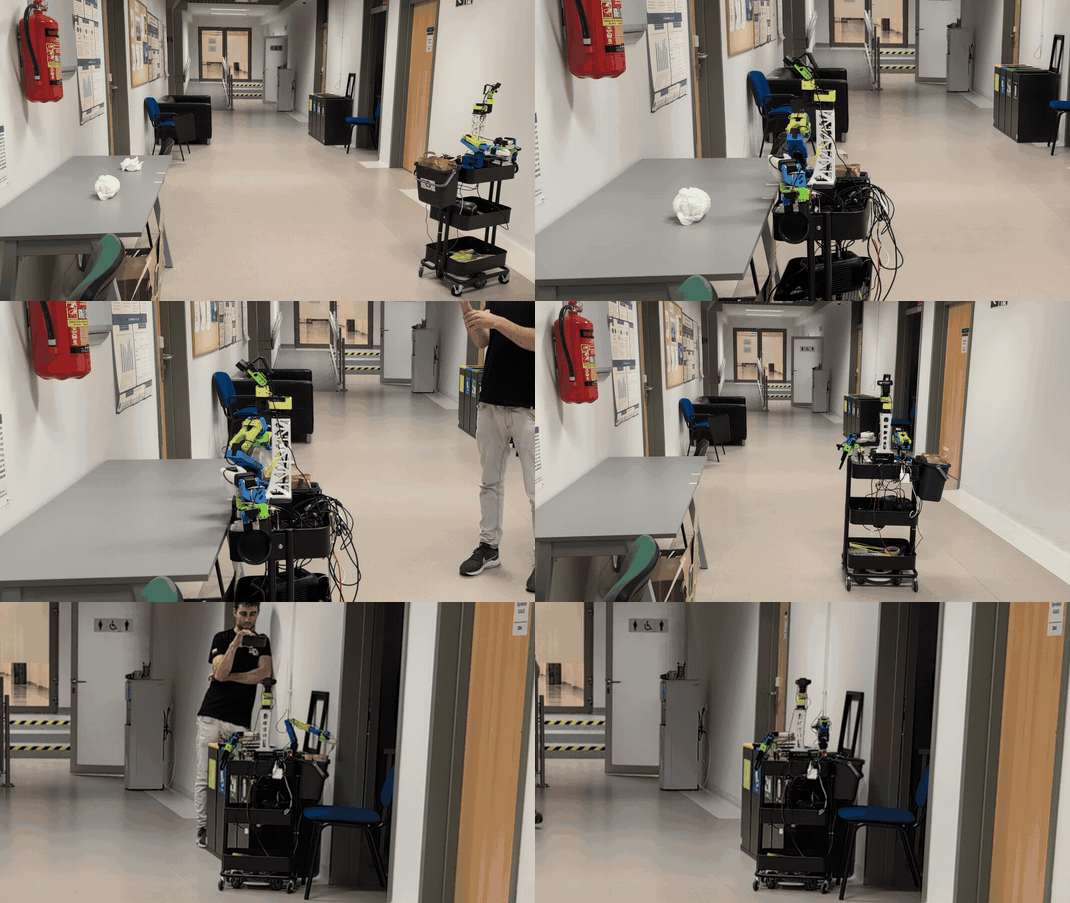
RoboCrew agent cleaning up a table.
🚀 Quick Start
Run on your robot:
pip install robocrew
Start GUI app with:
robocrew-gui
✨ Features
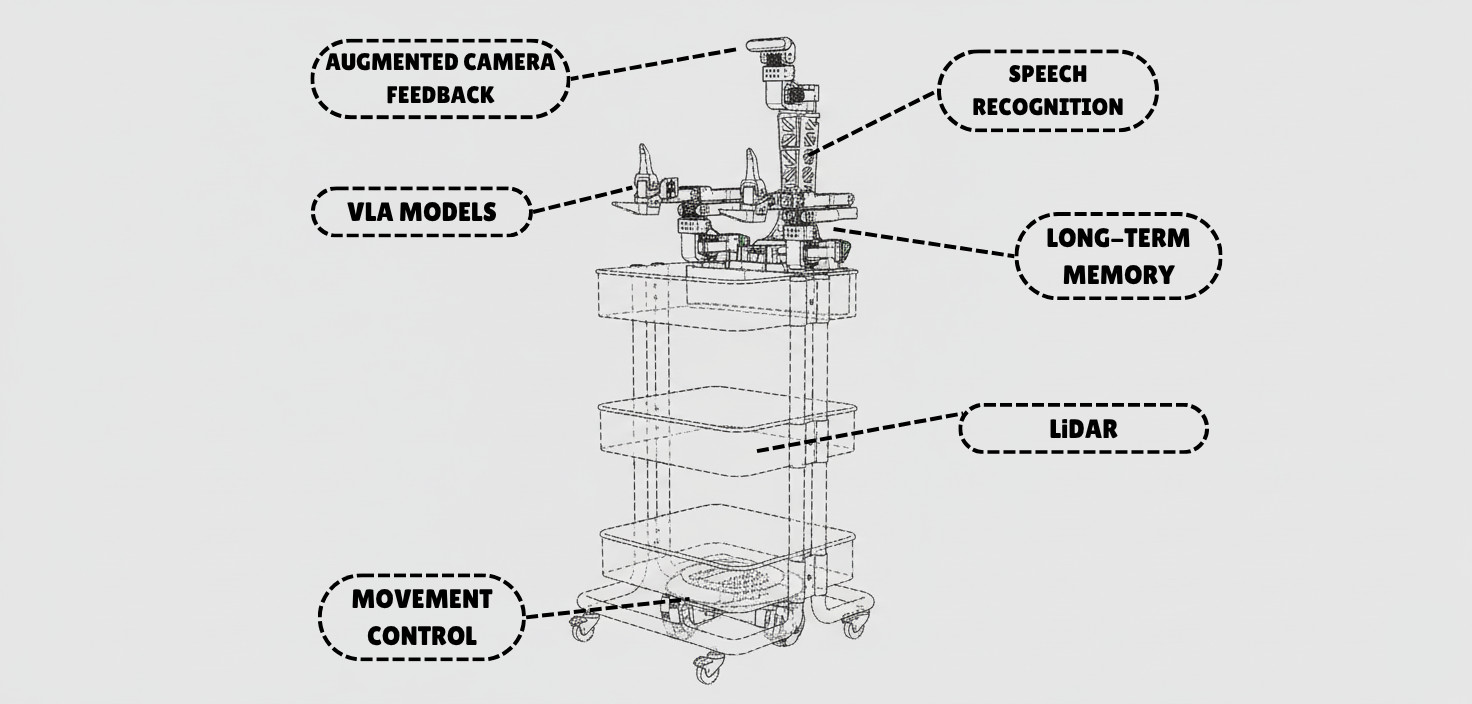
- 🚗 Movement - Pre-built wheel controls for mobile robots
- 🦾 Manipulation - VLA models as tools for arms control
- 👁️ Vision - Camera feed with image augmentation for better spatial understanding
- 🎤 Voice - Wake-word activated voice commands and TTS responses
- 🗺️ LiDAR - Top-down mapping with LiDAR sensor
- 🧠 Intelligence - Multi-agent control provides autonomy in decision making
🎨 Supported Robots
- ✅ XLeRobot - Full support for all features
- 🥝 LeKiwi - Use XLeRobot code (compatible platform)
- 🚙 Earth Rover mini plus - Full support
- 🔜 More robot platforms coming soon! Request your platform →
🎯 How It Works
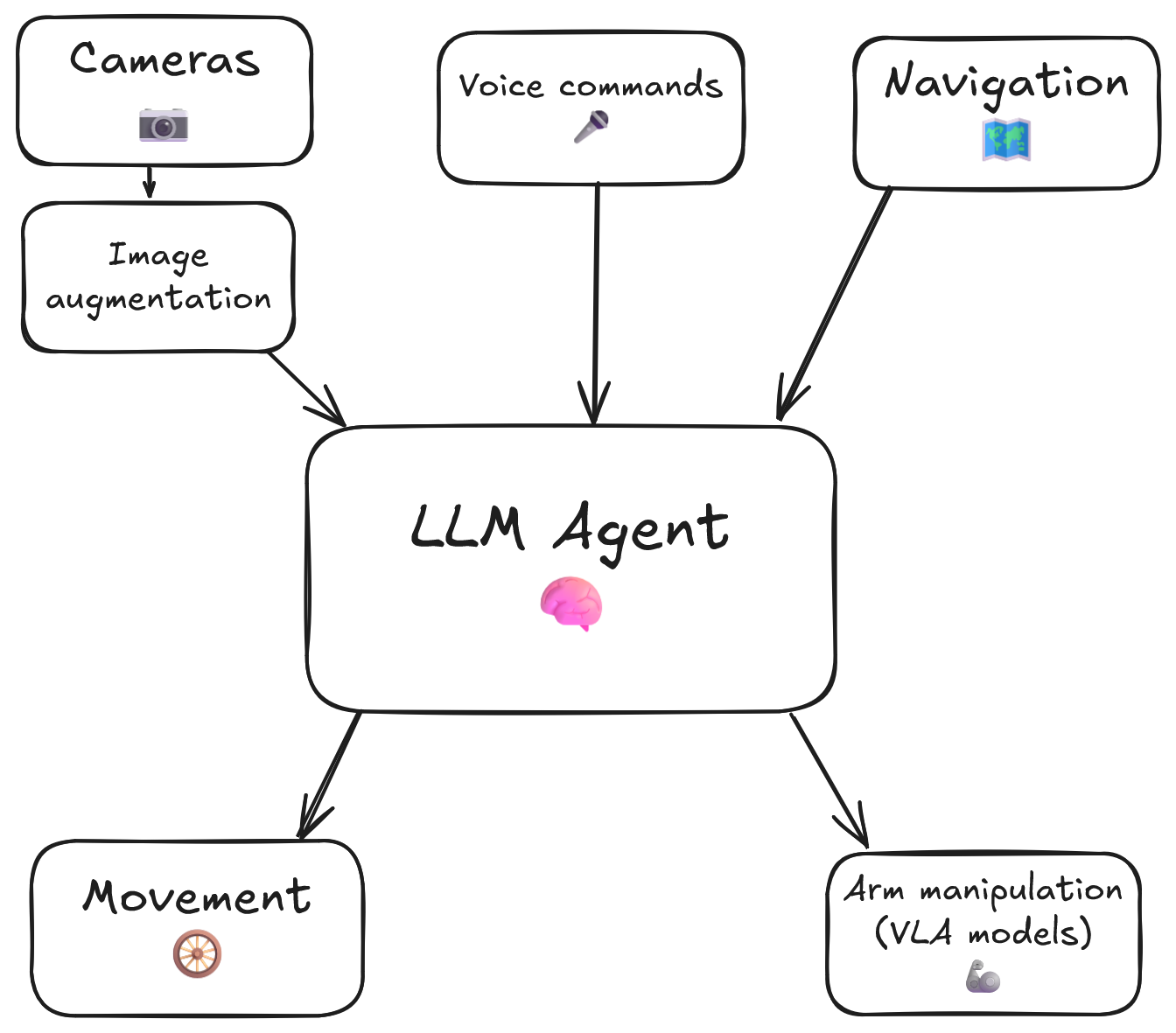
The RoboCrew Intelligence Loop:
- 👂 Input - Voice commands, text tasks, or autonomous operation
- 🧠 LLM Processing - LLM analyzes the task and environment...
- 🛠️ Tool Selection - ...and chooses appropriate tools (move, turn, grab an apple, etc.)
- 🤖 Robot Actions - Wheels and arms execute commands
- 📹 Visual Feedback - Cameras capture results with augmented overlay
- 🔄 Repeat - LLM evaluates results and adjusts strategy
📱 Scripts to Use:
To gain full control over RoboCrew features, you can create your own script. Simplest example:
from robocrew.core.camera import RobotCamera
from robocrew.core.LLMAgent import LLMAgent
from robocrew.robots.XLeRobot.tools import create_move_forward, create_turn_right, create_turn_left
from robocrew.robots.XLeRobot.servo_controls import ServoControler

# 📷 Set up main camera
main_camera = RobotCamera("/dev/camera_center")  # camera usb port Eg: /dev/video0

# 🎛️ Set up servo controller
right_arm_wheel_usb = "/dev/arm_right"  # provide your right arm usb port. Eg: /dev/ttyACM1
servo_controler = ServoControler(right_arm_wheel_usb=right_arm_wheel_usb)

# 🛠️ Set up tools
move_forward = create_move_forward(servo_controler)
turn_left = create_turn_left(servo_controler)
turn_right = create_turn_right(servo_controler)

# 🤖 Initialize agent
agent = LLMAgent(
    model="google_genai:gemini-3-flash-preview",
    tools=[move_forward, turn_left, turn_right],
    main_camera=main_camera,
    servo_controler=servo_controler,
)

# 🎯 Give it a task and go!
agent.task = "Approach a human."
agent.go()
🎤 Enable Listening and Speaking
Use voice to tell robot what to do.
📖 Docs: https://grigorij-dudnik.github.io/RoboCrew-docs/guides/examples/audio/
💻 Code example: examples/2_xlerobot_listening_and_speaking.py
🦾 Add VLA Policy as a Tool
Let's make our robot manipulate objects with its arms!
📖 Docs: https://grigorij-dudnik.github.io/RoboCrew-docs/guides/examples/vla-as-tools/
💻 Code example: examples/3_xlerobot_arm_manipulation.py
🧠 Increase intelligence with multiagent communication:
One agent plans mission, another controls robot.
📖 Docs: https://grigorij-dudnik.github.io/RoboCrew-docs/guides/examples/multiagent/
💻 Code example: examples/4_xlerobot_multiagent_cooperation.py
💬 Community & Support
- 💭 Join our Discord - Get help, share projects, discuss features
- 📖 Read the Docs - Comprehensive guides and API reference
- 🐛 Report Issues - Found a bug? Let us know!
- ⭐ Star on GitHub - Show your support!
❤️ Special thanks to all contributors and early adopters!
Project details
Verified details
These details have been verified by PyPIProject links
GitHub Statistics
Maintainers
Release history Release notifications | RSS feed


Download files
Download the file for your platform. If you're not sure which to choose, learn more about installing packages.
Source Distribution
Built Distribution
Filter files by name, interpreter, ABI, and platform.
If you're not sure about the file name format, learn more about wheel file names.
Copy a direct link to the current filters
File details
Details for the file robocrew-0.2.1.tar.gz.
File metadata
- Download URL: robocrew-0.2.1.tar.gz
- Upload date:
- Size: 66.2 kB
- Tags: Source
- Uploaded using Trusted Publishing? Yes
- Uploaded via: twine/6.1.0 CPython/3.13.12
File hashes
| Algorithm | Hash digest | |
|---|---|---|
| SHA256 |
dea82cc59edfcf3f36067f82aa8db741ebd6b80ce852df20cecc1b4d265eeb1f
|
|
| MD5 |
4e1ff43550937ca236057f7df86c5acb
|
|
| BLAKE2b-256 |
9be46353b83e0ba67291fb3ea5e760ace671d4dace4554180fc2d32207572a46
|
Provenance
The following attestation bundles were made for robocrew-0.2.1.tar.gz:
Publisher:
publish.yml on Grigorij-Dudnik/RoboCrew
-
Statement:
-
Statement type:
https://in-toto.io/Statement/v1 -
Predicate type:
https://docs.pypi.org/attestations/publish/v1 -
Subject name:
robocrew-0.2.1.tar.gz -
Subject digest:
dea82cc59edfcf3f36067f82aa8db741ebd6b80ce852df20cecc1b4d265eeb1f - Sigstore transparency entry: 1338642000
- Sigstore integration time:
-
Permalink:
Grigorij-Dudnik/RoboCrew@f7584c6467c9d714dd066b3a388c409a1bd0658a -
Branch / Tag:
refs/tags/v0.2.1 - Owner: https://github.com/Grigorij-Dudnik
-
Access:
public
-
Token Issuer:
https://token.actions.githubusercontent.com -
Runner Environment:
github-hosted -
Publication workflow:
publish.yml@f7584c6467c9d714dd066b3a388c409a1bd0658a -
Trigger Event:
push
-
Statement type:
File details
Details for the file robocrew-0.2.1-py3-none-any.whl.
File metadata
- Download URL: robocrew-0.2.1-py3-none-any.whl
- Upload date:
- Size: 68.9 kB
- Tags: Python 3
- Uploaded using Trusted Publishing? Yes
- Uploaded via: twine/6.1.0 CPython/3.13.12
File hashes
| Algorithm | Hash digest | |
|---|---|---|
| SHA256 |
321238a201f50106fdcfb53fcd42e406401296d49ab9ca81adfda3e972c7546d
|
|
| MD5 |
806fa15af262c389a4374705b3514bb2
|
|
| BLAKE2b-256 |
88baddad9c147a4d8dfa8c6778d103f0493a07f83531f77850601d744aa4abaf
|
Provenance
The following attestation bundles were made for robocrew-0.2.1-py3-none-any.whl:
Publisher:
publish.yml on Grigorij-Dudnik/RoboCrew
-
Statement:
-
Statement type:
https://in-toto.io/Statement/v1 -
Predicate type:
https://docs.pypi.org/attestations/publish/v1 -
Subject name:
robocrew-0.2.1-py3-none-any.whl -
Subject digest:
321238a201f50106fdcfb53fcd42e406401296d49ab9ca81adfda3e972c7546d - Sigstore transparency entry: 1338642011
- Sigstore integration time:
-
Permalink:
Grigorij-Dudnik/RoboCrew@f7584c6467c9d714dd066b3a388c409a1bd0658a -
Branch / Tag:
refs/tags/v0.2.1 - Owner: https://github.com/Grigorij-Dudnik
-
Access:
public
-
Token Issuer:
https://token.actions.githubusercontent.com -
Runner Environment:
github-hosted -
Publication workflow:
publish.yml@f7584c6467c9d714dd066b3a388c409a1bd0658a -
Trigger Event:
push
-
Statement type:






