
roboreg




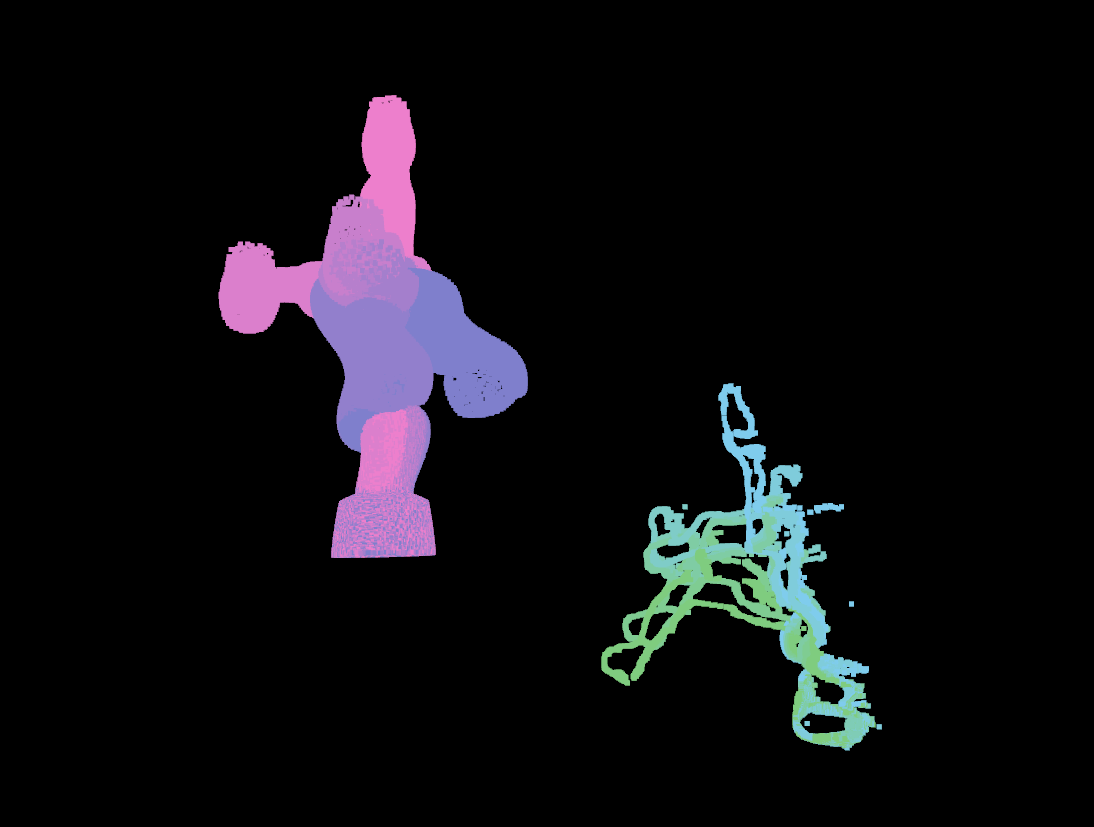
Eye-to-hand calibration from RGB-D images using robot mesh as calibration target.
| Unregistered | Registered |
|---|---|
 |
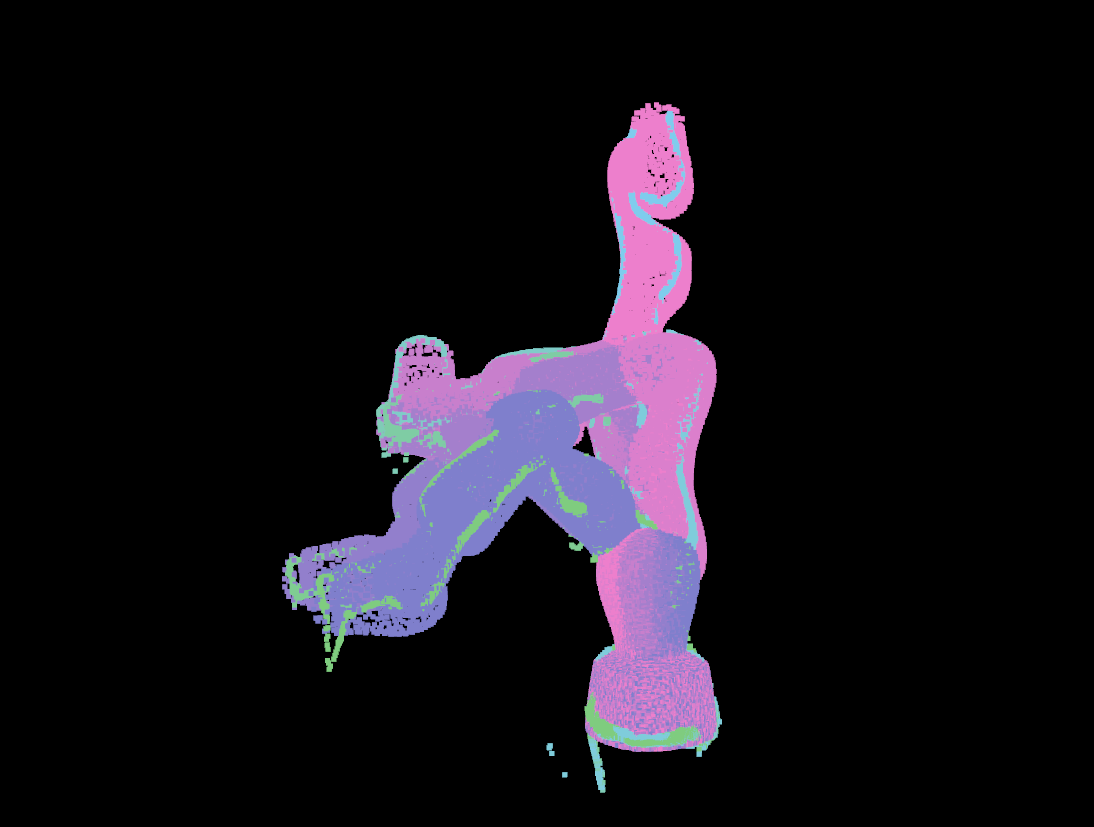 |
Table of Contents
Installation
Two install options are provided:
Pip (Requires CUDA Toolkit Installation)
[!NOTE] During runtime, CUDA Toolkit is required for the differentiable rendering. If you are planning to do differentiable rendering, see CUDA Toolkit Install Instructions.
To pip intall roboreg, simply run
pip install roboreg
Docker (Comes with CUDA Toolkit)
A sample Docker container is provided for testing purposes. First:
- Install Docker, see Docker Install Instructions
- Install NVIDIA Container Toolkit, see NVIDIA Container Toolkit Install Instructions
Next:
-
Clone this repository
git clone git@github.com:lbr-stack/roboreg.git
-
Build the Docker image (currently only runtime support, i.e. no rendering via compiled kernels)
cd roboreg
docker build \
    -t roboreg:latest \
    -f .docker/Dockerfile \
    --build-arg PYTORCH_VERSION=2.10.0 \
    --build-arg CUDA_VERSION=13.0 \
    .
For CUDA 12.4, use:
docker build \
    -t roboreg:latest \
    -f .docker/Dockerfile \
    --build-arg PYTORCH_VERSION=2.6.0 \
    --build-arg CUDA_VERSION=12.4 \
    .
-
Run container (on Linux host with NVIDIA Container Toolkit)
docker run -it \
    --gpus all \
    --network host \
    --ipc host \
    --volume /tmp/.X11-unix:/tmp/.X11-unix \
    --volume /dev/shm:/dev/shm \
    --volume /dev:/dev --privileged \
    --env DISPLAY \
    --env QT_X11_NO_MITSHM=1 \
    roboreg:latest
Command Line Interface
[!TIP] Examples use sample data under test/assets/lbr_med7_r800. Data is stored via Git Large File Storage (LFS). Data is cloned automatically when
git-lfsis installed. To clone in retrospect:sudo apt install git-lfs git lfs fetch --all git lfs checkout
Segment
This is a required step to generate robot masks.
rr-sam2 \
    --path test/assets/lbr_med7_r800/samples \
    --pattern "left_image_*.png" \
    --n-positive-samples 5 \
    --n-negative-samples 5 \
    --device cuda
Hydra Robust ICP
The Hydra robust ICP implements a point-to-plane ICP registration on a Lie algebra. It does not use rendering and can also be used on CPU.
rr-hydra \
    --camera-info-file test/assets/lbr_med7_r800/samples/left_camera_info.yaml \
    --path test/assets/lbr_med7_r800/samples \
    --mask-pattern mask_sam2_left_image_*.png \
    --depth-pattern depth_*.npy \
    --joint-states-pattern joint_states_*.npy \
    --urdf-path test/assets/lbr_med7_r800/description/lbr_med7_r800.urdf \
    --root-link-name lbr_link_0 \
    --end-link-name lbr_link_7 \
    --number-of-points 5000 \
    --display-results \
    --output-file HT_hydra_robust.npy
Camera Swarm
[!WARNING] On first run,
nvdiffrastcompiles PyTorch extensions. This might use too many resources on some systems (< 16 GB RAM). You can create an environment variableexport MAX_JOBS=1before the first run to limit concurrent compilation. Also refer to this Issue.
The camera swarm optimization can serve for finding an initial guess to Monocular Differentiable Rendering or Stereo Differentiable Rendering.
rr-cam-swarm \
    --collision-meshes \
    --n-cameras 1000 \
    --min-distance 0.5 \
    --max-distance 3.0 \
    --angle-range 3.141 \
    --w 0.7 \
    --c1 1.5 \
    --c2 1.5 \
    --max-iterations 100 \
    --display-progress \
    --urdf-path test/assets/lbr_med7_r800/description/lbr_med7_r800.urdf \
    --root-link-name lbr_link_0 \
    --end-link-name lbr_link_7 \
    --target-reduction 0.8 \
    --scale 0.1 \
    --n-samples 1 \
    --camera-info-file test/assets/lbr_med7_r800/samples/left_camera_info.yaml \
    --path test/assets/lbr_med7_r800/samples \
    --image-pattern left_image_*.png \
    --joint-states-pattern joint_states_*.npy \
    --mask-pattern mask_sam2_left_image_*.png \
    --output-file HT_cam_swarm.npy
Monocular Differentiable Rendering
[!WARNING] On first run,
nvdiffrastcompiles PyTorch extensions. This might use too many resources on some systems (< 16 GB RAM). You can create an environment variableexport MAX_JOBS=1before the first run to limit concurrent compilation. Also refer to this Issue.
This monocular differentiable rendering refinement requires a good initial estimate, as e.g. obtained from Hydra Robust ICP or Camera Swarm
rr-mono-dr \
    --optimizer AdamW \
    --lr 0.03 \
    --max-iterations 400 \
    --convergence-tolerance 0.001 \
    --convergence-patience 100 \
    --scheduler-factor 0.1 \
    --scheduler-patience 40 \
    --scheduler-threshold 0.0001 \
    --display-progress \
    --urdf-path test/assets/lbr_med7_r800/description/lbr_med7_r800.urdf \
    --root-link-name lbr_link_0 \
    --end-link-name lbr_link_7 \
    --camera-info-file test/assets/lbr_med7_r800/samples/left_camera_info.yaml \
    --extrinsics-file test/assets/lbr_med7_r800/samples/HT_hydra_robust.npy \
    --path test/assets/lbr_med7_r800/samples \
    --image-pattern left_image_*.png \
    --joint-states-pattern joint_states_*.npy \
    --mask-pattern mask_sam2_left_image_*.png \
    --output-file HT_dr.npy
Stereo Differentiable Rendering
[!WARNING] On first run,
nvdiffrastcompiles PyTorch extensions. This might use too many resources on some systems (< 16 GB RAM). You can create an environment variableexport MAX_JOBS=1before the first run to limit concurrent compilation. Also refer to this Issue.
This stereo differentiable rendering refinement requires a good initial estimate, as e.g. obtained from Hydra Robust ICP or Camera Swarm
rr-stereo-dr \
    --optimizer AdamW \
    --lr 0.03 \
    --max-iterations 400 \
    --convergence-tolerance 0.001 \
    --convergence-patience 100 \
    --scheduler-factor 0.1 \
    --scheduler-patience 40 \
    --scheduler-threshold 0.0001 \
    --display-progress \
    --urdf-path test/assets/lbr_med7_r800/description/lbr_med7_r800.urdf \
    --root-link-name lbr_link_0 \
    --end-link-name lbr_link_7 \
    --left-camera-info-file test/assets/lbr_med7_r800/samples/left_camera_info.yaml \
    --right-camera-info-file test/assets/lbr_med7_r800/samples/right_camera_info.yaml \
    --left-extrinsics-file test/assets/lbr_med7_r800/samples/HT_hydra_robust.npy \
    --right-extrinsics-file test/assets/lbr_med7_r800/samples/HT_right_to_left.npy \
    --path test/assets/lbr_med7_r800/samples \
    --left-image-pattern left_image_*.png \
    --right-image-pattern right_image_*.png \
    --joint-states-pattern joint_states_*.npy \
    --left-mask-pattern mask_sam2_left_image_*.png \
    --right-mask-pattern mask_sam2_right_image_*.png \
    --left-output-file HT_left_dr.npy \
    --right-output-file HT_right_dr.npy
Render Results
[!WARNING] On first run,
nvdiffrastcompiles PyTorch extensions. This might use too many resources on some systems (< 16 GB RAM). You can create an environment variableexport MAX_JOBS=1before the first run to limit concurrent compilation. Also refer to this Issue.
Generate renders using the obtained extrinsics:
rr-render \
    --batch-size 1 \
    --num-workers 0 \
    --urdf-path test/assets/lbr_med7_r800/description/lbr_med7_r800.urdf \
    --root-link-name lbr_link_0 \
    --end-link-name lbr_link_7 \
    --camera-info-file test/assets/lbr_med7_r800/samples/left_camera_info.yaml \
    --extrinsics-file test/assets/lbr_med7_r800/samples/HT_left_dr.npy \
    --images-path test/assets/lbr_med7_r800/samples \
    --joint-states-path test/assets/lbr_med7_r800/samples \
    --image-pattern left_image_*.png \
    --joint-states-pattern joint_states_*.npy \
    --output-path /tmp/renders/lbr_med7_r800
Testing
For testing on the xarm data, follow Docker (Comes with CUDA Toolkit). Inside the container, do
Hydra Robust ICP
To run Hydra robust ICP on provided xarm and realsense data, run
rr-hydra \
    --camera-info-file test/assets/xarm_7/samples/camera_info.yaml \
    --path test/assets/xarm_7/samples \
    --mask-pattern mask_*.png \
    --depth-pattern depth_*.npy \
    --joint-states-pattern joint_state_*.npy \
    --urdf-path test/assets/xarm_7/description/xarm_7.urdf \
    --root-link-name link_base \
    --end-link-name link7 \
    --number-of-points 5000 \
    --display-results \
    --output-file HT_hydra_robust.npy
Render Results
Generate renders using the obtained extrinsics:
rr-render \
    --batch-size 1 \
    --num-workers 0 \
    --urdf-path test/assets/xarm_7/description/xarm_7.urdf \
    --root-link-name link_base \
    --end-link-name link7 \
    --camera-info-file test/assets/xarm_7/samples/camera_info.yaml \
    --extrinsics-file test/assets/xarm_7/samples/HT_hydra_robust.npy \
    --images-path test/assets/xarm_7/samples \
    --joint-states-path test/assets/xarm_7/samples \
    --image-pattern img_*.png \
    --joint-states-pattern joint_state_*.npy \
    --output-path /tmp/renders/xarm_7
Acknowledgements
Organizations and Grants
We would further like to acknowledge following supporters:
| Logo | Notes |
|---|---|
 |
This work was supported by core and project funding from the Wellcome/EPSRC [WT203148/Z/16/Z; NS/A000049/1; WT101957; NS/A000027/1]. |
 |
This project has received funding from the European Union's Horizon 2020 research and innovation programme under grant agreement No 101016985 (FAROS project). |
 |
Built at RViMLab. |
 |
Built at CAI4CAI. |
 |
Built at King's College London. |
2 maintainers


Release files for roboreg 0.6.0
For a detailed explanation of source distributions (sdists) and built distributions (wheels), please see the package formats documentation.
Source distribution (sdist)
| File | Size | Uploaded | |
|---|---|---|---|
| roboreg-0.6.0.tar.gz | 206.7 kB | Details |
Built distribution (wheel)
| File | Interpreter | ABI | Platform | Reset |
|---|---|---|---|---|
| roboreg-0.6.0-py3-none-any.whl | Python 3 | none | any | Details |
Total release size: 272.2 kB
Release files / roboreg-0.6.0.tar.gz
| Download URL | roboreg-0.6.0.tar.gz |
|---|---|
| Size | 206.7 kB |
| Tags | Source |
|
SHA-256 checksum How to use checksums |
b8819df5facd5f710991d68a8f7122eea6dad8464ee909524a976f88140427c3
|
|
BLAKE2b-256 checksum How to use checksums |
f29f5b366b2480ecc505855463d0ef59f06c4bcb3a432de64f0086f50953cc7c
|
| Upload date | |
|
Uploaded using Trusted Publishing? What is trusted publishing? |
Yes |
| Uploaded via |
twine/7.0.0 CPython/3.13.14
|
Provenance
Provenance describes where a file came from. On PyPI, provenance is shared via attestations, which provide a verifiable record of the build or publishing details. View details, limitations and caveats.


PyPI Publish Attestation
PyPI verified that this artifact, at this checksum, originated from the publisher listed below.
Signed by GitHub Actions, verified by PyPI on Aug 4, 2026.
Transparency logRelease files / roboreg-0.6.0-py3-none-any.whl
| Download URL | roboreg-0.6.0-py3-none-any.whl |
|---|---|
| Size | 65.6 kB |
| Tags | Python 3 |
|
SHA-256 checksum How to use checksums |
15805b4d7ce09d8aff9e71485be6e4d63937d376d2efd1a3253495ed0f3eb333
|
|
BLAKE2b-256 checksum How to use checksums |
20f6031d8997e0b6647a086b23d6af6558e0e7ab017b08b6a326b69d44cf7d49
|
| Upload date | |
|
Uploaded using Trusted Publishing? What is trusted publishing? |
Yes |
| Uploaded via |
twine/7.0.0 CPython/3.13.14
|
Provenance
Provenance describes where a file came from. On PyPI, provenance is shared via attestations, which provide a verifiable record of the build or publishing details. View details, limitations and caveats.
PyPI Publish Attestation
PyPI verified that this artifact, at this checksum, originated from the publisher listed below.
Signed by GitHub Actions, verified by PyPI on Aug 4, 2026.
Transparency log













