
Table of Contents
Getting Started
RobotLog2DB is a command-line tool that enables you to import Robot Framework XML result files into TestResultWebApp’s database for presenting an overview about the whole test execution and detail of each test result.
RobotLog2DB tool is operating system independent and only works with Python 3.
How to install
RobotLog2DB can be installed in two different ways.
Installation via PyPi (recommended for users)
pip install robotframework-robotlog2dbInstallation via GitHub (recommended for developers)
Clone the robotframework-robotlog2db repository to your machine.
git clone https://github.com/test-fullautomation/robotframework-robotlog2db.gitUse the following command to install RobotLog2DB (executed in repository main folder):
python -m pip install .Or:
python -m pip install --proxy <proxy> .This command will also download and install all dependencies that are required to work with the source files in the current repository. After the initial installation of RobotLog2DB is done, you have the following two possibilities:
Clean the previous installation:
python "./cleanup_installation.py"cleanup_installation.py explicitly deletes all files and folders within the component installation folder under site-packages and also deletes local build artefacts.
Render the component documentation:
python "./genpackagedoc.py"This would e.g. be required in case of changes in the interface of RobotLog2DB.
The documentation is rendered by a separate application called GenPackageDoc, that is part of the build dependencies and runtime dependencies of RobotLog2DB.
GenPackageDoc needs to be configured. Details about how to do this, can be found in the README.rst (sections Install dependencies and Configure dependencies).
Use the following command to build RobotLog2DB (executed in repository main folder):
python -m build .Or:
python -m pip config set global.proxy <proxy>
python -m build .
After succesful installation, the executable file RobotLog2DB will be available (under Scripts folder of Python on Windows and ~/.local/bin/ folder on Linux).
In case above location is added to PATH environment variable then you can run it directly as operation system’s command.
Usage
RobotLog2DB requires the Robot Framework result file(s) which contains the output result in XML format (default name is output.xml) and TestResultWebApp’s database information for importing.
Use below command to get tools’s usage
RobotLog2DB -h
The usage should be showed as below:
usage: RobotLog2DB (RobotXMLResult to TestResultWebApp importer) [-h] [-v] [--recursive] [--dryrun] [--append] [--UUID UUID] [--variant VARIANT] [--versions VERSIONS] [--config CONFIG]
                                                                 resultxmlfile server user password database

RobotLog2DB imports XML result files (default: output.xml) generated by the Robot Framework into a WebApp database.

positional arguments:
resultxmlfile        absolute or relative path to the result file or directory of result files to be imported.
server               server which hosts the database (IP or URL).
user                 user for database login.
password             password for database login.
database             database schema for database login.

optional arguments:
-h, --help           show this help message and exit
-v, --version        version of the RobotLog2DB importer.
--recursive          if set, then the path is searched recursively for output files to be imported.
--dryrun             if set, then verify all input arguments (includes DB connection) and show what would be done.
--append             is used in combination with --UUID <UUID>.If set, allow to append new result(s) to existing execution result UUID in --UUID argument.
--UUID UUID          UUID used to identify the import and version ID on webapp. If not provided RobotLog2DB will generate an UUID for the whole import.
--variant VARIANT    variant name to be set for this import.
--versions VERSIONS  metadata: Versions (Software;Hardware;Test) to be set for this import (semicolon separated).
--config CONFIG      configuration json file for component mapping information.
--interface {db,rest}
                     database access interface.
--testrunurl TESTRUNURL
                     link to test execution job: Jenkins job, Gitlab CI/CD pipeline, ...
The below command is simple usage with all required arguments to import Robot Framework results into TestResultWebApp’s database:
RobotLog2DB <resultxmlfile> <server> <user> <password> <database>
Besides the executable file, you can also run tool as a Python module
python -m RobotLog2DB <resultxmlfile> <server> <user> <password> <database>
Example
In order the import the Robot Framework result(s) to TestResultWebApp’s database, we need the Robot Framework result file (output.xml).
So, firstly execute the Robot Framework testcase(s) to get the Robot Framework result file.
Sample Robot Framework testcase which contains neccessary information for importing into TestResultWebApp’s database:
*** Settings ***
# Test execution level
Metadata   project        ROBFW              # Project/Variant
Metadata   version_sw     SW_VERSION_0.1     # Software version
Metadata   version_hw     HW_VERSION_0.1     # Hardware version
Metadata   version_test   TEST_VERSION_0.1   # Test version

# File/Suite level
Documentation             This is description for Robot Framework test file
Metadata    author        Tran Duy Ngoan (RBVH/ECM1)
Metadata    component     Import_Tools
Metadata    testtool      Robot Framework 3.2rc2 (Python 3.9.0 on win32)
Metadata    machine       %{COMPUTERNAME}
Metadata    tester        %{USER}

*** Test Cases ***
Testcase 01
   [Tags]   ISSUE-001   TCID-1001   FID-112   FID-111
   Log       This is Testcase 01

Testcase 02
   [Tags]   ISSUE-RTC-003   TCID-1002   FID-113
   Log       This is Testcase 01
Notes:
In case you are using RobotFramework AIO, these below Metadata definitions will be handled implicitly by RobotFramework Testsuites Management library within Suite Setup.
project
version_sw
version_hw
version_test
machine
tester
testtool
So that you do not need to define them in your Robot Framework testcase(s).
However, if these Metadata definitions are already missing in the Robot Framework output result file, you can specific them when executing the RobotLog2DB tool with the optional arguments:
--variant VARIANT: Project definitions
--versions VERSIONS: Versions (Software;Hardware;Test) definitions.
--config CONFIG: Project, versions or component mapping definitions.
Please refer to RobotLog2DB tool’s Documentation for more detail about these optional arguments.
After getting Robot Framework result file (output.xml), use below sample command to import that result into TestResultWebApp’s database which is hosted at localhost as below sample command
RobotLog2DB output.xml localhost test_user test_pw test_db
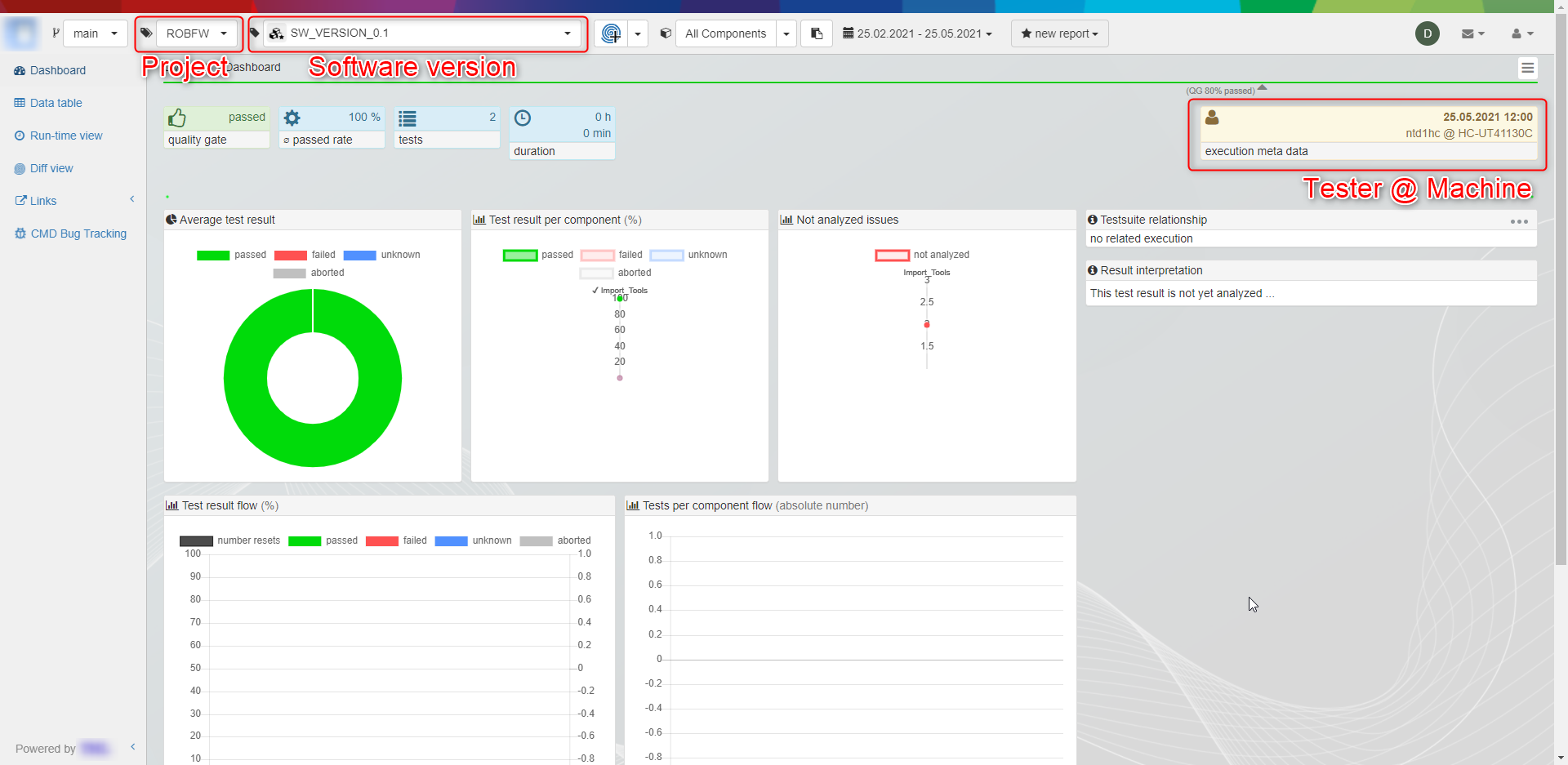
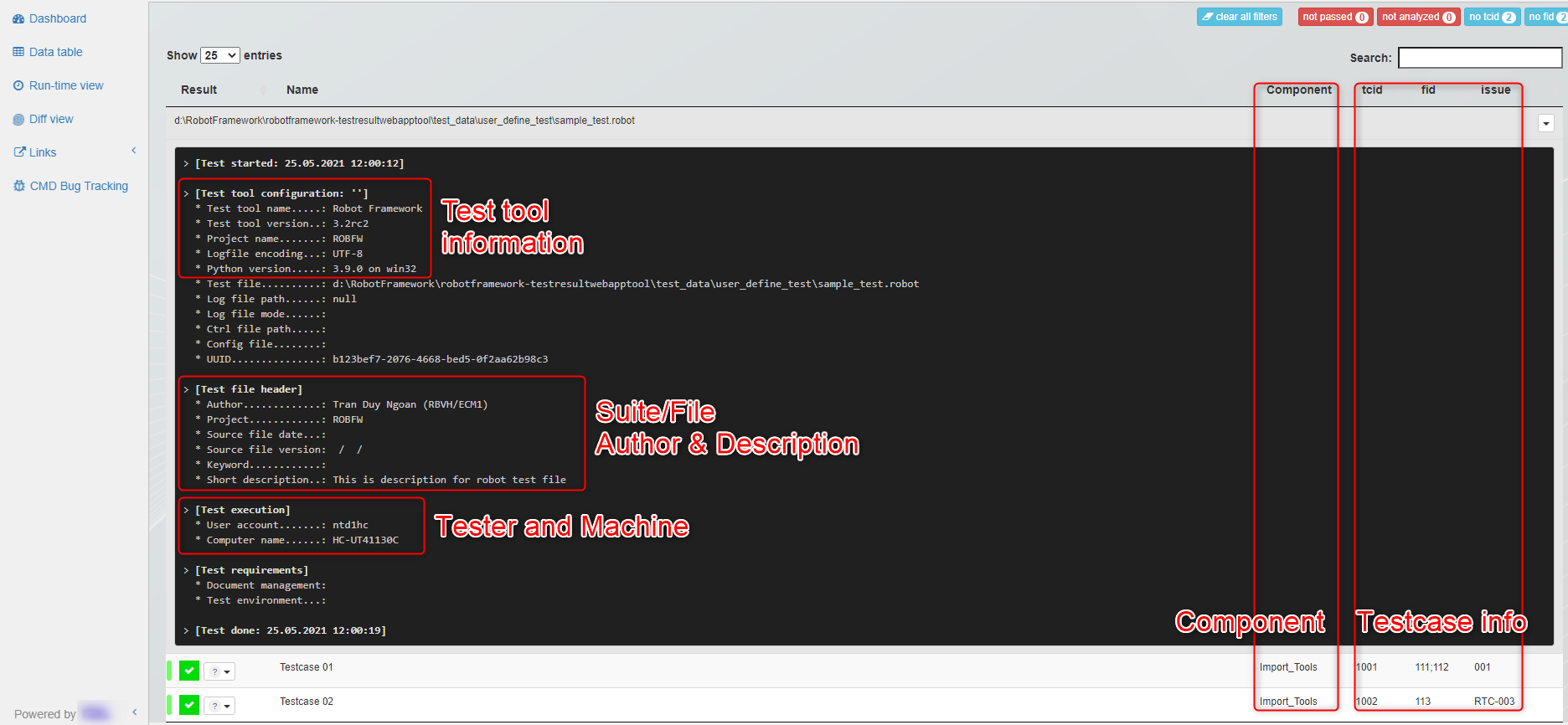
Then, open TestResultWebApp with your favourite browser and you will see how wonderful the execution result is displayed as below figures:
Dashboard view:
Datatable view:
Contribution
We are always searching support and you are cordially invited to help to improve RobotLog2DB tool.
Sourcecode Documentation
To understand more detail about the tool’s features, parameters and how Robot Framework testcase information will be displayed on TestResultWebApp, please refer to RobotLog2DB tool’s Documentation.
Feedback
Please feel free to give any feedback to us via
Email to: Thomas Pollerspöck
Issue tracking: RobotLog2DB Issues
About
Maintainers
Contributors
License
Copyright 2020-2023 Robert Bosch GmbH
Licensed under the Apache License, Version 2.0 (the “License”); you may not use this file except in compliance with the License. You may obtain a copy of the License at

Unless required by applicable law or agreed to in writing, software distributed under the License is distributed on an “AS IS” BASIS, WITHOUT WARRANTIES OR CONDITIONS OF ANY KIND, either express or implied. See the License for the specific language governing permissions and limitations under the License.
1 maintainer

Metadata
1 maintainer
Release files for robotframework-robotlog2db 1.6.0
For a detailed explanation of source distributions (sdists) and built distributions (wheels), please see the package formats documentation.
Source distribution (sdist)
| File | Size | Uploaded | |
|---|---|---|---|
| robotframework_robotlog2db-1.6.0.tar.gz | 548.3 kB | Details |
Built distribution (wheel)
| File | Interpreter | ABI | Platform | Reset |
|---|---|---|---|---|
| robotframework_robotlog2db-1.6.0-py3-none-any.whl | Python 3 | none | any | Details |
Total release size: 1.1 MB
Release files / robotframework_robotlog2db-1.6.0.tar.gz
| Download URL | robotframework_robotlog2db-1.6.0.tar.gz |
|---|---|
| Size | 548.3 kB |
| Tags | Source |
|
SHA-256 checksum How to use checksums |
76ab6af5c7b046c0bb78602fcbcbb0ef7c32b22a41855385f36010edc3991a7d
|
|
BLAKE2b-256 checksum How to use checksums |
fa6083d765afb2c0abedd769c7acfc0631d5d50c711c89c96715d47518972e3b
|
| Upload date | |
|
Uploaded using Trusted Publishing? What is trusted publishing? |
No |
| Uploaded via |
twine/6.1.0 CPython/3.13.12
|
Release files / robotframework_robotlog2db-1.6.0-py3-none-any.whl
| Download URL | robotframework_robotlog2db-1.6.0-py3-none-any.whl |
|---|---|
| Size | 543.1 kB |
| Tags | Python 3 |
|
SHA-256 checksum How to use checksums |
c8e60e5f2c6bd0028e3dfa74dae552bff333680b4e491917af8439c985022465
|
|
BLAKE2b-256 checksum How to use checksums |
99fcab445a7aa2bea7ed29f39b353f9a63cfbf2815fbc243eb5ece17fa0471ff
|
| Upload date | |
|
Uploaded using Trusted Publishing? What is trusted publishing? |
No |
| Uploaded via |
twine/6.1.0 CPython/3.13.12
|














