
SAPFX



pip install robotframework-sapfx
PyPI ships the libraries (the three channels below). The complete toolkit (recorders, rf-mcp/MCP integration, test agents, business resources) ships as the Windows deployment pack attached to each GitHub Release; see Install.
SAPFX is a SAP test-automation solution for Robot Framework (distribution
robotframework-sapfx): not a single library, but a set of tools designed
together around the whole life of a SAP test: writing, recording, generating,
running, healing, watching. Its core is one business vocabulary across three
channels:
SapEccLibrary(phase 1): SAP GUI thick client (ECC, S/4HANA backend), a hardened fork of robotframework-sapguilibrary (Apache 2.0), over COM.SapFioriLibrary(phase 2): SAP Fiori / S/4HANA web (SAPUI5), over Playwright (Browser library) with UI5-stable control selectors (no dynamic-id churn): role/property matching and a hierarchical UI5 XPath engine (//Table//Button[@text='Edit']), plus a WebGUIsidengine for classic SAP GUI for HTML pages and a Web Components engine forui5-*pages without a classic UI5 runtime. The locator engine is ported from playwright-sap (Apache-2.0).SapApiLibrary: the API channel (stdlib-only): OData v2 and v4 behind one keyword set (incl. the SAP CSRF protocol), optional RFC via pyrfc. Prepare and cross-check data through the API; drive the screen only for what you actually test; see the cross-paradigm flagship suite (tests/robot/flagship_cross_paradigm.robot: SE16 count == OData$counton the same live system).
A test reads the same whichever channel it drives. See docs/architecture.md and docs/fiori-architecture.md.
📖 Keyword documentation: one reference page per library, every keyword with its arguments and examples.
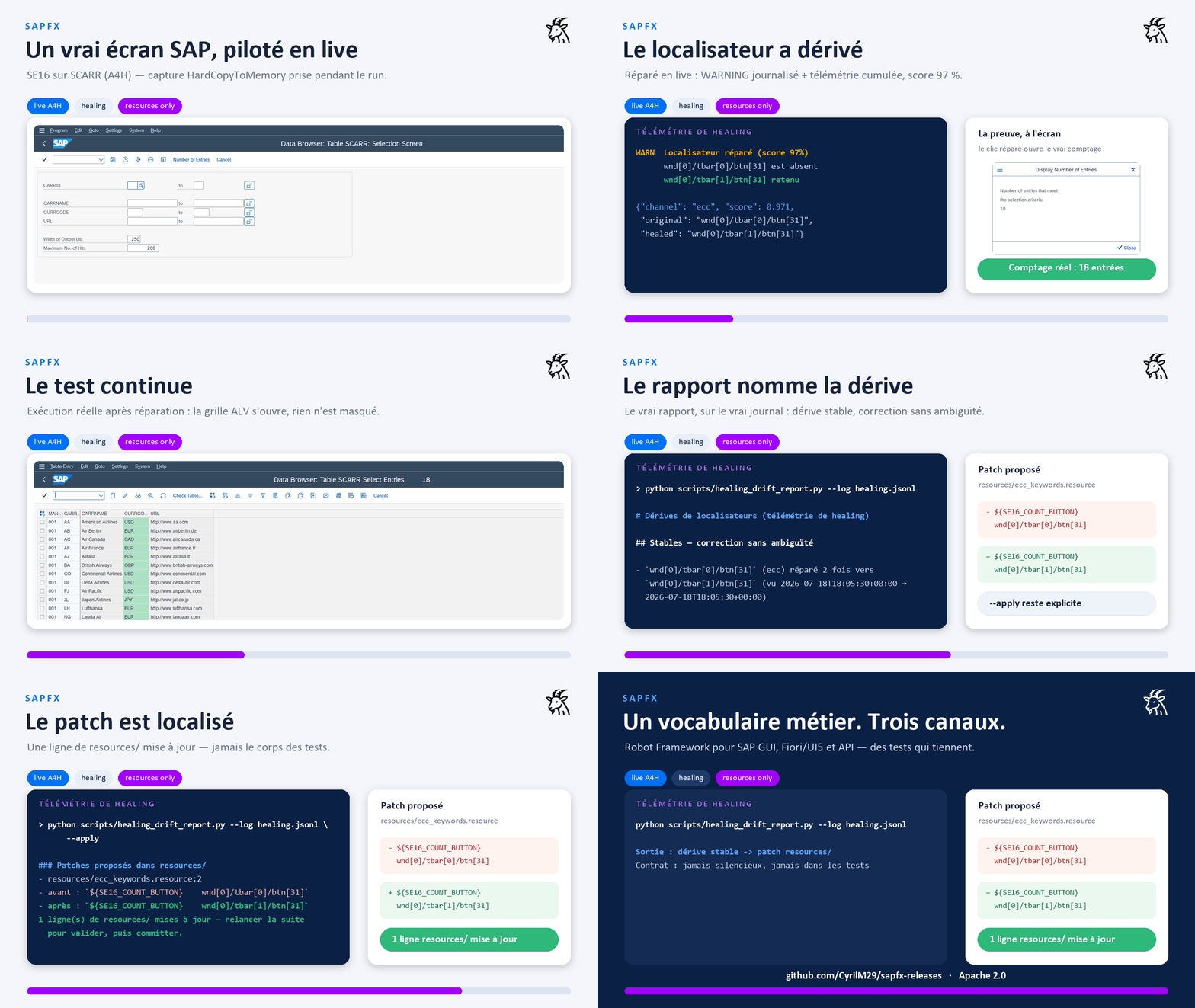
Everything above is real: screens captured on a live system (A4H) while the
library drives it, a stale locator healed mid-run (score 97 %), the real SE16
count, the real drift report. The important bit: healing is never silent. A
runtime WARNING becomes cumulative telemetry, then
scripts/healing_drift_report.py locates the patch to make in resources/
without changing business tests.
https://github.com/user-attachments/assets/0a471849-30a9-47f5-a48c-7071b16be8fb
3 min 20: VS Code and the business keywords, then SAP GUI, Fiori and the API channel driven live, and an MCP agent generating a suite from a real session.
One solution, the whole test lifecycle
The libraries are the execution core. Around them, each need of a SAP test project has its tool in the same box: same business vocabulary, same locator engines, same conventions everywhere:
What ships where.
pip install robotframework-sapfxgives you the three libraries and every keyword documented below. Items tagged (pack) are not Python packages: they live in this repository and in the Windows deployment pack. See Install for the two channels.
| Need | Tool in the box |
|---|---|
| Write readable tests | the three libraries + the resources/ business-keyword layer (pack): tests contain no raw SAP ids (a convention enforced by CI) |
| Capture an existing flow | two recorders (pack): desktop SAP GUI (native-event engine, GUI launcher) and web Fiori/UI5 (Chrome MV3 extension), exporting resource-first suites, spec drafts and replayable recordings |
| Generate and repair tests with AI, under control | the rf-mcp (MCP) integration and the plan → generate → heal agents (pack): every generated step is executed live before being written, and the healer patches resources/, never the tests |
| Watch screens without writing a scenario | the drift sentinel: perception and visual-baseline keywords ship with the libraries, the ready-made watch suite (pack) |
| Turn locator drift into preventive maintenance | healing telemetry (in the libraries) feeding healing_drift_report.py (pack), which locates the patch to make in resources/ |
| Provision a test workstation | the Windows deployment pack: the full install (see Install) |
That overall view is the point: recording, generation, execution, healing and watching all speak the same business keywords, so what one tool produces, the others can maintain.
Where this sits: including wdi5
wdi5 is the reference for UI5 end-to-end testing outside Robot Framework (UI5-community project, WebdriverIO-based, actively maintained). This project is not a wdi5 replacement and does not try to be one. The positioning is different: SAP test automation in Robot Framework, where the SAP GUI desktop client, the OData/RFC API channel and Fiori/UI5 share one business vocabulary, one runner and one report.
- Your stack is JS/WebdriverIO and your scope is a UI5 app → wdi5 is the natural choice.
- Your stack is Robot Framework, or your scenario spans the desktop client, APIs and Fiori in the same run → that is what this project is for.
Details in docs/fiori-architecture.md (§ “Why not Selenium / raw CSS / wdi5”).
What this fork adds over upstream
The upstream library is a solid base with good keyword coverage (including ALV
grids). This fork keeps all of it and adds the things production SAP automation
needs (see the full audit). Everything below is a
keyword you get from pip install robotframework-sapfx, except the items
tagged (pack), which are tools shipped with the repository and the Windows
deployment pack:
- Real synchronisation instead of fixed
sleeps:Wait Until Busy Done,Wait Until Element Present,Wait Until Element Value Is. - Autonomous bootstrap:
Open Sap Logonlaunches the Logon Pad and waits for the scripting engine;Connect To Session With Retry;Close Sap Logon. - Locale-independent
Run Transaction(reads the status-bar message type, not English/Dutch/German text) +Status Message Should Be Success. - ALV grids by column title:
Get Cell Value By Column Title,Read Grid(→ list of dicts),Get Column Id By Title. - Screen perception:
Get Screen Signature(ECC) andGet Ui5 Page Tree(Fiori): a read-only text/XML view of the live screen, for locator debugging and AI-agent integration. Both supportmode=diff(only what changed since the previous perception). - Scripting preflight & telemetry (ECC):
Scripting Should Be Fully Enabledfails early with the exact RZ11 parameter to fix;Enable Test Tool Mode,Get Session Telemetry. - Locator healing, never silent: failures suggest the closest ids on screen
(scored);
Resolve Element With Healing(ECC) andResolve Ui5 With Fallback(Fiori: role→xpath→sid→wc chain) repair a stale locator with a logged WARNING, feeding an opt-in telemetry journal (SAPFX_HEALING_LOG) thatscripts/healing_drift_report.py(pack) turns into preventive maintenance (stable drifts located inresources/, patch proposed,--applyexecutes). - Human locators (ECC, ported from RoboSAPiens with a stricter policy):
Find/Fill/Read Field By Label,Click Button By Label: visible label + geometry, grid positions (N @ Label/Label @ N), scoped anchor (Anchor >> Rest, tunablescope_radius); ambiguity always reported with candidates, never a silent first match. - Visual assertions (ECC):
Screen Should Match Baseline(perceptual dHash over in-memory screenshots, snapshot semantics): pixel-level coverage for exactly what the Scripting API cannot see (opaque GuiShell lists, record-only charts). Optionalvisualextra (Pillow). - Embedded WebView2 bridge (ECC):
Switch To Embedded Browser Pagehands a WebView2 control embedded in a SAP GUI/Business Client window to the Browser library over CDP: both channels in one suite. - Launchpad iframes & Fiori Elements:
Set Ui5 Framefor Work Zone/cFLP apps embedded in a (cross-origin) iframe; stableidSuffix=fe::…selectors. Multi-version UI5: 1.60 → 2.0 nightly, proven live. - Recorders (pack), not just spies: desktop (
tools/recorder: highlight, click-to-capture, hover,--recordreplayable keyword sequences with a native event engine (exact buttons/grids/trees via the Scripting API'sChangeevents, automatic polling fallback); Tkinter launcher + rootrecorder.cmd) and web (tools/recorder_web: snippet and a Chrome MV3 extension that exports a*** Test Cases ***body, incl. value assertions and iframe support). No third-party tracker. - rf-mcp (RobotMCP) integration (pack) (
integrations/robotmcp/):SapEccPlugin/SapFioriPluginplug into the rf-mcp server: keyword routing, SAP selector guidance, and live screen perception for AI agents. Validated end-to-end against a live A4H system and a live UI5 page.
Layout
src/SapEccLibrary/          # phase 1: SAP GUI thick client (COM)
  _vendor/sapgui_base.py    #   upstream, vendored verbatim (class renamed only)
  keywords/_connection.py   #   bootstrap mixin (Logon Pad, retry, CoInitialize)
  keywords/_waits.py        #   synchronisation mixin (+ closest-match hints)
  keywords/_grid.py         #   ALV ergonomics mixin
  keywords/_perception.py   #   Get Screen Signature (mode=diff) + screenshots
                            #   + visual assertions (perceptual-hash baselines)
  keywords/_diagnostics.py  #   scripting preflight + TestToolMode + telemetry
  keywords/_healing.py      #   Resolve Element With Healing (logged, never silent)
  keywords/_semantic.py     #   human locators (label + geometry, grids, >> scope)
  keywords/_embedded_browser.py  # WebView2/CDP bridge to the Browser library
  SapEccLibrary.py          #   composes them + locale-safe Run Transaction
src/SapFioriLibrary/        # phase 2: Fiori / S/4HANA web (Playwright + UI5)
  _ui5_runtime.py           #   UI5 control-selector model (pure data)
  _ui5_js.py                #   injected __SAPFX bundle: tree, XPath/role engines, sid
  regen_recorder.py         #   regenerates the web recorder (snippet + extension)
  SapFioriLibrary.py        #   resolves UI5 selectors via the Browser page
                            #   (+ Set Ui5 Frame, Resolve Ui5 With Fallback, idSuffix)
src/SapApiLibrary/          # API channel: OData v2/v4 + CSRF, optional RFC (stdlib-only)
src/sapfx_common/           # shared primitives: polling/retry, COM safety,
                            #   healing scoring + telemetry, perception diff,
                            #   object tree, semantic engine, visual hash
resources/                  # business keywords: ecc_keywords + fiori_keywords (mirrored)
                            # + a4h_demo_data (SFLIGHT/EPM demo-data guards)
tests/unit/                 # off-SAP/off-browser logic tests (run anywhere)
tests/robot/                # ecc_smoke + ecc_data_smoke + ecc_exploration (need SAP),
                            # fiori_smoke (OpenUI5 Demo Kit), fiori_sflight_smoke
                            # (local cap-sflight), compat smokes (UI5 1.60 legacy,
                            # UI5 2.0 nightly, cross-origin iframes)
                            # + recorder smokes (desktop record engine, web record mode)
                            # + flagship_cross_paradigm (GUI ↔ API ↔ Fiori cross-checks)
tools/recorder/             # desktop recorder (SAP GUI object tree, GUI launcher,
                            # native event record engine w/ polling fallback)
tools/recorder_web/         # web recorder: snippet + Chrome MV3 extension
integrations/robotmcp/      # rf-mcp plugins: keyword routing + SAP screen perception
packaging/ + scripts/       # Windows deployment pack sources + repo tooling
                            # (build_release_pack.py -> dist/sapfx-pack-<v>-win.zip)
docs/                       # architecture, fiori-architecture, mcp-integration,
                            # audit-upstream, testing-without-sap, ecc-validation,
                            # sap-test-data, deployment-pack (all bilingual EN/FR)
Install
Two distribution channels, by design:
Libraries only: PyPI. The four Python packages (SapEccLibrary,
SapFioriLibrary, SapApiLibrary, sapfx_common), for using the keywords in
your own Robot Framework project:
pip install robotframework-sapfx           # + extras: [web] Browser, [visual] Pillow
rfbrowser init                             # one-time: Playwright browsers (Fiori side)
The recorders, the rf-mcp plugins/sapfx-mcp overlay, the business resources
and the test agents are not on PyPI.
Full install: the Windows deployment pack (sapfx-pack-<version>-win.zip
attached to each GitHub Release).
This is the only channel that carries everything: both wheels (libraries +
rf-mcp plugins with the sapfx-mcp launcher), the business resource layer, both
recorders (desktop GUI + web MV3 extension), sample suites, maintenance scripts,
the plan → generate → heal test agents, and an install.cmd/install.ps1 that
builds a local venv and renders the MCP configs. Integrity is verifiable
(SHA-256 sums + CycloneDX SBOM + build provenance). Recommended for
provisioning target test machines: the SAPFX code arrives in one auditable
ZIP; note the installer still needs Python plus access to PyPI or an internal
mirror for the pinned dependencies. Full walkthrough:
docs/deployment-pack.md.
Working from a clone of this repo (development):
pip install -r requirements.txt      # robotframework + pywin32 (pinned, Windows) + browser
rfbrowser init                       # one-time: download Playwright browsers (Fiori side)
SAP-side prerequisites (scripting enabled server/client) are in docs/testing-without-sap.md, which also explains how to get a free local SAP system to test against (ABAP Platform Trial in Docker). The Fiori side needs no SAP at all: it tests against the public OpenUI5 Demo Kit.
Quick start
Tests speak business language; SAP element ids stay in the resource layer (convention: no raw ids, no CSS/XPath in test cases):
*** Settings ***
Resource    resources/ecc_keywords.resource
Suite Setup       Open SAP And Log In
Suite Teardown    Close SAP

*** Test Cases ***
Read The Clients Table In SE16
    Go To Transaction    SE16
    Display Table Contents    T000
    ${rows}=    Read Displayed Grid    max_rows=5
    Log    ${rows}

*** Variables ***
${SE16_TABLE_FIELD}    wnd[0]/usr/ctxtDATABROWSE-TABLENAME
${SE16_GRID}           wnd[0]/usr/cntlGRID1/shellcont/shell

*** Keywords ***
# In a real project these live in resources/, next to ecc_keywords.resource.
Display Table Contents
    [Arguments]    ${table}
    Input Text    ${SE16_TABLE_FIELD}    ${table}
    Send Vkey     0
    Send Vkey     8
    Wait Until Element Present    ${SE16_GRID}

Read Displayed Grid
    [Arguments]    ${max_rows}=5
    ${rows}=    Read Grid    ${SE16_GRID}    max_rows=${max_rows}
    RETURN    ${rows}
Run it (against a system, credentials via variables; Secret is the Robot
Framework 7.4 typed-variable syntax, keeping the password out of logs even at
TRACE level):
robot -v SAP_CONNECTION:"MY SYSTEM" -v SAP_USER:DEVELOPER \
      -v "SAP_PASSWORD: Secret:secret" tests/robot/ecc_smoke.robot
robot tests/robot/fiori_smoke.robot   # Fiori: no SAP needed (OpenUI5 Demo Kit)
Tests
python -m pytest tests/unit -q # logic tests, no SAP required
License
Apache 2.0. Includes vendored code from robotframework-sapguilibrary and locator engines ported from playwright-sap; see LICENSE and NOTICE.
1 maintainer

Metadata
1 maintainer
Release files for robotframework-sapfx 0.6.7
For a detailed explanation of source distributions (sdists) and built distributions (wheels), please see the package formats documentation.
Source distribution (sdist)
| File | Size | Uploaded | |
|---|---|---|---|
| robotframework_sapfx-0.6.7.tar.gz | 249.7 kB | Details |
Built distribution (wheel)
| File | Interpreter | ABI | Platform | Reset |
|---|---|---|---|---|
| robotframework_sapfx-0.6.7-py3-none-any.whl | Python 3 | none | any | Details |
Total release size: 515.8 kB
Release files / robotframework_sapfx-0.6.7.tar.gz
| Download URL | robotframework_sapfx-0.6.7.tar.gz |
|---|---|
| Size | 249.7 kB |
| Tags | Source |
|
SHA-256 checksum How to use checksums |
280bbc1e01bac1f2bb6c856d9f8c369c088520117780f55784412c368cb56af3
|
|
BLAKE2b-256 checksum How to use checksums |
a16c098186f2d53a5169ae42a901057e44640a01f8a5dad9eac6bdc857dda6c1
|
| Upload date | |
|
Uploaded using Trusted Publishing? What is trusted publishing? |
Yes |
| Uploaded via |
twine/7.0.0 CPython/3.13.14
|
Provenance
Provenance describes where a file came from. On PyPI, provenance is shared via attestations, which provide a verifiable record of the build or publishing details. View details, limitations and caveats.


PyPI Publish Attestation
PyPI verified that this artifact, at this checksum, originated from the publisher listed below.
Signed by GitHub Actions, verified by PyPI on Aug 19, 2026.
Transparency logRelease files / robotframework_sapfx-0.6.7-py3-none-any.whl
| Download URL | robotframework_sapfx-0.6.7-py3-none-any.whl |
|---|---|
| Size | 266.1 kB |
| Tags | Python 3 |
|
SHA-256 checksum How to use checksums |
ebdea5b52e785a916b5086ade128a5b12c2a1012de2f64ccbfcdb42bbf0ec493
|
|
BLAKE2b-256 checksum How to use checksums |
6e0e92ae3dc4e1859e480668d13419cefd911194f15528a935a9410b029c3a7e
|
| Upload date | |
|
Uploaded using Trusted Publishing? What is trusted publishing? |
Yes |
| Uploaded via |
twine/7.0.0 CPython/3.13.14
|
Provenance
Provenance describes where a file came from. On PyPI, provenance is shared via attestations, which provide a verifiable record of the build or publishing details. View details, limitations and caveats.
PyPI Publish Attestation
PyPI verified that this artifact, at this checksum, originated from the publisher listed below.
Signed by GitHub Actions, verified by PyPI on Aug 19, 2026.
Transparency log













