
Robot Framework State Machine Library

Project description

- Author:
marcinooo
- Tags:
Robot Framework, Python, State Machine, Library
- abstract:
Implementation of state machine in robot framework.
Description
Library contains implementation of state machine to control or test software components which can be in many states.
Documentation
Library documentation can be found here.
A good starting point is to check examples:
Installation
Install from PyPI:
$ pip install robotframework-statemachinelibrary
Install from github:
$ pip install git+https://github.com/marcinooo/robot-framework-state-machine
Usage
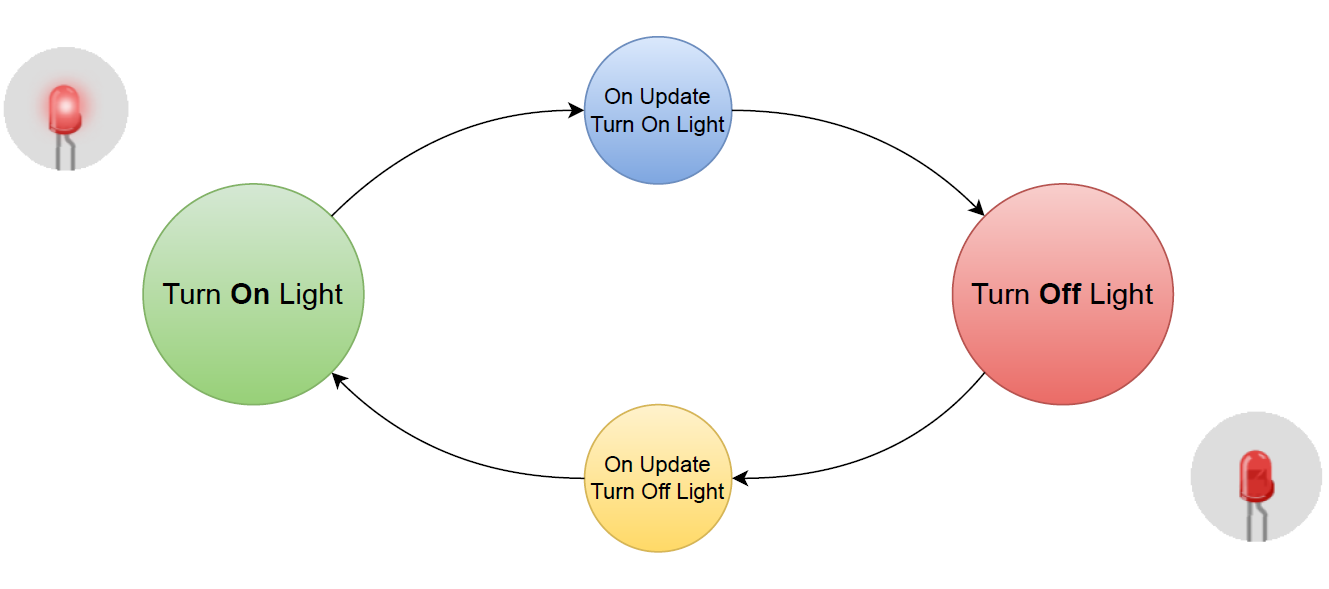
An example of using the library for LED blinking (of course, the library was created for more complex tasks :wink:).
*** Settings ***
Library  StateMachineLibrary

*** Tasks ***
Blink
    [setup]  Task Setup
    Run State Machine  start_from=Turn On Light  max_updates=10

*** Keywords ***
Task Setup
    Create State Machine  name=blink-machine
    Add State  state=Turn On Light   on_update=On Update Turn On Light
    Add State  state=Turn Off Light  on_update=On Update Turn Off Light

Turn On Light
    Log To Console  I am ON

On Update Turn On Light
    Sleep  0.25s
    Go To State  state=Turn Off Light

Turn Off Light
    Log To Console  I am OFF

On Update Turn Off Light
    Sleep  0.25s
    Go To State  state=Turn On Light
Flow diagram:
Overview
First of all import the library:
Library StateMachineLibraryCreate a state machine:
Create State Machine name=blink-machineYou can create as many as you want state machines. Each state machine should have a unique name.
Register keywords that should be executed in the given state (Turn On Light) and during its update (On Update Turn On Light):
Add State state=Turn On Light on_update=On Update Turn On LightBoth keywords must be defined:
*** Keywords ***
# ...
Turn On Light
    # Here you can put logic (e.g.: led controller)
    Log To Console  I am ON

On Update Turn On Light
    Go To State  state=Turn Off Light
Keywords On Update… should indicate the next state:
Go To State state=Turn Off LightCall the same keyword to enter the first state.
Force transition to a next state:
Update StateYou can pass data between states in context (recommended method) or using global variables.
*** Keywords ***
# ...

Turn On Light
    Update Context  led_status=ON

Turn Off Light
    # ...
    &{context}=    Get Context
    Log To Console    LED is ${context["led_status"]}
License
license (MIT)
Release history Release notifications | RSS feed


Download files
Download the file for your platform. If you're not sure which to choose, learn more about installing packages.
Source Distribution
Built Distribution
Filter files by name, interpreter, ABI, and platform.
If you're not sure about the file name format, learn more about wheel file names.
Copy a direct link to the current filters
File details
Details for the file robotframework-statemachinelibrary-2.0.0.tar.gz.
File metadata
- Download URL: robotframework-statemachinelibrary-2.0.0.tar.gz
- Upload date:
- Size: 10.6 kB
- Tags: Source
- Uploaded using Trusted Publishing? No
- Uploaded via: twine/4.0.2 CPython/3.9.18
File hashes
| Algorithm | Hash digest | |
|---|---|---|
| SHA256 |
9f5e2b29f852e4beb799cbd7064bca1c51a27aa4d30fb6936b2ed007b3e8814b
|
|
| MD5 |
750e29b2cece26c9f9a42635e7f3c929
|
|
| BLAKE2b-256 |
6a45df7fd863f4e762c2d7a67a0991c0ccc736198c1f8f3ccf6ea98abc636bad
|
File details
Details for the file robotframework_statemachinelibrary-2.0.0-py3-none-any.whl.
File metadata
- Download URL: robotframework_statemachinelibrary-2.0.0-py3-none-any.whl
- Upload date:
- Size: 12.1 kB
- Tags: Python 3
- Uploaded using Trusted Publishing? No
- Uploaded via: twine/4.0.2 CPython/3.9.18
File hashes
| Algorithm | Hash digest | |
|---|---|---|
| SHA256 |
2c1f2069907cacd913508087c1b75147449de58ffb08312f6ba9950caa30e2e9
|
|
| MD5 |
586b121dd393a8fc49311b14bb6ba96b
|
|
| BLAKE2b-256 |
9445790b44ca43e64b1920de63b8baa684cfeb45b49044ec2bdbb60e86a51349
|






