
k

Project description
RobotFramework - WebDialogs
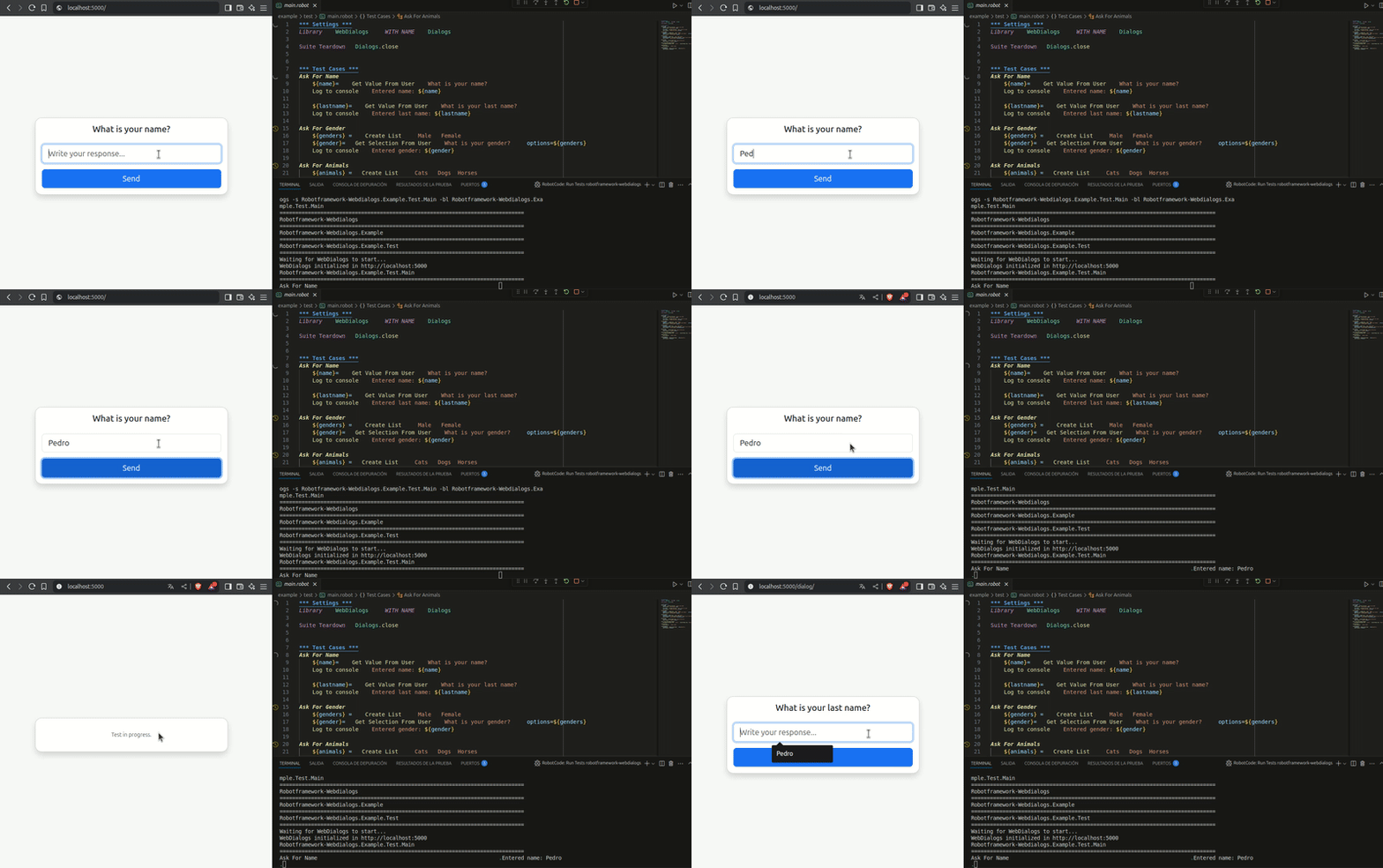
WebDialogs is a Robot Framework library that allows you to run interactive dialogs in a web browser instead of the console or native GUI windows. It is designed to be compatible with the official Robot Framework Dialog library, making migration or coexistence seamless. Additionally, it supports creating more complex dialogs using HTML templates written with Jinja2, providing flexible and customizable interfaces. Features
- Full support for dialogs compatible with Robot Framework's built-in Dialog library.
- Simple, responsive web interaction using Bootstrap.
- Embedded Flask web server, running alongside your tests.
- Support for dialogs with buttons, inputs, and selections.
- Ability to create custom HTML dialog templates with Jinja2.
- Architecture based on Robot Framework client + Flask server for maximum flexibility.
Installation
pip install robotframework-webdialogs
Basic Usage
*** Settings ***
Library    WebDialogs

*** Tasks ***
Pause Execution
    Pause Execution    Connect the cables and press continue
The test will pause and open a dialog in the browser. To view it, open:
http://localhost:5000
Examples
Dialogs.Get Value From User
Get User Personal Information
    [Documentation]    Collects basic personal information through dialogs
    ${name}=    Dialogs.Get Value From User    Please enter your first name:
    Log To Console    \nUser provided name: ${name}

Dialogs.Get Selection From User
Select Gender From Options
    [Documentation]    Demonstrates single-selection dialog
    @{genders}=    Create List    Male    Female    Non-binary    Prefer not to say
    ${gender}=    Dialogs.Get Selection From User
    ...    Please select your gender:
    ...    options=${genders}
    Log To Console   \nSelected gender: ${gender}

Dialogs.Get Selections From User
Select Multiple Favorite Animals
    [Documentation]    Demonstrates multi-selection dialog with validation
    @{animals}=    Create List    Cats    Dogs    Horses    Birds    Fish
    ${selected_animals}=    Dialogs.Get Selections From User
    ...    Select your favorite animals:
    ...    options=${animals}

    Should Not Be Empty    ${selected_animals}    No animals selected
    Log To Console    \nFavorite animals: ${selected_animals}

Dialogs.Pause Execution
Pause Execution
    [Documentation]    Pauses test execution and opens a dialog
    Dialogs.Pause Execution    Connect the cables and press continue

Dialogs.Execute Manual Step
Manual Verification Step
    [Documentation]    Requires manual user verification
    ${verification_result}=    Dialogs.Execute Manual Step
    ...    Please verify the device connection
    Log To Console    \nVerification result: ${verification_result}

Dialogs.Execute Custom Step
Process Complex Form Submission
    [Documentation]    Tests custom form handling
    ${form_response}=    Dialogs.Execute Custom Step
    ...    step=complexform

    Should Contain    ${form_response}    input    Form submission failed
    Log To Console    \nForm processing result: ${form_response}

Advanced Usage: Custom HTML Dialogs
You can create HTML dialog templates with Jinja2 for complex interfaces.
Use keyword Execute Custom Step step=complexform to open the custom dialog.
Create the dialog template in a file named complexform.html in the templates/ folder in you root project.
Complete Example
A fully working example is available in the example folder of the repository, which includes:
- Robot Framework test code
- Flask server code
- HTML templates
- Setup and run instructions
Architecture
- Robot Framework Client: sends dialog requests to the server.
- Flask Server: exposes a web interface where users respond to dialogs.
- Asynchronous communication with blocking waits on the Robot side until user response.
Requirements
- Python 3.9+
- Robot Framework 7.0+
- Modern web browser (Chrome, Firefox, Edge)
Roadmap
- Add test to the library.
- Documentation on creating and using custom Jinja2 templates.
- CI/CD integration examples.
- Improved error handling and support for concurrent sessions.
Release history Release notifications | RSS feed


Download files
Download the file for your platform. If you're not sure which to choose, learn more about installing packages.
Source Distributions
Built Distribution
Filter files by name, interpreter, ABI, and platform.
If you're not sure about the file name format, learn more about wheel file names.
Copy a direct link to the current filters
File details
Details for the file robotframework_webdialogs-0.1.1-py3-none-any.whl.
File metadata
- Download URL: robotframework_webdialogs-0.1.1-py3-none-any.whl
- Upload date:
- Size: 18.9 kB
- Tags: Python 3
- Uploaded using Trusted Publishing? No
- Uploaded via: twine/6.1.0 CPython/3.11.11
File hashes
| Algorithm | Hash digest | |
|---|---|---|
| SHA256 |
6a87e6dfb4fee1ed65c4806bfce8780f274863d1a1643c5e5448c59646ae1382
|
|
| MD5 |
a1612e37fa2e16ab07c0cc04990057b3
|
|
| BLAKE2b-256 |
2987befcd28c1b8162b75a570b6e917314bdc1735b6337b8e6c92ed4840c770b
|






